Finding the best VPS hosting in India requires balancing dedicated resource allocation with low-latency connectivity. A Virtual Private Server (VPS) provides isolated CPU, RAM, and storage, ensuring your website remains fast and stable even when other users on the same physical hardware experience traffic spikes.
This guide explains how to choose the right server, how much hardware you actually need, and how to secure your Linux environment. We also cover why local data centres are critical for performance and how to scale your resources as your business grows.
What Makes VPS Hosting the Right Choice for Indian Businesses?
VPS hosting provides a dedicated slice of a physical server, giving you the control and stability of a dedicated server at a much lower cost. This isolation ensures that your applications perform consistently regardless of what other users are doing on the network.
Dedicated Resources vs Shared Hosting
In a shared hosting environment, you share the same CPU and RAM with hundreds of other websites. If one site experiences a massive surge in traffic, your website may slow down or crash because the resources are exhausted. With VPS hosting vs shared hosting, you receive guaranteed resources that belong only to you.
To understand the impact of resource isolation, consider this worked example of a Pune digital marketing agency. They were running multiple client web applications on shared hosting, which caused frequent timeouts during heavy campaign peaks. After migrating to a Speed KVM VPS 2 (4 vCPU, 8 GB RAM), they eliminated resource bottlenecks entirely. Because their 4 vCPUs and 8 GB of RAM were dedicated, their client sites maintained sub-second load times even during high-traffic periods.
| Feature | Shared Hosting | KVM VPS | Dedicated Server |
|---|---|---|---|
| Resource Allocation | Shared with others | Dedicated virtual slice | Entire physical machine |
| Root Access | No | Yes | Yes |
| Performance Stability | Variable | High | Maximum |
| Scalability | Limited | High | Very High |
Why Local Infrastructure Matters
Using an Indian data centre is vital for reducing latency, which is the time it takes for data to travel from the server to your visitor. For a business based in Mumbai or Delhi, hosting on local infrastructure ensures that your customers experience near-instant page loads.
High latency can hurt your SEO rankings and user retention. By choosing Indian VPS hosting, you ensure that the round-trip time (RTT) for data packets remains minimal for your primary audience, providing a snappier experience for every visitor.
How Much RAM and CPU Do You Actually Need?
Determining your resource requirements depends on your specific application stack, the number of concurrent users, and the complexity of your database queries. A common mistake is over-provisioning, which wastes budget, or under-provisioning, which leads to the “Out of Memory” (OOM) errors that crash your services.
Calculating RAM for Traffic Demands
To estimate your needs, you must account for the base operating system usage plus the memory footprint of your services like Apache, Nginx, MySQL, or PHP. For a standard WordPress site with several plugins, the OS and web server might consume 1 GB of RAM, leaving the rest for your database and traffic spikes.
Consider our worked example of the Pune digital marketing agency. When they were managing 15 client sites on a smaller plan, they noticed that during peak campaign hours, their memory usage hit 95%. By upgrading to a Speed KVM VPS 2 (4 vCPU, 8 GB RAM), they increased their available memory by 100% compared to a 4 GB plan. This extra headroom allowed the MySQL buffer pool to grow, which kept frequently accessed data in RAM rather than fetching it from the disk, significantly speeding up their sites.
Storage Speed: SSD versus NVMe
Storage performance is often more critical than raw CPU speed for database-heavy applications. While standard SSDs are reliable, NVMe storage provides much higher IOPS (Input/Output Operations Per Second), which reduces the time your CPU spends waiting for data to be read from the disk.
If you are running a high-traffic eCommerce store or a heavy database, you should prioritize plans with NVMe storage to ensure your VPS server SSD performance can keep up with user requests. You can check your current disk I/O performance on a Linux VPS using this command:
sudo iostat -xz 1 5The await column in the output shows the average time (in milliseconds) for I/O requests to be served. If this number is consistently high, it is a sign that your current storage cannot handle your application’s workload, and you should consider a plan with faster NVMe drives.
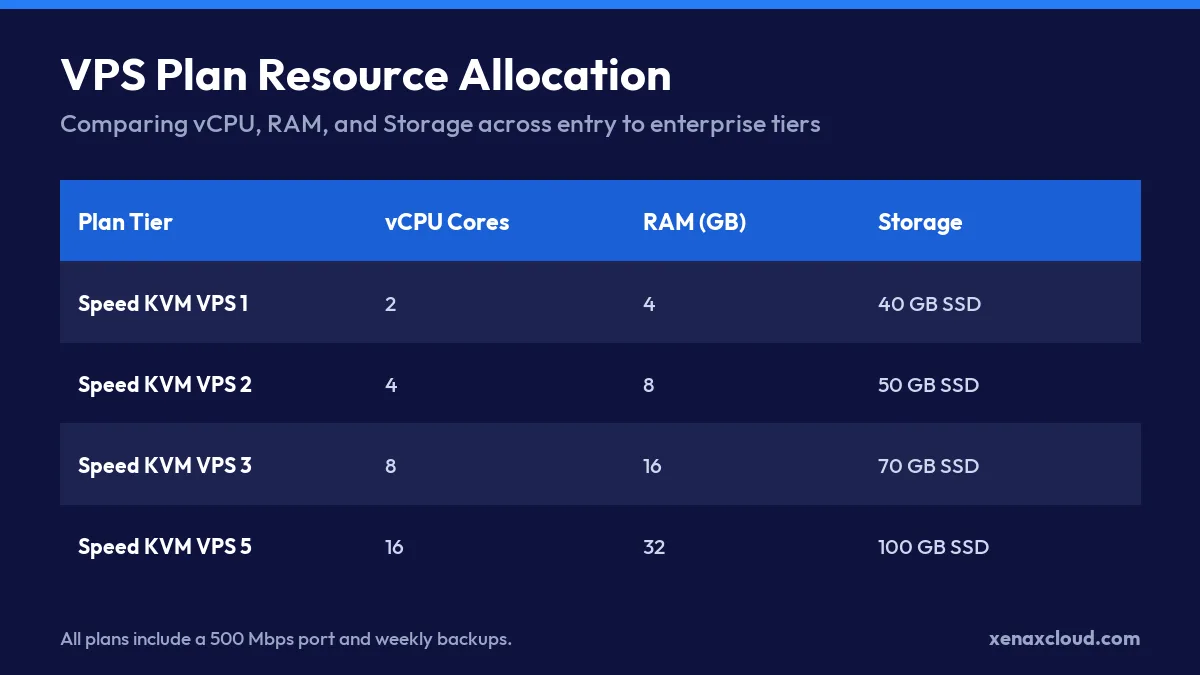
| Plan | vCPU | RAM | SSD storage | Bandwidth | Price |
|---|---|---|---|---|---|
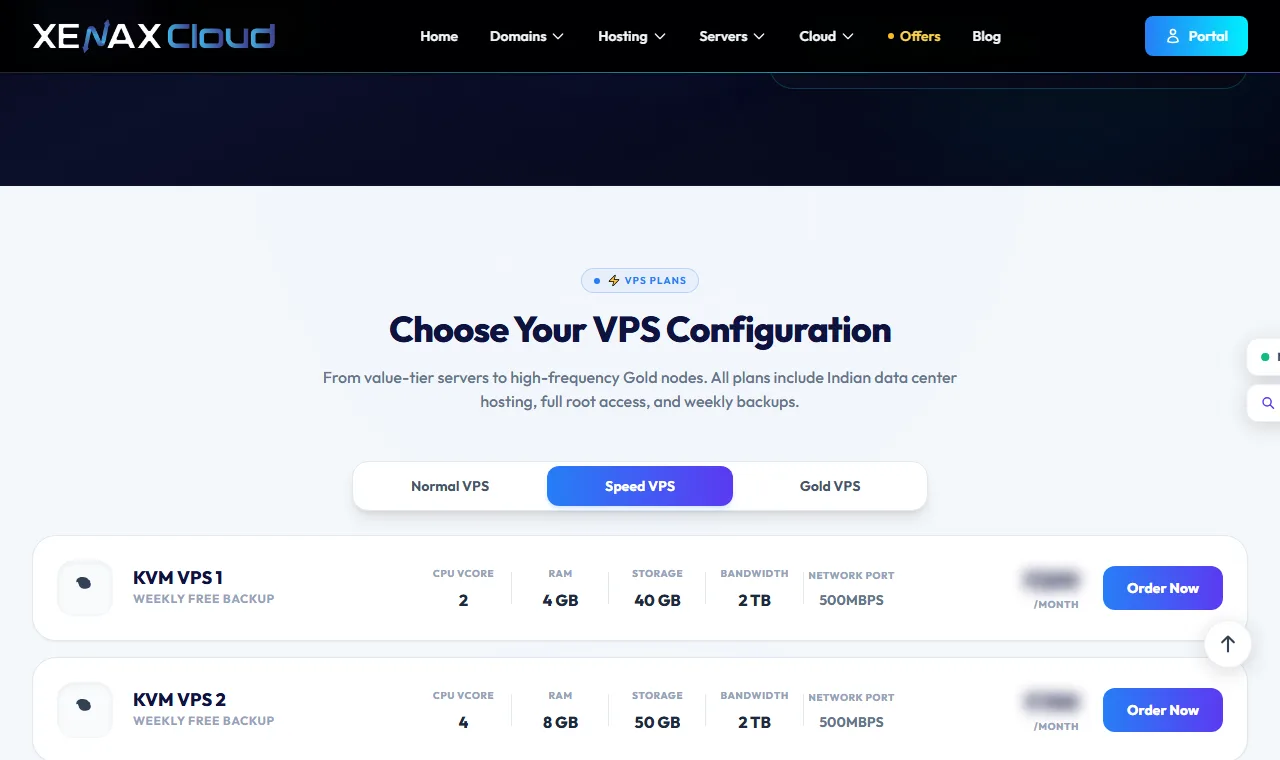
| Speed KVM VPS 1 | 2 | 4 GB | 40 GB | 2 TB | ₹599/mo |
| Speed KVM VPS 2 | 4 | 8 GB | 50 GB | 2 TB | ₹799/mo |
| Speed KVM VPS 3 | 8 | 16 GB | 70 GB | 4 TB | ₹1,399/mo |
| Speed KVM VPS 4 | 12 | 24 GB | 80 GB | 6 TB | ₹1,799/mo |
| Speed KVM VPS 5 | 16 | 32 GB | 100 GB | 8 TB | ₹2,399/mo |
| Speed KVM VPS 6 | 20 | 40 GB | 120 GB | 10 TB | ₹2,999/mo |
| Speed KVM VPS 7 | 24 | 48 GB | 150 GB | 10 TB | ₹3,499/mo |
| Speed KVM VPS 8 | 32 | 64 GB | 200 GB | 10 TB | ₹4,599/mo |
Every Speed VPS: KVM, full root, 500 Mbps port, weekly backup included, Indian data centre. Monthly, billed in INR. cPanel licence not included.
Why Choose an Indian Data Centre for Your VPS?
Choosing a data centre located entirely within India ensures the lowest possible latency for regional users and simplifies compliance with local data residency laws. By keeping your server physically close to your customers, you remove the delays caused by routing data through overseas cables.
Latency Benefits for Regional Audiences
Latency is the time it takes for a data packet to travel from the user to the server and back. When you use the best VPS hosting in India, you avoid “tromboning,” where traffic from an Indian user travels to a US or European server before returning to India.
For example, a request from a user in Chennai to a server in the US might have a round-trip time (RTT) of 250ms to 300ms. In contrast, routing that same request to a Tier-III facility in India typically drops the RTT to under 50ms. This 80% reduction in latency directly improves the perceived speed of your website, which is a critical factor for conversion rates in eCommerce.
You can verify your server’s network path and latency using the mtr (My Traceroute) command:
mtr -rw google.co.inThe output shows every “hop” your data takes. Look for high packet loss or latency spikes at specific hops to identify network congestion. If you see your traffic leaving India to hit a foreign node before returning, you are experiencing unnecessary latency that a local VPS would eliminate.
Enterprise Security and Redundancy
Hosting in a Tier-III data centre means your infrastructure benefits from N+1 redundancy. This ensures that if one power source or cooling unit fails, a backup takes over immediately without interrupting your service.
Key infrastructure standards provided by Xenax Cloud include:
- Dual A+B power feeds to prevent downtime during electrical faults.
- Biometric access control to ensure only authorised personnel enter the server hall.
- Industrial-grade cooling to maintain optimal hardware temperatures.
- 24/7 on-site monitoring and remote hands support.
How to Secure and Configure Your Linux VPS
Securing your Linux VPS involves disabling password-based logins and configuring a strict firewall to block unauthorized access. When you use the best VPS hosting in India, you must take these steps immediately after the first login to prevent brute-force attacks.
Initial Server Setup Commands
The first step in server hardening is to update your package list and upgrade all installed software to the latest security patches. On Ubuntu 24.04, run the following commands:
sudo apt update && sudo apt upgrade -yNext, disable password authentication for SSH to force the use of SSH keys. This is a critical security layer that prevents automated bots from trying thousands of passwords per second. Edit the SSH configuration file:
sudo nano /etc/ssh/sshd_configFind the line PasswordAuthentication no and ensure it is set to no. After saving, restart the SSH service to apply the changes:
sudo apt restart sshConfiguring UFW Firewall Rules
A properly configured firewall only allows traffic on the ports you need. The Uncomplicated Firewall (UFW) is part of the standard Ubuntu installation. To secure your server, follow this checklist:
- Allow SSH (Port 22) to maintain access to your server.
- Allow HTTP (Port 80) and HTTPS (Port 443) for web traffic.
- Allow specific ports for database or Tally on Cloud instances.
Run these commands to enable the firewall:
sudo ufw allow 22/tcp
sudo ufw allow 80/tcp
sudo ufw allow 443/tcp
sudo ufw enable
To verify your rules, run sudo ufw status verbose. The output will show Status: active and Logging: on, confirming that only the specified ports are open to the public internet.
For a detailed guide on setting up your server, see our our practical guide to choosing and setting up Indian VPS hosting.
How to Scale Your VPS Without Downtime
Scaling your VPS without downtime involves vertical scaling, where you increase the CPU and RAM of your existing virtual instance without migrating your data to a new server. This process allows your application to handle more concurrent users by simply allocating more resources from the physical host.
Direct Resource Upgrades
When your application grows, you can upgrade your plan to a higher tier to avoid performance bottlenecks. For example, a Pune digital marketing agency running multiple client web applications migrated from shared hosting to a Speed KVM VPS 2 (4 vCPU, 8 GB RAM) to eliminate resource bottlenecks during heavy campaign traffic peaks.
If their client base grows further, they can move to a higher tier without reinstalling their OS or moving files. Consider this resource progression for growing workloads:
| Plan | vCPU | RAM | SSD Storage | Bandwidth |
|---|---|---|---|---|
| Speed KVM VPS 1 | 2 | 4 GB | 40 GB | 2 TB |
| Speed KVM VPS 2 | 4 | 8 GB | 50 GB | 2 TB |
| Speed KVM VPS 3 | 8 | 16 GB | 70 GB | 4 TB |
| Speed KVM VPS 4 | 12 | 24 GB | 80 GB | 6 TB |
This linear growth ensures that as your traffic increases, the best VPS hosting in India remains stable by providing more compute power exactly when needed.
Automated Weekly Snapshots
To ensure data safety during scaling or configuration changes, Xenax Cloud provides weekly snapshots included. A snapshot is a point-in-time copy of your entire server disk, allowing you to roll back the entire system if an update fails.
Before performing a major version upgrade of your software, you can verify your current disk usage to ensure the snapshot has enough overhead:
df -hThe output shows the Avail column, which tells you how much free space remains on your NVMe SSD. Having sufficient space ensures that system backups and snapshots complete without errors.
For reliable performance and dedicated resources, choose the Speed KVM VPS 2 plan from Xenax Cloud. See the refund policy for exact terms.
Xenax Cloud VPS Hosting India vs the usual alternatives
| Feature | Xenax Cloud | Typical Indian shared host | Global budget host |
|---|---|---|---|
| Starting price | ₹649/mo | ₹199/mo | ₹149/mo (renews ₹499) |
| Storage | DataCenter SSD | 10 GB SSD | 25 GB SSD |
| DDoS protection | 100 Gbps, always on | Basic | Cloudflare only |
| Support | 24×7, in-house engineers | Tickets, business hours | Chat, outsourced |
| Data centre | India (NVMe) | India | Singapore / US |
| Control panel | cPanel / WHM included | cPanel | Custom panel |
Entry-level plans, list prices including GST where shown. Check each provider before buying — prices change.
See VPS Hosting India plansBest VPS Hosting in India: FAQs
What is the difference between Indian VPS and foreign VPS hosting?
The primary difference is latency, which is the time data takes to travel between the server and the visitor. Indian VPS hosting reduces this travel time for local users, avoiding the delays caused by routing traffic through overseas cables. This results in faster page loads and better SEO rankings for businesses targeting the Indian market.
Can Indian servers handle global website traffic effectively?
Yes, Indian servers can handle global traffic, but they are most efficient for users located within or near India. While global visitors can still access the site, the lowest latency and fastest response times are experienced by regional users. For a business with a primary audience in India, a local Tier-III data centre is the most effective choice.
Is KVM VPS hosting better than container-based virtualization?
KVM VPS is generally superior because it provides dedicated resources and full root access, unlike container-based virtualization where resources are shared. This ensures higher performance stability and prevents other users on the same physical host from affecting your server. KVM allows you to run your own kernel and customize the operating system completely.
How reliable is Xenax Cloud VPS infrastructure?
Xenax Cloud uses Tier-III data centres in India with N+1 redundancy to ensure high reliability. The infrastructure includes dual A+B power feeds, industrial-grade cooling, and 24/7 on-site monitoring to prevent downtime. Additionally, weekly snapshots included are provided to ensure data can be recovered quickly if a configuration error occurs.
Do I get full root access with Xenax Cloud KVM VPS plans?
Yes, all KVM VPS plans from Xenax Cloud provide full root access. This allows you to install any software, configure custom firewall rules, and manage the operating system exactly as you need. To see the available resource options, see the live price in the plan box.