A large storage vps is a virtual private server designed with high-capacity NVMe or SSD storage and significant bandwidth to handle data-heavy workloads. Unlike standard plans, these servers provide the disk space necessary for hosting massive media libraries, extensive databases, or frequent automated backups without compromising system speed.
This guide explains how to select the right high storage vps, calculates actual capacity requirements for growing businesses, and explores the benefits of using an Indian data centre for low-latency data access.
What Is a Large Storage VPS and Why Do You Need It?
A large storage vps provides dedicated disk resources and high bandwidth to ensure that large file transfers or heavy database queries do not slow down your entire server. This setup is essential when your data footprint exceeds the limits of standard web hosting.
How isolated disk space protects performance
Isolated storage means your disk I/O operations are not competing with other users on a physical machine. On a shared hosting platform, one user uploading a massive video file can cause disk thrashing, which slows down every other website on that server. With a KVM VPS, your storage performance remains consistent because the resources are dedicated to your instance.
Workloads that demand high disk capacity
Certain business models require more than just basic web hosting. For example, a Jaipur handicraft exporter might run a digital storefront featuring thousands of high-resolution product photographs.
If they store 5,000 items with an average image size of 2 MB, they need 10 GB just for images. Once you add daily transaction logs, customer database growth, and weekly backups, a small 5 GB or 10 GB plan will fail within months.
To avoid this, you should calculate your needs using a simple growth formula: (Current Data Size + Monthly Growth) × 12 months = Minimum Annual Capacity.
| Workload Type | Primary Storage Need | Recommended Resource Type |
|---|---|---|
| Ecommerce | Product media and logs | NVMe SSD for fast loading |
| Media Archives | Video and high-res images | High-capacity SSD |
| SaaS Applications | User-generated content | Scalable KVM VPS |
| Backup Servers | Compressed archives | High bandwidth and disk space |
For those needing to scale immediately, you can explore VPS hosting to find a plan that matches your specific storage calculations, and you can also check out our Shared Hosting for smaller projects.
How Much Storage Do Your Applications Actually Require?
Your storage requirement depends on the total volume of your static files, the growth rate of your database, and how many versions of backups you keep on the server. Most small businesses start with 40 GB to 80 GB, but data-heavy applications can quickly exceed these limits as they scale.
Estimating media and database expansion
To determine if you need a vps with large storage, you must audit your current file sizes. For a business like a Delhi coaching institute storing recorded video lectures, the math changes quickly. If one hour of compressed HD video is 500 MB and they upload 10 hours a week, they consume 2 GB per week or roughly 104 GB per year, excluding student databases and PDF notes.
You can check your current disk usage on a Linux server using this command:
df -hThe output shows the “Size”, “Used”, and “Avail” columns. If your “Use%” is consistently above 80%, it is time to upgrade to a higher storage tier to avoid system crashes.
Balancing vCPU allocation with storage growth
Storage cannot work in isolation; you need enough RAM and vCPU to manage the file system and database queries efficiently. If you have 200 GB of data but only 2 vCPUs, your server may struggle to index files or process backups.
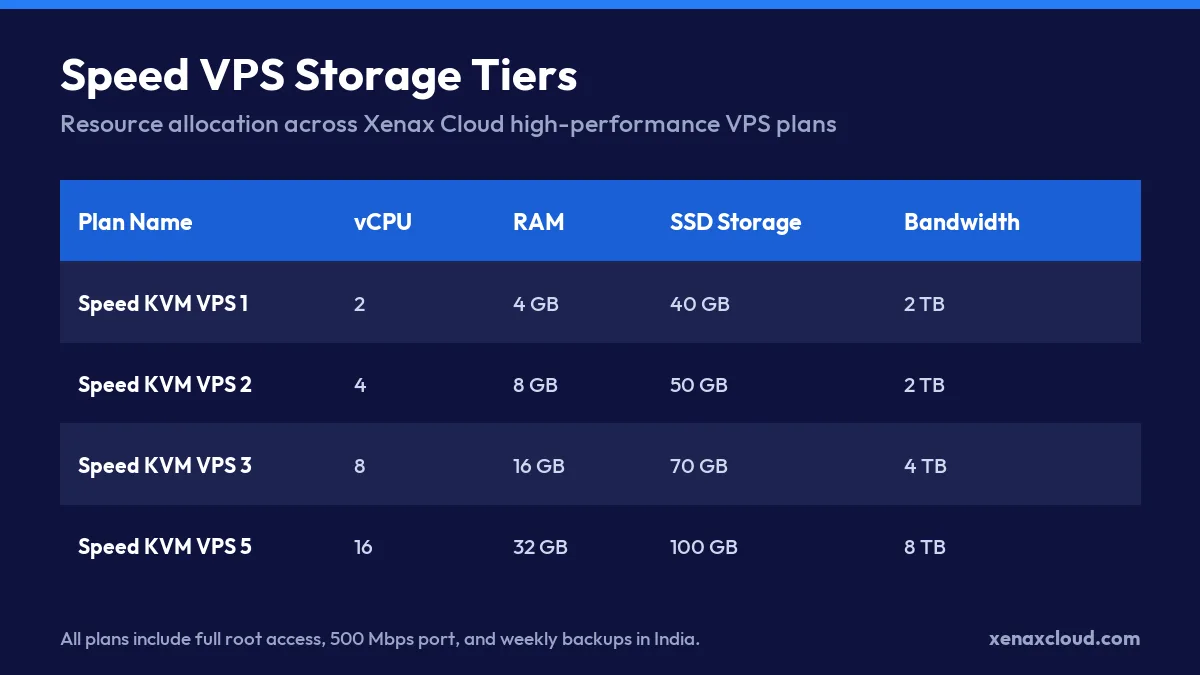
We recommend matching your storage growth with the following resource ratios based on our Speed KVM VPS specifications:
| Plan | vCPU | RAM | SSD Storage | Best For |
|---|---|---|---|---|
| Speed KVM VPS 1 | 2 | 4 GB | 40 GB | Small blogs, light portfolios |
| Speed KVM VPS 3 | 8 | 16 GB | 70 GB | Mid-sized ecommerce, SaaS |
| Speed KVM VPS 6 | 20 | 40 GB | 120 GB | Large archives, heavy databases |
| Speed KVM VPS 8 | 32 | 64 GB | 200 GB | Enterprise data workloads |
Matching these specs ensures that as your high storage vps grows, your processing power keeps pace with the data volume.
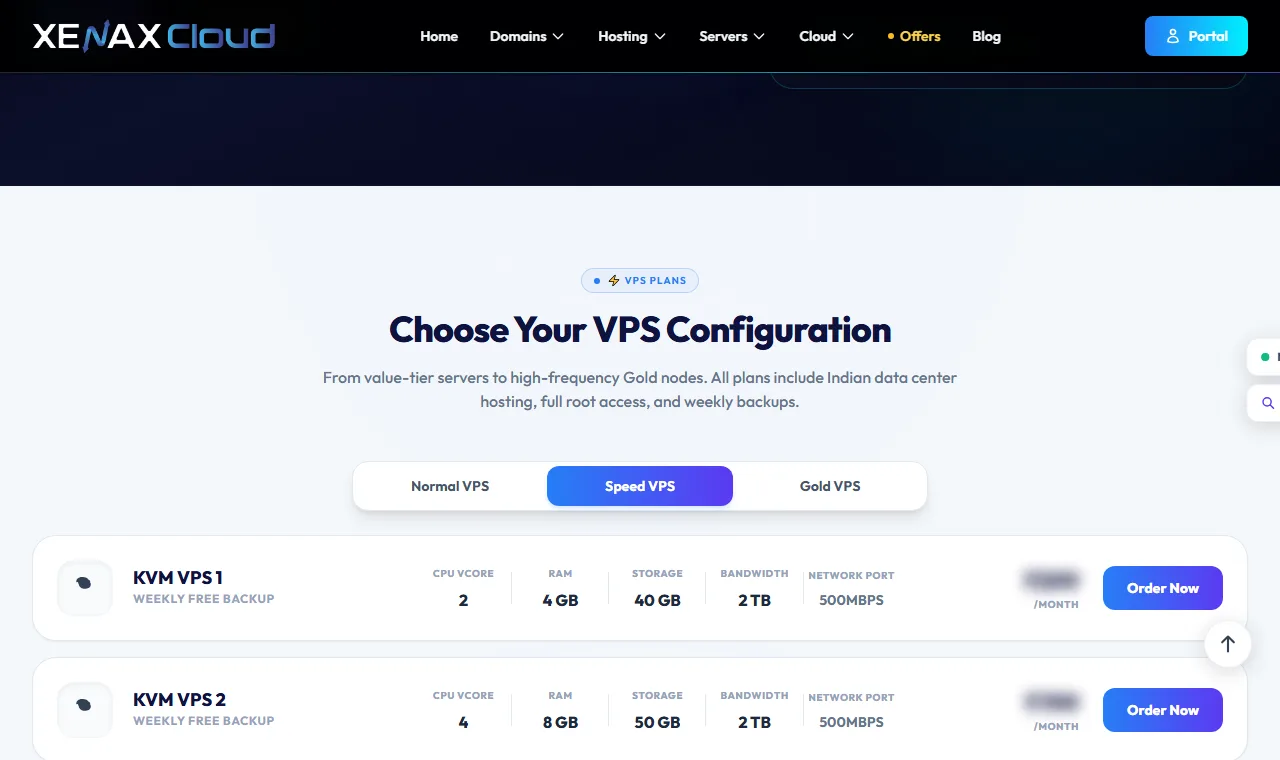
| Plan | vCPU | RAM | SSD storage | Bandwidth | Price |
|---|---|---|---|---|---|
| Speed KVM VPS 1 | 2 | 4 GB | 40 GB | 2 TB | ₹599/mo |
| Speed KVM VPS 2 | 4 | 8 GB | 50 GB | 2 TB | ₹799/mo |
| Speed KVM VPS 3 | 8 | 16 GB | 70 GB | 4 TB | ₹1,399/mo |
| Speed KVM VPS 4 | 12 | 24 GB | 80 GB | 6 TB | ₹1,799/mo |
| Speed KVM VPS 5 | 16 | 32 GB | 100 GB | 8 TB | ₹2,399/mo |
| Speed KVM VPS 6 | 20 | 40 GB | 120 GB | 10 TB | ₹2,999/mo |
| Speed KVM VPS 7 | 24 | 48 GB | 150 GB | 10 TB | ₹3,499/mo |
| Speed KVM VPS 8 | 32 | 64 GB | 200 GB | 10 TB | ₹4,599/mo |
Every Speed VPS: KVM, full root, 500 Mbps port, weekly backup included, Indian data centre. Monthly, billed in INR. cPanel licence not included.
Why Choose an Indian Data Centre for High-Capacity Hosting?
Hosting your high-capacity server in an Indian Tier-III data centre delivers low latency across Asian markets and high global routing performance. Xenax Cloud operates exclusively within these high-standard facilities to ensure your large datasets are always accessible and secure.
Latency advantages across Asian and global networks
Data proximity is the most significant factor when managing a large storage VPS. When your server is located in India, users in nearby regions like South East Asia or the Middle East experience much faster response times compared to servers hosted in North America or Europe.
For a business serving a regional audience, such as a logistics firm in Mumbai, local hosting reduces the time to first byte. This is critical when your application needs to fetch large files or complex database records. While strong connectivity is present, the primary advantage is the minimal delay for your most frequent users.
Physical security and Tier-III uptime standards
High-capacity hosting requires more than just digital security; it requires industrial-grade physical protection. Xenax Cloud utilizes Tier-III data centres in India that provide redundant power and cooling to prevent hardware failure during data-intensive tasks.
When you host large archives or critical business databases, you should verify the physical infrastructure. Use this checklist to evaluate a facility:
- Dual A+B power feeds to prevent downtime during electrical faults.
- Biometric access control for all server rooms.
- 24/7 on-site technical staff and remote hands support.
- DCIM monitoring for real-time environmental tracking.
- Advanced fire suppression and climate control systems.
By choosing a local, Tier-III environment, you ensure that your high storage vps remains stable even during heavy I/O workloads or local power fluctuations.
How to Configure Automated Backups on a Storage VPS
Automated backups on a large storage VPS are managed by scheduling regular snapshots or using scripts to move data to a secondary location. This prevents permanent data loss during server updates or accidental deletions.
Checking storage allocation via command line
Before setting up a backup routine, you must know exactly how much space your current data occupies to ensure your backup destination can hold it. On Ubuntu 24.04, use the du command to find the size of specific directories.
sudo du -sh /var/www/htmlThe output will look like 12G /var/www/html, meaning your web directory is using 12 gigabytes. If you are using a Speed KVM VPS 2 with 50 GB of SSD storage, a 12 GB site is manageable, but if that directory grows to 40 GB, your automated backups may fail due to lack of disk space for temporary archive files.
Setting up recurring maintenance scripts
To automate your data protection, we recommend using a cron job to trigger a compressed archive of your critical folders. This is essential for businesses like a Jaipur handicraft exporter who must back up thousands of high-resolution product photos and transaction logs daily.
Follow this checklist for a secure backup workflow:
- Create a compressed
.tar.gzarchive of your data directory. - Use a timestamp in the filename to avoid overwriting previous backups.
- Transfer the archive to a remote storage location or a separate volume.
- Set a retention policy to delete backups older than 30 days.
- Verify the integrity of the backup by performing a test restore monthly.
For those requiring managed resource protection, Xenax Cloud includes weekly free snapshots with our VPS hosting to provide an additional layer of recovery.
How to Scale Your Storage Without Downtime
Scaling your storage without downtime involves upgrading your VPS plan to a higher resource tier, which allows Xenax Cloud to allocate more disk space and RAM to your instance without requiring a full server reinstall. This process ensures your applications remain online while your capacity grows.
Transitioning between server tiers smoothly
When your data grows, moving to a larger plan prevents disk full errors that can crash databases. For example, a developer moving from a Speed KVM VPS 1 to a Speed KVM VPS 3 gains a significant boost in both processing power and storage capacity.
| Plan | vCPU | RAM | SSD Storage | Bandwidth |
|---|---|---|---|---|
| Speed KVM VPS 1 | 2 | 4 GB | 40 GB | 2 TB |
| Speed KVM VPS 2 | 4 | 8 GB | 50 GB | 2 TB |
| Speed KVM VPS 3 | 8 | 16 GB | 70 GB | 4 TB |
By upgrading, you increase your storage headroom by 30 GB and quadruple your RAM, which is essential for handling larger indices and more concurrent users.
Monitoring bandwidth consumption proactively
High storage often leads to high data transfer. You should monitor your bandwidth to avoid throttling during peak traffic. On Ubuntu 24.04, you can use the vnstat tool to track your monthly usage.
vnstat -mThe output shows a month-by-month breakdown of received and transmitted data. If you see your monthly usage approaching the 2 TB limit of a Speed KVM VPS 1, it is time to scale up to a higher tier to maintain consistent speeds for your users.
For reliable high-capacity workloads, we recommend deploying a Speed KVM VPS plan from Xenax Cloud to secure fast NVMe storage and 24/7 support.
Large Storage VPS: FAQs
What is the difference between standard VPS and a large storage VPS?
A standard VPS provides balanced resources for typical web hosting or small applications. A large storage VPS is specifically designed for workloads like media archives or large databases that require significantly higher disk capacity and consistent I/O performance.
Can Indian servers handle global website traffic efficiently?
Yes, Indian Tier-III data centres provide high-speed global routing that allows for efficient traffic handling. While local users in India and South East Asia will experience the lowest latency, the strong connectivity ensures reliable access for a global audience.
How do weekly free backups work on Xenax Cloud VPS plans?
Xenax Cloud includes weekly free snapshots for our VPS plans to provide an extra layer of data protection. These snapshots allow you to capture the state of your server, which is essential for recovery if you encounter errors during updates or configuration changes.
What operating systems can I install on my storage VPS?
You can install various operating systems on your storage VPS, including modern Linux distributions like Ubuntu 24.04 or 22.04. If you require a Windows environment, we also offer Windows RDP plans with full administrator access.
How do I upgrade my storage capacity as my application grows?
You can upgrade your storage capacity by moving to a higher resource tier within our VPS plans. This allows Xenax Cloud to allocate more SSD storage and RAM to your instance to ensure your application remains stable as your data volume increases. See the live price in the plan box below.