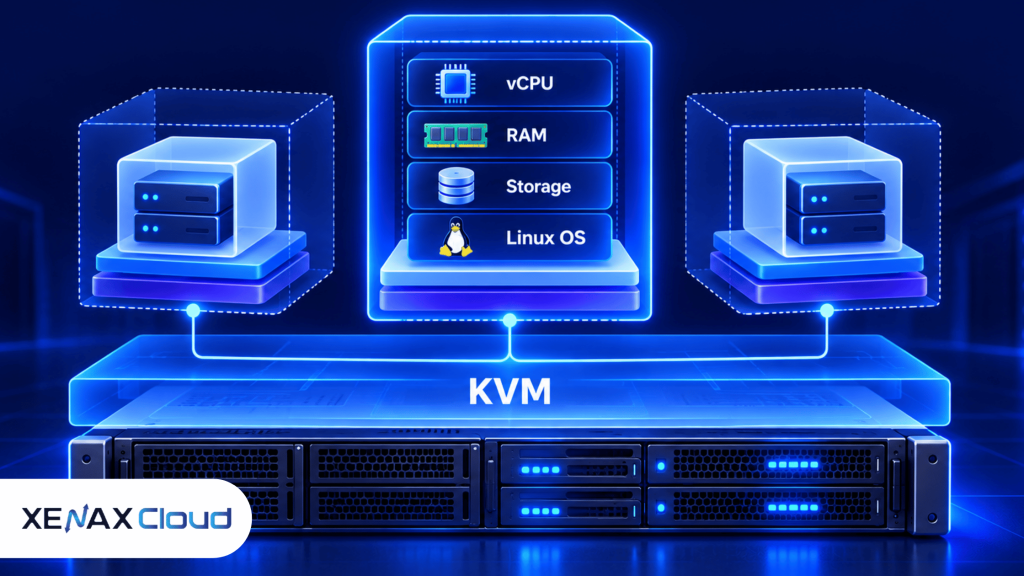
A virtual server is a virtualised computing environment that gives you allocated virtual CPU, memory, storage and an operating system on shared physical infrastructure. Virtual server hosting India means those virtual machines are hosted at an Indian data centre, giving businesses and developers a server environment without buying physical hardware.
For an Indian business, developer or agency, the main decision is not simply whether to use a virtual server. You need to determine how much CPU, RAM and storage your workload actually needs, and whether you need Linux, root access, backups or a particular server architecture.
Xenax Cloud operates one Tier-III data centre in Banda, Uttar Pradesh, India. Its VPS range uses KVM virtualisation, Linux operating systems, a 500 Mbps network port, weekly backup inclusion and one IPv4 address.
Virtual Server Hosting India: What Are You Actually Buying?
Virtual server hosting India provides an isolated server environment that runs as a virtual machine on physical infrastructure in India.
A KVM VPS is a virtual server that uses Linux kernel-based virtualisation to run an independent operating system environment. KVM stands for Kernel-based Virtual Machine and is built into the Linux kernel.
The practical difference from basic shared hosting is control. A VPS gives you full root access, so you can install packages, configure services and manage the operating system rather than working only inside a hosting control panel.
A VPS also differs from a physical dedicated server. Several virtual machines can run on physical hardware, while a dedicated server assigns the physical machine to one customer.
That makes a virtual server useful for workloads that need more control than shared hosting but don’t yet justify a physical server.
Xenax Cloud’s VPS environments are hosted at its single Indian data centre and use a 500 Mbps port. The VPS families also include weekly backups and one IPv4 address.
The underlying KVM technology is documented by the Linux kernel project, which describes KVM as the kernel-based virtual machine infrastructure used for virtualisation.
Screenshot option: A VPS control panel showing the server’s allocated CPU, RAM, storage and operating-system details.
How Much RAM Does a Virtual Server Need?
A virtual server needs enough RAM for its operating system, applications, databases and expected workload without constantly exhausting memory.
RAM is working memory used by the operating system and applications while they are running. More RAM does not automatically make every workload faster, but insufficient RAM can cause swapping, slower applications and service instability.
For example, a small Linux application server with a lightweight workload can fit into a lower-resource VPS. A WordPress installation with a database, web server, caching and several plugins can require more memory, especially when multiple processes run simultaneously.
Xenax Cloud’s Speed VPS family ranges from 2 vCPU and 4 GB RAM through configurations reaching 32 vCPU and 64 GB RAM. Storage scales from 40 GB SSD on the smallest listed Speed VPS configuration to 200 GB on the largest.
The General VPS family provides more RAM per vCPU, starting from 2 vCPU and 8 GB RAM and extending to 16 vCPU and 64 GB RAM.
Gold VPS uses high-frequency Xeon Gold processors and ranges from 2 vCPU and 4 GB RAM through 32 vCPU and 64 GB RAM.
This gives you three useful ways to think about the resource choice:
- Speed VPS: useful when balanced CPU, RAM and NVMe storage are the priority.
- General VPS: useful when the workload needs more RAM relative to CPU.
- Gold VPS: useful when CPU frequency is more relevant to the workload.
Buy Virtual Server: What Should You Check First?
Before you buy virtual server hosting, identify the operating system, CPU, RAM, storage and network requirements of the software you will run.
Start with the application rather than the hosting package. Check its documented minimum and recommended requirements, then add capacity for the operating system and other services that will run alongside it.
A practical checklist is:
- Identify the operating system. Confirm that the application supports Linux or the specific Linux distribution you plan to use.
- Estimate CPU demand. Separate ordinary workload from periodic CPU-heavy processing.
- Estimate RAM usage. Include the application, database, web server and background services.
- Measure storage needs. Count application files, databases, logs, uploads and expected growth.
- Check network requirements. Determine whether your workload needs continuous transfers or only normal web traffic.
- Check backup needs. Confirm what should be backed up and how often it can be restored.
- Plan administration. Make sure you can manage Linux updates, firewall rules, SSH access and application configuration.
- Choose the smallest suitable configuration. Move up when actual resource use shows that additional capacity is needed.
For Linux administration, SSH is normally the main remote management method. A basic connection commonly looks like:
ssh username@server-ip
After connecting, check CPU, memory, storage and running services before deploying the production workload.
The important point is that a virtual server gives you control, but that control also means you are responsible for operating-system configuration and application administration.
Virtual Server India: Which VPS Family Fits Your Workload?
Virtual server India options should be selected by workload characteristics rather than by the VPS name alone.
The three VPS families have different resource priorities.
| VPS family | Starting resource profile | Key characteristic | Suitable consideration |
| Speed VPS | 2 vCPU, 4 GB RAM | NVMe storage | Balanced compute and storage |
| General VPS | 2 vCPU, 8 GB RAM | More RAM per vCPU | Memory-heavy workloads |
| Gold VPS | 2 vCPU, 4 GB RAM | High-frequency Xeon Gold | CPU-frequency-sensitive workloads |
| Larger configurations | Up to 32 vCPU, 64 GB RAM | More compute capacity | Growing or heavier workloads |
The Speed VPS family also reaches 200 GB storage on its largest listed configuration, while General VPS and Gold VPS provide different CPU-to-memory combinations.
A useful decision rule is:
Choose Speed VPS if your application needs balanced CPU, RAM and NVMe storage. Choose General VPS if RAM is the limiting resource. Choose Gold VPS if your workload benefits from high-frequency Xeon Gold CPU resources.
Worked Example: A Jaipur Agency Hosting Three Client Websites
A small Jaipur agency running three moderate WordPress websites can start with a VPS sized around the combined CPU, RAM and storage requirements of those sites.
Suppose the agency manages three WordPress sites, each with its own database and media files. The combined project data occupies 25 GB, the websites are expected to run several PHP workers and the agency wants root access for server-level configuration.
A 2 vCPU, 4 GB RAM, 40 GB SSD Speed VPS provides a defined starting point for this workload.
The 40 GB storage leaves room above the current 25 GB requirement, while 4 GB RAM provides more capacity than the existing application data alone would suggest.
The smaller decision point is not storage alone. If monitoring shows memory consistently approaching the available limit, moving to a larger RAM configuration is more useful than simply adding storage.
If the agency later needs significantly more memory, a General VPS with 2 vCPU and 8 GB RAM provides a different resource balance.
If the three websites become substantially busier, the agency should measure CPU, RAM, disk usage and database activity before selecting the next configuration.
How to Manage a Virtual Server After Purchase
A virtual server requires regular operating-system, access-control, backup and resource management after deployment.
The hosting provider supplies the virtual machine environment, but server administration remains part of running a VPS.
Use this routine:
- Secure SSH access. Use strong authentication and avoid exposing unnecessary services.
- Update the operating system. Apply security updates according to the distribution’s maintenance process.
- Configure the firewall. Allow only the ports required by your applications.
- Monitor resources. Watch CPU, RAM, storage and network usage.
- Review logs. Check application and system logs for errors or unexpected activity.
- Test backups. Confirm that important files and databases can actually be restored.
- Document changes. Record installed packages, configuration changes and administrative access.
A common mistake is to treat a VPS as managed shared hosting. Root access gives you more control, but it also means a configuration mistake can affect the application.
For a production website, keep an independent copy of important data before making major server changes. This is particularly useful before changing databases, web-server configuration or application versions.
When Is a Virtual Server Not the Right Choice?
A virtual server is not the right choice when the workload specifically requires dedicated physical hardware, specialised hardware or resources that a VPS cannot provide.
A dedicated server can make more sense when you need physical CPU and RAM resources assigned to one machine, specific hardware requirements or substantially more storage and memory.
Xenax Cloud’s dedicated server range uses Intel Xeon and AMD EPYC processors, with configurations ranging from 16 GB to 512 GB RAM, NVMe storage and a 1 Gbps port.
A VPS is also not ideal if you don’t want responsibility for operating-system administration. In that situation, a managed hosting product may be easier to operate, depending on the application.
The decision should therefore be based on control, resource requirements and administration responsibility rather than assuming that a VPS is always the next step above shared hosting.
Is Virtual Server Hosting India Safe for Business Applications?
Virtual server hosting India can be used for business applications when the server, operating system and application are configured and maintained securely.
Server location alone does not determine security. Access controls, software updates, firewall rules, backups and application security all matter.
For an Indian business, hosting the virtual machine in India can also simplify the physical location decision when the workload needs an Indian data centre.
Xenax Cloud operates one Tier-III data centre in Banda, Uttar Pradesh, India. It does not operate server facilities in the United States, Singapore, Europe or other countries.
For sensitive business applications, identify the data stored on the VPS before deployment. Separate application secrets from source code, restrict administrative access and maintain backups outside the application directory.
Virtual Server India: What Should You Order?
The right virtual server India configuration is the smallest plan that meets your measured CPU, RAM, storage and application requirements with room for normal growth.
For a lightweight application, a smaller Speed VPS configuration may be sufficient. For a memory-heavy workload, the General VPS family can be a better starting point because its configurations provide more RAM per vCPU.
For CPU-frequency-sensitive workloads, Gold VPS is the relevant family to evaluate.
If the workload requires more than a virtual environment can reasonably provide, move the decision to dedicated hardware rather than continually increasing VPS resources without measuring the bottleneck.
The Xenax Cloud VPS page is the relevant product page for reviewing the available VPS families and configurations.
Virtual Server Hosting India: FAQs
What is virtual server hosting India used for?
Virtual server hosting India is used for websites, applications, databases, development environments and other workloads that need an isolated server environment hosted at an Indian data centre. A VPS provides operating-system-level control without requiring a physical server.
How do I buy virtual server hosting for a Linux application?
To buy virtual server hosting, first identify the application’s Linux requirements, then choose CPU, RAM, storage and network capacity. Select a VPS family that matches the main resource bottleneck and verify that you can administer the operating system.
How much RAM does a virtual server need for WordPress?
A small WordPress installation can use a lower-resource VPS, while multiple sites, plugins, databases and concurrent requests can require more RAM. Measure actual memory use and choose a configuration with capacity above the normal working requirement.
Is a virtual server India environment suitable for a database?
Yes, provided the VPS has enough RAM, CPU and storage for the database workload. Database-heavy applications should be sized from query activity, memory requirements, storage growth and backup needs rather than website traffic alone.
Can I install my own software on a KVM VPS?
Yes, a KVM VPS with full root access lets you install and configure supported Linux software. You remain responsible for package management, application configuration, firewall rules, security updates and service monitoring.
When should I move from a VPS to a dedicated server?
Move to dedicated hardware when the workload needs physical resources, specialised hardware or substantially more memory and storage than a suitable VPS configuration provides. Measure the bottleneck first so the upgrade addresses the actual limitation.
Does virtual server hosting India provide root access?
Xenax Cloud’s VPS environments include full root access, allowing you to manage the Linux operating system, install software and configure server services. Root access also means you are responsible for making safe configuration changes.
If your workload needs Linux root access, a 500 Mbps network port, weekly backups and a defined CPU/RAM configuration, start by measuring the application’s actual resource use and then select the appropriate VPS family. For balanced CPU and NVMe storage, evaluate Speed VPS; for higher RAM per vCPU, evaluate General VPS.