vps reselling is a business model where you purchase virtual private server resources from a provider like Xenax Cloud and sell them to your own clients under your own brand. It allows you to offer high-performance, isolated hosting environments without the massive capital investment required to own physical data centre hardware.
This article explains how to start a hosting brand, how to partition resources effectively, and how to choose the right infrastructure for virtual server hosting India. We also cover scaling strategies for agencies and developers looking to build recurring revenue.
What is VPS Reselling and How Does It Work?
VPS reselling involves buying large blocks of compute resources and dividing them into smaller, manageable virtual instances for your customers. You act as the service layer, providing the branding, billing, and customer interface while the underlying hardware is managed by your infrastructure provider.
To understand the mechanics, consider a worked example of a Jaipur digital marketing agency named Apex Web Solutions. They purchase a Speed KVM VPS 3 package with 8 vCPU and 16 GB RAM. Instead of using it for themselves, they partition these resources into four distinct client hosting tiers. They sell these managed virtual servers to local e-commerce stores, charging each client a premium for the managed service and local support. By doing this, they turn one large resource into four separate revenue streams.
How resource partitioning works for resellers
Resource partitioning is the process of using a hypervisor to split a single physical server into multiple isolated virtual environments. Each environment acts as a standalone server with its own operating system and dedicated resources.
When you partition a server, you are essentially allocating specific slices of the hardware to different users. A typical reseller workflow follows this structure:
- Resource Acquisition: You select a high-capacity plan from Xenax Cloud.
- Virtualization: Using a hypervisor, you create multiple Virtual Machines (VMs).
- Allocation: You assign specific amounts of CPU, RAM, and SSD storage to each VM.
- Isolation: You ensure that one client’s high traffic or software error does not affect the performance of another client.
| Resource Type | Role in Partitioning | Impact on Client Experience |
|---|---|---|
| vCPU | Processing power | Determines how many simultaneous tasks a client can run |
| RAM | Active memory | Dictates how many applications or database queries stay fast |
| SSD Storage | Persistent data | Affects how quickly files load and how much data is stored |
| Bandwidth | Network throughput | Determines the speed of data transfer for the client’s website |
Why Start a VPS Reselling Business in India?
Starting a VPS reselling business in India allows you to tap into a rapidly growing digital economy by providing high-performance hosting with low latency to local businesses. By leveraging Indian data centres, you can offer superior speed to clients across South Asia while maintaining a cost-effective infrastructure.
The Indian market is ideal for resellers because many small to medium enterprises (SMEs) are moving their operations online. For a Jaipur digital marketing agency, bundling reliable hosting with web design services is a proven way to secure monthly recurring income. Instead of a one-time project fee, they provide ongoing value through managed virtual server hosting India services.
Latency advantages for Asian audiences
Latency is the time it takes for a data packet to travel from a user to a server and back. When you host your clients on servers located within India, you significantly reduce this delay for users in the region. Lower latency results in faster website loading times, which is a critical factor for SEO and user retention.
To understand the technical advantage, consider the difference in network hops. A client in Delhi accessing a server in a local Tier-III data centre will experience much lower millisecond (ms) delays compared to accessing a server in Europe or North America.
| Location Segment | Typical Latency Impact | Business Benefit |
|---|---|---|
| Domestic (Within India) | Extremely Low | Faster local e-commerce and banking apps |
| South Asia (ASEAN/SAARC) | Low to Moderate | Improved performance for regional startups |
| Global (US/Europe) | Higher | Standard international web performance |
By choosing vps hosting with cpanel on Indian infrastructure, you position your brand as a high-performance provider for the local market. This local presence builds trust with clients who prioritise data sovereignty and rapid response times.
How Much RAM Does a Reseller VPS Need?
The amount of RAM you need depends on the total number of clients and the complexity of the applications they run. A good rule of thumb is to allocate at least 1 GB to 2 GB of RAM per mid-sized WordPress site or database-heavy application to ensure stability.
Sizing guidelines for startups and agencies
When planning your initial investment, you must balance the cost of your infrastructure against the performance requirements of your clients. A small agency might start by partitioning a single high-capacity server into several smaller units to maximize profit margins.
Consider the example of Apex Web Solutions, a Jaipur digital marketing agency. They purchased a Speed KVM VPS 3 package with 8 vCPU and 16 GB RAM. They partitioned these resources into four distinct client hosting tiers, selling managed virtual servers to local e-commerce stores and generating steady monthly recurring revenue.
To help you plan, here is a breakdown of how you might allocate resources based on real Xenax Cloud specifications:
| Client Type | Estimated RAM per Client | Recommended Total Reseller RAM | Suggested Xenax Plan |
|---|---|---|---|
| Basic Landing Pages | 512 MB to 1 GB | 8 GB to 16 GB | Speed KVM VPS 2 or 3 |
| Small E-commerce (WooCommerce) | 2 GB to 4 GB | 32 GB to 64 GB | Speed KVM VPS 5 or 8 |
| High-Traffic SaaS / Dev Apps | 8 GB+ | 128 GB+ | Speed KVM VPS 8 or higher |
If you are unsure of your current memory usage, you can use the free command in the Linux terminal to check available resources:
free -hThe output will show “total”, “used”, and “free” memory in a human-readable format (like GiB or MiB). If your “available” memory is consistently below 10% of the total, it is time to upgrade your vps server to a higher tier to prevent client downtime.
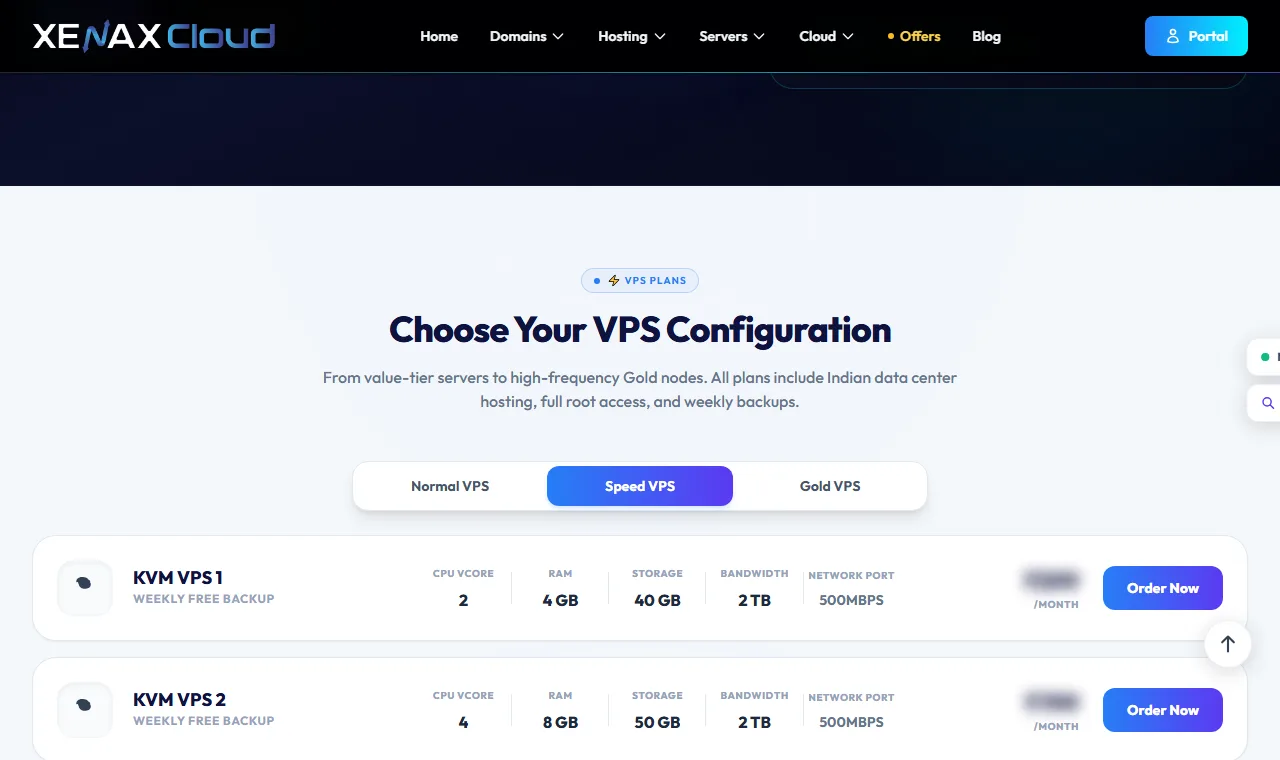
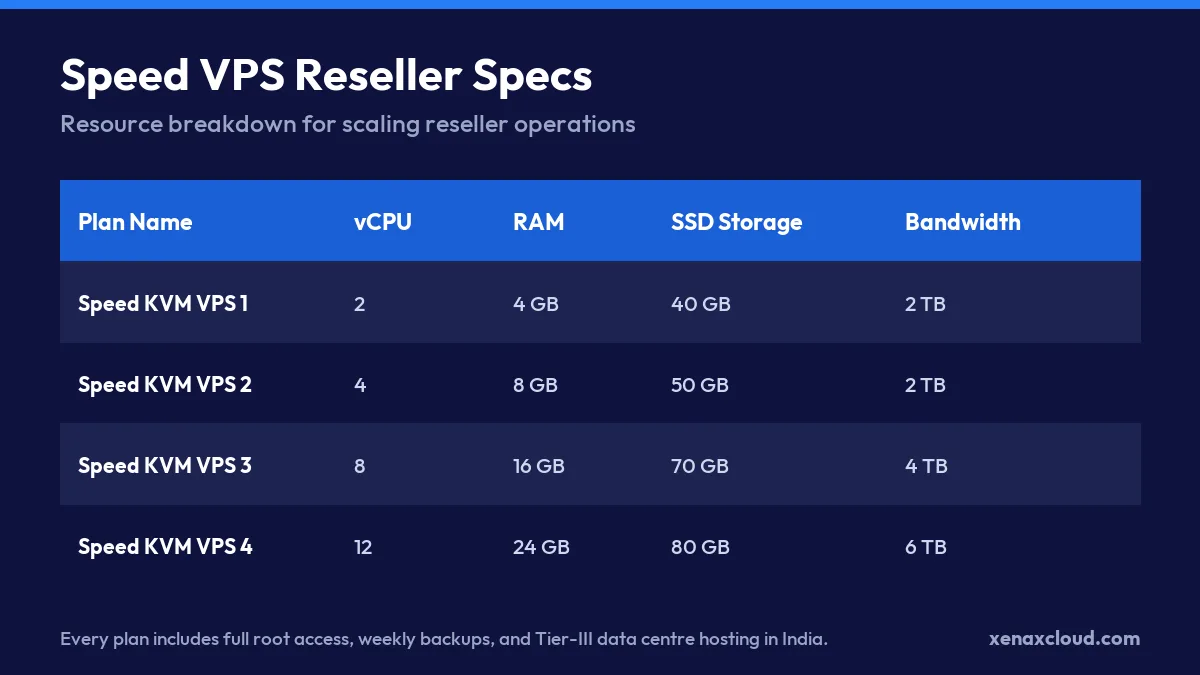
| Plan | vCPU | RAM | SSD storage | Bandwidth | Price |
|---|---|---|---|---|---|
| Speed KVM VPS 1 | 2 | 4 GB | 40 GB | 2 TB | ₹599/mo |
| Speed KVM VPS 2 | 4 | 8 GB | 50 GB | 2 TB | ₹799/mo |
| Speed KVM VPS 3 | 8 | 16 GB | 70 GB | 4 TB | ₹1,399/mo |
| Speed KVM VPS 4 | 12 | 24 GB | 80 GB | 6 TB | ₹1,799/mo |
| Speed KVM VPS 5 | 16 | 32 GB | 100 GB | 8 TB | ₹2,399/mo |
| Speed KVM VPS 6 | 20 | 40 GB | 120 GB | 10 TB | ₹2,999/mo |
| Speed KVM VPS 7 | 24 | 48 GB | 150 GB | 10 TB | ₹3,499/mo |
| Speed KVM VPS 8 | 32 | 64 GB | 200 GB | 10 TB | ₹4,599/mo |
Every Speed VPS: KVM, full root, 500 Mbps port, weekly backup included, Indian data centre. Monthly, billed in INR. cPanel licence not included.
How to Set Up Your Hosting Brand and Client Portals
Setting up your hosting brand involves configuring a white-label billing system and a client portal that masks the underlying Xenax Cloud infrastructure. You act as the primary interface for your customers, providing them with their own login credentials while you manage the core server resources.
Managing customer accounts and billing systems
To run a professional operation, you should integrate an automated billing platform like WHMCS or a similar client management tool. This allows you to automate invoice generation, manage service suspensions for non-payment, and provide a self-service area where clients can view their server details.
When you use reseller hosting, your goal is to present a unified brand experience. While Xenax Cloud provides the high-performance hardware and Tier-III data centre stability, your customers should only ever interact with your company name and your support channels.
Use this checklist to ensure your brand setup is professional:
- Domain and DNS: Register your brand domain and set up professional email addresses (e.g., support@yourbrand.in).
- White-labeling: Configure your billing software to use your logo, brand colours, and custom nameservers.
- Support Channels: Set up a ticketing system or a dedicated WhatsApp Business account to handle client queries.
- Service Agreements: Draft clear terms of service that outline your specific refund policies and support hours.
- Automated Provisioning: Connect your billing platform to your server management tools to ensure clients receive their details immediately after payment.
By following these steps, you move from being a simple user of a vps reseller setup to a legitimate hosting provider. This professional structure is essential for building long-term trust with your clients.
What Are the Key Steps to Scale Your Hosting Revenue?
Scaling your hosting revenue requires transitioning from simple resource reselling to offering high-value managed services and tiered product packages. By increasing the complexity of what you offer, you can move from low-margin basic hosting to high-margin managed infrastructure.
One of the most effective ways to scale is by bundling technical tasks into “Managed” tiers. For example, instead of just selling a VPS, you can sell a “Managed WordPress Environment” that includes security updates and daily backups. This allows you to charge a premium for your expertise rather than just the hardware.
Monitoring server performance and uptime
Proactive monitoring is the foundation of a scalable business because it allows you to fix resource bottlenecks before a client notices a slowdown. You should monitor CPU load, memory usage, and disk I/O to ensure your partitions remain stable as you add more customers.
To check the current load average and see if your server is struggling under the weight of multiple virtual environments, use the uptime command in your terminal:
uptimeThe output will show the system load average for the last 1, 5, and 15 minutes. If the numbers are consistently higher than your total vCPU count, your clients will experience latency, and you must scale up to a larger vps hosting with cpanel setup or a higher-spec KVM instance.
To keep your growth predictable, use this scaling checklist:
- Tiered Packages: Create “Starter,” “Business,” and “Enterprise” tiers to capture different market segments.
- Automated Backups: Always include weekly backups in your higher-tier plans to build client trust.
- Resource Audits: Review your resource allocation monthly to identify underused or overstressed partitions.
- Value-Added Services: Offer managed migrations or security hardening for an additional fee.
If you are ready to launch your hosting brand, explore the Speed KVM VPS plans or review the Reseller Hosting options on Xenax Cloud today.
VPS Reselling: FAQs
What is the difference between shared hosting and VPS reselling?
Shared hosting involves multiple users sharing a single operating system and all its resources on one server. In VPS reselling, you use a high-capacity server to create multiple isolated virtual machines, giving each client their own dedicated resources like vCPU and RAM.
Can Indian servers handle global website traffic efficiently?
Indian servers provide excellent performance for users within India and South Asia due to extremely low latency. While users in the US or Europe will experience higher latency than local users, the Tier-III infrastructure ensures reliable global connectivity for international audiences.
Do I need advanced technical knowledge to start reselling virtual servers?
You need a foundational understanding of server management to partition resources and manage virtual machines effectively. While Xenax Cloud provides the high-performance hardware, you will be responsible for managing your clients, their billing, and your own brand’s support.
How do I set up my own pricing for my hosting clients?
You can set your own prices by calculating your infrastructure costs and adding a margin for your managed services. To see the live price in the plan box for your base resources, check the Xenax Cloud product pages.
What support options are available for Xenax Cloud reseller servers?
Xenax Cloud provides 24/7 support through tickets, live chat, and WhatsApp to assist with your infrastructure. This ensures you have professional assistance available whenever you need to manage your reseller server environment.