cPanel VPS hosting combines the dedicated power of a Virtual Private Server (VPS) with the intuitive graphical interface of the cPanel control panel. This setup allows you to manage your own isolated server resources without needing to be a Linux expert, ensuring your websites remain fast and stable.
This guide explains how to choose the right resource allocation for your business, compares managed and unmanaged setups, and shows why hosting your server in India improves performance for local users.
What is cPanel VPS Hosting and How Does It Work?
cPanel VPS hosting is a hosting environment where a physical server is divided into multiple virtual servers, each managed by the cPanel software. It gives you the dedicated CPU and RAM of a private server but allows you to handle technical tasks through a web browser instead of a command line.
The Role of Virtualisation in Resource Isolation
Virtualisation uses a hypervisor to carve out a specific slice of a physical server’s hardware for your exclusive use. Unlike shared hosting, where one noisy neighbor can slow down your site, a VPS ensures your resources are locked.
To understand the difference in scale, consider these verified specifications from our Speed KVM VPS range:
| Plan | vCPU | RAM | SSD Storage | Bandwidth |
|---|---|---|---|---|
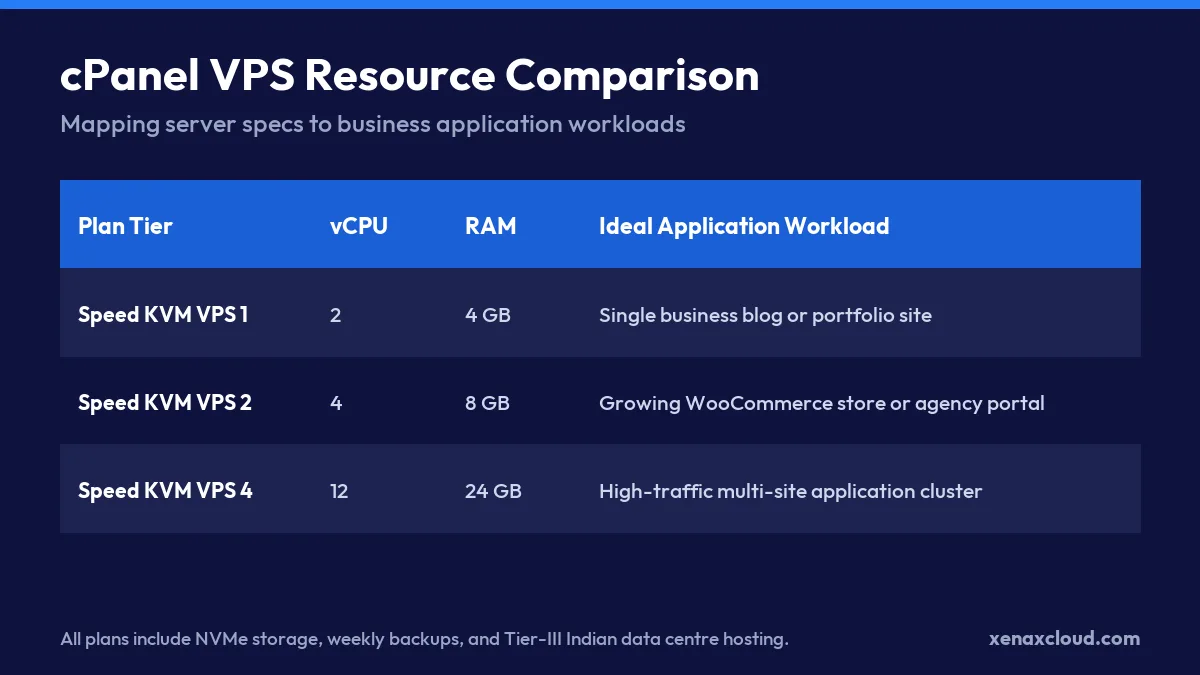
| Speed KVM VPS 1 | 2 | 4 GB | 40 GB | 2 TB |
| Speed KVM VPS 2 | 4 | 8 GB | 50 GB | 2 TB |
| Speed KVM VPS 3 | 8 | 16 GB | 70 GB | 4 TB |
In this environment, if you are on Speed KVM VPS 2, your 8 GB of RAM is reserved for your applications alone. Even if other users on the same physical machine experience a traffic surge, your allocated 4 vCPUs continue to process your requests without interference.
Why cPanel Eliminates the Need for Linux Command-Line Mastery
cPanel acts as a translation layer between you and the server’s operating system. Instead of typing complex strings of code into a terminal to create an email account or a MySQL database, you click a button in a dashboard.
For example, instead of manually editing a configuration file via SSH to check your disk usage, you can see a visual gauge in cPanel. If you still need to use the terminal for specific tasks, you can run a command like:
df -hThe output will show you exactly how much of your SSD storage is used and how much is available in a human-readable format, which matches the limits defined in your VPS hosting plan.
Why Choose cPanel VPS Hosting Over Shared Hosting?
cPanel VPS hosting is superior to shared hosting because it provides dedicated hardware resources that are not shared with other users. This ensures your website performance remains consistent regardless of how much traffic other sites on the same physical server receive.
Avoiding Neighbourhood Noise on Shared Servers
In a shared environment, hundreds of websites compete for the same pool of RAM and CPU. When one site experiences a sudden traffic spike, it creates neighbourhood noise, which can slow down every other site on that server.
A KVM-based VPS eliminates this by using a hypervisor to create a strict boundary. If you use a cPanel VPS, your resources are isolated. This means your site will not crash just because another user is running a heavy script.
Guaranteed RAM and CPU for Consistent E-Commerce Performance
For businesses running online stores, resource contention leads to slow checkout pages and database timeouts. Dedicated allocation ensures that your PHP processes and MySQL queries have the memory they need to execute instantly.
Picture a Jaipur handicraft export shop launching a high-volume WooCommerce store with thousands of product listings. Operating on shared hosting often causes database timeouts during festive season flash sales. Upgrading to Speed KVM VPS 2 with 4 vCPU and 8 GB RAM guarantees dedicated processing power, while cPanel handles SSL certificates and customer database backups effortlessly.
The following table shows how resource allocation scales to handle different business needs:
| Business Stage | Recommended Resource Level | Primary Benefit |
|---|---|---|
| Small Blog | 2 vCPU / 4 GB RAM | Stable page loads |
| Growing Store | 4 vCPU / 8 GB RAM | Faster checkout processing |
| High-Traffic App | 8 vCPU / 16 GB RAM | High concurrent user support |
By moving to a managed VPS hosting with cPanel setup, you gain the stability of a dedicated environment with the ease of a visual dashboard.
How Much RAM and CPU Do You Need for cPanel VPS?
Your cPanel VPS hosting requirements depend on your monthly traffic, the number of concurrent visitors, and the complexity of your software stack. Most small to medium business websites require between 4 GB and 16 GB of RAM to maintain fast load times and stable database connections.
Sizing for Single WordPress Sites and Small Business Portals
A basic business portal or a professional blog typically needs a minimum of 2 vCPUs and 4 GB of RAM. This configuration allows the operating system, the cPanel service, and a LiteSpeed or Apache web server to run without swapping to disk.
For example, a Delhi coaching institute running a site with course listings and a contact form will find that 4 GB of RAM is sufficient for handling 50 to 100 concurrent visitors. At this level, the primary resource constraint is usually the PHP memory limit rather than the total server RAM.
Scaling Up for WooCommerce and High-Traffic Application Stacks
E-commerce sites and dynamic applications require more resources because every product search or checkout action triggers a database query. For these workloads, we recommend at least 8 GB to 16 GB of RAM.
Consider the resource math for a high-traffic store:
- OS and cPanel overhead: 1.5 GB to 2 GB
- MySQL/MariaDB buffer pool: 2 GB to 4 GB (for faster database indexing)
- PHP-FPM workers: 2 GB to 4 GB (to handle simultaneous requests)
- Free buffer for traffic spikes: 2 GB
This total aligns with the Speed KVM VPS 2 or 3 specifications. If you are unsure about your current usage, you can check your real-time memory consumption using this command:
free -mThe available column in the output tells you exactly how much RAM remains before the server starts using swap space, which would significantly slow down your website. For those needing high-performance environments, choosing the best VPS hosting with cPanel ensures you have the headroom to grow.
| Plan | vCPU | RAM | SSD storage | Bandwidth | Price |
|---|---|---|---|---|---|
| Speed KVM VPS 1 | 2 | 4 GB | 40 GB | 2 TB | ₹599/mo |
| Speed KVM VPS 2 | 4 | 8 GB | 50 GB | 2 TB | ₹799/mo |
| Speed KVM VPS 3 | 8 | 16 GB | 70 GB | 4 TB | ₹1,399/mo |
| Speed KVM VPS 4 | 12 | 24 GB | 80 GB | 6 TB | ₹1,799/mo |
| Speed KVM VPS 5 | 16 | 32 GB | 100 GB | 8 TB | ₹2,399/mo |
| Speed KVM VPS 6 | 20 | 40 GB | 120 GB | 10 TB | ₹2,999/mo |
| Speed KVM VPS 7 | 24 | 48 GB | 150 GB | 10 TB | ₹3,499/mo |
| Speed KVM VPS 8 | 32 | 64 GB | 200 GB | 10 TB | ₹4,599/mo |
Every Speed VPS: KVM, full root, 500 Mbps port, weekly backup included, Indian data centre. Monthly, billed in INR. cPanel licence not included.
Unmanaged VPS vs Managed cPanel VPS Hosting
The choice between unmanaged and managed environments depends on whether you want to control the server configuration or focus on your business operations. Unmanaged VPS hosting gives you total control through the command line, while cPanel-equipped hosting provides a graphical interface to automate complex tasks.
When Developers Prefer Unmanaged Root Access
Developers often choose an unmanaged setup because it provides complete freedom to customize the software stack without any restrictions. This is ideal for running custom applications, specific versions of Node.js, or specialized security configurations that a standard control panel might not support.
With unmanaged access, you are responsible for every layer of the system. This includes performing security patches, managing firewalls, and configuring the web server. For example, if you need to check the status of your running services on Ubuntu, you would use:
systemctl status nginxThe output will tell you if your web server is active, inactive, or failed, allowing you to troubleshoot manually. This level of control is perfect for engineers who want to optimize every byte of performance.
Why Non-Technical Teams Rely on cPanel and WHM Administration
Non-technical teams and business owners often prefer cPanel because it replaces complex terminal commands with an intuitive web dashboard. Instead of writing code to create a database or an email account, you simply click a button.
To help you decide, consider this administrative workload comparison:
| Task | Unmanaged VPS (Manual) | cPanel VPS (Automated) |
|---|---|---|
| Creating a new Email | Command line / Postfix config | Click Create Account |
| Installing an SSL | Certbot / Manual CLI | AutoSSL / One-click |
| Database Management | MySQL command line | phpMyAdmin via Dashboard |
| Setting up Backups | Manual Cron jobs / Scripts | Scheduled via cPanel interface |
For those who want to skip the server maintenance and get straight to building their brand, cpanel for vps provides the necessary tools to manage multiple websites efficiently.
Why Host Your cPanel VPS in an Indian Data Centre?
Hosting your cPanel VPS in an Indian data centre ensures the lowest possible latency for local users and maintains compliance with national data sovereignty laws. By placing your server physically closer to your primary audience, you reduce the time it takes for data packets to travel, which directly improves page load speeds and user experience.
Minimising Latency Across Asian Business Hubs
Network latency is the delay between a user’s request and the server’s response. When you use cpanel vps hosting located in India, you avoid the long haul trip to US or European servers, which can add 200ms to 300ms of delay per request.
For a business targeting the Asia-Pacific region, the difference in response times is significant. Consider this latency estimation for a standard website request:
| Route | Estimated Round Trip Time (RTT) | User Experience |
|---|---|---|
| Mumbai User $\rightarrow$ Indian DC | 10ms to 40ms | Instantaneous |
| Mumbai User $\rightarrow$ Singapore DC | 60ms to 90ms | Very Fast |
| Mumbai User $\rightarrow$ US East DC | 220ms to 280ms | Noticeable Lag |
You can verify your server’s actual latency from your current location using the ping command in your terminal:
ping -c 4 your-server-ipThe time= value in the output represents the latency in milliseconds. A lower number indicates a faster connection, making this the best VPS hosting in India for local businesses.
Enterprise Security Standards and Dual Power Redundancy
Xenax Cloud hosts every server in a Tier-III data centre in India, which guarantees a high level of availability and security. Tier-III facilities feature redundant components for power and cooling to maintain continuous operation.
Key infrastructure benefits include:
- Dual A+B power feeds to prevent downtime during a single power source failure.
- Biometric access and 24/7 surveillance for physical security.
- Industrial-grade cooling systems to maintain hardware health.
- High-speed cross-connects for stable international routing.
How to Scale Your cPanel VPS Without Server Migration
Scaling your cPanel VPS involves increasing your allocated virtual resources, such as CPU, RAM, or storage, through your hosting dashboard or support team. Because Xenax Cloud uses KVM technology, these upgrades happen at the hypervisor level, meaning you do not need to reinstall your operating system or move your website files to a new server.
Upgrading Resources During Traffic Surges
When your website experiences sudden growth, you can expand your hardware limits to prevent slowdowns. For example, picture a Jaipur handicraft export shop launching a high-volume WooCommerce store with thousands of product listings. Operating on shared hosting causes database timeouts during festive season flash sales. Upgrading to Speed KVM VPS 2 with 4 vCPU and 8 GB RAM guarantees dedicated processing power, while cPanel handles SSL certificates and customer database backups effortlessly.
To see how much headroom you have before needing an upgrade, you can monitor your current resource usage in the terminal:
free -hThe output shows your total, used, and available RAM in a human-readable format. If the available column is consistently below 500 MB, it is time to scale up.
Maintaining Uptime While Scaling Virtual Infrastructure
Scaling KVM resources is designed to be a smooth process that preserves your service continuity. Unlike older virtualization methods that required a full rebuild, modern cloud environments allow for vertical scaling.
| Resource Type | Scaling Benefit | Impact on cPanel |
|---|---|---|
| vCPU | Faster PHP processing | Faster page loads and admin dashboard |
| RAM | Larger database cache | Reduced MySQL/MariaDB timeouts |
| NVMe Storage | More room for media/logs | No disk full errors during backups |
For growing business websites requiring dedicated performance and easy administration, we recommend deploying Speed KVM VPS 2 in our Tier-III Indian data centre. Confirm your specific configuration requirements with our 24/7 support team.
cPanel VPS Hosting: FAQs
What is the difference between cPanel and WHM on a VPS?
WHM is the administrative tool used to create and manage individual cPanel accounts on a VPS. While WHM handles server-wide settings and account creation, cPanel is the user-level dashboard where you manage specific website files, emails, and databases.
Can I migrate my existing cPanel websites to a Xenax Cloud VPS?
Yes, you can move your existing cPanel websites to a Xenax Cloud VPS. Since we use a standard cPanel environment, the migration process is straightforward, though you should confirm the specific migration steps with our support team.
How does a Tier-III Indian data centre improve website speed?
A Tier-III data centre in India reduces network latency by placing the server physically closer to your Indian users. This eliminates the long trip to overseas servers, resulting in faster round trip times and near-instantaneous page loads for local visitors.
Is technical knowledge required to manage a cPanel VPS?
While root access allows for advanced command line configuration, cPanel is designed for those who prefer a visual interface. It replaces complex terminal commands with a dashboard, allowing non-technical users to manage emails, SSL certificates, and databases with a few clicks.
What backup mechanisms are included with Xenax VPS plans?
Xenax Cloud provides weekly free snapshots for VPS hosting to ensure your data is protected. You can also use the cPanel interface to schedule and manage your own regular website backups.