Permalinks play a much bigger role in your website’s success than most people realize. A permalink is the permanent URL of a post, page, category, or product on your WordPress site. When users and search engines read your URL, they decide whether it looks trustworthy, relevant, and easy to understand. That is why learning how to change permalink in WordPress correctly is essential for website owners worldwide.
This topic matters globally because clean and well-structured URLs improve search visibility, user experience, and click-through rates. Whether you run a blog, business website, or online store, permalink structure directly affects SEO performance. Indian hosting infrastructure supports this need well by offering cost-effective plans, low latency across Asia, competitive global speeds, strong security standards, and easy scalability for international businesses. With the right hosting and correct permalink setup, WordPress sites perform better everywhere.
Understanding Permalinks in WordPress
Before learning how to change permalink in WordPress, it helps to understand what permalinks actually are. A permalink is the full URL that points to a specific piece of content on your website. Once indexed by search engines or shared on social media, that link becomes part of your site’s digital footprint.
WordPress allows flexible permalink structures, which means you can control how URLs appear. For example, you can include post names, categories, dates, or custom slugs. Clean URLs are easier to read and remember, which improves trust and usability.
Changing permalinks without understanding their impact can lead to broken links or SEO issues. That is why a proper how to change permalink in WordPress guide is important, especially for growing websites.
Why Indian Servers Are a Smart Choice for WordPress Sites
WordPress websites rely heavily on server performance, uptime, and stability. Indian servers have become a preferred choice for global users because they balance affordability and performance effectively.
Cost-effectiveness allows startups and bloggers to invest in quality hosting without overspending. Low latency across Asia ensures faster loading times for a large user base, while global routing keeps performance competitive worldwide. Strong security practices and compliance standards protect WordPress files, databases, and URLs from misuse.
Scalability also matters. As your WordPress site grows and you refine URLs or content structure, Indian hosting makes it easy to scale resources without downtime. This creates a strong foundation for managing permalinks confidently.
How to Choose the Right Hosting Plan Before Changing Permalinks
Before applying changes related to how to change permalink in WordPress, your hosting environment should be reliable. Shared hosting is suitable for most WordPress beginners and small websites. It provides easy access to WordPress settings and stable performance.
For higher traffic sites or advanced customization, VPS hosting offers more control over server configurations. However, for permalink changes and SEO improvements, quality shared hosting is usually sufficient.
The most contextually relevant internal link for this topic is Shared Hosting:
👉 https://xenaxcloud.com/shared-hosting/
Plans like Silver — 1 Website, 15GB Storage, 100GB Bandwidth, $1.79 are ideal for beginners, while Diamond — Unlimited Websites, Unlimited Storage, Unlimited Bandwidth, $7.19 suits growing businesses managing multiple WordPress sites.
How to Change Permalink in WordPress Using Settings
The easiest way to learn how to change permalink in WordPress is through the WordPress dashboard. Navigate to Settings and then Permalinks. You will see several permalink structure options.
The most SEO-friendly option is usually “Post name.” It creates clean URLs that clearly describe the content. After selecting your preferred structure, save the changes.
WordPress automatically updates internal rules, but it is still important to test links after making changes. This method is best for new websites that have not yet been indexed heavily by search engines.
How to Change Permalink for Individual Posts and Pages
Sometimes you do not want to change the entire permalink structure. Instead, you may want to update a single post or page URL. This is common when optimizing old content.
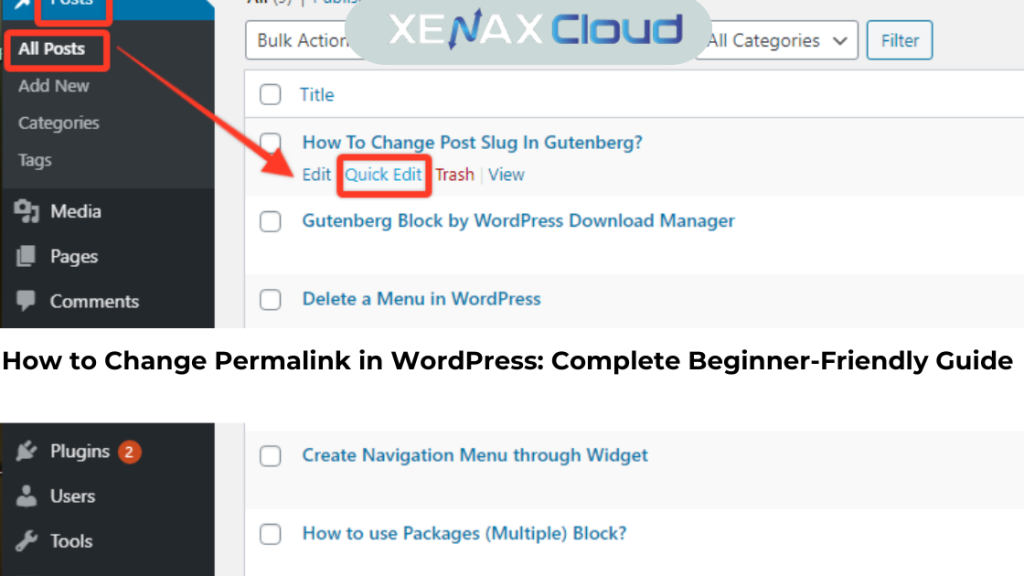
Open the post or page in the WordPress editor. Click on the permalink field near the title and edit the slug. Keep it short, descriptive, and keyword-focused.
This how to change permalink in WordPress tutorial method allows precise control without affecting the rest of your site. Always ensure the new permalink accurately reflects the content to avoid user confusion.
SEO Considerations When Changing Permalinks
Changing URLs can impact SEO if not handled carefully. Search engines treat each URL as a unique page. When you change a permalink, the old URL may return a 404 error unless redirected properly.
Using proper redirects preserves SEO value and prevents traffic loss. Many WordPress plugins help manage redirects easily. Clean permalinks also improve keyword relevance and click-through rates.
This is why a thoughtful how to change permalink in WordPress guide focuses on both usability and search engine behavior.
Speed, Uptime, and Security Advantages for WordPress URLs
Permalink changes themselves do not affect speed directly, but server quality does. Fast servers ensure that updated URLs load quickly across regions.
High uptime ensures search engines can re-index new permalinks without issues. Security measures protect URLs from malicious manipulation and spam.
Indian hosting environments provide a strong balance of speed, uptime, and security, supporting WordPress SEO improvements smoothly.
Real-World Use Cases for Changing WordPress Permalinks
Bloggers often change permalinks to improve readability or include focus keywords. Businesses update URLs during rebranding or content restructuring.
E-commerce stores optimize product URLs for better conversions. Agencies manage client sites where clean permalinks are part of professional SEO delivery.
These use cases show why knowing how to change permalink in WordPress is practical and widely applicable.
Why Indian Servers Handle Global WordPress Traffic Efficiently
WordPress sites serve global audiences. Indian servers connect efficiently to international networks, ensuring stable performance for users worldwide.
Low latency in Asia and reliable routing to Europe and North America support fast page delivery. This matters when search engines crawl updated permalinks.
Efficient handling of global traffic ensures that URL changes are indexed quickly and accurately.
Scalability Options for Growing WordPress Websites
As your site grows, you may add categories, pages, or multilingual content. Flexible hosting makes it easier to manage evolving permalink structures.
Shared hosting can handle moderate growth, while VPS options support advanced scalability. Indian hosting allows seamless upgrades without migration stress.
Scalability ensures that permalink optimization remains manageable as your WordPress site expands.
Comparison: Indian Servers vs Foreign Regions
| Feature | India | USA | Canada | Germany | UAE |
|---|---|---|---|---|---|
| Latency in Asia | Low | High | High | Moderate | Low |
| Global Performance | Competitive | High | High | High | Moderate |
| Uptime Reliability | Stable | Stable | Stable | Stable | Stable |
| Scalability | Flexible | Flexible | Moderate | Flexible | Moderate |
FAQs
What is the difference between Indian VPS and foreign VPS?
Indian VPS offers lower latency in Asia with reliable global performance.
Can Indian servers handle global website traffic?
Yes, they efficiently support international WordPress traffic.
Is Indian hosting cost-effective for international users?
Indian hosting provides strong performance at affordable rates.
How reliable is XenaxCloud hosting?
XenaxCloud delivers stable uptime and professional support.
How to choose the right server for my business?.
Choose based on traffic, growth plans, and control needs.
Conclusion
Learning how to change permalink in WordPress is a foundational skill for improving SEO, usability, and long-term website performance. Clean URLs help users trust your content and help search engines understand it better.
With XenaxCloud’s Indian hosting, you get cost-effective infrastructure, global performance, and easy scalability. Backed by a 15-day money-back guarantee, XenaxCloud makes WordPress management simple and reliable.
If you want a faster, cleaner, and more SEO-friendly WordPress site, choose XenaxCloud today. The latest deals and offers are always available on the XenaxCloud Offers Page:
👉 https://xenaxcloud.com/offers