An Indian VPS server is a virtual private server hosted in a Tier-III data centre in India, providing dedicated vCPU, RAM, and storage resources through hardware virtualization. This setup allows you to run intensive applications with low latency for users across the country, offering much better performance than shared hosting.
This article explains how virtual private servers work, why local hosting benefits your business, and how to choose the right specifications for your workloads. We also provide technical steps for securing your Linux environment and comparing different hosting tiers.
What is an Indian VPS Server and How Does It Work?
An Indian VPS server uses virtualization technology to divide a single physical server into multiple isolated virtual environments, each acting as an independent machine. Every user receives a specific portion of the hardware that cannot be accessed or slowed down by other customers on the same physical host.
Virtualization vs Shared Hosting
Virtualization is the process of using software to create an abstraction layer over computer hardware. In a shared hosting environment, you share the same operating system, memory, and CPU cycles with hundreds of other websites. If one site experiences a massive traffic spike, your site may slow down or crash.
With a KVM VPS, you use Kernel-based Virtual Machine technology to ensure that your resources are strictly reserved. This means if you pay for 8 GB of RAM, that memory is dedicated to your instance alone.
Hardware Resources
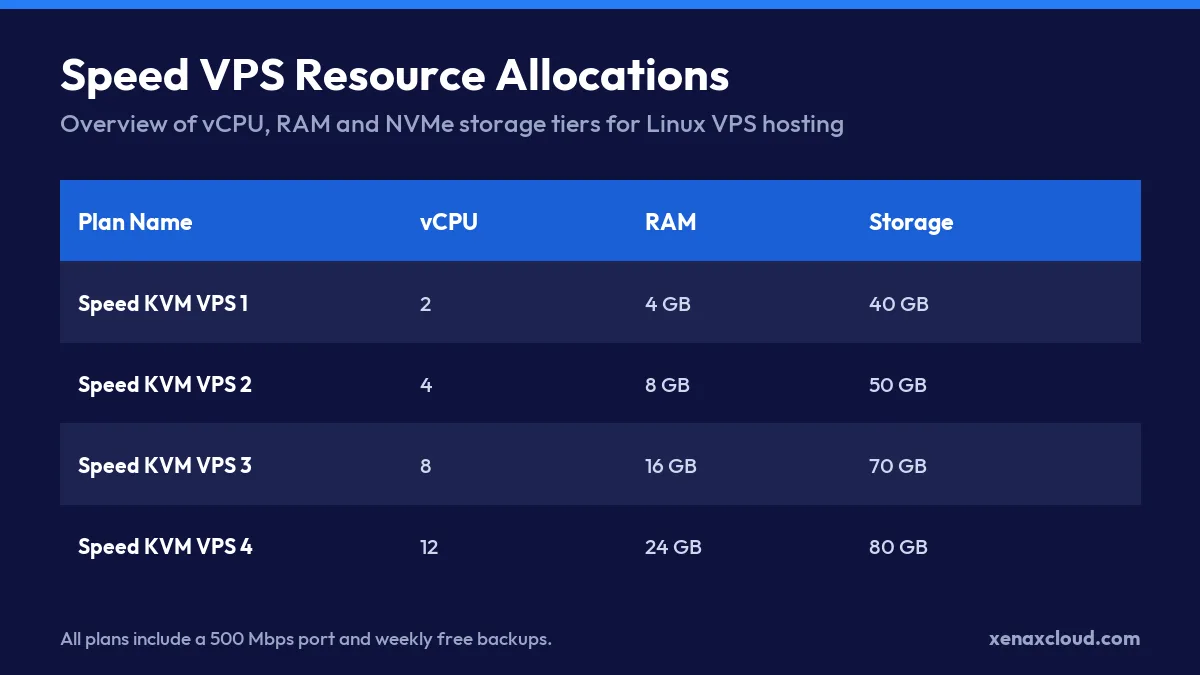
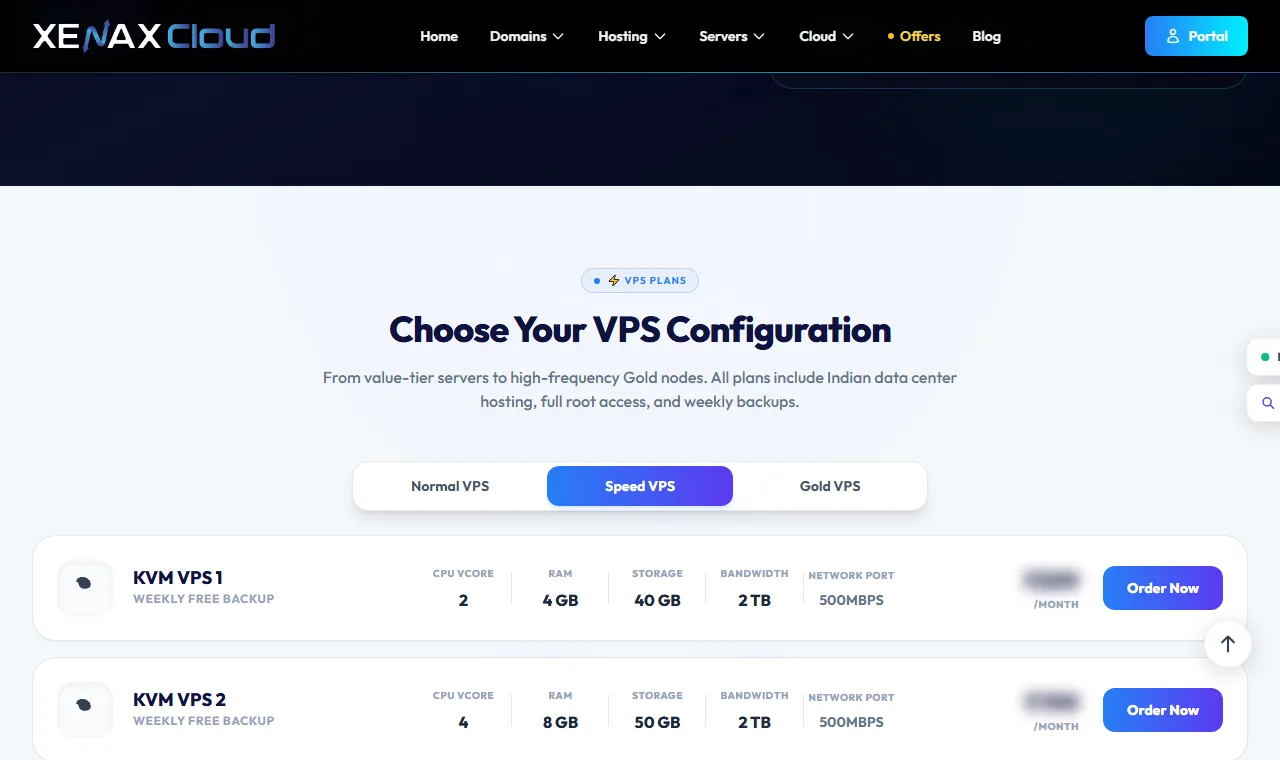
When you deploy a server, you are allocating specific physical components to your virtual instance. To help you decide which tier fits your needs, consider this breakdown of our Speed KVM VPS resources:
| Plan | vCPU | RAM | SSD Storage | Bandwidth |
|---|---|---|---|---|
| Speed KVM VPS 1 | 2 | 4 GB | 40 GB | 2 TB |
| Speed KVM VPS 2 | 4 | 8 GB | 50 GB | 2 TB |
| Speed KVM VPS 3 | 8 | 16 GB | 70 GB | 4 TB |
| Speed KVM VPS 4 | 12 | 24 GB | 80 GB | 6 TB |
For example, imagine a Jaipur handicraft shop running a custom Node.js and MySQL e-commerce backend. During a festival sale, their traffic might jump from 10 to 100 concurrent users. By deploying on Speed KVM VPS 2 with 4 vCPU and 8 GB RAM, the store maintains fast page loads and stable checkout times because the CPU and memory are not being fought over by other users.
Why Choose an Indian VPS Server for Your Business?
Choosing an Indian VPS server allows you to provide a faster experience to local users and ensures your data management complies with national regulations. By hosting your infrastructure within the country, you eliminate the physical distance that causes network lag.
Achieving Ultra-Low Latency
Latency is the time it takes for a data packet to travel from a user’s device to your server and back. When your server is located in a Tier-III data centre in India, users in cities like Delhi, Mumbai, or Bangalore experience much lower ping times compared to using servers in Europe or the US.
This speed is critical for real-time applications. For instance, if a developer in Chennai is testing a web application, they can measure the difference using a simple ping command:
ping xenaxcloud.comAn output showing time=15.4 ms indicates a highly responsive connection, whereas a global server might show time=250.0 ms. For an e-commerce site or a fintech app, those extra milliseconds can directly impact conversion rates and user retention.
Data Privacy and Security
Local hosting is a strategic choice for staying aligned with the Digital Personal Data Protection (DPDP) Act 2023. Keeping sensitive customer information on an Indian VPS server helps businesses manage data residency requirements more effectively.
When selecting the best VPS hosting in India, you should use this checklist to ensure your environment is production-ready:
- Verify the data centre is a Tier-III facility.
- Confirm you have full root access for custom security configurations.
- Check for dedicated resources (vCPU and RAM) to prevent “noisy neighbor” issues.
- Ensure the provider offers weekly backups for disaster recovery.
- Confirm the ability to scale resources as your user base grows.
| Plan | vCPU | RAM | SSD storage | Bandwidth | Price |
|---|---|---|---|---|---|
| Speed KVM VPS 1 | 2 | 4 GB | 40 GB | 2 TB | ₹599/mo |
| Speed KVM VPS 2 | 4 | 8 GB | 50 GB | 2 TB | ₹799/mo |
| Speed KVM VPS 3 | 8 | 16 GB | 70 GB | 4 TB | ₹1,399/mo |
| Speed KVM VPS 4 | 12 | 24 GB | 80 GB | 6 TB | ₹1,799/mo |
| Speed KVM VPS 5 | 16 | 32 GB | 100 GB | 8 TB | ₹2,399/mo |
| Speed KVM VPS 6 | 20 | 40 GB | 120 GB | 10 TB | ₹2,999/mo |
| Speed KVM VPS 7 | 24 | 48 GB | 150 GB | 10 TB | ₹3,499/mo |
| Speed KVM VPS 8 | 32 | 64 GB | 200 GB | 10 TB | ₹4,599/mo |
Every Speed VPS: KVM, full root, 500 Mbps port, weekly backup included, Indian data centre. Monthly, billed in INR. cPanel licence not included.
How Much RAM Does a WordPress or Node.js VPS Need?
The amount of RAM you need depends on the number of concurrent users and the complexity of your application’s stack. A basic WordPress site might run on 2 GB of RAM, but dynamic Node.js applications or high-traffic e-commerce stores typically require at least 4 GB to 8 GB to handle memory-intensive processes.
Resource Planning for E-Commerce
Calculating your resource needs requires looking at your peak traffic rather than your average traffic. Let’s look at the Jaipur handicraft shop example from earlier to see how we calculate the actual memory requirements for a production environment.
If the shop runs a Node.js backend and a MySQL database, we must account for the base memory usage of the Operating System (Ubuntu 24.04) and the application processes:
- Operating System (Ubuntu): ~500 MB
- MySQL Database (Active): ~1 GB to 2 GB (depending on cache settings)
- Node.js Application (per instance): ~256 MB to 512 MB
- Buffer for Traffic Spikes: ~2 GB
For this shop, a total of 4 GB of RAM is the absolute minimum, but 8 GB provides the stability needed during festival sales. Using a Speed KVM VPS 2 ensures that the MySQL buffer pool has enough room to operate without swapping to the disk, which would slow down the entire site.
Scaling CPU and RAM
As your traffic grows, you will need to scale both your vCPU and RAM to maintain performance. You can monitor your current usage in real-time using the free command in your terminal:
free -hThe output will look similar to this:
              total        used        free      shared  buff/cache   available
Mem:           7.7Gi       2.1Gi       4.2Gi       120Mi       1.4Gi       5.1Gi
Swap:          2.0Gi          0B       2.0Gi
In this example, the available column shows 5.1 GiB. If that number drops below 500 MB during high traffic, it is time to upgrade to a higher tier of linux vps india to avoid application crashes.
How to Set Up and Secure Your Linux VPS
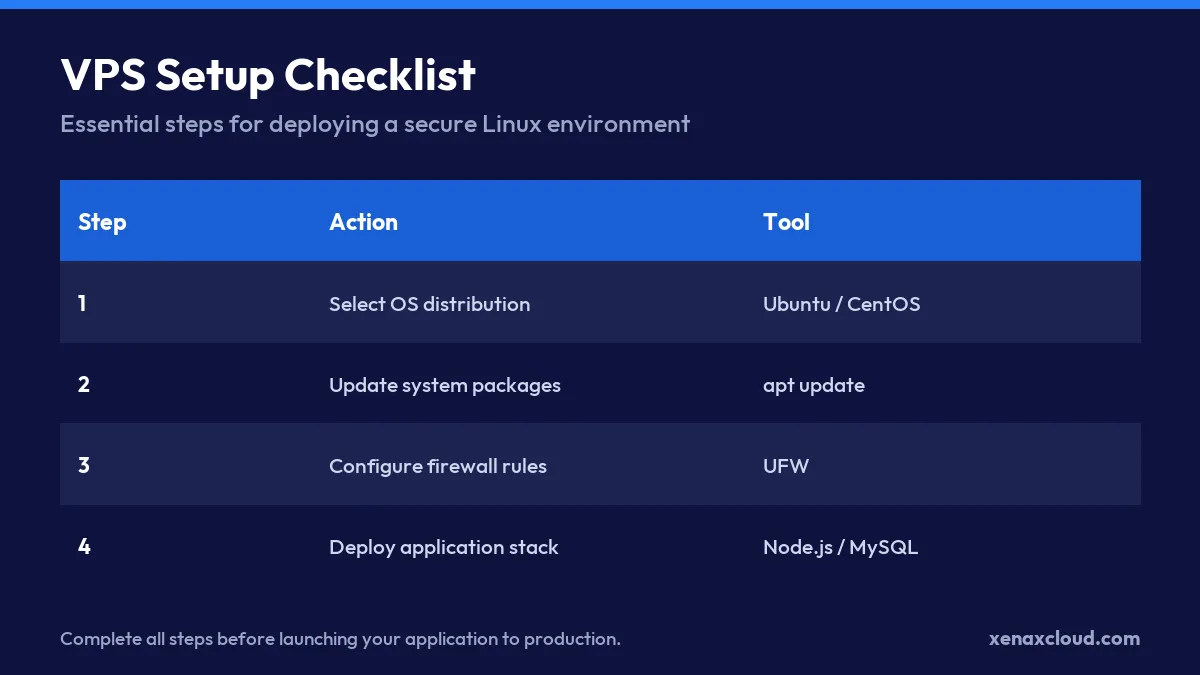
Securing your Linux VPS involves two immediate steps: updating all installed software to patch vulnerabilities and configuring a firewall to restrict network access. Following these steps ensures your server is not exposed to common automated attacks immediately after deployment.
Updating System Packages
The first task after logging into your server via SSH is to ensure the operating system and all installed packages are running the latest security patches. On Ubuntu 24.04, you should run the following command:
sudo apt update && sudo apt upgrade -yThe update command refreshes your local package index, while upgrade actually installs the new versions. After the process finishes, you will see a summary of how many packages were upgraded. If you see “0 upgraded, 0 newly installed,” your server is already current.
Configuring the Firewall
A firewall acts as a gatekeeper for your server. We recommend using UFW (Uncomplicated Firewall) because it is easy to manage and highly effective for most Linux users.
To secure your server, you must allow SSH access before enabling the firewall, otherwise, you will be locked out of your own instance. Follow this sequence:
sudo ufw allow 22/tcp

sudo ufw allow 80/tcp
sudo ufw allow 443/tcp

sudo ufw enable
When you run sudo ufw status, the output should look like this:
Status: active

To                         Action      From
--                         ------      ----
22/tcp                     ALLOW       Anywhere
80/tcp                     ALLOW       Anywhere
443/tcp                    ALLOW       Anywhere
This configuration ensures that only web traffic and your administrative SSH connection can reach your applications. If you are deploying a best vps server in India for a high-traffic site, this setup provides a solid defensive baseline.
Comparing Linux VPS Hosting with Dedicated Servers
Linux VPS hosting provides virtualized resources for efficient application hosting, while dedicated servers offer exclusive access to raw hardware. Choosing between them depends on whether your application needs isolated resource slices or the full power of a bare-metal machine.
When to Upgrade to Dedicated
You should upgrade from a VPS to a dedicated server when your workload consistently consumes more than 80% of your allocated CPU or RAM. If you notice high “iowait” percentages in your system metrics, it often means your virtualized disk access is struggling to keep up with heavy database operations.
A dedicated server is the right choice for:
- High-traffic e-commerce platforms with thousands of concurrent users.
- Large-scale database clusters that require massive NVMe throughput.
- Applications requiring specialized hardware like high-core count EPYC processors.
Cost and Control Trade-offs
The decision involves balancing budget against the need for total hardware isolation. While a VPS is more cost-effective for most startups, a dedicated server eliminates the “noisy neighbor” effect where other users on the same physical host might impact your performance.
| Feature | Linux VPS Hosting | Dedicated Server |
|---|---|---|
| Resource Allocation | Virtualized (Shared Hardware) | Exclusive (Bare-metal) |
| Scalability | Fast (Upgrade RAM/CPU instantly) | Slower (Requires hardware changes) |
| Management | Full Root Access | Full Root + IPMI Access |
| Best Use Case | Small to medium web apps | Enterprise workloads |
For reliable performance and full root control, we recommend deploying a plan from the Xenax Cloud Speed KVM VPS lineup.
| Plan | CPU | Cores / threads | RAM | NVMe storage | Bandwidth | Price |
|---|---|---|---|---|---|---|
| Xeon Starter | Xeon E-2314 | 4C / 4T | 16 GB DDR4 ECC | 480 GB | 10 TB | ₹7,999/mo |
| Xeon Pro | Xeon E-2388G | 8C / 16T | 32 GB DDR4 ECC | 960 GB | 20 TB | ₹11,999/mo |
| EPYC Core | EPYC 7313P | 16C / 32T | 64 GB DDR4 ECC | 1.92 TB | 20 TB | ₹15,999/mo |
| Xeon Gold | Xeon Gold 6226R | 16C / 32T | 64 GB DDR4 ECC | 1.92 TB | 30 TB | ₹18,999/mo |
| EPYC Power | EPYC 7402P | 24C / 48T | 128 GB DDR4 ECC | 3.84 TB | 30 TB | ₹22,999/mo |
| Xeon Ultra | Xeon Gold 6242R | 20C / 40T | 128 GB DDR4 | 3.84 TB | Unlimited | ₹27,999/mo |
| EPYC Ultra | EPYC 7502P | 32C / 64T | 256 GB DDR4 | 7.68 TB | Unlimited | ₹34,999/mo |
| EPYC Titan | EPYC 7742 | 64C / 128T | 512 GB DDR4 | 15.36 TB | Unlimited | ₹59,999/mo |
Every plan: 1 Gbps port, IPMI remote access included, full root, Tier-III data centre in India. Monthly, billed in INR. 10 Gbps ports, dual-socket and custom builds are quoted by the sales team.
Xenax Cloud VPS Hosting India vs the usual alternatives
| Feature | Xenax Cloud | Typical Indian shared host | Global budget host |
|---|---|---|---|
| Starting price | ₹649/mo | ₹199/mo | ₹149/mo (renews ₹499) |
| Storage | DataCenter SSD | 10 GB SSD | 25 GB SSD |
| DDoS protection | 100 Gbps, always on | Basic | Cloudflare only |
| Support | 24×7, in-house engineers | Tickets, business hours | Chat, outsourced |
| Data centre | India (NVMe) | India | Singapore / US |
| Control panel | cPanel / WHM included | cPanel | Custom panel |
Entry-level plans, list prices including GST where shown. Check each provider before buying — prices change.
See VPS Hosting India plansIndian VPS Server: FAQs
What is the best VPS server in India?
The best VPS server depends on your specific workload and resource requirements. For most growing businesses, the Speed KVM VPS lineup provides dedicated resources and full root access within a Tier-III Indian data centre.
How much does an Indian VPS server cost?
Pricing varies based on the amount of vCPU, RAM, and storage you require for your applications. Please see the live price in the plan box below to view our current rates.
Can I get full root access on a Linux VPS?
Yes, every KVM VPS plan from Xenax Cloud includes full root access. This allows you to install custom software, manage security settings, and configure your environment exactly how you need it.
Why is local hosting better for Indian users?
Local hosting reduces latency by placing your server physically closer to your customers in cities like Delhi or Mumbai. This results in faster page load times and a more responsive experience for your Indian user base.
How do I connect to my VPS server?
You can connect to your server using SSH (Secure Shell) from your local terminal or a client like PuTTY. Once you have your IP address and credentials, you can manage your server remotely from anywhere.