Shared hosting with cPanel is a web hosting service that lets you manage website files, databases, email accounts and security settings through a browser-based control panel. It suits small business websites, portfolios, blogs and other sites that do not need a dedicated server. The right plan depends on your website count, storage needs and traffic-related resource usage.
For an Indian business owner, the practical benefit is centralised management without having to administer a Linux server through command-line tools. You can upload files, create mailboxes, install supported applications and manage backups from the hosting account.
The important distinction is that cPanel simplifies website administration, but it does not remove the limits of shared hosting. Several customers use the same physical server, so your plan’s storage and bandwidth limits still matter.
What does shared hosting with cPanel include?
Shared hosting with cPanel combines website hosting with a graphical control panel for common administration tasks. You manage your hosting account in a browser rather than configuring every service directly on the operating system.
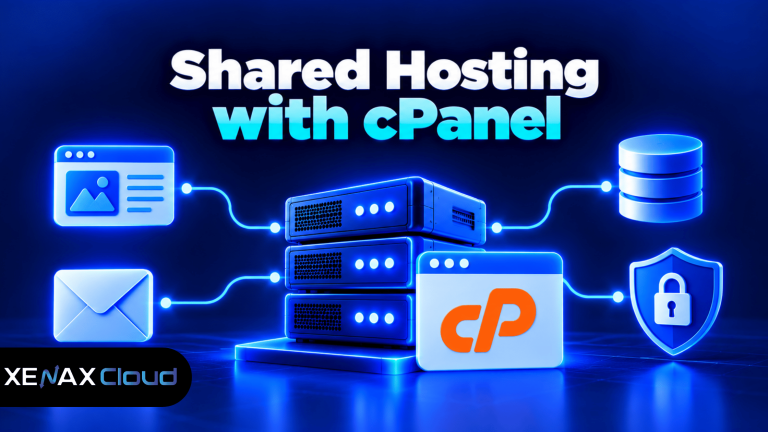
cPanel is a web hosting control panel that provides browser-based tools for managing website files, databases, email and related settings. The hosting server runs the website, while cPanel gives you a more accessible way to configure supported services.
A typical cPanel hosting account may let you manage:
- Files: Upload website content, organise directories and edit supported files using File Manager or FTP access.
- Databases: Create and manage databases required by applications such as WordPress.
- Email: Create mailboxes, manage email settings and configure email clients, within your plan’s limits.
- SSL: Manage supported SSL certificates so visitors can connect to your website over HTTPS.
- Domains: Configure supported domain and subdomain settings for your hosted websites.
- Backups: Access backup tools provided by the host and check whether restore options are available.
Xenax Cloud Shared Hosting includes cPanel, LiteSpeed web server, Let’s Encrypt SSL, DDoS protection and JetBackup 5 backups. The number of websites, disk space, bandwidth and mailboxes depends on the selected plan.
cPanel does not automatically make every application compatible with your hosting account. Before installing a business application, check its PHP, database and other server requirements against the hosting environment.
How do you set up a website using cPanel?
You can prepare a website through cPanel by connecting the domain, uploading the files or installing an application, and testing the result. The exact menu names can vary with the cPanel configuration and enabled features.
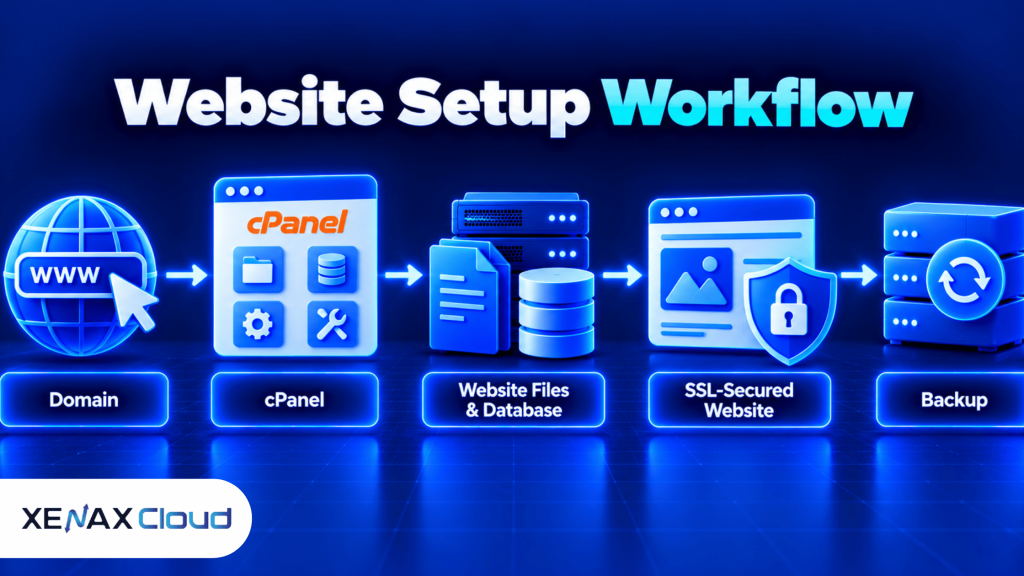
Start by confirming that your domain points to the correct hosting account. If you have just changed nameservers or DNS records, allow time for the changes to propagate before treating a website that does not load as a hosting fault.
Follow these steps for a typical new website:
- Connect your domain to the hosting account using the DNS details supplied by the provider.
- Open cPanel through the hosting account or the provider’s login link.
- Upload your website files through File Manager or a supported FTP client.
- Create a database and database user if your application requires one.
- Install your application using an available installer or its official instructions.
- Enable the available SSL certificate and confirm the site loads over HTTPS.
- Test forms, links, images, email delivery and mobile layouts before sharing the website.
- Check the backup status and confirm how to restore the site if something goes wrong.
For WordPress, the setup process also involves configuring the database and administrator account, then selecting a theme and essential plugins. If WordPress is the main workload, compare the separate WordPress hosting plans with shared cPanel hosting before deciding.
Keep a separate copy of your website files and database before making major changes. A backup feature is useful, but you should verify that a restore is possible rather than assuming that a backup has everything you need.
Which cPanel shared hosting plan fits your website?
The right cPanel shared hosting plan is the one that meets your website, storage, bandwidth and mailbox requirements without paying for capacity you do not need. Xenax Cloud’s Shared Hosting family has four plans with different limits.
| Plan | Websites | Disk space | Bandwidth | Mailboxes |
| Silver | 1 | 5 GB | 50 GB | 3 |
| Gold | 3 | 15 GB | 100 GB | 6 |
| Platinum | 10 | 100 GB | 1,000 GB | 25 |
| Diamond | Unlimited | Unlimited | Unlimited | Unlimited |
All four plans include cPanel, LiteSpeed, Let’s Encrypt SSL, DDoS protection and JetBackup 5 backups. Diamond is the only plan in this family described as having unlimited bandwidth; the other plans have defined bandwidth allocations.
Choose by your actual requirements:
- Silver: One small business website with modest storage needs and a limited number of business mailboxes.
- Gold: A small group of websites, such as a main company site, a separate service site and a campaign site.
- Platinum: Multiple content-heavy websites or a business that needs more storage, bandwidth and mailboxes.
- Diamond: A workload that needs the plan’s unlimited listed website, disk, bandwidth and mailbox allocations, subject to the provider’s applicable terms and server policies.
Storage and bandwidth are different limits. Disk space stores website files, images, email and databases; bandwidth measures the amount of data transferred to visitors. A site can fit within its disk allocation but still exceed its bandwidth allowance if it serves many large images or downloads.
What is Linux hosting with cPanel?
Linux hosting with cPanel is a web hosting service that uses a Linux server operating system and provides cPanel for managing the hosted website. It is a common fit for PHP applications, WordPress and many database-driven websites.
Linux is an operating system that manages the server’s hardware and software resources. cPanel runs as the administration interface on a supported hosting environment; it is not a replacement for the operating system itself.
Before choosing Linux hosting with cPanel, check the application’s requirements. Confirm the required PHP version, database type, extensions and file permissions with the host, especially if you are moving an existing website.
Linux shared hosting is not the same as a Linux VPS. Shared hosting provides a managed hosting account with defined plan limits, while a VPS gives you a virtual server and more administrative control. Xenax Cloud’s VPS family includes KVM-based Linux servers with root access, so it may suit software that needs server-level configuration.
A VPS is usually a better fit when your application needs custom system packages, long-running background services or configuration that shared hosting does not permit. It also requires more server administration, so the extra control comes with extra responsibility.
How much storage and bandwidth does your website need?
Your website needs enough disk space for its files, databases, email and growth, plus sufficient bandwidth for the data delivered to visitors. There is no single storage or bandwidth figure that suits every site.
Estimate storage by checking your current website backup, database size, uploaded media and email usage. Leave room for new pages, images, application updates and backup files that may temporarily occupy space during a migration.
Bandwidth depends on page size and visits. A page containing compressed text and small images transfers less data than a page filled with high-resolution images, large downloadable files or video.
For a rough planning estimate, multiply your average page transfer size by the number of page views you expect, then add traffic from downloads and other assets. This is an estimate rather than a promise of actual usage, since caching, repeat visits and browser behaviour change the amount transferred.
Use these decision rules:
- Choose Silver when one website fits within 5 GB disk space and 50 GB bandwidth, with no more than three mailboxes required.
- Choose Gold when you need up to three websites, 15 GB disk space and 100 GB bandwidth.
- Consider Platinum when you need up to ten websites, 100 GB disk space or 1,000 GB bandwidth.
- Consider Diamond if your requirements exceed the listed limits of the other Shared Hosting plans and the plan’s terms fit your use.
If traffic rises suddenly, investigate the cause before upgrading. A search engine crawl, a popular post, a hotlinked image or a misconfigured application can increase transfer usage without representing a permanent increase in demand.
Worked example: which plan fits a small Indian business?
A small Indian business with two websites, several staff mailboxes and a modest product catalogue may fit Gold if its storage and bandwidth remain within the plan limits. The website count alone rules out Silver because Silver supports only one website.
For example, consider a Jaipur-based design business with a main company website and a separate portfolio website. Suppose its files, databases and email-related storage fit within 15 GB, expected transfer remains below 100 GB, and the team needs six mailboxes. Gold matches those stated requirements.
The next smaller plan, Silver, would not fit because it supports only one website, even if the two websites together used very little storage. If the business later needs more than 15 GB of disk space, more than 100 GB of bandwidth, or a fourth website, it should reassess Platinum rather than assuming Gold will stretch beyond its published limits.
For a business with several websites, compare the plan’s site count alongside its storage and bandwidth. Do not select a plan based only on how many websites you can host, because a media-heavy site may use more storage and transfer than several simple brochure sites.
Xenax Cloud lists these specifications on its Shared Hosting page. Check the current plan details there before ordering, particularly if you are migrating a site that already has significant email or media storage.
Is cPanel shared hosting secure enough for a business website?
cPanel shared hosting can support a business website when the application is maintained, access is protected and backups are checked. Security still depends on the host’s controls and your own website configuration.
SSL encrypts data sent between the visitor’s browser and the website, helping protect information in transit. It does not make a vulnerable plugin safe or guarantee that a website cannot be compromised.
Use these basic precautions:
- Use unique passwords for cPanel, email and website administrator accounts.
- Keep WordPress, themes, plugins and other applications updated.
- Remove unused accounts, extensions and old website copies.
- Use HTTPS and check that important pages do not load mixed content.
- Review file permissions and avoid making files writable by everyone.
- Verify backup availability before updating applications or changing files.
Xenax Cloud includes DDoS protection and JetBackup 5 backups with its Shared Hosting plans. These features help address specific risks, but they do not remove the need to maintain the website or confirm that a restore works.
For a neutral reference, the WordPress security guidance explains practical measures for protecting a WordPress installation. Apply the relevant steps to your own setup and check with your host before changing server-level settings.
When should you move beyond shared hosting?
You should consider VPS hosting when your application needs server-level control, custom software or resources beyond what your shared hosting account can provide. A larger shared plan may be enough when the main issue is simply more websites, storage, bandwidth or mailboxes.
Shared hosting is usually suitable for brochure websites, small blogs, portfolios and standard business sites. VPS hosting is more appropriate for applications that require root access, custom services, specialised runtime settings or closer control over the server environment.
Consider moving beyond shared hosting if:
- Your application needs root access or system packages that the shared environment does not allow.
- Background jobs or long-running processes are not supported by your hosting account.
- Your resource use repeatedly reaches plan limits despite reasonable optimisation.
- You need to isolate an application in its own virtual server environment.
A VPS also means you may need to manage operating system updates, firewall settings, application services and monitoring. If you do not have someone able to handle those tasks, managed shared hosting may remain the more practical choice.
Shared hosting with cPanel: FAQs
Is shared hosting with cPanel suitable for WordPress?
Yes, shared hosting with cPanel can run WordPress when the hosting environment meets the software’s requirements. Check the supported PHP version, database configuration, storage and bandwidth limits before installing it. If WordPress is your main workload, compare Xenax Cloud’s dedicated WordPress Hosting plans with Shared Hosting.
How many websites can I host with cPanel shared hosting?
The number depends on the plan: Silver supports one website, Gold supports three, Platinum supports ten and Diamond lists unlimited websites. Check storage and bandwidth as well as the site count, because several large websites may outgrow a plan’s other limits before reaching its website limit.
Is Linux hosting with cPanel different from a VPS?
Yes, Linux hosting with cPanel usually gives you a managed hosting account, while a VPS provides a virtual server with greater administrative control. Shared hosting is simpler for standard websites, whereas a VPS is better suited to custom server software or applications that require root access and additional configuration.
Does cPanel hosting include email accounts?
Yes, Xenax Cloud Shared Hosting includes mailboxes according to the selected plan. Silver includes three, Gold six and Platinum 25, while Diamond lists unlimited mailboxes. Before moving business email, record existing mailbox addresses and settings, and make a separate backup of important messages.
Can I migrate an existing website to cPanel hosting?
Yes, an existing website can be migrated if its application and dependencies are compatible with the new hosting environment. Back up the website files and database first, check email and DNS requirements, test the migrated site before changing DNS, and retain the old copy until the new site works correctly.
Is cPanel shared hosting enough for a growing business?
It can be enough while the website fits the plan’s site, storage and bandwidth limits and does not need server-level control. Review actual usage as the business grows. If you need custom services, root access or resources beyond shared hosting, compare a suitable VPS instead.
For a single small website, compare Silver’s site, disk, bandwidth and mailbox limits with your actual needs. If you manage multiple sites, choose Gold or Platinum based on their published capacity; consider Diamond only when its listed unlimited allocations fit your requirements and the applicable terms.