If your local machine is becoming the bottleneck for builds, testing, staging, or hosting development projects, an India VPS for developers India can give you a separate Linux environment with dedicated virtual CPU and RAM resources. Xenax Cloud’s VPS hardware is located at its single data centre in Banda, Uttar Pradesh, India, so this option suits developers who want their server infrastructure in India, but it is not intended for projects that specifically require hardware in another country.
For a developer, the useful question isn’t simply whether a VPS is available. You need to match CPU, RAM, storage and operating system to what you’re actually running, such as a Node.js application, Python API, database, Docker containers, staging website or CI workload.
What makes a VPS useful for development work?
A VPS gives you an isolated virtual server where you control the operating system, installed packages, services and application configuration.
Unlike shared hosting, where the hosting environment is largely preconfigured, a VPS lets you install development tools and configure services at the system level. This makes it suitable for staging environments, APIs, background workers, databases and applications that need more control than cPanel hosting provides.
For example, a developer can install Git, Nginx, Node.js, Python, Docker and a database on the same Linux server. Docker containers can also keep application components isolated from each other; Docker describes containers as isolated processes that package an application with what it needs to run.
The trade-off is administration. You are responsible for operating-system updates, SSH access, application configuration, firewall rules, backups beyond the included service, and the security of software you install.
Developer VPS: which resources actually matter?
A developer VPS should be sized according to the workload running simultaneously, with RAM becoming particularly important once you combine an application, database and development services.
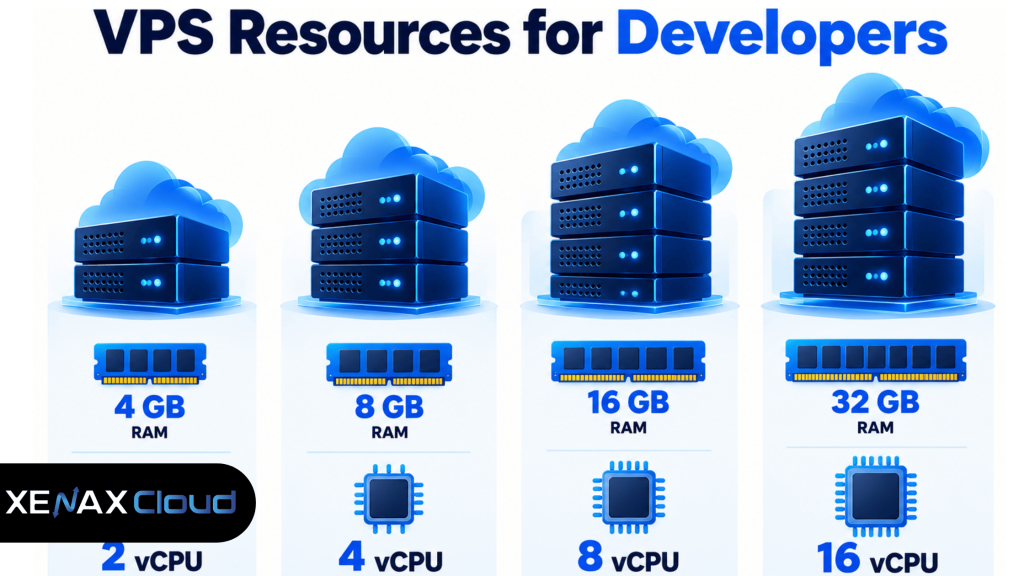
| Development workload | Practical starting configuration | Xenax VPS option |
| Small API, static site or test server | 2 vCPU, 4 GB RAM | Speed VPS from ₹599/month |
| API + database + background services | 4 vCPU, 8 GB RAM | Speed VPS ₹799/month |
| Docker-based staging environment | 8 vCPU, 16 GB RAM | Speed VPS ₹1,399/month |
| Multiple services and heavier builds | 12 vCPU, 24 GB RAM | Speed VPS ₹1,799/month |
| Larger development environment | 16 vCPU, 32 GB RAM | Speed VPS ₹2,399/month |
These are configuration examples rather than performance guarantees. Your application, database size, build process and number of simultaneous services determine the actual requirement.
The Speed VPS range uses KVM virtualisation, a 500 Mbps port, weekly free backup and one IPv4 address. The listed configurations run from 2 vCPU and 4 GB RAM through 32 vCPU and 64 GB RAM.
For developers who need a different balance of CPU and RAM, the Normal VPS starts at ₹649 with 2 vCPU and 8 GB RAM. Gold VPS starts at ₹749 with 2 vCPU and 4 GB RAM using high-frequency Xeon Gold processors.
VPS for hosting projects: development, staging or production?
A VPS for hosting projects is most useful when your project needs server-level control and you want development, testing or application services to run independently of your personal computer.
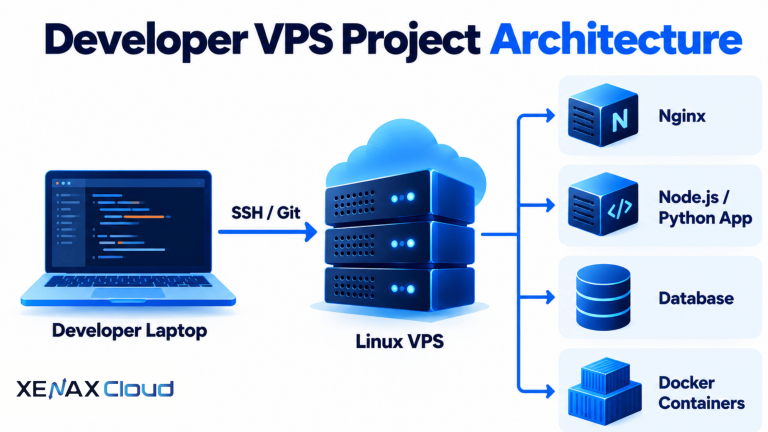
A typical project might look like this:
Developer laptop
|
| SSH / Git
v
Linux VPS
|
+– Nginx
|
+– Node.js / Python application
|
+– PostgreSQL / MySQL
|
+– Docker containers
|
+– Background worker
For a Node.js project, for example, the VPS can hold the application code, runtime, reverse proxy and supporting services. Node.js publishes its own installation and release information through nodejs.org, including LTS releases for production-oriented use.
Docker becomes useful when a project has several components. Docker’s documentation describes Compose as a way to define and run multi-container applications from a YAML configuration, which can make development and testing environments easier to reproduce.
A VPS is not automatically the right choice for every project. If you only need to host a simple WordPress website and don’t need root-level control, managed WordPress hosting can remove much of the server administration.
For a developer who needs Linux server access, application runtimes and custom services, VPS hosting is the relevant Xenax product.
What can you run on an India VPS for developers India?
An India VPS for developers India can host development and deployment workloads such as APIs, staging sites, Docker services, web applications, test databases and background processes.
The important distinction is between hosting a project and developing entirely on the server. You can keep your source code locally and use Git and SSH to deploy it to the VPS, or use the remote server as a development environment when your workflow requires it.
A simple Linux setup might begin with:
sudo apt update
sudo apt upgrade
sudo apt install git nginx
You can then install the runtime required by your application and configure Nginx as a reverse proxy. If your project uses containers, Docker can provide separate environments for the application and its supporting services.
Before opening an application to the public internet, configure a firewall and only expose the ports your application actually needs. Keep SSH access restricted and use SSH keys where appropriate rather than relying on a password-only workflow.
How much does a developer VPS cost in India?
A developer VPS starts at ₹599 per month on the listed Speed VPS range, while larger configurations cost more according to their CPU and RAM allocation.
The current Speed VPS prices include:
- 2 vCPU, 4 GB RAM, 40 GB SSD: ₹599/month
- 4 vCPU, 8 GB RAM: ₹799/month
- 8 vCPU, 16 GB RAM: ₹1,399/month
- 12 vCPU, 24 GB RAM: ₹1,799/month
- 16 vCPU, 32 GB RAM: ₹2,399/month
- 20 vCPU, 40 GB RAM: ₹2,999/month
- 24 vCPU, 48 GB RAM: ₹3,499/month
- 32 vCPU, 64 GB RAM: ₹4,599/month
The pricing makes the resource decision fairly concrete. If your project needs only a small API and test environment, paying for 16 GB RAM may add capacity you don’t use. If you are running several containers and a database together, starting with only 4 GB may leave little room for the operating system and application services.
Every plan has a 15-day money-back window, so the first term gives you a defined period in which to evaluate whether the selected configuration fits your project.
When should you use a VPS instead of shared hosting?
A VPS makes more sense than shared hosting when your project requires root-level server control, custom software or services that aren’t available in a standard hosting environment.
Shared cPanel hosting is simpler for websites where the main requirement is managing domains, files, databases, email and common web applications. It starts at ₹149 per month, so a small website doesn’t necessarily justify moving to a VPS.
A developer should consider a VPS when the project needs things such as:
- Custom system packages or runtimes.
- Docker containers.
- Long-running background processes.
- Custom Nginx or application-server configuration.
- Root or SSH-based server administration.
- A dedicated development or staging environment.
If your project is simply a WordPress website, WordPress hosting may involve less server administration than maintaining your own VPS.
What changes when your users are outside India?
The server location affects network latency, so an India-hosted VPS is most appropriate when your development team, application users or dependent services can work with an India-based server location.
Xenax Cloud’s only data centre is in Banda, Uttar Pradesh. As a physics-based expectation rather than a Xenax benchmark, round-trip latency from India can be roughly 50–80 ms to Singapore, 120–160 ms to Europe and 200–250 ms to the US East Coast.
That matters for interactive applications and developer workflows that make frequent network requests. It matters less for workloads where the server performs most processing locally and communication is occasional.
If your project contract specifically requires compute hardware in Europe, the US or another country, this VPS does not meet that location requirement because the hardware is in India.
FAQs
Is an India VPS suitable for a Node.js project?
Yes. A Linux VPS can provide the operating-system access needed to install Node.js, Nginx, Git, databases and supporting services. The appropriate configuration depends on the application’s runtime, database, build process and expected concurrent workload.
Can I use a VPS for both staging and production?
You can, but separating staging and production is generally easier to manage as projects become more important. For a small project, one VPS can host both environments if resources and configuration are carefully separated.
Is 4 GB RAM enough for a developer VPS?
Four GB can work for a small application, test server or lightweight development environment. If you combine a database, application server, Docker containers and build processes, 8 GB or more gives you additional memory headroom.
Can Docker run on a developer VPS?
Yes. Docker can run containers on a VPS, allowing application components and their dependencies to be packaged into isolated environments. Docker also provides Compose for defining multi-container application environments.
What should I check before ordering a VPS?
Check the required operating system, CPU, RAM, storage, application dependencies, database workload and server location first. Then compare those requirements with the VPS configuration rather than selecting a plan only from its monthly price.
If your project needs Linux server control, start with the smallest VPS configuration that gives your application enough CPU and RAM headroom, then increase resources as the workload grows; the listed VPS plans provide several upgrade points and include a 15-day money-back window.