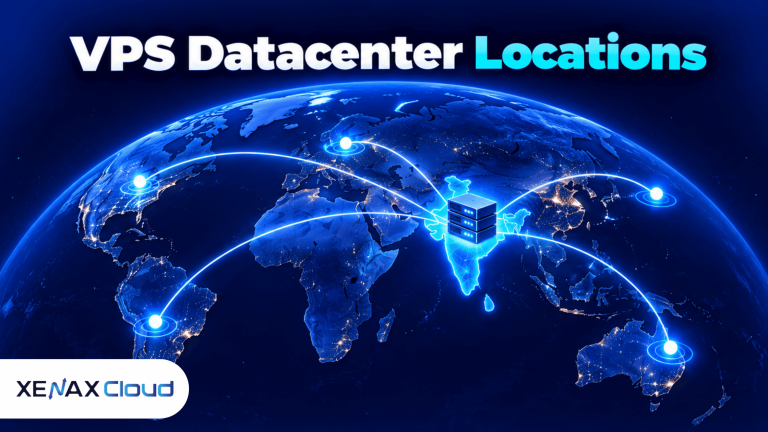
VPS datacenter locations determine where a virtual private server physically runs and how network traffic reaches it. Choosing a location close to your main users can reduce network latency, while data residency rules may require information to remain in a particular country. The right region depends on your audience, application, compliance needs and connectivity requirements.
A server location is not just a setting in a hosting dashboard. It identifies the physical facility that houses the underlying hardware, even when virtualisation lets a provider create many independent servers on that hardware.
For Indian businesses, the decision may involve hosting an application near customers in India, keeping business data within a required jurisdiction or serving users across several countries. Understanding the trade-offs helps you select a VPS region without paying for a location that does not serve your needs.
What Are VPS Datacenter Locations?
VPS datacenter locations are the physical regions where the servers hosting virtual private servers operate. A virtual private server, or VPS, is a virtual machine that runs its own operating system and allocated computing resources on a physical host.
A provider may offer servers in one country, several cities or multiple countries. The actual choice depends on its infrastructure, not simply the countries listed in a marketing page or the locations of its customers.
A datacenter contains the physical equipment and supporting systems required to operate servers. These include computing hardware, network connections, power systems, cooling equipment and physical security controls. A virtual server inherits the physical location of its host facility.
When comparing vps datacenter locations, check the physical server facility rather than relying only on a provider’s website or IP address. The actual VPS server location affects network routes, data residency decisions and the distance between your application and its users.
Three concepts help distinguish what a location affects:
- Physical location: The facility where the server hardware operates.
- Network latency: The time data takes to travel between a client and a server, usually measured in milliseconds.
- Data residency: The country or jurisdiction where data is stored or processed.
These concepts are connected, but they are not interchangeable. A server can be physically located in India while serving users abroad, and an application can send data to external services in other countries even when its primary server is local.
How Does VPS Server Location Affect Latency?
VPS server location affects latency because network traffic must travel through physical links between the user, the server and any other services the application depends on. A shorter network route often helps, although routing and congestion also influence the result.
Latency matters for interactive applications such as remote desktops, APIs, online stores, collaboration tools and database-driven websites. A delay that seems small during a simple page load can become noticeable when an application makes many sequential requests.
For example, an application hosted in India may be a sensible choice for customers mainly in Indian cities. If most users are in another region, hosting closer to those users may reduce the network distance for their requests.
The physical distance is only part of the explanation. Internet traffic does not always follow a direct geographical route, and packets may cross several networks before reaching the destination. Network peering, routing policy, congestion, the user’s internet provider and the destination application’s own response time all matter.
Comparing vps datacenter locations from your users’ actual networks gives you a more useful picture than choosing a region based on geographical distance alone. Test multiple connections before deciding which server location suits your application.
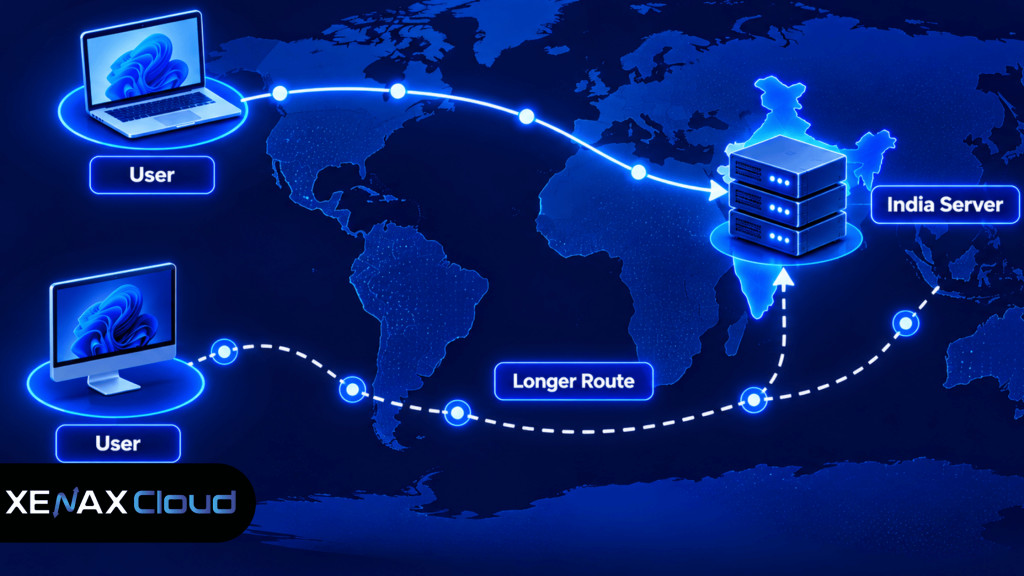
You can assess the route from a client machine using standard network tools. The results are specific to the testing connection and time, so one test should not be treated as a universal performance guarantee.
ping your-server-ip
traceroute your-server-ip
On Windows, use tracert your-server-ip instead of traceroute. Some networks block or deprioritise these probes, so missing replies do not automatically mean the server is unavailable.
Which VPS Datacenter Location Should You Choose?
The right VPS datacenter location is the region that best matches your main users, data requirements and application dependencies. Start with the location of your audience, then check legal obligations and network performance.
| Main requirement | Location to prioritise | What to verify |
| Indian customers and staff | India | Latency from key cities and ISP networks |
| Customers concentrated in one overseas region | A suitable nearby region | Actual route quality and provider availability |
| Data must remain in a specific jurisdiction | A compliant location in that jurisdiction | Storage, backups, logs and third-party processing |
| Users spread across several continents | A region aligned with the main workload, with caching or edge services as needed | Latency from each major audience |
| Application depends on an external database or API | A region with suitable connectivity to that dependency | Round-trip latency between services |
A server in the same country as your customers is often a practical starting point, but country-level proximity alone cannot guarantee the shortest route. Test from representative networks and measure the complete application, not just the server’s response to a ping.
You should also account for the services your software uses. If your VPS communicates frequently with a database, payment gateway, storage service or external API hosted elsewhere, the distance between those systems can affect total response time.
For a business that serves Indian customers and needs an Indian-hosted server, an Indian VPS data center may provide a straightforward starting point. For an international audience, compare the provider’s real available regions rather than assuming every provider has facilities in every country.
The best vps datacenter locations for your business depend on where your customers connect from, which external services your application uses and whether data must remain in a particular jurisdiction.
What Should You Check Before Choosing a VPS Region?
Before selecting a VPS region, check the provider’s actual facility location, network route, data-handling arrangements and server specifications. A country name alone is not enough to assess whether a plan fits your workload.
Use the following checks before ordering:
- Identify the cities and countries where most users are located.
- Confirm the physical datacenter location with the hosting provider.
- Check whether data residency rules apply to your workload.
- Measure latency from representative client networks when possible.
- Review CPU, RAM, storage, bandwidth and operating-system requirements.
- Map dependencies such as databases, APIs, backups and object storage.
- Plan monitoring, updates and backups before moving production data.
A VPS’s location does not replace the need to size the server properly. A nearby server with insufficient memory or a slow database can perform worse than a well-configured application hosted farther away.
Check the provider’s backup policy and recovery process as well. Before migrating an existing site or application, create an independent backup and verify that it can be restored. A backup stored only on the same server may be lost if that server or its storage becomes unavailable.
What Does an Indian VPS Data Center Mean for Your Business?
An Indian VPS data center means the physical server facility is located in India, which can be useful for workloads serving Indian users or subject to relevant Indian data-handling requirements. It does not automatically guarantee compliance with every law or contract.
The phrase “Indian VPS data center” describes physical infrastructure, not the nationality of a hosting company or the country from which support staff work. Ask the provider where the server hardware is housed and where backups and other copies of your data are stored.
Xenax Cloud operates one Tier-III data centre in Banda, Uttar Pradesh, India. It does not operate server facilities in the United States, Singapore, Europe or other countries. Businesses considering Xenax Cloud should evaluate the Indian facility against their audience location, application dependencies and data requirements.
Xenax Cloud VPS hosting uses KVM virtualisation, Linux, full root access, one IPv4 address and a 500 Mbps network port, with weekly backups included. The available VPS families have different CPU and memory configurations, so location should be considered alongside resource requirements.
For a technical comparison, start with the Xenax Cloud VPS hosting plans and confirm that the required operating system, resources and network arrangement fit your application. Do not assume that an Indian server alone meets a regulatory requirement; check the specific rule, contract or policy that applies to your organisation.
VPS Datacenter Locations: What Is the Decision Rule?
Choose a VPS location based on the dominant workload and its constraints, rather than selecting a region solely because it sounds close or familiar. A simple decision rule helps narrow the options before you compare plans.
- Choose an Indian region if most users are in India and the application’s data-handling requirements permit hosting there.
- Choose a region near your main overseas audience if that audience generates most requests and the provider has a suitable facility.
- Prioritise jurisdiction over distance when a contract or applicable rule requires data to be stored or processed in a particular country.
- Evaluate service-to-service latency if the VPS depends heavily on a remote database, API or storage system.
- Consider caching or a content delivery network if users are geographically distributed and much of the content can be served from edge locations.
- Review application capacity separately if CPU, RAM, storage or database performance is the real bottleneck.
The recommended location is not the right choice if a binding data-residency obligation requires another jurisdiction or if the application’s critical dependency is too far away. In that case, select a compliant location or redesign the architecture so the relevant services communicate efficiently.
Worked Example: An Indian Business Choosing a VPS Region
Consider a Jaipur-based software company that runs an internal business application for 25 employees in India. Its application and database are used throughout the workday, and the team needs administrator access to configure Linux services and monitor resource usage.
An Indian VPS region is a reasonable first candidate because the users are in India and the workload is primarily domestic. The company should still test connectivity from its office and remote employees, especially if they use different internet providers.
For capacity, the company should estimate concurrent users, application processes, database memory use, file storage and background jobs. Xenax Cloud offers Speed VPS configurations from 2 vCPU, 4 GB RAM and 40 GB storage up to 32 vCPU, 64 GB RAM and 200 GB storage. General VPS offers more RAM per vCPU, while Gold VPS uses high-frequency Xeon Gold processors.
For this example, a Speed VPS with 4 vCPU and 8 GB RAM is a plausible starting point only if the application’s measured or documented resource needs fit that configuration. A smaller 2-vCPU, 4-GB configuration may not leave enough headroom if the application and database both consume significant memory while background jobs run. These are sizing considerations, not performance guarantees.
The company should measure actual RAM use, CPU load, disk capacity and response time during normal and busy periods before finalising the plan. If memory pressure or sustained CPU saturation appears, it should investigate the cause and resize based on the bottleneck instead of assuming a different location will fix it.
How Can You Verify the Server Location and Network Route?
You can verify a server’s network path with diagnostic tools, but those tools do not always prove the physical location of the hardware. Confirm the facility address or region with the provider and use network diagnostics as supporting evidence.
A practical verification process includes checking the provider’s documentation, reviewing the IP address’s registered information and testing the route from your actual users’ networks. IP geolocation databases can be inaccurate, and an IP address may be registered in a different place from the physical server.
To verify vps datacenter locations, compare the provider’s stated facility with network diagnostic results and IP registration records. Treat these checks as supporting evidence, because an IP address alone cannot conclusively establish the physical location of server hardware.
Useful checks include:
- Ask the provider to confirm the physical facility and where backups are held.
- Review the IP address’s registration and routing information, while treating geolocation results as estimates.
- Run ping and traceroute or tracert from representative client connections.
- Measure application response times as well as network latency.
- Repeat tests at different times and from different networks.
- Record a baseline before migration so that post-migration results can be compared fairly.
For network terminology and address registration, consult the Internet Assigned Numbers Authority (IANA). IP registration data can help identify network allocations, but it is not a substitute for confirmation from the hosting provider about the physical datacenter.
VPS Datacenter Locations: FAQs
Does VPS datacenter location affect website speed?
Yes, VPS datacenter location can affect website speed because it influences the network distance between users and the server. However, page speed also depends on application code, caching, database queries, server resources and third-party services. Test the complete website from the networks your visitors actually use.
Is an Indian VPS data center suitable for international users?
Yes, an Indian VPS data center can serve international users, but the network route may add latency for visitors far from India. Suitability depends on how interactive the application is, where most requests originate and whether caching or a content delivery network can serve static content closer to overseas users.
How do I check my VPS server location in India?
Ask the hosting provider to confirm the physical facility, then compare that information with IP registration records and network-route tests. IP geolocation tools provide estimates rather than definitive proof of hardware location. If data residency matters for compliance, obtain written confirmation of where primary data and backups are stored or processed.
Can I change my VPS datacenter location later?
Sometimes, but changing VPS location usually requires a migration to a server in the target region. The process may involve transferring files, databases, configuration, IP-dependent settings and backups. Confirm that the provider offers the destination region and test the migrated application before switching production traffic.
Is a nearby VPS location always better?
No, a nearby VPS location is not always better because routing quality, network congestion, server capacity and application dependencies also affect response time. Compare real latency and application performance from representative networks. A slightly more distant server with better connectivity may outperform a closer server with a poor route.
Does a VPS location determine where all my data is stored?
No, the VPS location does not necessarily determine where every copy of your data is stored. External backups, monitoring tools, email services, databases and third-party APIs may process or store information in other jurisdictions. Review each service’s data-handling arrangements when residency or contractual obligations apply.
Which Xenax Cloud VPS family should I choose for an Indian workload?
Choose a Xenax Cloud VPS family based on CPU, memory and storage requirements after confirming that the Indian facility suits your workload. Speed VPS offers NVMe storage, General VPS provides more RAM per vCPU, and Gold VPS uses high-frequency Xeon Gold processors. Check resource utilisation before selecting a size.
If your users and application are primarily in India, start by evaluating a Xenax Cloud VPS hosted in its Banda, Uttar Pradesh facility. Select Speed VPS for workloads suited to its NVMe configurations, General VPS when memory per vCPU matters, or Gold VPS when CPU frequency is a priority; then verify resource needs, data-handling obligations and connectivity before ordering.