A VPS for chatbot hosting is a virtual private server that runs the application code, API connections, conversation logic and supporting services behind a chatbot. It can host a website chatbot, customer-support assistant, internal knowledge bot or messaging integration. The right setup depends on whether the AI model runs on the server or through an external API.
A chatbot does not always need a large server. If an external AI provider generates the responses, your VPS may mainly handle incoming messages, authentication, business rules, conversation history and retrieval from your own documents. Running an AI model locally requires a different assessment of memory, processing capacity and, in some cases, GPU resources.
This distinction matters before choosing a plan. A server sized for a lightweight API chatbot may struggle with local model inference or a large number of simultaneous conversations.
What Does a VPS for Chatbot Hosting Actually Run?
A chatbot VPS runs the software that receives user messages, processes requests and returns responses to the application or messaging platform. It can also store conversation state, connect to databases and retrieve relevant information from documents.
A VPS is a virtual private server that provides an allocated set of computing resources within a physical server. Xenax Cloud’s VPS offerings use KVM virtualisation, Linux, a 500 Mbps network port, one IPv4 address, full root access and weekly backups.
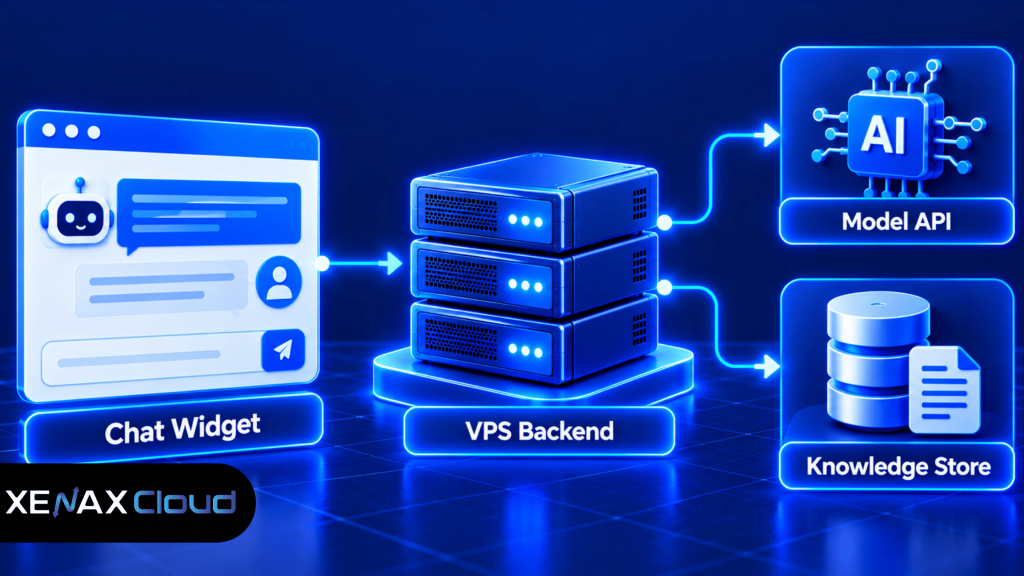
A typical chatbot deployment may contain these components:
- Application backend: Receives messages and applies business rules. Python frameworks such as FastAPI or Flask and JavaScript frameworks such as Express can serve this role.
- Model connection: Sends prompts to an external large language model API or passes requests to a model running locally.
- Conversation storage: Stores session identifiers, preferences and other required application data in a database.
- Knowledge retrieval: Searches approved documents or database records to supply relevant context to the model.
- Web interface or webhook: Connects a website chat widget or messaging service to the backend.
You do not need every component on the same VPS. For example, a small deployment can run the backend and a lightweight database together, while a larger service may use a managed database and separate worker processes.
Choose the server around the work it performs rather than the label “AI chatbot”. The amount of processing needed to connect to an external model is very different from the amount needed to generate answers locally.
Which Chatbot Hosting Architecture Should You Choose?
The best architecture depends on where response generation happens and how much data your chatbot must process. Decide this before estimating CPU, RAM or storage.
A chatbot using an external model API sends requests to another provider’s model service. A locally hosted model performs inference on your own server, meaning the server itself calculates the generated response. A retrieval-augmented generation (RAG) chatbot searches a knowledge source and supplies relevant material to a model before it answers.
| Chatbot architecture | Main VPS workload | Main resource concern | Suitable starting approach |
| External model API | Requests, business logic and sessions | CPU, RAM and network handling | Small Linux VPS |
| Website FAQ bot | Search, rules and response formatting | Application memory and database size | Small Linux VPS |
| RAG chatbot | Document processing and retrieval | RAM, storage and indexing workload | VPS sized for the retrieval stack |
| Local language model | Model inference and application services | Model memory, compute and possible GPU needs | Assess model requirements first |
The table is a starting point, not a guarantee of capacity. Frameworks, dependencies, document volume, model size and concurrency can change resource needs significantly.
How Much RAM and CPU Does a Chatbot VPS Need?
A chatbot VPS needs enough RAM to keep its application, runtime, database and supporting processes working without excessive swapping. CPU requirements depend on how much processing occurs locally and how many requests arrive at the same time.
For an API-based chatbot, the backend may use modest resources when idle but need more capacity during concurrent requests, document searches or background jobs. A locally hosted language model can require substantially more memory and compute than the API connector itself.
Use these distinctions when estimating requirements:
- 2 vCPU and 4 GB RAM: A possible starting configuration for a lightweight API-connected chatbot with limited supporting services. Test it against your actual dependencies and expected traffic.
- 4 vCPU and 8 GB RAM: Consider this when the application has several processes, more active sessions, a larger retrieval component or additional background work. It is not a universal minimum.
- More RAM or CPU: Consider a larger configuration when measured memory use stays high, CPU queues build up, or document processing competes with user requests.
- Local model inference: Check the chosen model’s memory requirements and runtime documentation before buying. A standard CPU VPS should not be assumed to support every model efficiently.
These are planning examples, not measured Xenax Cloud chatbot benchmarks. They are intended to help you shortlist a configuration for testing.
Storage also needs a clear estimate. Count the operating system, application dependencies, logs, database files, uploaded documents and backups. Keep operational headroom instead of allocating the entire disk to chatbot data.
Monitor memory use, CPU utilisation, request latency, error rates and database growth after deployment. If RAM fills during ordinary use, investigate memory leaks, oversized workers or caching before immediately upgrading the server.
How to Host a Chatbot on a Server Step by Step
To host a chatbot on a server, prepare a Linux VPS, deploy the backend, configure its connections, secure public access and test the complete message flow before launch.
- Select a Linux VPS with enough memory, CPU and storage for the planned architecture.
- Update the operating system and install the runtime required by your application.
- Deploy the chatbot backend and keep application dependencies in a controlled environment.
- Configure model API credentials, database access and environment variables outside public source files.
- Secure the application with a firewall, HTTPS, restricted administrative access and appropriate authentication.
- Test normal conversations, invalid inputs, API failures, timeouts and simultaneous requests.
- Monitor logs, memory, CPU, storage and response times after launch.
The exact commands depend on the operating system and framework, so avoid copying a generic installation script into a production server without checking what it changes. For a Linux application, a typical preparation sequence is:
sudo apt update
sudo apt upgrade
These commands apply to Debian- or Ubuntu-based systems; other distributions use different package managers. Review the pending changes before confirming an upgrade, especially on an existing production server.
Run the chatbot application as a dedicated, non-root service account where practical. Put secrets in protected environment configuration, avoid committing them to source control and configure a process manager so the application can restart after a failure or system reboot.
For public access, configure a reverse proxy such as Nginx or Caddy to terminate HTTPS and forward requests to the application. Do not expose internal databases or development ports directly to the internet.
Is Chatbot Hosting India Suitable for Your Users?
Chatbot hosting India is a practical option when your application, team or audience benefits from hosting infrastructure located in India. The appropriate location still depends on where users connect from and which external AI service your application calls.
Xenax Cloud operates one Tier-III data centre in Banda, Uttar Pradesh, India. Its VPS infrastructure is located in India, so it can suit deployments that need an Indian hosting location, but it is not an option for workloads that specifically require compute infrastructure in the United States, Singapore or Europe.
Consider the whole request path rather than server location alone. A chatbot may send each user message from the browser to the VPS, from the VPS to an external model API, and then back through the same services. Network distance to the model provider can therefore affect perceived response time even when the VPS itself is responsive.
For an Indian business, check these points before choosing a deployment location:
- User location: Where are most visitors or staff connecting from?
- Model API location: Where does the external provider process requests, and what latency does that add?
- Data handling: Does the chatbot collect personal, financial, customer or confidential business information?
- Connectivity requirements: Does the application depend on a third-party messaging platform, CRM or internal database?
- Operational access: Can your team securely administer and maintain the server?
Data residency is not the same as full data localisation. Hosting the application in India does not automatically mean that every prompt, uploaded file, backup or model API request remains in India. Review the data flows and provider terms before sending sensitive information.
How Do You Choose the Right Xenax Cloud VPS Family?
Xenax Cloud offers three VPS families with different resource profiles, so choose based on the chatbot’s actual workload rather than assuming one family is suitable for every AI application.
| VPS family | Published characteristics | Consider it when | Check before ordering |
| Speed VPS | NVMe storage; 2 to 32 vCPU; 4 GB to 64 GB RAM | Storage performance and a range of server sizes matter | Confirm disk capacity against application and database growth |
| General VPS | More RAM per vCPU; 2 to 16 vCPU; 8 GB to 64 GB RAM | The application has relatively high memory needs | Confirm CPU capacity for peak request processing |
| Gold VPS | High-frequency Xeon Gold; 2 to 32 vCPU; 4 GB to 64 GB RAM | CPU frequency matters for the workload | Test actual application latency and concurrent processing |
The VPS families share KVM virtualisation, Linux availability, full root access, one IPv4 address, weekly backups and a 500 Mbps port. Those specifications describe the hosting environment; they do not promise a particular chatbot response time.
If you want to compare available configurations, review the Xenax Cloud VPS hosting plans and match the resource allocation to your architecture. A Speed VPS may suit a deployment that benefits from NVMe storage, while General VPS is worth considering for a memory-heavy retrieval service. Gold VPS may fit CPU-sensitive application processing, but actual performance depends on the complete stack.
A worked example: a Jaipur coaching institute’s support chatbot
Consider a coaching institute in Jaipur that wants a website chatbot to answer questions about course schedules, admission procedures and class timings. The chatbot uses an external model API and searches a maintained set of institute documents; it does not run the language model locally.
The institute might begin by evaluating a configuration with 2 vCPU and 4 GB RAM if its initial traffic is modest and the database and retrieval service remain lightweight. If testing shows memory pressure from document indexing, several workers or a larger local search index, the team should consider a higher-memory configuration such as General VPS with 2 vCPU and 8 GB RAM, subject to the chosen software’s requirements.
The smaller configuration is not automatically inadequate. It becomes unsuitable when measured resource use or load tests show that the application cannot meet its response-time and reliability requirements. Conversely, if the chatbot runs a local model, the team must calculate model-specific memory and compute needs instead of using this API-based example.
Choose a configuration by evidence: test realistic questions, expected concurrent sessions and the largest normal document search. Record memory and CPU usage, response latency and errors, then select the smallest configuration that meets the target with operational headroom.
How Do You Secure and Maintain a Chatbot VPS?
A secure chatbot VPS limits administrative access, protects secrets, validates incoming requests and maintains recoverable copies of important data. Security needs to cover both the server and the information passing through the chatbot.
Start with the operating system and network controls. Apply security updates, use SSH keys where appropriate, restrict administrative access, enable a firewall and expose only the ports the application needs. Configure HTTPS for public web traffic and rotate credentials if they may have been exposed.
Chatbot-specific controls matter too. A user should not be able to retrieve another user’s conversation by changing an identifier, access internal tools without permission or make the backend execute arbitrary commands through a prompt. Treat model output as untrusted input and enforce permissions in application code rather than relying on the model to follow instructions.
Before deployment, use this checklist:
- Store API keys in protected server configuration, not frontend JavaScript or public repositories.
- Set request limits and timeouts to control accidental loops and excessive API usage.
- Apply authentication and authorisation to private conversations and administrative functions.
- Avoid logging passwords, API keys or unnecessary personal information.
- Back up the database, configuration and uploaded knowledge files, then test a restoration procedure.
- Monitor failed logins, unusual traffic, application exceptions and disk growth.
Xenax Cloud’s VPS plans include weekly backups, but a backup schedule is not a substitute for a recovery plan. Before a major migration or database change, take an additional verified backup and keep a separate copy of critical data where your security policy permits.
For general application security, follow the OWASP Application Security Verification Standard. Use it to review authentication, access control, input handling and other risks relevant to your chatbot.
VPS for Chatbot Hosting: FAQs
Can I host a chatbot without running an AI model on the VPS?
Yes, you can host a chatbot backend on a VPS while using an external model API to generate responses. The server can manage the website widget, authentication, conversation state and knowledge retrieval. Check the model provider’s API terms, request limits, data handling and network latency before deployment.
Is a GPU necessary for chatbot hosting?
No, a GPU is not necessarily required when the chatbot sends prompts to an external model API. A CPU-based VPS can run the application backend and supporting services. Local model inference has different requirements, so check the model’s memory, compute and hardware guidance before choosing a server.
How many users can a chatbot VPS support?
There is no reliable user count based on RAM or vCPU alone. Capacity depends on simultaneous requests, response generation time, database queries, worker configuration and external API limits. Load-test representative conversations and increase resources when measured latency, CPU queues or memory pressure exceed your service targets.
Can I host a chatbot using Python on a Linux VPS?
Yes, a Linux VPS can run a Python chatbot backend using frameworks such as FastAPI or Flask. Install the required Python runtime and dependencies, configure secrets securely, run the application under a service manager and put HTTPS in front of it. Follow the framework’s deployment guidance for production settings.
Is chatbot hosting India suitable for confidential business data?
It can be suitable only if the complete data flow meets your organisation’s security and compliance requirements. An Indian VPS location alone does not establish where an external model API processes prompts or where backups are stored. Review provider terms, access controls, retention policies and applicable legal obligations first.
Can I host a RAG chatbot on a VPS?
Yes, a retrieval-augmented generation chatbot can run on a VPS if the selected application, embedding process, document index and database fit its resources. Start with a representative document set and measure indexing time, memory use and search latency. Larger collections may need a separate database or indexing service.
Which Xenax Cloud VPS is suitable for chatbot hosting?
The right Xenax Cloud VPS family depends on the workload. Speed VPS offers NVMe storage, General VPS provides more RAM per vCPU, and Gold VPS uses high-frequency Xeon Gold processors. For an API-connected chatbot, choose a tested size based on application memory, concurrency and retrieval requirements rather than model branding alone.
For an API-connected chatbot, shortlist a Linux VPS configuration based on measured RAM, CPU and storage needs, then test it with representative conversations before production. Review the available Xenax Cloud VPS families and choose the configuration that fits your backend and retrieval workload.