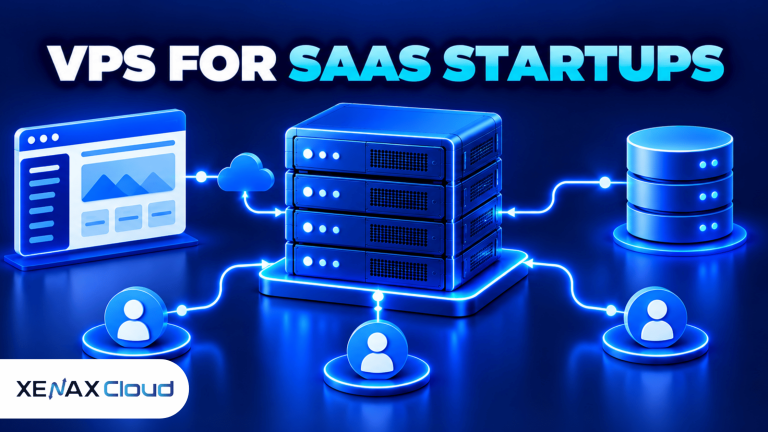
A VPS for SaaS startup gives your software a dedicated virtual server environment for running the application, API and supporting services. The right size depends on your framework, database, concurrent users, background jobs and expected growth. Start with measurable requirements, keep backups independent of deployments, and increase resources when monitoring shows a sustained need.
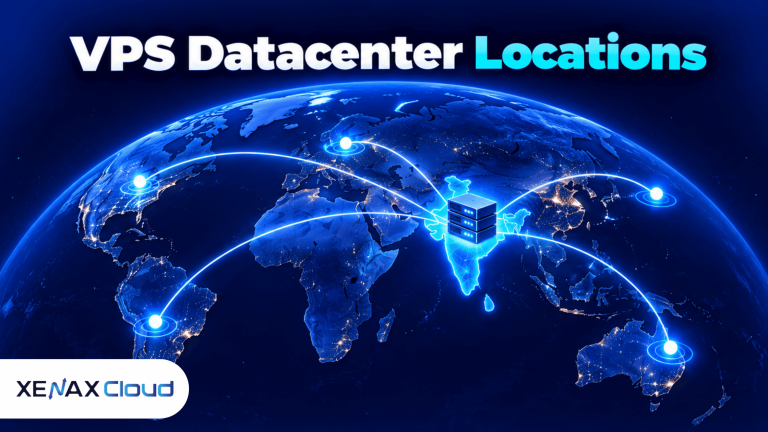
For an Indian startup, server location also affects response time for customers and access to data. Xenax Cloud operates a Tier-III data centre in India, with Linux KVM VPS options for applications that need root access and control over their software stack.
A sensible starting configuration is not necessarily the smallest server available or the largest one your budget allows. It is the configuration that can run your current workload without persistent resource pressure while leaving a clear path for scaling.
Choosing a VPS for SaaS startup means matching server resources to your application’s current workload while leaving room for growth. A suitable VPS can run your backend API, database, authentication service and background jobs without requiring you to manage a large server environment from day one.
What Is a VPS for SaaS Startup?
A VPS for SaaS startup is a virtual private server that runs the startup’s application and supporting software within an allocated set of computing resources. VPS means virtual private server, while SaaS means software as a service: software customers access over a network, commonly through a browser or API.
A KVM VPS uses Kernel-based Virtual Machine virtualisation to run a separate virtual machine with its own operating system. Root access lets developers install packages, configure services, manage processes and deploy frameworks without relying on the restrictions of a typical shared hosting account.
A SaaS application may contain several components:
- Frontend: the interface customers use, such as a dashboard built with React or another web framework.
- Backend: the application logic and API, commonly using Node.js, Python, PHP or another supported runtime.
- Database: the system storing accounts, subscriptions, application records and configuration.
- Background workers: processes that handle email queues, report generation, scheduled tasks and other work outside the main request.
- Supporting services: a reverse proxy, caching layer, monitoring agent and deployment tools.
These components do not always need separate servers on day one. A small application may run its web server, backend and database on one VPS, but the design should make it possible to separate the database or workers later if they begin competing for resources.
How Much RAM and CPU Does a SaaS VPS Need?
A SaaS VPS needs enough RAM and CPU to run its operating system, application processes, database and background work without sustained resource pressure. The right starting point depends on actual software behaviour, not just the number of registered customers.
The table below gives planning ranges for common early-stage workloads. These are starting estimates, not performance guarantees; the framework, database size, caching, request patterns and concurrent work can change the requirement substantially.
| Workload | Starting configuration | Suitable situation | Main limitation |
| Prototype or internal MVP | 2 vCPU, 4 GB RAM | Light traffic, small dataset, limited background work | Little room for memory-heavy services |
| Early production SaaS | 2–4 vCPU, 4–8 GB RAM | Small customer base and a modest database | Spikes can affect application and database together |
| Busy application or API | 4–8 vCPU, 8–16 GB RAM | More concurrent requests and active jobs | Needs workload monitoring and database tuning |
| Resource-heavy processing | 8+ vCPU, 16+ GB RAM | CPU-heavy jobs or large in-memory workloads | A larger VPS may still need separate services |
These ranges are engineering estimates for planning, not published Xenax Cloud benchmarks. The smallest configuration in the table can be enough for a lean MVP, but a database, queue worker and application server all competing for memory may need a larger configuration.
Which resource should you increase first?
Increase RAM if the operating system is frequently swapping, the application is running out of memory, or the database needs more memory for its working set. Increase CPU if requests or jobs remain CPU-bound and the processor stays busy after inefficient queries and application code have been checked.
Storage matters too. NVMe storage can help with workloads involving frequent database reads and writes, but it does not fix inefficient queries or a lack of RAM. Estimate the database, uploaded files, logs, backups and deployment artefacts before selecting disk capacity.
A practical starting rule is to choose 2 vCPU and 4 GB RAM for a lean application with low concurrency, then consider 4 vCPU and 8 GB RAM if load tests or production monitoring show repeated CPU saturation, memory pressure or slow response times. Do not use account registrations alone as a sizing measure: ten active users can generate more work than hundreds of inactive accounts.
When evaluating a VPS for SaaS startup, assess CPU usage, RAM consumption, database size and concurrent requests together. For example, a SaaS application running a dashboard, API and database on one server may need more memory than a lightweight API service. Monitor actual resource usage before upgrading, rather than choosing a larger server without evidence.
How Do You Select a VPS Configuration for a SaaS Stack?
A suitable VPS configuration matches the application stack to CPU, memory, storage and operating-system requirements. Xenax Cloud offers Speed VPS, General VPS and Gold VPS families, with different resource profiles.
The following diagram illustrates how a small SaaS deployment may be arranged before services are split across multiple servers.
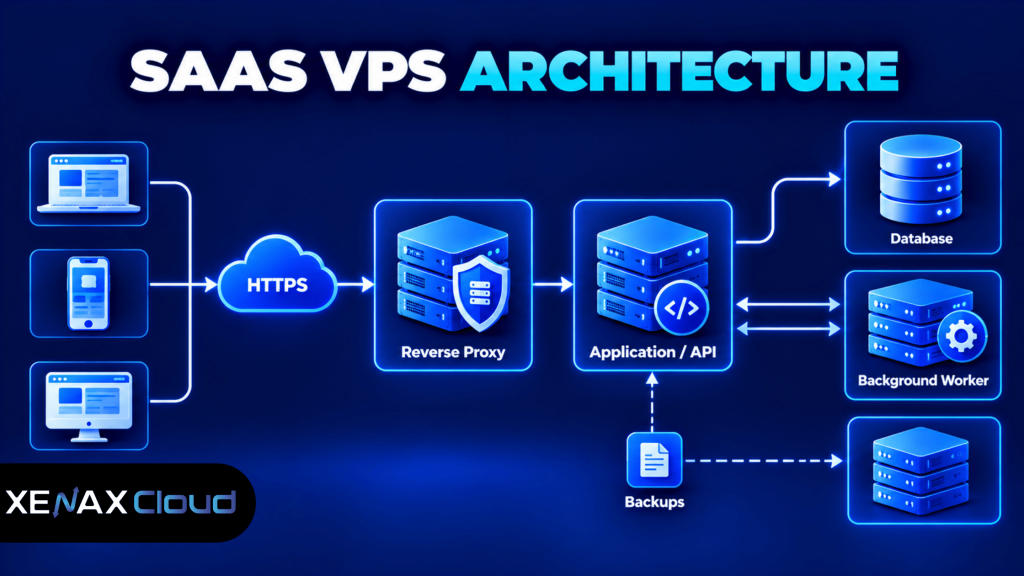
A single-server setup is easier to manage initially, but it creates a shared failure point: if the VPS becomes unavailable, the application and database on it may both be affected. Independent backups, deployment rollback and tested recovery procedures reduce the risk of a failed update or accidental data deletion.
VPS families available from Xenax Cloud
| VPS family | Resource profile | Storage or CPU detail | Consider it for |
| Speed VPS | 2–32 vCPU, 4–64 GB RAM | NVMe storage | Applications with frequent storage access |
| General VPS | 2–16 vCPU, 8–64 GB RAM | More RAM per vCPU | Memory-heavy application services |
| Gold VPS | 2–32 vCPU, 4–64 GB RAM | High-frequency Xeon Gold CPU | Workloads that benefit from higher CPU frequency |
All three VPS families use KVM virtualisation and are hosted in Xenax Cloud’s Indian data centre. The VPS offering includes full root access, one IPv4 address, weekly backup and a 500 Mbps network port.
For the available sizes and specifications, review Xenax Cloud VPS hosting. Choose the family by workload first, then select a size that meets the application’s resource needs.
VPS for Startups India: What Should You Check?
A VPS for startups India should be evaluated by server location, operating-system control, backup policy, network capacity and the ability to manage the application safely. These factors matter alongside RAM and CPU because a server that is difficult to recover can create more operational risk than a modestly sized one.
For Indian startups, hosting location can affect latency between the server and customers. Xenax Cloud operates one Tier-III data centre in India; it does not operate VPS locations in the United States, Singapore or Europe. If your application must meet a particular data residency or contractual requirement, confirm the relevant obligations before choosing any hosting provider.
Before ordering a VPS, check these points:
- Operating system: Confirm that your application runtime and required packages support the selected Linux distribution.
- Administrative access: Root access is useful for installing runtimes, configuring services and managing firewall rules.
- Network capacity: Xenax Cloud VPS plans have a 500 Mbps port; actual transfer performance depends on workload, network conditions and service limits.
- Backup coverage: Weekly backups are included, but you should confirm retention and recovery details that matter to your application.
- Security responsibilities: A VPS gives you control, but you must still patch software, secure SSH, restrict database access and monitor logs.
- Support availability: Xenax Cloud provides 24/7 support; clarify which operating-system and application issues are covered.
A common mistake is assuming that VPS hosting automatically secures a SaaS product. Virtualisation separates the server environment, but it does not make weak passwords, exposed databases, vulnerable packages or unsafe application code secure.
For standards-based transport security, consult the OWASP Transport Layer Security Cheat Sheet. Use HTTPS for browser and API traffic, keep certificates renewed, and avoid sending credentials or session tokens over unencrypted connections.
How to Deploy a SaaS Application on a VPS
You can deploy a SaaS application on a VPS by preparing the operating system, configuring secure access, installing the runtime, deploying the application and testing recovery. The exact commands vary by Linux distribution and application framework, so use the installation instructions maintained by your software vendors.
- Choose a Linux distribution supported by your application and dependencies.
- Secure SSH access with key authentication and disable password login when tested and appropriate.
- Update the operating system and install required security patches.
- Install the application runtime, database and reverse proxy from trusted repositories or official sources.
- Configure environment variables, database credentials, firewall rules and HTTPS.
- Deploy the application through a repeatable process with version control and a rollback option.
- Monitor CPU, memory, disk space, error logs and application response times.
- Test database restoration and application recovery before relying on the server in production.
For example, on a compatible Linux system using systemd, you can check the status of an application service with:
sudo systemctl status your-app.service
Replace your-app.service with the actual service name. Review application logs through the system’s configured logging method when the service fails to start; do not paste production secrets into support tickets or public issue trackers.
For a database-backed SaaS application, create a database user with only the permissions the application requires. Do not expose the database port publicly unless a specific architecture requires it and access is restricted to trusted sources.
Deployment should also include a rollback plan. Keep the previous working application release available until the new version passes health checks, and back up the database before schema changes that could alter or remove existing records.
Worked Example: A SaaS Startup in Jaipur
A Jaipur startup building a small inventory and billing SaaS can begin with a 2 vCPU, 4 GB RAM VPS if its first release has a lightweight API, a small database and limited background processing. Suppose the team has a handful of pilot businesses, a modest number of simultaneous users and no large report-generation jobs; this is a reasonable configuration to load-test first.
The next decision is whether to choose a larger resource profile before launch. If the team intends to run the application, database, queue workers and monitoring stack together, and tests show memory pressure or sustained CPU saturation, 4 vCPU and 8 GB RAM is a more prudent starting target.
For this workload, Xenax Cloud’s Speed VPS offers a starting size of 2 vCPU, 4 GB RAM and 40 GB NVMe storage, with larger configurations available. If the application needs more RAM per vCPU, the General VPS family begins at 2 vCPU and 8 GB RAM; if CPU frequency is the main concern, compare the Gold VPS family.
Use this decision rule:
- Choose 2 vCPU and 4 GB RAM if the app is lightweight, the database is small, concurrency is low and load tests show headroom.
- Choose 2–4 vCPU and 8 GB RAM if several application services run together or the database and workers create measurable memory pressure.
- Choose 4 or more vCPU if sustained CPU saturation remains after code, queries and worker concurrency have been reviewed.
- Separate the database or background workers onto another server when their resource demands interfere with web requests or when independent scaling and recovery are needed.
The 2 vCPU and 4 GB RAM configuration is not the right choice for a SaaS product with large in-memory datasets, heavy media processing or sustained CPU-intensive jobs; evaluate a larger Speed VPS or a suitable General VPS configuration instead.
For the initial workload described here, start by comparing the relevant Xenax Cloud VPS configurations and run a representative load test before production. Select the plan that fits measured resource use rather than assuming every SaaS startup needs the same server size.
SaaS Hosting India: How Should You Plan for Growth?
SaaS hosting India should support a controlled path from a single application server to separate services as demand grows. Scaling works best when the application can be measured and components can be moved without rewriting the entire product.
Start by monitoring the following signals:
- Memory: Watch used memory, swap activity and application restarts caused by out-of-memory conditions.
- CPU: Track sustained utilisation and request latency during normal traffic and load tests.
- Database: Review slow queries, connection counts, index usage and database storage growth.
- Disk: Track free space, logs, uploaded files and backup retention.
- Application: Monitor error rates, response time percentiles, queue depth and failed background jobs.
Do not scale based on a single short spike. A temporary CPU increase during deployment may not justify a larger server, while recurring slow database queries may need indexing or query optimisation before adding CPU or RAM.
A useful growth path is to begin with the application and database on one VPS, introduce external object storage or a separate database when justified, and move background workers when they compete with web requests. Add a load balancer and multiple application instances only when the application supports the architecture and the operational cost of managing it is justified.
VPS for SaaS Startup: FAQs
Is a VPS suitable for a SaaS startup?
Yes, a VPS is suitable for many early-stage SaaS products because it provides root access and configurable CPU, RAM and storage without requiring a physical server. A single VPS can host an application and small database, but production systems still need backups, patching, monitoring and a recovery plan.
How much RAM does a SaaS application need?
A lightweight SaaS MVP can begin with 4 GB RAM, while an application running several services or a larger database may need 8 GB or more. Measure memory under realistic load, including background jobs and database activity, before committing to a production configuration.
Is VPS hosting safe for customer data?
VPS hosting can support a secure deployment, but safety depends on system configuration and application practices. Restrict administrative access, use HTTPS, patch the operating system, apply least-privilege database permissions, store secrets securely and test backups. Hosting on a VPS alone does not guarantee compliance or prevent data breaches.
Can I host the frontend, API and database on one VPS?
Yes, a small SaaS product can run its frontend, API and database on one VPS if the combined workload fits its resources. Separate these components when database activity, background jobs or traffic cause resource contention, or when independent scaling and recovery become operational requirements.
Which Xenax Cloud VPS family is suitable for a SaaS app?
Speed VPS is worth evaluating when NVMe storage suits the workload, General VPS when additional RAM per vCPU is useful, and Gold VPS when higher CPU frequency matters. Compare the application’s measured memory, CPU and storage requirements with each family’s available configurations before selecting a size.
How often should I back up a SaaS database?
The backup schedule should reflect how much data your business can afford to lose and how quickly service must recover. Xenax Cloud VPS plans include weekly backups, but applications with frequent customer updates may also need application-level database backups at shorter intervals and a tested restoration process.
Can I upgrade a VPS as my SaaS user base grows?
Yes, you can plan for larger VPS configurations as resource demand increases, subject to the provider’s available options and upgrade process. Monitor CPU, RAM, disk and database activity first, then confirm whether an upgrade requires downtime, a reboot or a migration before making the change.
For a new SaaS MVP, compare Speed VPS at 2 vCPU and 4 GB RAM with General VPS at 2 vCPU and 8 GB RAM, then choose based on measured workload and memory needs. Review the available configurations and confirm backup and upgrade details before ordering.