A VPS with cPanel is a virtual private server on which you install the cPanel and WHM control panel yourself, using a cPanel licence bought separately for that server. Xenax Cloud does not sell a cPanel VPS bundle: you take a KVM VPS with full root access and add your own licence, or you choose cPanel hosting, where the licence is already included.
Most people searching for cPanel VPS hosting want one of two things: the cPanel dashboard they already know, or more power than shared hosting gives. This guide shows which route fits which need, the server size cPanel really needs, and how to set it up.
How Does cPanel Work on a VPS?
On a VPS, cPanel is software you install on your own server and license per server from cPanel, L.L.C.
cPanel is the control panel your clients or team use to manage websites, email and databases. WHM (Web Host Manager) is its administrator side, where you create cPanel accounts, set limits and manage the server. Both run on the VPS, and the VPS is yours: you keep root access and choose every package.
That is the main difference from cPanel hosting. With hosting, Xenax Cloud runs the server and the licence is part of the plan. With a VPS, you run the server and pay cPanel directly for the licence, priced by how many cPanel accounts you host.
VPS With cPanel or cPanel Hosting: Which One?
Choose cPanel hosting for one to ten ordinary websites, and a VPS with your own cPanel licence when you need dedicated resources or software that shared hosting does not allow.
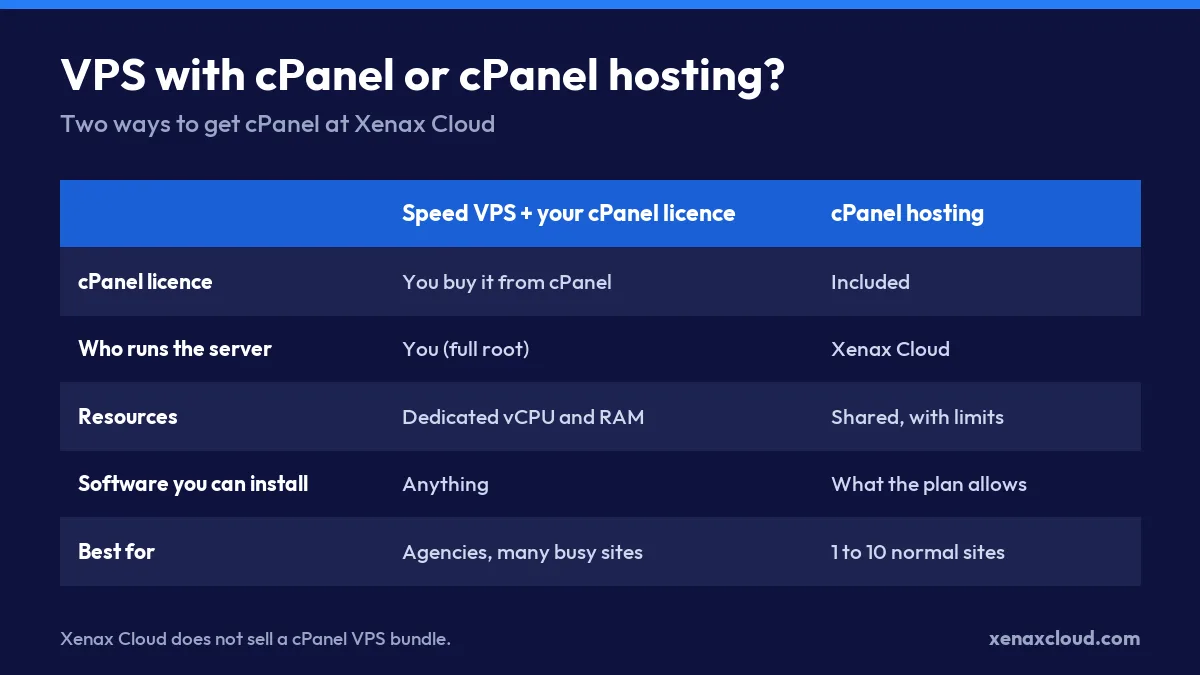
- Choose cPanel hosting if you run one to ten business sites or blogs and want cPanel without managing a server.
- Choose a VPS with your own cPanel licence if you host many client sites as an agency, your sites hit shared hosting limits, or you need software such as Node.js services, Redis or Docker next to cPanel.
- Choose a VPS without cPanel if you are comfortable on the command line; a VPS runs websites perfectly well with no panel at all.
A VPS with cPanel is not the right choice for a single small site. The licence plus the server costs more than cPanel hosting, and you take on updates and security yourself.
cPanel Hosting Plans With the Licence Included
If what you want is the cPanel dashboard rather than a server, cPanel hosting includes the licence in every plan.
| Plan | Websites | SSD storage | Bandwidth | Email accounts | Databases | Price |
|---|---|---|---|---|---|---|
| Silver | 1 | 15 GB | 100 GB | 3 | 5 | ₹149/mo |
| Gold | 3 | 25 GB | 500 GB | 6 | 6 | ₹199/mo |
| Platinum | 10 | 100 GB | 1,000 GB | 25 | Unlimited | ₹349/mo |
| Diamond | Unlimited | Unlimited | Unlimited | Unlimited | Unlimited | ₹599/mo |
cPanel included, LiteSpeed web server, SSL certificates, Indian data centre. Monthly, billed in INR.
Every plan runs on the LiteSpeed web server in an Indian data centre, with SSL certificates included. Compare the plans in detail on the cPanel hosting page.
What VPS Size Does cPanel Need?
cPanel needs at least 2 GB of RAM and 40 GB of disk, and 4 GB of RAM is the practical starting point once websites, email and MySQL run together.
The official cPanel system requirements list the supported operating systems and the minimum hardware. In practice, add your websites’ own needs on top of cPanel’s:
- 4 GB RAM, 2 vCPU suits cPanel with up to about ten light sites.
- 8 GB RAM, 4 vCPU suits an agency with 15 to 30 client sites or a few WooCommerce stores.
- 16 GB RAM, 8 vCPU suits busy stores, many email accounts or heavy MySQL use.
| Plan | vCPU | RAM | SSD storage | Bandwidth | Price |
|---|---|---|---|---|---|
| Speed KVM VPS 1 | 2 | 4 GB | 40 GB | 2 TB | ₹599/mo |
| Speed KVM VPS 2 | 4 | 8 GB | 50 GB | 2 TB | ₹799/mo |
| Speed KVM VPS 3 | 8 | 16 GB | 70 GB | 4 TB | ₹1,399/mo |
| Speed KVM VPS 4 | 12 | 24 GB | 80 GB | 6 TB | ₹1,799/mo |
| Speed KVM VPS 5 | 16 | 32 GB | 100 GB | 8 TB | ₹2,399/mo |
| Speed KVM VPS 6 | 20 | 40 GB | 120 GB | 10 TB | ₹2,999/mo |
| Speed KVM VPS 7 | 24 | 48 GB | 150 GB | 10 TB | ₹3,499/mo |
| Speed KVM VPS 8 | 32 | 64 GB | 200 GB | 10 TB | ₹4,599/mo |
Every Speed VPS: KVM, full root, 500 Mbps port, weekly backup included, Indian data centre. Monthly, billed in INR. cPanel licence not included.
Every Speed VPS runs on KVM with full root access, a 500 Mbps port and a weekly backup included, which is what a self-managed cPanel server needs.
Worked Example: A Lucknow Web Agency With 25 Client Sites
Picture a Lucknow web agency hosting 25 small business sites for clients, each with two or three mailboxes, currently spread across three shared hosting accounts.
The agency wants one WHM login, separate cPanel accounts per client and the freedom to install Redis for two WooCommerce stores. That rules out shared hosting, because WHM, per-client accounts and Redis are not available there.
Their sites together use about 5 GB of RAM at busy times, and they want room to grow.
- Speed KVM VPS 1 (4 GB RAM) is too small: cPanel, MySQL and email alone take most of it.
- Speed KVM VPS 2 (8 GB RAM, 4 vCPU) fits today with some headroom.
- Speed KVM VPS 3 (16 GB RAM, 8 vCPU) leaves room for the next 20 clients without a migration.
Speed KVM VPS 3 is the plan to choose here, with a cPanel licence tier that covers 30 to 50 accounts. If the agency only had five clients, cPanel hosting Platinum with ten sites would be simpler and cheaper.
How to Install cPanel on a VPS
Installing cPanel on a fresh VPS takes about an hour, most of it the installer running on its own.
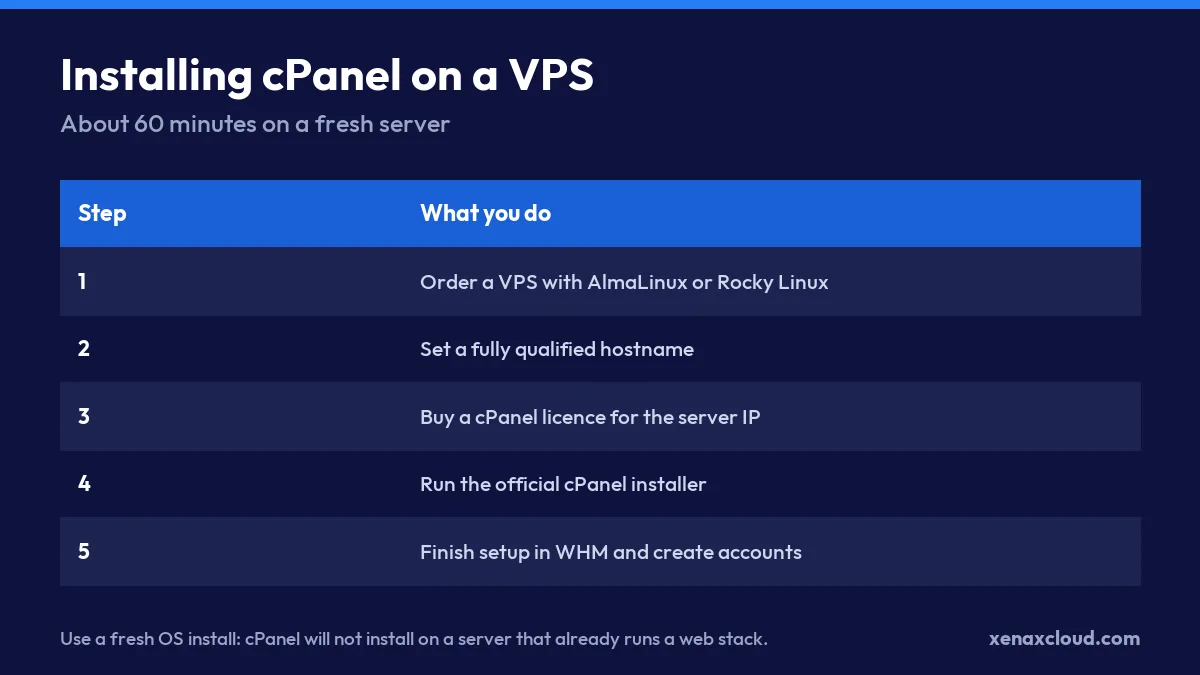
- Order a VPS and choose AlmaLinux or Rocky Linux as the operating system.
- Point a hostname such as server.yourdomain.com to the VPS IP address.
- Set that hostname on the server.
- Buy a cPanel licence for the server’s IP address from cPanel or an authorised partner.
- Run the official installer as root.
- Open WHM on port 2087, finish the setup wizard and create your first cPanel account.
- Set up backups and a firewall before you move any live site.
hostnamectl set-hostname server.yourdomain.com
cd /home && curl -o latest -L https://securedownloads.cpanel.net/latest && sh latest
Use a clean operating system install. The cPanel installer stops if Apache, Nginx or MySQL are already installed on the server.
Managing a cPanel VPS After Setup
A cPanel VPS needs regular care from you, because the server is self-managed.
- Keep automatic cPanel updates on in WHM.
- Use a firewall such as CSF and allow only the ports you use.
- Keep your own off-server backups in addition to the weekly VPS backup.
- Watch disk space; email and logs grow faster than most people expect.
If you would rather not manage any of this, read about shared hosting vs VPS before you decide, and see our guide to unmanaged VPS hosting.
Xenax Cloud VPS Hosting vs the usual alternatives
| Feature | Xenax Cloud | Typical Indian shared host | Global budget host |
|---|---|---|---|
| Starting price | ₹599/mo | ₹199/mo | ₹149/mo (renews ₹499) |
| Storage | 40 GB SSD storage | 10 GB SSD | 25 GB SSD |
| DDoS protection | 100 Gbps, always on | Basic | Cloudflare only |
| Support | 24×7, in-house engineers | Tickets, business hours | Chat, outsourced |
| Data centre | India (NVMe) | India | Singapore / US |
| Control panel | cPanel / WHM included | cPanel | Custom panel |
Entry-level plans, list prices including GST where shown. Check each provider before buying — prices change.
See VPS Hosting plansVPS With cPanel: FAQs
Does Xenax Cloud sell a VPS with cPanel included?
No. Xenax Cloud sells KVM VPS plans with full root access, on which you can install cPanel with your own licence, and cPanel hosting plans where the licence is included. There is no combined cPanel VPS bundle.
How much RAM does a cPanel VPS need?
cPanel’s minimum is 2 GB of RAM, but 4 GB is the practical starting point with websites, email and MySQL running. Agencies with 15 or more client sites should start at 8 GB, and busy WooCommerce stores at 16 GB.
Which operating system should I choose for cPanel?
Choose AlmaLinux or Rocky Linux, which cPanel supports and which Xenax Cloud offers on every VPS. Ubuntu is also supported by recent cPanel versions. Always start from a fresh install, because cPanel will not install over an existing web server.
Is cPanel hosting cheaper than a cPanel VPS?
Yes, for one to ten ordinary websites cPanel hosting is cheaper, because the licence is included and you do not pay for a whole VPS. A cPanel VPS becomes worth it when you need dedicated resources, WHM for many clients, or custom software.
Can I install another control panel instead of cPanel?
Yes. A Xenax Cloud VPS gives you full root access, so you can install any control panel you prefer, or run websites with no panel at all. The choice depends on what your team already knows and what the panel costs to license.
If you host one to ten sites, start with cPanel hosting; if you run an agency or need dedicated resources, a Speed KVM VPS with 8 to 16 GB of RAM and your own cPanel licence is the setup that grows with you.