Travel agency website hosting is the service that stores your travel website’s pages, destination photos, tour details, enquiry forms and booking data so visitors can access them online. The right hosting plan depends on how many websites you operate, how much media you publish, the traffic you receive and whether bookings happen on your site.
A small travel agency may need only a company profile, destination pages and a contact form. A tour operator handling several brands, large photo galleries or online payments has different storage, bandwidth, security and application requirements.
The important decision is not simply finding a hosting account. You need to match the hosting environment to the website software and the way customers enquire, compare packages and make reservations.
What Does Travel Agency Website Hosting Need?
Travel agency website hosting needs sufficient disk space, bandwidth, database support, HTTPS, backups and server resources for its website software and visitor activity. A website built with WordPress has different requirements from a custom booking application, so identify the platform before selecting a plan.
A travel website commonly contains destination photographs, tour itineraries, hotel and transport information, seasonal packages, enquiry forms, maps and customer reviews. Each page adds files or database records, while image-heavy pages can transfer considerably more data than a simple text page.
A few technical terms help you compare plans:
- Disk space is the storage allocated to website files, email and databases. Images, videos and backups can consume it quickly.
- Bandwidth is the amount of data transferred between your website and visitors. Large images and repeated page views increase usage.
- SSL/TLS is the encryption technology that protects data travelling between a visitor’s browser and your website. HTTPS should be enabled, especially on enquiry and payment pages.
- A database is an organised store of information used by applications such as WordPress to save pages, settings, users and booking records.
- A content delivery network (CDN) is a distributed service that delivers cached website files from locations closer to visitors. It can reduce the distance static images and scripts travel.
You should also check whether the hosting account supports the PHP version, database software and extensions required by your website. For WordPress, consult the current official WordPress hosting requirements rather than relying on an old installation checklist.
Choosing travel agency website hosting based on storage, bandwidth and booking features helps keep your website aligned with your agency’s actual requirements.
Travel Website Hosting: Shared Hosting or VPS?
Travel website hosting can run on shared hosting or a VPS; the right choice depends on the website’s resource demands and need for server control. Shared hosting is generally suitable for standard business websites, while a VPS is more appropriate when an application needs dedicated virtual resources or custom server configuration.
A shared hosting account places multiple customer accounts on a server. The hosting provider manages the server environment, while you manage your website through a control panel such as cPanel. A VPS is a virtual private server with allocated virtual CPU and memory, giving you more control over the operating system and application stack.
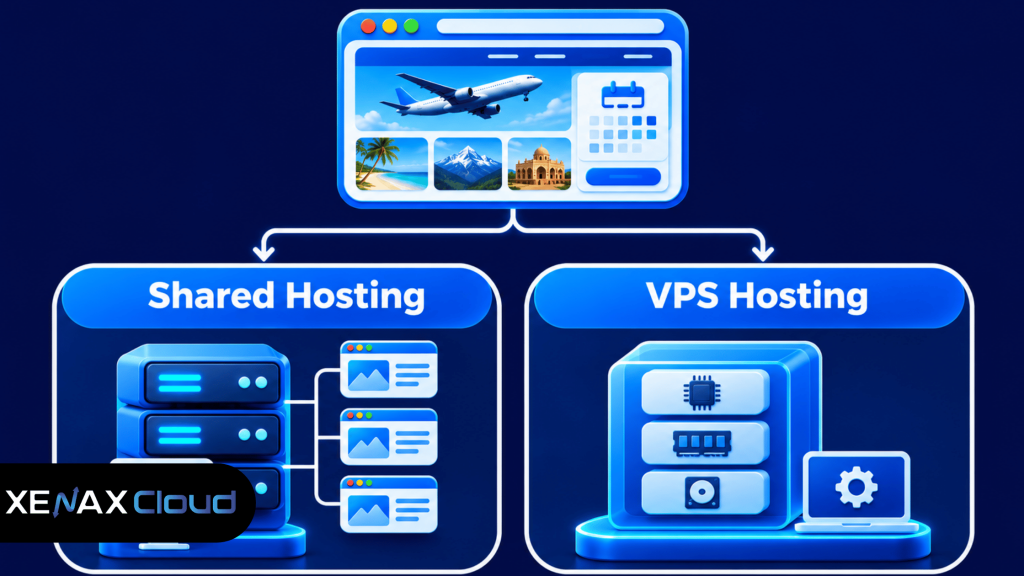
| Requirement | Shared hosting | VPS hosting |
| Standard WordPress website | Suitable | Suitable |
| Server administration | Provider-managed environment | Root access and server management |
| Custom software stack | Limited by hosting environment | Greater configuration control |
| Resource allocation | Shared server environment | Allocated virtual CPU and RAM |
| Maintenance responsibility | Lower server-level workload | More server administration |
Do not select a VPS only because the word sounds more advanced. If your site uses a standard CMS, receives moderate traffic and does not need custom server settings, a managed shared account may be the more practical fit.
Tour Operator Website Hosting and Website Features
Tour operator website hosting must support the functions visitors use to research trips, submit enquiries and complete reservations. The hosting plan should be selected around the actual features installed, not just the business label or number of tour packages.
A brochure-style website may only need destination pages, tour descriptions, a gallery and an enquiry form. A booking website can add availability calendars, customer accounts, payment processing, automated emails, itinerary downloads and connections to external reservation systems.
Before choosing a plan, list the features your website needs:
- Destination and package pages: Use organised page templates for locations, itineraries, inclusions, exclusions and travel dates.
- Enquiry forms: Collect only the information your sales team needs, such as destination, travel dates, group size and contact details.
- Booking and payment tools: Confirm that the booking plugin or application supports your payment gateway and required transaction flow.
- Customer accounts: Check how the software stores customer profiles, booking history and uploaded documents.
- Email notifications: Confirm that form submissions and booking confirmations reach the intended mailbox; configure domain authentication and monitor delivery.
- Maps and external integrations: Check API requirements, usage limits and whether the integration loads scripts on every page.
A common mistake is assuming that every booking plugin works on every shared hosting account. Plugins can have different PHP, database, memory and background-task requirements. Ask the software vendor for its server requirements and compare them with the hosting environment before moving a live booking system.
How to Prepare a Travel Agency Website Before Launch
You can prepare a travel agency website for launch by confirming its software requirements, configuring its domain and security, testing its forms and checking its backups. Complete the following steps before directing advertising or customer traffic to the new website.
- List the website pages, booking features, forms and integrations you intend to publish.
- Check the CMS, PHP, database and extension requirements against the hosting environment.
- Estimate storage using the current website files, image library, email needs and expected content growth.
- Connect the domain to the hosting account using the DNS records supplied by the provider.
- Enable HTTPS and redirect visitors from HTTP to the secure website address.
- Test enquiry forms, booking steps, payment redirects and confirmation emails.
- Verify backups and restore procedures before replacing an existing live website.
If you are moving an established travel website, keep the old hosting account active until the new website has been checked. Take a separate copy of website files and database exports before changing DNS; a backup stored only inside the same hosting account may not protect you from account-level loss.
For a WordPress website, install only the plugins you need and remove inactive themes and extensions. Keep WordPress, plugins and themes updated, use unique administrator passwords and limit admin access to people who maintain the site.
Travel Agency Website Hosting: Which cPanel Plan Fits?
The right travel agency website hosting plan depends on the number of sites, storage requirement, bandwidth consumption and email accounts. Xenax Cloud shared hosting uses cPanel and LiteSpeed web server, includes Let’s Encrypt SSL and DDoS protection, and provides JetBackup 5 backups.
The shared hosting plans differ in the number of websites, disk space, bandwidth and mailboxes. These limits matter for agencies that publish many destination pages, run multiple regional websites or use domain-based email for sales and support.
| Shared plan | Websites | Disk space | Bandwidth | Mailboxes |
| Silver | 1 | 5 GB | 50 GB | 3 |
| Gold | 3 | 15 GB | 100 GB | 6 |
| Platinum | 10 | 100 GB | 1,000 GB | 25 |
| Diamond | Unlimited | Unlimited | Unlimited | Unlimited |
Xenax Cloud’s shared cPanel hosting is designed for websites that can run within a managed hosting environment. You can use cPanel to manage website files, databases, email accounts and other hosting settings without administering the server operating system.
The plan limits should be compared with your actual content. For example, an agency with one main website and a small media library may not need the storage allocated to a multi-site plan. An agency operating several destination or regional websites may need the higher site and mailbox limits.
Review the shared cPanel hosting plans to compare the available configurations. Xenax Cloud operates one Tier-III data centre in Banda, Uttar Pradesh, India; do not assume that choosing this hosting account places your website on a server in another country.
Before purchasing hosting, make sure your domain and hosting account are configured correctly. Your domain is the website address, while hosting stores the website files and database. Read our guide on the difference between domain and hosting to understand how both services work together for your travel agency website.
Worked Example: A Jaipur Tour Operator With Multiple Websites
A Jaipur tour operator running three websites, publishing destination galleries and managing separate sales mailboxes should compare the Gold and Platinum shared plans. The correct choice depends on the combined storage and bandwidth needs of all three sites, not simply the number of domains.
Suppose the operator runs a main agency website, a Rajasthan tour website and a corporate travel website. The team needs three websites, separate domain-based mailboxes and space for package photographs, itinerary PDFs and blog content.
Gold supports three websites, 15 GB disk space, 100 GB bandwidth and six mailboxes. It fits the stated website and mailbox count if the combined files and data transfer remain within those limits.
Silver would not fit because it supports only one website. Platinum supports ten websites, 100 GB disk space, 1,000 GB bandwidth and 25 mailboxes, making it the more suitable shared plan if the three sites need more storage, transfer capacity or mailboxes than Gold provides.
The operator should measure current website storage and review hosting bandwidth reports before deciding. If the booking system requires custom server modules, background processing beyond the shared environment’s limits or direct root access, shared hosting is not the right choice; consider a VPS and plan for server administration.
When Should a Travel Website Move Beyond Shared Hosting?
A travel website should move beyond shared hosting when its software needs custom server configuration, its resource use regularly exceeds the account limits or its booking workload requires greater control. A larger shared plan is not a substitute for root access or application-level server administration.
Use these practical decision rules:
- Choose Silver for one website that fits within 5 GB disk space and 50 GB bandwidth, with up to three mailboxes.
- Choose Gold for up to three websites that fit within 15 GB disk space and 100 GB bandwidth, with up to six mailboxes.
- Choose Platinum for up to ten websites that need no more than 100 GB disk space and 1,000 GB bandwidth, with up to 25 mailboxes.
- Choose Diamond when the account needs the plan’s unlimited site, disk, bandwidth and mailbox allowances, while still following the provider’s applicable usage policies.
- Consider a VPS when your booking application needs root access, custom services, specialised background workers or a server configuration unavailable in shared hosting.
Traffic alone does not determine when you need a VPS. A website with many cached destination pages may use fewer server resources than a smaller website running complex availability searches and frequent database queries.
Review resource usage in cPanel and investigate repeated slow requests, PHP errors, database bottlenecks and bandwidth growth. If the problem comes from oversized images, poorly configured caching or an inefficient plugin, correcting the application may be more useful than changing the hosting type.
Travel Website Security, Backups and Performance Checks
Travel website security depends on HTTPS, software updates, controlled administrator access, reliable backups and careful handling of customer information. Hosting features help, but they do not replace secure website configuration or responsible payment processing.
Travel websites may collect names, phone numbers, email addresses, travel dates, passenger counts and special requests. Limit access to this information, avoid collecting details that the business does not need and use a reputable payment gateway rather than storing card details in website forms.
Use this operational checklist:
- Enable HTTPS and confirm that forms load securely.
- Keep the CMS, themes, plugins and server-side software updated.
- Use unique passwords and enable multi-factor authentication where available.
- Give staff only the website permissions required for their work.
- Keep backups separate from the live website where possible.
- Test a backup restore before relying on it during an emergency.
- Compress destination images and use modern image formats to reduce page transfer.
- Use caching for pages that do not need live booking data.
- Test the booking and enquiry process after plugin or theme updates.
For payment handling, confirm that the gateway redirects or securely processes transactions according to its integration documentation. Do not store sensitive payment credentials in ordinary WordPress fields, enquiry forms or email messages.
Xenax Cloud includes JetBackup 5 backups with shared hosting. You should still confirm the backup schedule and retention applicable to your account, and maintain an independent copy of critical website files and database exports.
Travel Agency Website Hosting: FAQs
What is the best hosting for a travel agency website?
The right hosting depends on the website software, number of sites, media storage and booking features. A standard WordPress agency website can often use shared cPanel hosting, while a custom booking application may need VPS resources and server control. Compare actual requirements before selecting a plan.
How much storage does a travel website need?
A travel website’s storage requirement depends on its image library, page files, databases, email and backups. A small site may fit within 5 GB, while several image-heavy websites may need 15 GB or more. Compress photographs and review actual disk usage before choosing a plan.
Is shared hosting suitable for an online travel booking website?
Shared hosting can suit a booking website if its software supports the hosting environment and its resource use stays within the account limits. Check the booking plugin’s PHP, database and memory requirements, then test availability searches, payment redirects and confirmation emails before launch.
Do travel agency websites need SSL certificates?
Yes, a travel agency website should use HTTPS to encrypt connections between visitors and the website. HTTPS is especially important for enquiry forms, customer logins and booking pages. Xenax Cloud shared hosting includes Let’s Encrypt SSL, but you must ensure the certificate is installed and the website redirects to HTTPS.
Can I host multiple tour websites in one cPanel account?
Yes, a shared hosting plan can host multiple websites when its site limit and technical configuration support them. Xenax Cloud Gold supports three websites, while Platinum supports ten. Keep each site’s files, databases, administrator accounts and backups organised to reduce maintenance errors.
When should a travel agency choose VPS hosting instead?
Choose VPS hosting when the booking application requires root access, custom server software, dedicated virtual CPU and RAM allocation or background services unavailable in shared hosting. A VPS also requires server administration, so arrange responsibility for operating system updates, firewall rules, monitoring and backups.
Is Indian hosting suitable for a travel agency serving overseas customers?
Indian hosting can serve overseas visitors, but page delivery time depends on the visitor’s distance from the server, network routes, caching and page size. Xenax Cloud’s data centre is in Banda, Uttar Pradesh, India. Use a CDN for static assets if your audience is spread across several regions.
For a travel agency running one standard website, begin with the shared plan whose site, disk, bandwidth and mailbox limits match current usage. Choose Gold for up to three sites within its stated limits, or Platinum when the additional storage and bandwidth are needed; move to VPS hosting only when the application requires server-level control.