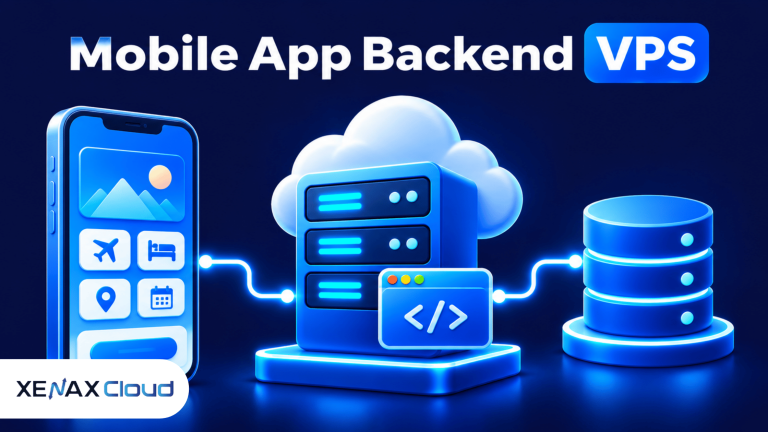
A VPS for mobile app backend workloads gives your application a remotely hosted server to process API requests, authenticate users, run business logic and communicate with databases. The right configuration depends on concurrent requests, application framework, database workload, file storage and background jobs, not simply the number of app downloads.
A mobile app may look simple to users while its backend performs several tasks: checking login credentials, retrieving account details, processing orders, sending notifications and recording activity. If these services share one server, CPU, memory and storage must support their combined workload.
The first decision is whether your app needs a managed application environment or full server control. A VPS is useful when you need root access, a custom runtime, a database service or deployment tools that standard shared hosting does not provide.
What Does a VPS for Mobile App Backend Do?
A VPS for mobile app backend runs the server-side components that receive requests from a mobile application and return data or perform actions. It gives developers control over the operating system, application runtime, server configuration and deployment process.
A mobile app backend is the server-side software that handles application data, authentication, business rules and communication with other services. The mobile app is the client; it sends requests to the backend rather than performing every operation locally.
An API (Application Programming Interface) is a defined interface that allows software systems to exchange requests and responses. A mobile app commonly uses HTTPS APIs to communicate with backend services.
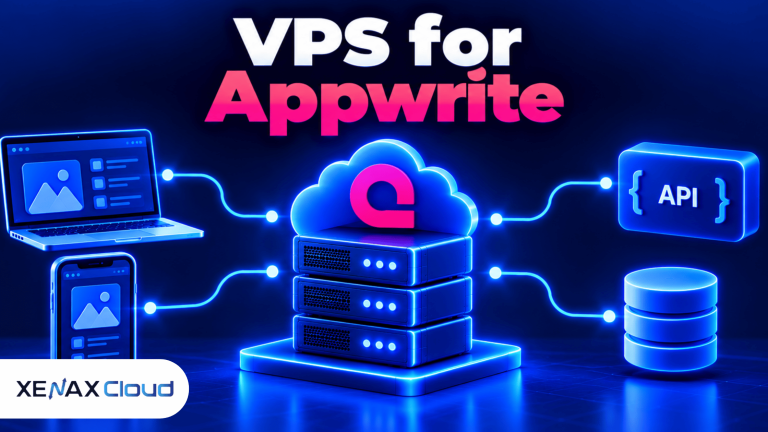
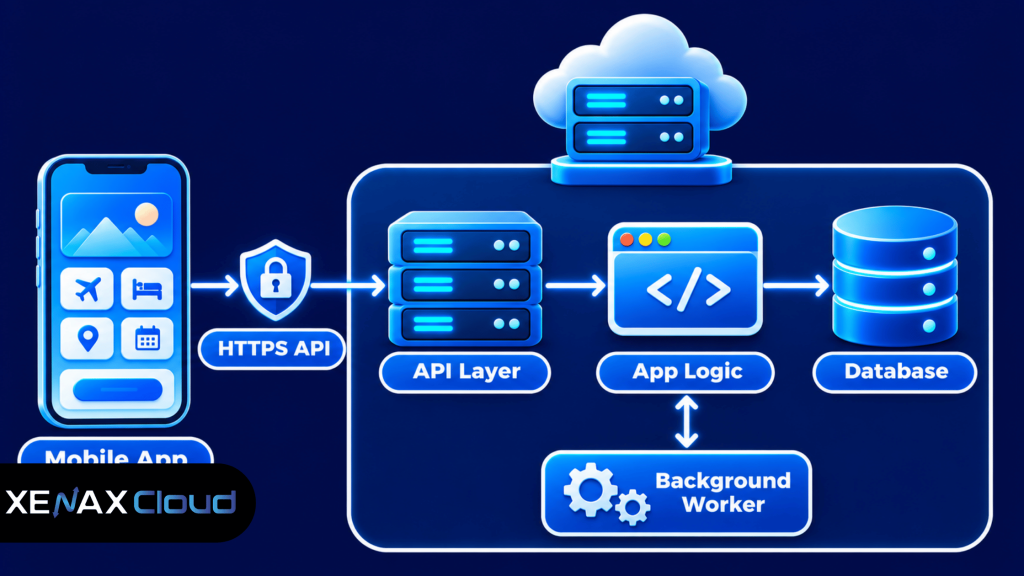
A typical architecture looks like this:
- Mobile client: The Android or iOS application that users install.
- API layer: Receives requests, validates input and routes them to application functions.
- Application runtime: Executes business logic, such as account updates, search, order processing or booking operations.
- Database: Stores structured records such as user profiles, products, transactions and app settings.
- Background worker: Processes tasks that do not need to finish during the user’s immediate request, such as report generation or queued notifications.
- External services: Payment gateways, email providers, push notification services and other APIs.
A VPS can host several of these components, but placing everything on one machine creates a shared resource limit. If a database query consumes memory or a background task uses CPU heavily, API response times may also be affected.
How Should You Structure a Mobile App Backend on a VPS?
A mobile app backend should separate incoming API traffic, application processing, persistent data and background tasks into clearly managed components. The separation makes it easier to identify bottlenecks and decide which component needs more resources.
For a small application, the API service and database may initially run on the same VPS. This reduces infrastructure complexity, but you should monitor memory and disk activity because database operations and application processes compete for the same resources.
As usage grows, you can separate the database or background workers onto another server. That introduces network configuration, access control, backup coordination and additional administration, so split services when monitoring shows a real need rather than adding components without a reason.
Common backend technologies include Node.js, Python frameworks, PHP, Java and .NET. Database choices may include PostgreSQL, MySQL or MongoDB; select one according to your application’s data model and the framework’s support.
App Backend Hosting India: What Should You Check?
App backend hosting India should be assessed by server location, network connectivity, operating system access, resource allocation and support for your application’s technology stack. The location matters because network distance can affect the time required for requests to travel between the user and server.
For an application whose primary audience is in India, hosting the backend in an Indian data centre can keep the server geographically closer to many users. Actual response time still depends on the user’s network, routing, API processing, database queries and third-party services.
Check these points before selecting a provider:
- Data centre location: Confirm the actual facility location rather than assuming that a provider’s sales region is its server location.
- Operating system: Verify that the VPS supports the Linux distribution or other environment required by your application.
- Root access: Confirm that you can install runtimes, configure services, manage firewall rules and deploy updates.
- Network capacity: Check the VPS port specification and whether the application transfers large files or media.
- Backup coverage: Understand what is backed up, how often recovery points are created and how restoration works.
- Support availability: Confirm when technical support can assist with infrastructure or network issues.
Xenax Cloud operates one Tier-III data centre in Banda, Uttar Pradesh, India. Its VPS hosting uses KVM virtualisation, Linux, full root access, one IPv4 address, a 500 Mbps port and weekly backups.
The server location should be part of your data handling decision, but it does not by itself establish regulatory compliance. If your app stores financial, health or identity information, review the laws and contractual requirements that apply to your organisation and data.
API Server Hosting: VPS Resources and Plan Families
API server hosting needs enough CPU to process application requests, enough RAM to keep services running and sufficient storage for the operating system, application files, logs and local data. The resource balance depends on the framework, database design and request pattern.
A vCPU is a virtual CPU allocation presented to a virtual machine. RAM is working memory used by the operating system and active processes, while NVMe storage is a fast solid-state storage technology used for persistent files and data.
Xenax Cloud offers three VPS families with different resource characteristics:
| VPS family | Starting configuration | Storage | Main distinction |
| Speed VPS | 2 vCPU, 4 GB RAM | NVMe, 40 GB at entry size | NVMe storage and multiple size options |
| General VPS | 2 vCPU, 8 GB RAM | Varies by selected size | More RAM per vCPU |
| Gold VPS | 2 vCPU, 4 GB RAM | Varies by selected size | High-frequency Xeon Gold processors |
Speed VPS has eight sizes, ranging from 2 vCPU, 4 GB RAM and 40 GB storage up to 32 vCPU, 64 GB RAM and 200 GB storage. General VPS has four sizes, from 2 vCPU and 8 GB RAM up to 16 vCPU and 64 GB RAM. Gold VPS has eight sizes, from 2 vCPU and 4 GB RAM up to 32 vCPU and 64 GB RAM.
Choose based on the bottleneck you expect:
- Speed VPS: Consider it when NVMe storage and a balanced CPU/RAM configuration fit the application.
- General VPS: Consider it when the API runtime and database need more memory relative to CPU allocation.
- Gold VPS: Consider it when the application is sensitive to CPU frequency and benefits from high-frequency Xeon Gold processors.
Do not compare VPS plans by vCPU count alone. A database-heavy application may need more RAM, while CPU-intensive image processing may benefit more from a higher-frequency processor.
Xenax Cloud VPS plans include weekly backups and full root access. The VPS network port is 500 Mbps, so applications that transfer large media files should also consider bandwidth consumption and whether files should be delivered through a separate storage or content delivery service.
How to Deploy a Mobile App Backend on a VPS
You can deploy a mobile app backend on a VPS by preparing the operating system, installing the application runtime, configuring the database and exposing the API through HTTPS. Test the deployment with a staging app before directing production users to the server.
- Select a Linux VPS configuration that meets the application’s CPU, RAM and storage requirements.
- Update the operating system and create a non-root deployment account.
- Install the required runtime, framework dependencies and database software.
- Configure environment variables, database credentials and application settings.
- Run the API service under a process manager or service supervisor.
- Secure the server with firewall rules, SSH key authentication and HTTPS.
- Test API routes, database operations, logs, backups and application connectivity.
For a Linux deployment, update packages before installing the runtime. On an Ubuntu-based server, the general package maintenance commands are:
sudo apt update
sudo apt upgrade
Use the installation instructions for the specific runtime and database version your project supports. Avoid copying a command from an unrelated tutorial without checking the operating system release and official package source.
A production API should run as a managed service rather than depending on an administrator keeping a terminal window open. Configure the service to start after a reboot, capture application logs and restart according to a controlled failure policy.
Place a reverse proxy such as Nginx in front of the application when your architecture requires it. The proxy can handle incoming HTTPS connections and forward requests to the application process on an internal port; keep internal service ports inaccessible from the public internet unless they must be exposed.
For API security, follow established practices for authentication, access control, input validation, error handling and rate limiting. The OWASP REST Security Cheat Sheet provides technical guidance for protecting REST APIs.
Before switching the mobile app to the production API address, test login, expired tokens, invalid requests, database failures and network interruptions. Keep a copy of the previous working deployment and database backup so you can roll back if the release causes problems.
Worked Example: A Bengaluru Startup Launching a Delivery App
A Bengaluru startup launching a delivery app with an API, customer accounts, order records and background status updates could begin by evaluating Speed VPS with 2 vCPU, 4 GB RAM and 40 GB NVMe storage. This entry configuration is a reasonable candidate only if the application and database fit within its available memory.
Assume the first release has a small operations team, a customer mobile app and a delivery partner app. The backend handles login, order creation, status updates and basic location records; images are stored separately rather than filling the application server disk.
If the developer’s measured staging workload shows that the API, database and operating system together need around 6 GB of working memory during expected activity, the 4 GB Speed VPS entry configuration is too small. General VPS with 2 vCPU and 8 GB RAM is the more appropriate starting configuration because it offers more memory while keeping the same entry vCPU count.
This is a sizing example, not a traffic guarantee. The startup should run load tests with representative API requests, inspect memory use and database response times, and increase resources if actual usage approaches the server’s limits.
Xenax Cloud General VPS is the family to evaluate when memory capacity is the main requirement. If the application instead performs CPU-heavy processing and memory use remains modest, compare Speed VPS or Gold VPS based on storage and processor needs.
The Xenax Cloud VPS plans list the available families and configurations. A VPS is not the right choice if you need a fully managed backend platform and do not have anyone responsible for server updates, firewall rules, monitoring and recovery; use a managed application service or arrange server administration.
How Much CPU, RAM and Storage Does a Mobile App Backend Need?
A mobile app backend needs enough CPU for request processing, enough RAM for the application and database processes, and enough storage for software, logs and persistent records. There is no reliable server size based only on app downloads because concurrent requests and application behaviour determine resource use.
Use these practical sizing rules as a starting point, then validate them with staging tests:
- 2 vCPU and 4 GB RAM: Consider for a compact API with a light runtime, limited background processing and a small database workload.
- 2 vCPU and 8 GB RAM: Consider when the application and database need more memory or several services run together.
- Higher vCPU allocations: Consider when CPU utilisation remains high during normal request processing or background jobs delay API responses.
- More storage: Add capacity when database files, uploaded content, logs and deployment artefacts approach the available disk space.
- Separate database hosting: Consider it when database load competes with API processing or when independent scaling and recovery are needed.
These are planning thresholds based on resource allocation, not guaranteed user or request limits. A poorly indexed database query can consume more resources than several simple API requests, while a memory leak can gradually exhaust RAM even when traffic is stable.
Monitor CPU utilisation, available memory, swap activity, disk usage, database connections, API response times and error rates. Review those measurements during realistic load tests and after each major application release.
Storage planning should distinguish application files from user uploads and database data. If users upload photographs or documents, consider object storage or a dedicated storage service instead of placing every file on the same VPS disk as the application.
Mobile App Backend Security, Backups and Scaling
A mobile app backend needs protected API access, secure server administration, tested backups and monitoring to reduce the impact of attacks and operational failures. A VPS gives you configuration control, but that also means you are responsible for securing the software you install.
Use these controls as part of the deployment process:
- SSH access: Use SSH keys for administration, restrict access to trusted IP addresses where practical and avoid routine root login.
- Firewall: Expose only the ports required for public API traffic and administration.
- HTTPS: Encrypt connections between mobile clients and the API.
- Authentication: Use an established token or identity system and validate credentials on the server.
- Authorisation: Check permissions on every protected operation; hiding a button in the app does not secure an API endpoint.
- Input validation: Validate request fields and reject unexpected or malformed input.
- Secrets management: Keep database passwords, signing keys and API credentials out of source code and public repositories.
- Backups: Back up databases and important files, and test restoration separately from the live application.
A mobile app backend should also handle growth in a controlled way. Add caching for data that does not change frequently, use queues for time-consuming tasks and optimise database indexes before increasing server size without evidence.
When one VPS becomes a bottleneck, identify which component is responsible. High API CPU use, database memory pressure, slow storage operations and excessive background jobs require different remedies; adding vCPU will not automatically fix a database query or network dependency.
Xenax Cloud provides weekly backups with its VPS service, but an application that records frequent orders or user changes may need more frequent database exports. Keep an independent backup and document how to restore the database and application files.
VPS for Mobile App Backend: FAQs
Is a VPS good for mobile app backend hosting?
Yes, a VPS is suitable for a mobile app backend when you need control over the operating system, application runtime, API services and database configuration. You must also manage updates, security, monitoring and backups. A managed platform may suit teams that do not want server administration.
Which VPS is suitable for app backend hosting in India?
The suitable VPS depends on application memory, CPU use, storage and the location of your users. Xenax Cloud offers Speed VPS, General VPS and Gold VPS in its Indian data centre in Banda, Uttar Pradesh. Compare their resource profiles against staging measurements before selecting a configuration.
Can I host a mobile app API and database on one VPS?
Yes, an API and database can run on one VPS if their combined CPU, RAM and storage use fit the server. This is simpler to operate initially, but both services compete for resources. Separate the database when monitoring shows contention or independent scaling is needed.
How much RAM is needed for a mobile app backend?
A compact backend may be evaluated on 4 GB RAM, while a backend running an API and database together may need 8 GB or more. The correct amount depends on runtime, database size, concurrent requests and background jobs. Use load tests and memory monitoring to validate the configuration.
Is Linux necessary for API server hosting?
No, Linux is not mandatory for API server hosting, but it is widely used for web APIs and server-side applications. Choose the operating system supported by your framework, dependencies and deployment tools. Xenax Cloud VPS plans in this brief provide Linux with full root access.
Can a VPS handle Android and iOS app requests together?
Yes, one API backend can serve both Android and iOS clients if both applications use compatible API endpoints and authentication. The server processes requests according to the API design, not the mobile operating system. Test both clients for request formats, token handling and version compatibility.
When should I upgrade my mobile app backend VPS?
Upgrade when sustained CPU or memory pressure, slow database operations or storage limits affect normal application work. First identify the bottleneck using monitoring and logs. Choose more RAM for memory pressure, more CPU for processing limits, or additional storage for growing files and database records.
For a compact API with a light database workload, evaluate Speed VPS with 2 vCPU, 4 GB RAM and 40 GB NVMe storage. If the API and database need more memory together, compare General VPS with 2 vCPU and 8 GB RAM; select the configuration after testing your application’s real workload and deployment requirements.