A VPS for Node.js app deployment gives you a Linux server where you control the Node.js runtime, application dependencies, environment variables and running processes. It suits APIs, backend services, real-time applications and web apps that need persistent processes, configurable resources and more server access than typical shared hosting provides.
Node.js is a JavaScript runtime that executes JavaScript outside a web browser. A VPS, or virtual private server, is a virtual machine with allocated resources and its own operating system environment.
Choosing a server is only one part of deployment. You also need to plan memory, CPU, storage, ports, process management, reverse proxy configuration, security and application updates.
This article explains how to estimate resources, deploy a Node.js application on Linux and decide which Xenax Cloud VPS family fits your workload.
A vps for nodejs app deployment gives you a Linux server where you control the Node.js runtime, application dependencies, environment variables and running processes. It suits APIs, backend services, real-time applications and web apps that need persistent processes, configurable resources and more server access than typical shared hosting provides.
Why Choose a VPS for Nodejs App Hosting?
A VPS for Node.js app hosting is useful when your application needs a persistent server process, custom packages or control over the operating system and network configuration.
Node.js applications commonly run as backend APIs, web servers, task processors and real-time services. Unlike a static website, a Node.js backend may need to remain active so it can receive requests, process data and communicate with databases or other services.
A VPS gives you control over:
- Node.js runtime: Install and manage the runtime version your application supports.
- Dependencies: Install packages through npm, Yarn or another supported package manager.
- Process management: Keep the application running and restart it after a crash or server reboot.
- Network configuration: Configure application ports, firewall rules and reverse proxy routing.
- Environment variables: Store runtime configuration separately from application source code.
- Deployment workflow: Pull code from a repository, install dependencies and release application updates.
A VPS is not automatically easier to maintain than shared hosting. You are responsible for operating-system updates, application security, process configuration and server monitoring unless those tasks are covered by a separate management arrangement.
A vps for nodejs app deployment is useful when your project needs a persistent backend, custom server packages and control over application processes.
Which Node.js Projects Need a VPS?
A VPS is a practical option for Node.js projects that need a continuously running backend or custom server configuration.
| Node.js project | Typical requirement | Why a VPS can fit |
| REST API | Persistent HTTP service | Control over runtime and process |
| SaaS backend | API, database connection and jobs | Configurable server resources |
| Real-time application | WebSocket connections | Custom network and proxy settings |
| E-commerce backend | API and background tasks | Control over dependencies |
| Internal business tool | Authentication and data processing | Dedicated application environment |
A small static website that only serves HTML, CSS and images may not need a Node.js VPS. If your project does not run a persistent backend, simpler web hosting may be sufficient.
How Much RAM and CPU Does a Node.js VPS Need?
The RAM and CPU required by a Node.js VPS depend on application memory usage, concurrent requests, background jobs and the other services running on the server.
Node.js can handle many asynchronous I/O operations without creating a separate thread for every request. However, that does not mean every application needs very little memory or can use unlimited CPU capacity.
Your application may also run a database, caching service, queue worker, scheduled task or monitoring agent. Those components consume resources alongside the Node.js process.
Before selecting a VPS configuration, estimate how much memory your application will use. Read our article on how much RAM a VPS needs for a closer look at memory planning. You can also follow our VPS setup tutorial to understand the initial server configuration process.
When selecting a vps for nodejs app hosting, calculate memory requirements for the Node.js process, background workers and operating system together.
RAM Planning for Node.js Applications
RAM is the working memory available to the operating system and running applications. A Node.js process uses memory for the JavaScript heap, runtime structures, buffers, loaded modules and application data.
Use these planning categories as starting points, not guaranteed capacity limits:
- Small API or development service: A 4 GB RAM VPS may be a reasonable starting point if the application has modest memory use and few supporting services.
- Production API with additional services: Consider 8 GB RAM or more when the application runs workers, caching or other memory-consuming components.
- Multiple Node.js services: Estimate the combined memory demand of every process, plus operating-system and monitoring overhead.
- Data-heavy workloads: Measure actual memory use under representative requests before selecting a larger configuration.
The Node.js V8 engine also manages its own JavaScript heap. The heap is not the same as total process memory, so do not treat a heap limit as the complete RAM requirement for the server.
CPU Planning for Node.js
CPU capacity matters most when your application performs computation rather than waiting for network or database responses.
A typical Node.js application uses an event loop to coordinate asynchronous work. Long-running synchronous JavaScript or CPU-intensive tasks can block that event loop and delay other requests.
Consider additional vCPU capacity when you have:
- Image or document processing.
- Data transformation and report generation.
- Encryption or compression workloads.
- Multiple worker processes.
- Several application services running on one VPS.
For an I/O-heavy API, database performance, network latency and efficient queries may matter as much as CPU count. Adding vCPU does not fix a slow database query or an event loop blocked by inefficient code.
How Much Storage and Bandwidth Should You Plan?
Storage requirements depend on application files, uploaded content, logs, package dependencies and any local data stored on the VPS.
For a Node.js API that stores user uploads locally, estimate the size and growth of those files separately from the application code. Keep logs under control through rotation, and avoid storing the only copy of important user data on the application server.
Bandwidth depends on response sizes and request volume. An API returning small JSON responses has a different traffic profile from an application serving video, large downloads or image files.
How to Deploy a Node.js App on a Linux VPS
You can deploy a Node.js application by preparing the Linux server, installing a supported runtime, configuring the application and running it behind a reverse proxy.
The exact commands depend on your Linux distribution, Node.js installation method and application structure. The following workflow describes a common deployment pattern.
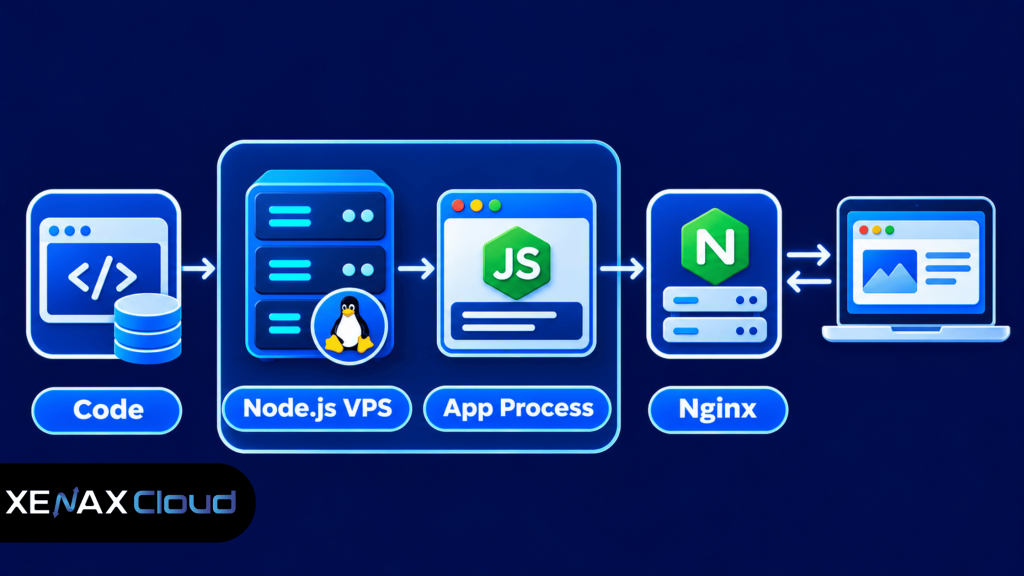
A reverse proxy is a server that accepts client requests and forwards them to an application server. It lets you expose standard web traffic while keeping the Node.js process bound to an internal port.
A properly configured vps for nodejs app deployment should keep the application process running, route public requests through a reverse proxy and use HTTPS.
Deployment Steps
- Prepare a supported Linux VPS and update its operating system.
- Install a Node.js release supported by your application.
- Upload the application code or clone its repository.
- Configure environment variables and install production dependencies.
- Test the application locally on its configured port.
- Run the application with a process manager.
- Configure a reverse proxy, domain and HTTPS certificate.
Install Dependencies and Start the Application
After connecting to your Linux VPS through SSH, move to the application directory and install its dependencies using the package manager specified by the project.
For an npm-based application, the common commands are:
cd /var/www/my-node-app
npm ci
The npm ci command installs dependencies from the lock file and is suitable for repeatable deployment when the project has a valid package-lock.json.
If the project defines a production start script, use the script specified in its package.json. For example:
npm run start
Test the application on its local port before configuring public traffic. The actual port must match the application configuration.
Keep the Node.js Process Running
A process manager supervises application processes and can restart them after a failure or server reboot. PM2 is one commonly used option for Node.js applications.
A basic PM2 workflow looks like this:
npm install -g pm2
pm2 start npm –name my-node-app — run start
pm2 status
pm2 logs my-node-app
Configure the process manager’s startup integration for your Linux distribution and verify that the application starts after a controlled reboot. Do not assume that starting a process once makes it persistent.
Configure a Reverse Proxy and HTTPS
A reverse proxy such as Nginx can receive requests for your domain and forward them to the Node.js application on an internal port. This allows the application process to listen on a local interface instead of exposing its development port directly to the internet.
A simplified Nginx configuration may look like this:
server {
listen 80;
server_name example.com www.example.com;
location / {
    proxy_pass http://127.0.0.1:3000;
    proxy_http_version 1.1;
    proxy_set_header Host $host;
    proxy_set_header X-Real-IP $remote_addr;
    proxy_set_header X-Forwarded-For $proxy_add_x_forwarded_for;
    proxy_set_header X-Forwarded-Proto $scheme;
}
}
Replace the domain and internal port with your actual values. Validate the configuration before reloading Nginx, then configure HTTPS and redirect public HTTP traffic to the secure endpoint.
NodeJS Hosting India: What Should Developers Check?
NodeJS hosting India should provide the server access and network setup required to deploy your application while keeping the location of the hosting infrastructure clear.
For an Indian business, the physical location of the server can matter for data residency, operational requirements and network latency to users or connected services. A provider’s advertised service location should match the actual facility hosting the workload.
Check these details before ordering:
- Server location: Confirm the country and facility where the VPS runs.
- Virtualisation: Check whether the VPS uses KVM or another virtualisation platform.
- Operating system: Confirm that your preferred Linux distribution is available.
- Root access: Verify that you can install packages and configure system services.
- Network capacity: Check the port speed and applicable traffic policy.
- Backups: Understand backup frequency, retention and restoration procedure.
- Support: Confirm whether assistance is available for infrastructure issues and whether application administration is your responsibility.
Xenax Cloud operates one Tier-III data centre in Banda, Uttar Pradesh, India. Its VPS hosting uses KVM virtualisation, Linux, a 500 Mbps port, one IPv4 address, full root access and weekly backups.
The VPS server gives developers control over the operating system and application stack. You can review the Xenax Cloud VPS hosting plans to compare the available resource families and configurations.
For technical deployment guidance, the Node.js documentation explains the runtime and its core concepts. Use the documentation for the Node.js release your application supports rather than copying commands intended for a different version.
Speed VPS vs General VPS vs Gold VPS for Node.js
The right Node.js VPS family depends on whether your workload needs NVMe storage, more RAM per vCPU or high-frequency CPU resources.
Xenax Cloud offers three VPS families with different resource priorities. All use KVM virtualisation and Linux, with full root access, a 500 Mbps port, one IPv4 address and weekly backups.
| VPS family | Resource focus | Starting configuration | Suitable workload |
| Speed VPS | NVMe storage | 2 vCPU, 4 GB RAM, 40 GB storage | APIs and applications needing fast storage |
| General VPS | More RAM per vCPU | 2 vCPU, 8 GB RAM | Memory-heavy services and multiple processes |
| Gold VPS | High-frequency Xeon Gold CPU | 2 vCPU, 4 GB RAM | Workloads sensitive to CPU performance |
Speed VPS has eight sizes, ranging from 2 vCPU, 4 GB RAM and 40 GB storage to 32 vCPU, 64 GB RAM and 200 GB storage. General VPS has four sizes, with configurations ranging from 2 vCPU and 8 GB RAM to 16 vCPU and 64 GB RAM.
Gold VPS has eight sizes, starting at 2 vCPU and 4 GB RAM and extending to 32 vCPU and 64 GB RAM. Its high-frequency Xeon Gold processors make it a candidate for CPU-sensitive workloads, but actual application performance still depends on code efficiency, database behaviour and request patterns.
Which VPS Family Should You Select?
Choose the family based on the resource bottleneck you expect to encounter.
- Choose Speed VPS when NVMe storage is a priority and your application has a moderate memory requirement.
- Choose General VPS when the application and its supporting services need more RAM relative to CPU capacity.
- Choose Gold VPS when CPU frequency is a key consideration for your workload.
Do not select a VPS only by comparing vCPU counts. A Node.js application that spends most of its time waiting for database responses may benefit more from query optimisation than from additional CPU resources.
Worked Example: Node.js VPS for a Pune SaaS Application
Consider a Pune-based SaaS developer deploying a Node.js API for a business application. The service runs one API process, two background workers, a monitoring agent and a local reverse proxy, with a separate managed database.
The developer estimates that the application and its supporting services need around 5 GB of working memory under the expected workload. The VPS must also leave room for Linux and routine system processes, so a configuration with 4 GB RAM would not meet the stated memory requirement.
Xenax Cloud’s General VPS begins with 2 vCPU and 8 GB RAM. That makes it a more suitable starting configuration for this example than the Speed VPS entry configuration of 2 vCPU and 4 GB RAM, because the deciding factor is memory rather than storage speed.
The developer should monitor memory use, CPU utilisation, response times and worker queues after deployment. If the workload grows or CPU becomes the limiting resource, the next decision should be based on those measurements rather than an assumed visitor count.
General VPS is not the right choice if the application is primarily CPU-bound and needs a higher-frequency processor. In that case, evaluate Gold VPS and compare the required CPU characteristics with the application’s measured workload.
Security, Monitoring and Maintenance for a Node.js VPS
A production Node.js VPS needs routine operating-system maintenance, restricted access, application monitoring and tested backups.
Root access gives you administrative control, but it also means configuration mistakes can affect the entire server. Use a non-root deployment account for routine application work and reserve elevated permissions for administration.
Secure the Server and Application
Apply these controls before exposing the application publicly:
- Use SSH key authentication and restrict administrative access.
- Keep the operating system and Node.js dependencies updated.
- Configure a firewall to allow only required ports.
- Bind the Node.js application to localhost when Nginx handles public traffic.
- Store secrets in environment variables or a suitable secret-management system.
- Use HTTPS for public application traffic.
- Validate input and apply authentication and authorisation checks to protected API routes.
Do not store database passwords, API keys or signing secrets in a public Git repository. If a secret is exposed, rotate it rather than simply deleting it from the latest commit.
Monitor the Application
Monitor the server and application separately because a healthy VPS does not guarantee a healthy Node.js service.
Useful measurements include:
- CPU utilisation and memory consumption.
- Disk usage and log growth.
- HTTP response codes and response times.
- Application restarts and uncaught errors.
- Database connection failures.
- Background job failures and queue delays.
Set alerts for sustained resource pressure rather than reacting to every brief spike. Review logs after deployment and after major dependency updates to identify errors before they affect more users.
Plan Backups and Recovery
A backup is a separate copy of data that can be restored after accidental deletion, corruption or infrastructure failure. Xenax Cloud includes weekly backups with its VPS plans, but you should still maintain an application-specific backup strategy.
Back up databases and user-uploaded files according to how frequently they change. Store an additional copy outside the VPS and periodically test restoration, because an untested backup does not prove that the application can be recovered.
VPS for Node.js App: FAQs
Is a VPS good for hosting a Node.js app?
Yes, a VPS is suitable for a Node.js application that needs a persistent process, custom dependencies or control over Linux configuration. You can install the required runtime, manage background workers and configure a reverse proxy. You must also maintain the operating system, application security and deployment process.
How much RAM does a Node.js VPS need?
A small Node.js application may start with 4 GB RAM, while services running multiple workers or supporting components may need 8 GB or more. Measure actual memory use under representative traffic. Include operating-system overhead, monitoring agents, caches and other processes when sizing the server.
Can I host multiple Node.js apps on one VPS?
Yes, you can host multiple Node.js applications on one VPS if its CPU, RAM, storage and network capacity can support their combined workload. Assign separate ports, process names, domains and environment configurations. Keep each application’s dependencies and secrets isolated, and monitor resource usage across all processes.
Is Linux required for Node.js VPS hosting?
No, Node.js can run on more than one operating system, but Linux is a common choice for production VPS deployments. Linux provides standard tools for SSH administration, package management, process supervision and reverse proxy configuration. Confirm that your application’s dependencies support the operating system you select.
What is the difference between Node.js hosting and a Node.js VPS?
Node.js hosting is a service configured to run Node.js applications, while a Node.js VPS gives you a virtual server with operating-system access and control over the application environment. Managed Node.js hosting may handle more infrastructure tasks, whereas a VPS generally requires you to manage deployment and maintenance.
Can I run a database and Node.js app on the same VPS?
Yes, you can run a database and Node.js application on one VPS, but both services compete for CPU, RAM and storage. For a small project, this may be practical. For a growing production application, consider a separate database service to isolate resource demand and simplify scaling.
Which Xenax Cloud VPS is suitable for a Node.js app?
Speed VPS suits applications that prioritise NVMe storage, General VPS suits workloads needing more RAM per vCPU, and Gold VPS is intended for CPU-sensitive workloads. Compare the application’s measured memory and CPU use with the available configurations before selecting a size.
For a Node.js application with moderate storage needs, evaluate Speed VPS; for multiple workers or memory-heavy services, consider General VPS; and for CPU-sensitive processing, assess Gold VPS. Start with the configuration that meets your measured requirements and review server metrics as traffic and application workload change.