A VPS for Telegram bot is a virtual private server that runs your bot’s code and processes Telegram messages without depending on your personal computer staying switched on. It suits bots that respond to commands, send scheduled notifications, connect to business systems or perform background tasks, provided the server has enough resources for the workload.
A bot running on a laptop may stop responding when the computer sleeps, loses connectivity or closes the application. Hosting it on a VPS gives the process a persistent server environment, although you still need to configure automatic restarts, monitoring and secure access.
The right setup depends on the bot’s programming language, number of users, frequency of background tasks and external services it calls. A simple notification bot has different requirements from a bot that processes uploaded files or queries a large database.
What Does a VPS for Telegram Bot Actually Do?
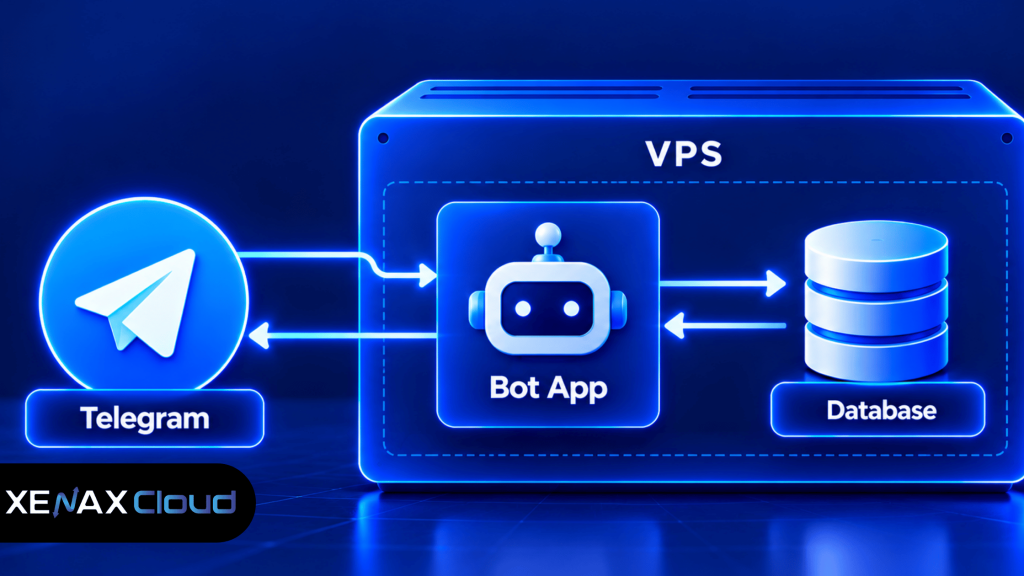
A VPS for Telegram bot hosting runs your application code, receives updates from Telegram and sends replies through the Telegram Bot API. It can also run scheduled jobs, connect to databases and communicate with other services.
A VPS is a virtual private server that provides an allocated set of computing resources on a physical server. Xenax Cloud’s VPS hosting uses KVM virtualisation, Linux, full root access, one IPv4 address, a 500 Mbps network port and weekly backups.
A Telegram bot typically has four parts:
- Bot application: Your Python, Node.js or other supported program that defines commands and response logic.
- Telegram Bot API: The interface your application uses to receive updates and send messages.
- Persistent storage: A database or files used for preferences, job status, user settings and other information that must survive restarts.
- Background tasks: Scheduled notifications, data processing or periodic checks that run outside an individual message handler.
These components do not always need separate servers. A small bot can run its application and a lightweight database on one VPS, while a more demanding bot may benefit from an external database or separate worker processes.
A VPS does not guarantee that every message will be delivered instantly. Telegram API limits, network delays, application errors and third-party dependencies can all affect how the bot behaves.
How Do You Keep a Telegram Bot Running 24×7?
To host Telegram bot 24×7, run the bot as a managed background service that starts automatically, restarts after unexpected failures and records useful logs. A VPS provides the environment, but service configuration is what helps the application recover.
The two common ways to receive Telegram updates are long polling and webhooks. With long polling, the bot application repeatedly requests new updates from Telegram. With webhooks, Telegram sends updates to a public HTTPS endpoint configured for the bot.
Choosing between long polling and webhooks
- Long polling: Often simpler for a small bot because the application initiates the connection. It can work without exposing an incoming application port publicly.
- Webhook: Useful when you want Telegram to send updates to an HTTPS endpoint. It requires a reachable endpoint and correct TLS and network configuration.
- Background worker: Useful for scheduled messages, file processing or tasks that should not delay a reply to an incoming command.
For a small bot, long polling may be the easiest starting point. If you use webhooks, follow Telegram’s current requirements for webhook URLs, certificates and supported ports instead of assuming that any public port will work.
A process manager such as systemd can start the bot during system boot and restart it after a failure. This is more reliable than leaving a terminal window open and assuming the process will continue running.
Which VPS Configuration Does a Telegram Bot Need?
The right VPS configuration depends on the programming language, libraries, persistent storage and workload rather than the number of bot commands alone. Start with a modest configuration for a lightweight bot, then measure its actual resource use.
| Bot workload | Possible starting configuration | What to monitor |
| Simple command and reply bot | 2 vCPU, 4 GB RAM | Process memory and request errors |
| Notification bot with scheduled jobs | 2 vCPU, 4 GB RAM | Job queues, scheduling and logs |
| Bot with database queries and several workers | 2 to 4 vCPU, 8 GB RAM for evaluation | Memory, query time and concurrent tasks |
| File-processing or compute-heavy bot | Size according to file and processing requirements | CPU peaks, temporary storage and memory |
These are planning examples, not official Telegram requirements or measured Xenax Cloud benchmarks. The software stack, library overhead, file sizes and workload can change the appropriate configuration.
For most small bots, reliable process management and correct error handling matter more than purchasing a large server immediately. If the bot processes large uploads, generates reports or performs expensive calculations, test those tasks before choosing a final configuration.
How to Deploy a Telegram Bot on a VPS Step by Step
You can deploy a Telegram bot by preparing a Linux server, installing the required runtime, configuring the bot token and running the application under a service manager. The commands depend on your operating system and programming language.
- Choose a Linux VPS with sufficient CPU, RAM and storage.
- Update the operating system and create a dedicated application user.
- Install Python, Node.js or the runtime your bot requires.
- Upload the bot code and install its dependencies.
- Configure the bot token and other secrets outside public source files.
- Test commands, error handling and any scheduled jobs.
- Enable automatic startup, restart behaviour and application logging.
For a Python bot on a Debian- or Ubuntu-based system, a basic preparation sequence is:
sudo apt update
sudo apt upgrade
Review pending system changes before confirming an upgrade, especially if the server already hosts production workloads. Install the runtime and dependencies using the instructions appropriate to your chosen Python version and bot framework.
Store the bot token in a protected environment file or secrets mechanism. Do not paste it into public repositories, website code or logs. If a token is exposed, revoke it through Telegram’s bot management interface and configure the replacement securely.
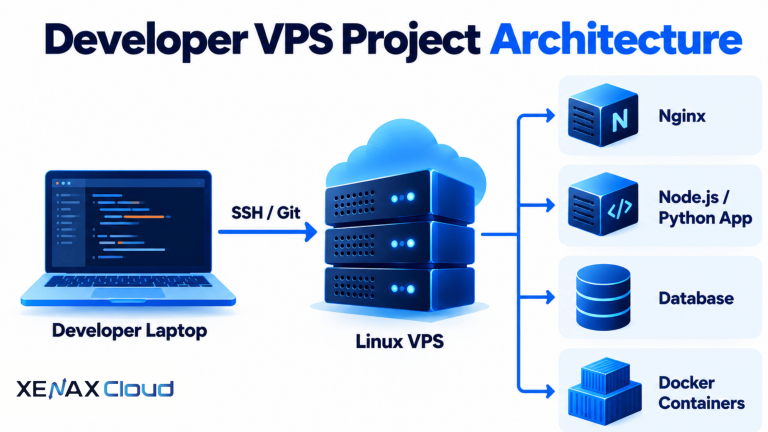
To keep the process running after you disconnect from SSH, use a service manager rather than relying on an interactive terminal. Configure the service to run as the dedicated application user, set the correct working directory and make logs available for troubleshooting.
For Telegram’s official API behaviour and update methods, consult the Telegram Bot API documentation. Check the current guidance before configuring webhooks or handling API errors.
Is a VPS for Discord Bot Hosting Different?
A VPS for Discord bot hosting uses the same basic server concepts as Telegram bot hosting, but the bot connects to Discord’s API and gateway rather than Telegram’s Bot API. Your choice of server depends on the bot’s event handling, command logic, database use and background processing.
A Discord bot may listen for gateway events, respond to slash commands, manage roles or retrieve information from a database. Some features require particular permissions or privileged intents, so configure the bot in the Discord developer settings according to the functions it needs.
The infrastructure requirements are often similar for lightweight Telegram and Discord bots:
- A supported runtime such as Python or Node.js.
- Persistent process management and logs.
- Secure storage for bot credentials.
- Network connectivity to the relevant platform API.
- A database or file storage when the bot needs persistent state.
You can host both bots on one VPS if the combined workload fits the available resources and their dependencies do not conflict. Keep them as separate services with separate credentials and logs, so a crash or update affecting one bot does not unnecessarily disrupt the other.
A single VPS may not be the right choice if one bot has heavy processing needs or both applications require strict isolation. In that case, consider separate VPS instances or move shared data services to an appropriate external system.
Worked Example: A Jaipur Coaching Institute’s Telegram Bot
A coaching institute in Jaipur can use a Telegram bot to answer common admission questions, send class reminders and let students request a timetable. Its server requirements depend on whether the bot sends simple messages or also processes files and queries a database.
Suppose the institute has a small administrative team and expects the bot to handle commands, scheduled reminders and basic database lookups. A configuration with 2 vCPU and 4 GB RAM is a reasonable candidate for initial testing, provided the database and processing workload remain modest.
The institute should test the bot with realistic message bursts, scheduled jobs and database requests. If memory remains under pressure because multiple workers and database services share the server, a configuration with 2 vCPU and 8 GB RAM is a sensible next option to evaluate.
The smaller configuration is not automatically unsuitable. Upgrade when measurements show persistent memory pressure, CPU saturation or delayed jobs that cannot be resolved through application improvements. If the bot processes large documents or runs CPU-intensive tasks, estimate those requirements separately rather than relying on this example.
Use this decision rule:
- Choose a smaller configuration for evaluation when the bot mainly responds to commands and sends simple notifications.
- Choose more RAM when memory pressure persists during normal traffic or multiple workers share the server.
- Choose more CPU when processing tasks or concurrent handlers keep CPU busy and delay responses.
- Separate services when a database or heavy job competes with the bot’s message-handling process.
Xenax Cloud offers Speed VPS with NVMe storage, General VPS with more RAM per vCPU and Gold VPS with high-frequency Xeon Gold processors. Compare the available Xenax Cloud VPS configurations against the measured workload rather than choosing only by the family name.
How Do You Secure and Maintain a Telegram Bot VPS?
A secure Telegram bot VPS protects the bot token, restricts server access, validates incoming data and keeps recoverable copies of important state. Security depends on both server configuration and the bot’s application logic.
Use these practices before putting the bot into regular use:
- Protect credentials: Keep bot tokens and API keys out of public code and logs.
- Limit permissions: Run the bot under a dedicated user instead of root.
- Restrict network access: Open only the ports needed for SSH, HTTPS or other required services.
- Validate inputs: Treat message text, uploaded files and callback data as untrusted input.
- Handle failures: Add timeouts, retry logic and error logging for external API calls.
- Back up state: Protect databases, configuration and any files that the bot needs to recover after a failure.
For a webhook-based bot, verify requests according to Telegram’s current webhook guidance and avoid accepting arbitrary requests as trusted bot updates. For long polling, protect the server’s outbound access and credentials even though you may not need a public webhook endpoint.
Xenax Cloud VPS plans include weekly backups, but confirm the backup scope and retention requirements for your own application. Before changing the deployment or database, take an additional backup and verify that you can restore the bot’s persistent state.
Use a service manager to restart the application after a crash, and monitor logs for repeated failures rather than allowing the process to restart indefinitely without investigation. A restart policy can recover a process, but it cannot fix a broken token, invalid code or an unavailable external API.
VPS for Telegram Bot: FAQs
Can I run a Telegram bot on a VPS continuously?
Yes, a Telegram bot can run continuously on a VPS when the application is configured as a managed service and the server remains operational. Set up automatic startup, restart behaviour and logging. External API failures, application bugs and maintenance can still interrupt service, so monitor the process and handle errors.
How much RAM does a Telegram bot need?
A lightweight Telegram bot may be suitable for evaluation on a VPS with 4 GB RAM, while bots with several workers, database services or file-processing tasks may need more. Measure memory during representative use and increase RAM if persistent pressure affects response handling or background jobs.
Can I host a Telegram bot without my computer being on?
Yes, a VPS runs the bot independently of your personal computer. After deployment, the application can continue processing messages when your laptop is switched off, provided the server and its dependencies remain available. Configure the bot as a service so it starts automatically after a server reboot.
Should I use long polling or a webhook for my Telegram bot?
Long polling is often simpler for a small bot because the application requests updates from Telegram. Webhooks let Telegram send updates to a public HTTPS endpoint and require the endpoint to be configured correctly. Choose based on your application framework, networking setup and deployment needs.
Can I host Telegram and Discord bots on the same VPS?
Yes, you can run Telegram and Discord bots on one VPS if their combined CPU, RAM, storage and dependency requirements fit the server. Run them as separate services with distinct credentials and logs. Use separate servers if resource contention or isolation requirements make a shared environment unsuitable.
Which Xenax Cloud VPS family suits a Telegram bot?
The right family depends on the workload rather than the messaging platform. Speed VPS offers NVMe storage, General VPS provides more RAM per vCPU, and Gold VPS uses high-frequency Xeon Gold processors. Start with measured requirements for the bot runtime, database and background tasks before selecting a configuration.
How do I recover a Telegram bot after a server restart?
Run the bot through a service manager configured to start at boot and restart after unexpected exits. Check the service logs after a restart to confirm that the application can read its configuration, authenticate with Telegram and reconnect to any database. Keep a current backup of persistent state and deployment settings.
For a small Telegram bot that mainly responds to commands and sends notifications, start by evaluating a Linux Speed VPS configuration with 2 vCPU and 4 GB RAM. Choose more memory or CPU if your database, worker count or processing workload requires it, then monitor the service after deployment.