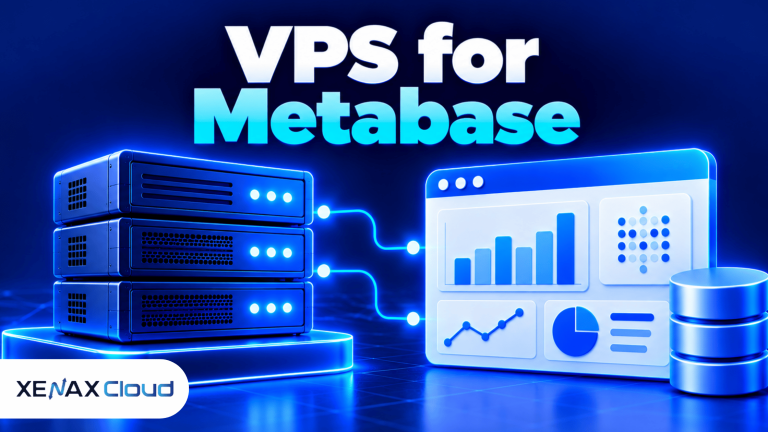
A VPS for Metabase is a virtual private server that runs Metabase, the business intelligence application used to explore data, create charts and share dashboards. The right configuration depends on the size of your data, the number of people using dashboards, the complexity of queries and whether the connected database runs on the same server.
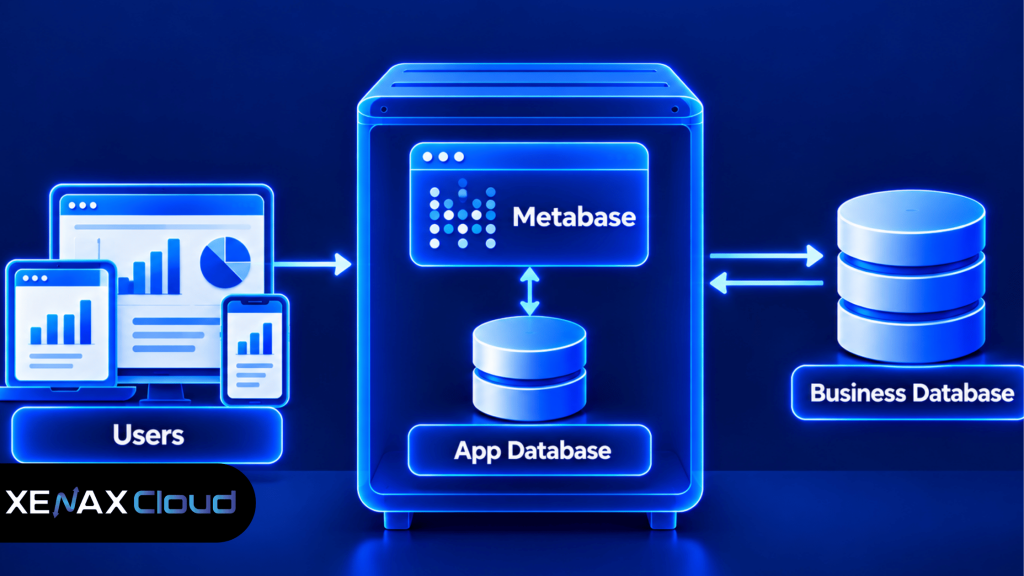
Metabase does not automatically store every business record in its own application database. It connects to data sources such as PostgreSQL, MySQL and other supported databases, then queries those sources to produce analytics. The application database separately stores Metabase configuration, users, saved questions and dashboard metadata.
This distinction affects server sizing. A small team querying an existing database may need less capacity than an organisation running Metabase, its application database and a large analytical database on one VPS.
Choosing a VPS for Metabase starts with checking your dashboard workload, database size, RAM requirements and expected concurrent users.
What Does Metabase Need From a VPS?
Metabase needs enough memory and CPU for its application process, background work and concurrent requests, plus storage for its application database if that database is hosted locally. The connected business database has its own resource requirements.
Business intelligence (BI) tool hosting is a setup that runs software for querying, analysing and presenting business data. Metabase is a BI tool that lets users build questions, visualisations and dashboards through a web interface.
A typical installation has three parts:
- Metabase application: Handles logins, saved questions, dashboard rendering and database connections.
- Metabase application database: Stores configuration, users, collections, saved questions and other application metadata.
- Analytics database: Holds the business records Metabase queries, such as orders, sales, customer information or operational data.
The application database and analytics database can be different systems. For a small deployment, the application and its metadata database may run on one VPS, while the actual business data remains on an existing database server. For a larger deployment, separating these workloads can prevent analytics queries from competing with the application for CPU, memory and disk access.
Metabase can be deployed using Docker or another supported installation method. Docker packages an application and its dependencies into a container, making the deployment easier to reproduce, but it does not remove the need to plan persistent storage, upgrades, networking and backups.
Which VPS Configuration Fits a Metabase Deployment?
The right VPS configuration depends on whether Metabase is the only workload, whether its application database is local and how demanding the connected data queries are. Treat the following configurations as starting points for evaluation, not guaranteed capacity.
| Deployment type | Suggested starting point | Main consideration |
| Small internal dashboard | 2 vCPU and 4 GB RAM for evaluation | Keep query complexity and concurrent use modest |
| Team dashboard with local metadata database | 2 to 4 vCPU and 8 GB RAM for evaluation | Allow memory for Metabase and database processes |
| Heavier analytics usage | 4 or more vCPU with RAM sized from monitoring | Query complexity and concurrency can dominate |
| Metabase with a local analytical database | Size for both application and database | Storage performance, RAM and CPU contention |
These are planning estimates rather than official Metabase minimums or Xenax Cloud benchmark results. A database with large joins, many simultaneous queries or high-cardinality data may need significantly more capacity. Validate the chosen configuration using your actual database and dashboard workload.
How Much RAM and CPU Does Metabase Need?
Metabase needs enough RAM to run the Java application and its supporting processes without persistent memory pressure. CPU demand depends on dashboard concurrency, background operations and how much query processing occurs on the same machine.
The Java Virtual Machine (JVM) is the runtime that executes Metabase. The amount of memory available to the JVM should leave room for the operating system, file cache, container overhead and any locally hosted database. Allocating nearly all system RAM to the JVM can make the server unstable under load.
Use these practical signals to guide sizing:
- RAM: If memory remains heavily occupied during normal use, inspect JVM memory, other processes and database caching before resizing.
- CPU: If CPU stays saturated while users open dashboards, investigate slow queries and concurrency as well as adding vCPU.
- Disk: Allow space for the operating system, application files, the application database, logs and backups.
- Query time: Slow dashboards can result from the underlying SQL query or database indexes rather than an undersized Metabase server.
- Concurrent users: Ten people opening a lightweight dashboard do not necessarily create the same load as ten people running complex queries at once.
For an existing analytics database, a configuration with 2 vCPU and 4 GB RAM may be a reasonable test environment for a lightweight deployment. A setup with 2 vCPU and 8 GB RAM provides more memory headroom when Metabase shares the server with its metadata database, but still may not suit heavy analytical workloads.
Avoid sizing from the number of registered accounts alone. The important variables are concurrent activity, dashboard refresh patterns, query complexity and the volume of data processed. Measure the workload during a representative busy period before deciding to scale.
A VPS for Metabase should have enough RAM and CPU to handle dashboard queries, background tasks and simultaneous users without persistent resource pressure.
How to Set Up Metabase on a VPS Step by Step
To host Metabase on a VPS, prepare a supported server environment, deploy the application, configure a persistent application database and secure the public connection. Confirm the current official installation instructions before using specific image tags or commands.
- Choose a Linux VPS with suitable CPU, RAM and storage headroom.
- Update the operating system and restrict administrative access.
- Install Docker or another installation method supported by Metabase.
- Configure persistent storage and the application database.
- Connect the analytics database using a dedicated account with limited permissions.
- Secure the web interface with HTTPS and appropriate access controls.
- Test dashboards, backups, upgrades and recovery before inviting users.
Docker Compose is often used to describe the services and settings for a containerised application. The exact configuration depends on the chosen Metabase version and application database, so use the official deployment documentation rather than treating a short example as a complete production configuration.
For deployment reference, consult the official Metabase installation documentation. Follow the instructions for the deployment method you choose, including persistence and upgrade requirements.
Keep credentials out of public source repositories. Use environment variables or an appropriate secrets-management mechanism, restrict database access to the required network paths and avoid exposing database ports directly to the public internet.
A successful first launch is not the end of setup. Confirm that Metabase can reconnect after a restart, that saved questions persist, and that the application database can be restored from backup.
Should You Run Metabase and the Database on the Same VPS?
Running Metabase and its application database on the same VPS can simplify a small deployment, but hosting the analytical database separately often makes resource planning easier. The right choice depends on query load, operational requirements and the capacity available on the server.
For a small team, one VPS may be adequate when the analytics database already exists elsewhere and only Metabase plus its metadata database run locally. If you also move a large production database onto that server, the workloads can compete for RAM, CPU and storage I/O.
Consider separating the analytical database when:
- Complex queries cause the dashboard application to become slow.
- Database storage growth makes the server’s disk capacity difficult to manage.
- Database maintenance or restarts should not affect the same application environment.
- Different teams need separate database administration or backup policies.
- The database requires more RAM or CPU than the Metabase application itself.
Separation also adds operational work. You must manage database connectivity, access rules, backups and network security between systems. For a small installation, that additional complexity may not be justified until monitoring shows a real resource or operational problem.
A self hosted dashboard is an analytics interface that an organisation operates on infrastructure it controls or manages. Self-hosting gives you more control over deployment and access, but your team remains responsible for patching, credentials, database permissions, backups and recovery.
What Should You Check When Comparing BI Tool Hosting?
BI tool hosting should be evaluated by resource allocation, database connectivity, access controls, backup arrangements and the location of the infrastructure. The hosting specification matters, but so does the work required to operate the application safely.
Xenax Cloud’s VPS infrastructure uses KVM virtualisation, Linux, a 500 Mbps network port, one IPv4 address, full root access and weekly backups. Its data centre is in Banda, Uttar Pradesh, India. These are infrastructure details, not a promise of a specific Metabase dashboard response time.
When comparing VPS options, check the following:
- CPU and memory: Confirm the actual vCPU and RAM allocation for the selected configuration.
- Storage: Check the available disk capacity and whether the storage type suits the application and database workload.
- Network access: Make sure the server can reach the database securely without opening unnecessary public ports.
- Operating system: Verify that your selected Metabase installation method supports the environment you plan to use.
- Backup scope: Confirm which server data is covered and arrange separate protection for important database content.
- Administration: Decide who will apply updates, monitor resource usage and handle recovery if the application fails.
A VPS provides more operating-system control than a typical shared web hosting account, but it also requires more administration. If you do not want to manage Linux, application updates and database connections, a managed service may suit your team better than an unmanaged server.
Review the available Xenax Cloud VPS hosting configurations to compare the Speed VPS, General VPS and Gold VPS families. The Speed VPS family uses NVMe storage; General VPS provides more RAM per vCPU; and Gold VPS uses high-frequency Xeon Gold processors. Choose according to the workload rather than assuming one family is always best for Metabase.
Worked Example: Hosting Metabase for a Jaipur Retail Business
A Jaipur retailer running sales reports for a small management team should start with the existing database and dashboard workload before selecting a VPS size. The right configuration depends on whether the retailer is only hosting Metabase or also moving the sales database onto the server.
Suppose the retailer has six staff members who need daily sales dashboards, product reports and branch summaries. The sales database already runs on a separate system, and Metabase will host the application and its metadata database.
A configuration with 2 vCPU and 4 GB RAM is a reasonable initial candidate for a controlled workload test if dashboard queries are modest. The retailer should test the actual reports with several users accessing them together, then check memory use, CPU activity and query latency.
If the application and metadata database compete for memory, or if the team adds heavier dashboards and scheduled work, a configuration with 2 vCPU and 8 GB RAM may provide more headroom. The smaller size is not automatically wrong; it becomes unsuitable when measured load fails the team’s performance requirements.
Use this decision rule:
- Choose a smaller configuration for evaluation when the analytical database is external, dashboards are simple and monitoring shows adequate headroom.
- Choose more RAM when memory pressure persists during normal use or the application shares resources with a local metadata database.
- Choose more CPU when concurrent queries and application processing keep CPU saturated after slow queries have been investigated.
- Separate the database when its workload competes with Metabase or requires independent administration and recovery.
If the retailer moves a large analytical database onto the same VPS, neither example configuration should be accepted without measuring database storage, memory and query requirements. In that case, size the server for both workloads or keep the analytical database separate.
How Do You Secure and Maintain a Self Hosted Dashboard?
A self hosted dashboard should use restricted database permissions, protected administrator accounts, encrypted web access and tested backups. Hosting the application yourself does not automatically make the data private or secure.
Metabase access controls should match the sensitivity of the underlying data. Use database accounts with only the permissions required for reporting, and avoid giving a dashboard application unrestricted write access to a production database when read-only access is sufficient.
Before launch, check these controls:
- HTTPS: Use a reverse proxy or supported deployment configuration to encrypt browser connections.
- Database permissions: Create a dedicated account for Metabase and limit its access to the required databases and tables.
- Authentication: Protect administrator accounts with strong credentials and any supported additional authentication controls.
- Network exposure: Restrict database and administrative ports to trusted sources.
- Updates: Review application and operating-system updates, and test important changes before applying them to production.
- Backups: Protect the Metabase application database and the underlying business data according to their separate recovery needs.
Metabase’s application database contains configuration and saved work that may not be recoverable simply by reinstalling the application. Before an upgrade or migration, take a consistent backup of the application database and any other data that must be preserved, then verify that restoration is possible.
Xenax Cloud’s weekly VPS backups provide a recovery layer, but you should confirm their scope and retention against your requirements. Keep separate database backups when the analytics data is important, and test recovery before relying on the server for business reporting.
For a reporting deployment, also check that dashboard users can see only the data permitted by your organisation’s access policy. Review database permissions and Metabase collection access together; hiding a chart from a user is not a substitute for restricting access to sensitive source data where required.
When selecting a VPS for Metabase, compare Speed VPS, General VPS and Gold VPS according to storage needs, memory requirements and query-processing workload.
VPS for Metabase: FAQs
What is the best VPS size for Metabase?
There is no single VPS size that suits every Metabase installation. A lightweight setup connected to an existing database may begin testing with 2 vCPU and 4 GB RAM, while a local application database or heavier usage may need more memory. Validate the choice with representative dashboards and concurrent access.
Can Metabase run on a Linux VPS?
Yes, Metabase can run on a suitable Linux VPS using a supported installation method, including Docker. Confirm the current installation instructions, provide persistent storage for the application database and configure secure web access. The selected server must have enough resources for Metabase and any additional services hosted alongside it.
Does Metabase store my business data?
Metabase stores application information such as users, saved questions and configuration in its application database. Business records generally remain in the connected data sources that Metabase queries. Understand the distinction before planning backups, permissions or migration, and confirm where each database is hosted and how it is protected.
Can I run Metabase and PostgreSQL on one VPS?
Yes, you can run Metabase and PostgreSQL on one VPS if the server has sufficient resources and the setup meets your operational needs. Both applications compete for CPU, memory and disk access. Separate them when database workload, independent maintenance or recovery requirements make a combined deployment unsuitable.
Is a VPS suitable for a self hosted dashboard?
Yes, a VPS can host a self hosted dashboard when you need control over the application environment and can manage its security and maintenance. You remain responsible for updates, database access, monitoring and recovery. If your team cannot administer the server, consider a managed deployment instead.
Which Xenax Cloud VPS family should I choose for Metabase?
Choose based on the workload rather than the product name alone. Speed VPS offers NVMe storage, General VPS provides more RAM per vCPU, and Gold VPS uses high-frequency Xeon Gold processors. Compare the available configurations with measured CPU, memory and storage needs before ordering.
What is the best VPS for Metabase?
The best VPS for Metabase depends on your database size, dashboard complexity and concurrent users. A small deployment connected to an existing database can begin by testing a modest configuration, while heavier workloads may require more RAM or CPU. Monitor actual usage before upgrading.
How do I back up Metabase before upgrading?
Back up the Metabase application database before upgrading, and preserve any required configuration and deployment files. If Metabase connects to a separate analytics database, follow that database’s backup procedure too. Verify the backup and recovery process before making changes so saved questions, settings and business data remain recoverable.
For a small Metabase deployment connected to an existing analytics database, begin by evaluating a Linux VPS with 2 vCPU and 4 GB RAM, then scale based on measured demand. If you also host a local database or run complex reports, compare higher-memory configurations before ordering through Xenax Cloud’s VPS page.