A VPS for Node.js is a virtual private server that gives a Node.js application its own allocated CPU, RAM and storage within a virtual machine. It lets developers control the runtime, install packages, configure environment variables, run background processes and manage deployment without depending on shared hosting restrictions.
For an Indian developer or business, a VPS can be useful when an application needs a persistent Node.js process, API endpoints, WebSocket connections or custom server configuration. The right choice depends on the application’s memory use, concurrent workload, database arrangement and deployment method.
A VPS for Node.js gives developers a dedicated Linux environment to install the required runtime, manage application processes and configure server-level settings. It is especially useful when an application needs persistent backend services rather than static website hosting.
This article explains how to size a server, prepare Linux, deploy a Node.js application and keep it running after you disconnect from SSH. It also covers the practical differences between VPS families available from Xenax Cloud.
What Does a VPS for Node.js Actually Provide?
A VPS for Node.js provides an isolated server environment where you control the operating system, runtime, application dependencies and network configuration.
Node.js is a JavaScript runtime that executes JavaScript outside a web browser. It is commonly used for REST APIs, backend services, real-time applications, automation tools and server-rendered web applications.
A KVM VPS is a virtual server that uses hardware-assisted virtualisation to run an independent operating system with allocated resources. With root access, you can install Node.js, configure Nginx, create system users, manage firewall rules and select the process manager that suits your application.
This is different from ordinary shared hosting. Shared hosting is designed around a managed hosting environment and its supported application features. A VPS gives you more control over the operating system and long-running services, but you also take responsibility for server administration.
A typical Node.js deployment has these components:
- Node.js runtime: Executes the application code.
- Package manager: Installs project dependencies through npm or another supported tool.
- Application process: Runs the backend service and listens on a configured port.
- Reverse proxy: Accepts public web requests and forwards them to the application.
- Database: Stores application data, either locally or on a separate database service.
- Process manager: Restarts the application after a crash or server reboot.
A VPS is useful when you need control over these components. It is not automatically the right choice for every website. A small static website may be easier to operate through conventional web hosting, while an API or persistent backend service may need a VPS.
What Should You Check Before Choosing Node.js Hosting India?
Node.js hosting India should give you enough compute resources, suitable storage, root access and a network location that makes sense for your users.
A server’s advertised CPU and RAM are only the starting point. Your application may also need memory for database connections, caching, build processes, background jobs and monitoring agents. Leave capacity for these services instead of allocating every available resource to the Node.js process.
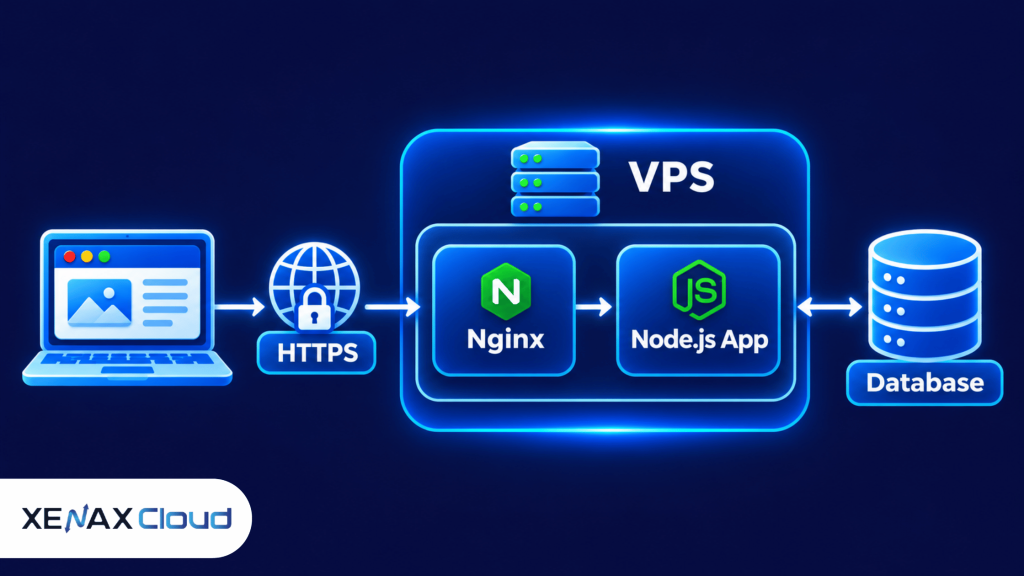
A typical production request travels from a visitor’s browser to the domain, then to a reverse proxy such as Nginx. The proxy forwards the request to the Node.js application on an internal port. The application processes the request and communicates with its database or other services.
This arrangement keeps the application process separate from the public-facing web entry point. It also gives you a place to configure HTTPS, request routing and other web-server rules.
Which VPS resources matter for Node.js?
| Resource | What it affects | What to evaluate |
| vCPU | Request processing and parallel workloads | Application workload and worker count |
| RAM | Runtime, dependencies, cache and background jobs | Peak memory use, not just idle use |
| NVMe storage | Application files, logs and local data access | Project size, uploads and database growth |
| Network port | Data transfer capacity | Expected traffic and response payload sizes |
CPU demand depends on what the application does. An API that mostly waits for database responses has a different CPU profile from a service that performs image processing, report generation or intensive calculations.
RAM needs depend on the application and its dependencies. A small Express API may run with less memory than a service using server-side rendering, multiple workers, in-memory caching or several background queues. Measure memory under representative traffic before increasing the worker count.
Storage planning should include more than the source code. Account for dependencies, uploaded files, logs, temporary files, database files if hosted locally, and room for deployment releases. Keep database backups separate from the live application directory.
For Indian users, the physical location of the server can also affect network latency. Xenax Cloud operates a Tier-III data centre in India. That gives businesses a domestic hosting location, although actual response time still depends on the visitor’s network, application processing and external services.
A reliable hosting with backups setup should protect both website files and databases. For a WordPress site, this means preserving uploaded media, themes, plugins, configuration files and database records so the website can be restored after accidental changes, failed updates or data loss.
Choosing web hosting with daily backup is not enough by itself. Check how often backups run, how long copies are retained, whether databases are included and how you can restore individual files or the complete website. If you use WordPress, read our guide on how to restore WordPress from a backup to understand the recovery process before you need it.
How to Deploy a Node App on a VPS
To deploy a Node app on a VPS, prepare Linux, install a supported Node.js release, upload the application, configure its environment and run it behind a reverse proxy.
The following example assumes an Ubuntu-based Linux server, SSH access and a project that starts through an npm script. Exact package commands can vary with the Linux distribution and the Node.js installation method.
Steps to deploy a Node.js application
- Connect to the server through SSH.
- Update the operating system packages.
- Install an actively supported Node.js LTS release.
- Create a non-root application user.
- Upload the project files to the application directory.
- Configure production environment variables.
- Start the application and test its local port.
- Configure a reverse proxy and HTTPS.
Connect to your server using the IP address and login details supplied with your VPS:
ssh username@YOUR_SERVER_IP
Update installed packages:
sudo apt update
sudo apt upgrade -y
Install Node.js using a trusted installation method that provides the required supported release. Check the official Node.js release schedule before selecting a version. Production applications should use a supported LTS release rather than an experimental or end-of-life version.
Verify the installation:
node -v
npm -v
Create a separate Linux user for the application rather than running the application as root:
sudo adduser nodeapp
Create an application directory and assign ownership:
sudo mkdir -p /var/www/my-node-app
sudo chown -R nodeapp:nodeapp /var/www/my-node-app
Upload your project using Git or another secure deployment method. Then install dependencies from the project directory:
cd /var/www/my-node-app
npm ci
Use npm ci when the project has a committed lock file and you want a reproducible dependency installation. If the application uses a different package manager, follow the project’s documented installation process.
Set production environment variables outside the source code. For example, the application may need a database connection string, a session secret and an application port. Do not commit passwords, private keys or production credentials to a public Git repository.
Start the application using the script defined in package.json:
npm run start
Test the application locally before configuring public traffic. If the app listens on port 3000, you can check its response from the server:
curl http://127.0.0.1:3000
A successful local response confirms that the application is listening. It does not yet confirm that the domain, HTTPS certificate or reverse proxy is configured correctly.
How Should You Run Node.js in Production?
A production Node.js application should run as a managed process behind a reverse proxy, with controlled environment variables and restricted network access.
Starting an application directly in an SSH session is suitable for a quick test, not a production deployment. Closing the terminal or losing the SSH connection can interrupt a process that was started interactively.
A process manager or Linux service manager can keep the application running independently of your login session. It can also start the service after a server reboot and help you inspect logs.
Common choices include:
- systemd: Linux service management with startup and restart policies.
- PM2: A Node.js process manager with process monitoring and log commands.
- Container runtime: Useful when the application is packaged and deployed through a container workflow.
Choose one process-management approach and document how the application starts, stops and restarts. Avoid running multiple managers against the same application process.
Example systemd service
For a simple application, create a service file:
[Unit]
Description=Node.js application
After=network.target
[Service]
Type=simple
User=nodeapp
WorkingDirectory=/var/www/my-node-app
Environment=NODE_ENV=production
Environment=PORT=3000
ExecStart=/usr/bin/node /var/www/my-node-app/server.js
Restart=on-failure
RestartSec=5
[Install]
WantedBy=multi-user.target
Save it as:
/etc/systemd/system/my-node-app.service
Then reload systemd and enable the service:
sudo systemctl daemon-reload
sudo systemctl enable my-node-app
sudo systemctl start my-node-app
sudo systemctl status my-node-app
The example assumes Node.js is available at /usr/bin/node and the application entry point is server.js. Confirm both paths on your own server before enabling the service.
For a public application, configure Nginx or another reverse proxy to accept HTTPS traffic and forward requests to the application’s local port. Keep the Node.js listening port inaccessible from the public internet unless there is a specific reason to expose it.
Set up a valid TLS certificate, redirect HTTP traffic to HTTPS and renew certificates before expiry. Keep database ports private and allow only the connections required by the application.
The Express production guidance also recommends setting NODE_ENV to production. This changes Express behaviour, including less verbose error responses and production-oriented caching. See the Express production best practices for further details.
Choosing web hosting with daily backup is not enough by itself. Check how often backups run, how long copies are retained, whether databases are included and how you can restore individual files or the complete website. These details determine how much recent work you can recover after a problem.
Worked Example: Which VPS Fits an Indian Node.js Project?
A small Indian software agency running one customer-facing API and one background worker can begin by evaluating a VPS with 2 vCPU and 4 GB RAM, provided measured application usage fits within that capacity.
Consider an agency in Pune building a Node.js API for an appointment-booking platform. The application has one backend service, a small background worker, a separate managed database and a moderate amount of file storage. The team wants Linux root access, NVMe storage and the ability to configure its own runtime.
Xenax Cloud Speed VPS starts with 2 vCPU, 4 GB RAM and 40 GB NVMe storage. That entry configuration gives the agency a concrete starting point to test its application, provided the combined runtime, worker, monitoring and operating-system memory use stays within the available RAM.
The next step is not to guess how many users the server can handle. Run a load test that reflects the application’s real endpoints, database queries and background tasks. Monitor CPU utilisation, memory, response time, disk use and database connection counts during the test.
If the application regularly approaches its memory limit, add RAM or reduce unnecessary processes before production traffic grows. If CPU remains saturated during request processing, investigate inefficient code and database queries, then evaluate a larger CPU allocation.
Xenax Cloud General VPS is designed for more RAM per vCPU. It may be worth evaluating when the application is memory-heavy, while Speed VPS uses NVMe storage and is available in multiple resource configurations. Gold VPS uses high-frequency Xeon Gold processors and is another option to evaluate for workloads where CPU frequency matters.
The Xenax Cloud VPS hosting plans provide the available VPS families and configurations. Compare the resource allocation with your measured workload rather than selecting a plan based only on the number of visitors claimed in a hosting advertisement.
Decision rule: Start by evaluating 2 vCPU and 4 GB RAM for one modest Node.js service with a separate database. Consider 8 GB RAM or more when the measured peak memory use, multiple application processes, caching or background jobs need additional headroom. Consider a higher CPU configuration when sustained CPU saturation remains after application and database optimisation.
The entry Speed VPS configuration is not the right choice if your application already needs more than 4 GB RAM under normal production load. In that case, evaluate a larger Speed VPS or a General VPS configuration with more RAM per vCPU.
What Should You Monitor After Deployment?
A deployed Node.js application needs monitoring for process health, memory, CPU, disk capacity, logs and database connectivity.
A server can appear healthy while the application is returning errors or failing to process background jobs. Monitor the application itself, not only whether the VPS responds to a ping.
Start with these checks:
- Process status: Confirm the Node.js service is active and restarts are not occurring repeatedly.
- Memory: Check resident memory use and look for sustained growth that may indicate a memory leak.
- CPU: Identify whether high CPU use is continuous or limited to short bursts.
- Disk: Monitor application files, logs, uploads and database storage.
- HTTP responses: Check application endpoints for unexpected errors and slow responses.
- Database: Track connection failures, query delays and storage growth.
Useful Linux commands include:
free -h
df -h
top
systemctl status my-node-app
journalctl -u my-node-app -f
Keep logs useful but avoid recording passwords, access tokens, session cookies or personal information. Rotate logs so they do not consume the server’s available disk space.
Backups need separate attention. Xenax Cloud VPS plans include weekly backups, but a weekly provider backup should not be treated as a complete application recovery strategy. Maintain separate copies of source code, environment configuration templates, uploaded files and database exports. Store sensitive credentials securely and test restoration before relying on a backup.
VPS for Node.js: FAQs
Is a VPS better than shared hosting for Node.js?
A VPS is generally more suitable when your Node.js application needs a persistent process, custom runtime configuration or root access. Shared hosting may be sufficient for websites supported by its application environment. Choose based on the actual deployment requirements, not the assumption that every JavaScript project needs a VPS.
How much RAM does a Node.js VPS need?
A small Node.js application may fit within 4 GB RAM, but the correct amount depends on its dependencies, traffic, workers and database arrangement. Monitor peak memory during realistic testing. Add capacity when the application and supporting services approach the available memory limit.
Can I host multiple Node.js applications on one VPS?
Yes, you can host multiple Node.js applications on one VPS if its CPU, RAM, storage and network capacity can support them. Assign separate application users, ports, service definitions and environment variables. Keep each application’s credentials separate and monitor combined resource usage.
Which Node.js version should I install on a production VPS?
Install a supported Node.js LTS release that is compatible with your application’s dependencies. Check the official Node.js release schedule before installation. Avoid end-of-life releases and test runtime upgrades in a staging environment before changing the production server.
Can I deploy a Node.js app without cPanel?
Yes, a Node.js application can run directly on a Linux VPS without cPanel. You can manage the runtime, packages, services, reverse proxy and firewall through SSH and Linux tools. This gives you control, but it also means you are responsible for system updates, access security and application maintenance.
Is Node.js hosting India suitable for an API serving Indian customers?
An Indian VPS can be a suitable hosting location for an API whose users are primarily in India. Actual latency depends on the user’s internet provider, routing, database location and application processing. Test from the networks and regions that matter to your customers before selecting a production configuration.
Does a VPS automatically keep my Node.js app running?
No, a VPS does not automatically manage every application process. Configure systemd, PM2 or another process manager to start the application and restart it according to your requirements. Also configure monitoring and alerts, because a running process does not guarantee that every application endpoint is working correctly.
For a modest Node.js API, evaluate a Xenax Cloud Speed VPS configuration with 2 vCPU, 4 GB RAM and 40 GB NVMe storage, then validate it under realistic load. If your application needs more memory per vCPU, compare the General VPS family before ordering.