Web hosting for bloggers India gives your blog a server where its website files, images, database and WordPress installation can run. The right hosting should support your current content, expected visitors, storage requirements and security needs without making routine website management difficult.
If you are starting a personal blog, travel website, food blog or professional publication, you probably do not need to rent an entire server. Shared hosting can provide the basic environment for publishing articles and managing a WordPress website.
The important decision is not simply choosing the cheapest package. You need to understand storage, bandwidth, backups, SSL, control panels and the point at which your blog may need more resources.
What Should Web Hosting for Bloggers India Include?
Web hosting for bloggers India should provide sufficient storage, bandwidth, a supported PHP environment, database access, HTTPS and a control panel that makes routine management manageable.
Web hosting is a service that stores website files and makes them available to visitors through the internet. A hosting server processes requests for your pages, images, scripts and database content when someone opens your blog.
For a WordPress blog, check these essentials before purchasing:
- Storage: Space for WordPress files, themes, plugins, images, backups and other website data.
- Bandwidth: The amount of data your hosting account can transfer to visitors.
- PHP and database support: WordPress needs a compatible PHP environment and a MySQL-compatible database.
- SSL certificate: HTTPS encrypts the connection between your website and visitors.
- Control panel: cPanel makes it easier to manage files, databases, email accounts and other hosting settings.
- Backup arrangements: A backup gives you a recovery point if an update, plugin or accidental deletion damages your website.
WordPress also publishes its own hosting recommendations. Its requirements page recommends supported PHP, MariaDB or MySQL versions and HTTPS. Check the official WordPress hosting requirements before selecting a hosting environment.
A hosting account should also make it possible to manage your blog without contacting technical support for every small change. For many new bloggers, cPanel and a WordPress installer are more useful than having root access to a server they do not know how to administer.
Choosing web hosting for bloggers India also means checking how easily you can manage your website after installation. Look for cPanel access, a supported WordPress environment, SSL, database management and a clear backup process. These features make routine publishing and website maintenance easier without requiring server administration knowledge.
Shared Hosting vs WordPress Hosting for Bloggers
Shared hosting and WordPress hosting can both run a blog, but they differ in how the hosting environment is packaged and optimised. Your choice depends on whether you want general website hosting or a WordPress-focused service.
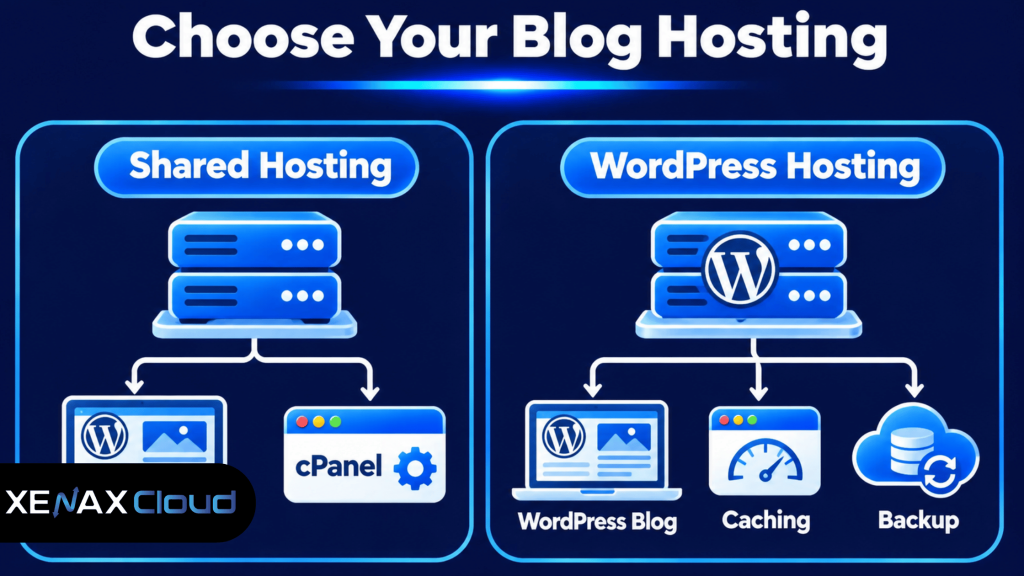
Shared hosting is a general hosting arrangement where multiple customer accounts use resources on the same physical server. It is suitable for blogs that do not require dedicated server resources or advanced operating-system control.
WordPress hosting is a hosting service configured and packaged specifically for WordPress websites. Depending on the provider, it may include WordPress installation tools, caching, backups and settings intended for WordPress workloads.
If you are still learning how WordPress websites work, read our guide on how to start blogging on WordPress. It explains the basic steps involved in setting up a blog, choosing its structure and getting your first articles published.
| Feature | Shared hosting | WordPress hosting |
| Main purpose | General websites and applications | WordPress websites |
| WordPress installation | Usually through an installer | Often includes WordPress-focused installation tools |
| Control panel | Commonly cPanel | May use cPanel or another panel |
| Caching | Depends on provider and configuration | May include WordPress-specific caching |
| Suitable for | Blogs, portfolios and business websites | Blogs and WordPress-focused projects |
Neither category automatically guarantees better performance. A well-configured shared hosting account can run a small WordPress blog effectively, while a poorly maintained WordPress installation can remain slow even on a specialised plan.
If you want to understand the initial setup process, read How to Start Blogging on WordPress. It covers the practical steps from choosing a niche and domain to installing WordPress and publishing content.
Hosting for Blog India: Which Resources Matter Most?
Hosting for blog India should be selected according to the number of websites, content storage, expected visitor activity and the applications running on the account.
Disk space is the storage allocated to your hosting account for website files, databases, email and other data. A blog with many original photographs and downloadable files needs more storage than a text-focused website.
Bandwidth is the volume of data transferred between your website and its visitors. A page containing several large images can consume more bandwidth per visit than a lightweight text page.
Consider these resource requirements:
- A personal blog with compressed images and a small plugin collection may need modest storage.
- A photography or travel blog may need more disk space because of its image library.
- A publication with frequent visitors needs enough bandwidth for its page views and media delivery.
- A blog with several editors may need a suitable user-management process and reliable backups.
For Indian readers, the physical location of the hosting infrastructure can also matter. A server located in India may provide a shorter network path for many visitors in India, although actual loading time also depends on routing, caching, page size and the visitor’s internet connection.
Do not confuse bandwidth with storage. Increasing disk space does not automatically increase the amount of traffic your website can handle. Similarly, a large bandwidth allowance does not fix slow database queries or an overloaded WordPress installation.
How to Choose the Best Hosting for New Blog
The best hosting for new blog projects is usually a shared hosting plan that supports one website, provides enough storage for its content and includes the tools needed to manage WordPress.
A new blogger should avoid buying resources based on an imagined future audience. Start with the actual website requirements and move to a larger plan when usage data shows that the current account is reaching its limits.
Use this decision rule:
- One new blog: Choose a plan that supports one website and enough disk space for WordPress, themes, plugins and images.
- One blog with a large media library: Prioritise storage and check how much space backups and email consume.
- Several blogs: Choose a plan that permits the required number of websites.
- A growing publication: Check bandwidth, resource usage and backup requirements before upgrading.
- A resource-intensive website: Consider WordPress hosting or VPS hosting if shared hosting limits become a consistent problem.
A common mistake is selecting a plan only because its storage figure looks large. Your blog also needs adequate bandwidth, compatible software, database access and a sensible backup arrangement.
Another mistake is installing every SEO, security, caching and design plugin you find. Plugins add functionality, but unnecessary or poorly maintained plugins can increase resource use and create compatibility problems. Install only what your blog actually needs.
Worked Example: Hosting for a New Indian Food Blog
Consider a food blogger in Lucknow who wants to publish recipes, cooking instructions and original photographs on one WordPress website. The blog needs one website, room for its initial image library, a database and enough bandwidth for readers opening recipe pages.
For this example, assume the initial website fits within 5 GB of disk space and its expected transfer stays within 50 GB of bandwidth. A single-site Xenax Cloud Shared Hosting Silver configuration matches those stated requirements because it supports one website, 5 GB disk space and 50 GB bandwidth.
Gold would be unnecessary if the blogger still needs only one website and remains within Silver’s resource limits. Gold becomes relevant if the same account needs to host up to three websites or requires its larger stated storage and bandwidth allowances.
Xenax Cloud Shared Hosting also includes cPanel, LiteSpeed web server, Let’s Encrypt SSL and JetBackup 5 backups. These features help with routine website management, encrypted connections and recovery planning.
The Silver configuration is not the right choice if the food blog grows beyond its storage or bandwidth allowance, or if the owner needs several separate websites. In that situation, compare Gold or Platinum against the actual resource requirements rather than upgrading without checking usage.
How to Set Up a WordPress Blog on Shared Hosting
You can set up a WordPress blog on shared hosting by connecting your domain, installing WordPress, configuring the website and checking that HTTPS works correctly.
- Register your domain. Choose a name that is easy to spell and relevant to your blog.
- Purchase hosting. Select a shared hosting plan that supports your website and storage requirements.
- Point your domain. Set the correct nameservers or DNS records provided by your hosting provider.
- Open cPanel. Sign in to your hosting control panel using the credentials supplied by the provider.
- Install WordPress. Use the available WordPress installer and select the domain for installation.
- Create administrator access. Set a unique username and strong password for the WordPress dashboard.
- Enable HTTPS. Confirm that the SSL certificate is installed and that the website opens securely.
- Publish a test post. Check the desktop and mobile layout, images, navigation and links before announcing the blog.
After installation, open the WordPress dashboard and review the basic settings. Set the site title, language, timezone and permalink structure before publishing a large number of articles.
For a typical blog, a post-name permalink structure is easier for readers to understand than URLs containing long query strings. If your website already has indexed URLs, do not change the permalink structure casually because old links may stop working without suitable redirects.
Before installing themes or plugins, confirm that your hosting environment supports the software requirements. Keep WordPress core, themes and plugins updated, and take a backup before major updates.
Before selecting a package, understand what your hosting account actually provides. Our article on shared hosting with cPanel explains the control panel, account features and hosting limits that bloggers should check before ordering.
How Much Hosting Storage and Bandwidth Does a Blogger Need?
A blogger’s storage and bandwidth needs depend on image sizes, page design, visitor numbers and how often content is updated. There is no single resource allocation that suits every blog.
For example, a text-focused technology blog with compressed screenshots may use less storage than a travel blog publishing full-resolution photographs. A recipe blog with multiple images on every article may transfer more data per page view.
Use these practical checks:
- Review disk usage in cPanel before adding more media.
- Compress images before uploading them to WordPress.
- Remove unused themes, plugins and old backup archives from the live account.
- Check bandwidth reports to understand data transfer.
- Review resource usage if the website becomes slow during busy periods.
Do not keep the only copy of important photographs or article drafts on the hosting account. Maintain a separate copy of original content and important media. A hosting backup helps with recovery, but it should not be your only copy of business-critical material.
If the blog regularly reaches account limits, investigate the cause first. A sudden increase in bandwidth could come from legitimate traffic, large images, automated requests or hotlinking. The correct solution depends on what is consuming the resources.
When Should a Blogger Upgrade from Shared Hosting?
A blogger should upgrade when the website consistently needs more resources or technical control than the current shared hosting plan provides. A temporary traffic spike does not automatically mean that you need a VPS.
Check these indicators before changing hosting:
- Disk usage is approaching the account’s allocated storage.
- Bandwidth usage regularly approaches the plan allowance.
- Resource limits are reached during normal publishing or visitor activity.
- The website needs server-level software or configuration that shared hosting does not permit.
- Several growing websites need more resources than the current account can provide.
If the blog remains a straightforward WordPress website, moving from one shared hosting plan to another with suitable limits may be enough. If the website needs dedicated resource allocation, custom server software or greater administrative control, a KVM VPS may be more appropriate.
Xenax Cloud provides shared hosting and separate VPS options for different requirements. The decision should be based on actual resource usage and the level of server management you can handle, not simply on the assumption that VPS hosting is always faster.
Xenax Cloud Shared Hosting vs the usual alternatives
| Feature | Xenax Cloud | Typical Indian shared host | Global budget host |
|---|---|---|---|
| Starting price | ₹149/mo | ₹199/mo | ₹149/mo (renews ₹499) |
| Storage | 15 GB SSD storage | 10 GB SSD | 25 GB SSD |
| DDoS protection | 100 Gbps, always on | Basic | Cloudflare only |
| Support | 24×7, in-house engineers | Tickets, business hours | Chat, outsourced |
| Data centre | India (NVMe) | India | Singapore / US |
| Control panel | cPanel / WHM included | cPanel | Custom panel |
Entry-level plans, list prices including GST where shown. Check each provider before buying — prices change.
See Shared Hosting plansWeb Hosting for Bloggers India: FAQs
Which hosting is suitable for a new blog in India?
Shared hosting is suitable for many new blogs because it provides website storage, database access and a control panel without requiring server administration. Choose a plan that supports your website count, storage and bandwidth needs. A single-site blog can begin with a suitable single-site configuration.
Is shared hosting enough for a WordPress blog?
Yes, shared hosting can run a WordPress blog when the server supports the required PHP, database and HTTPS environment. It is a practical choice for straightforward websites. If your blog consistently reaches resource limits or needs server-level control, evaluate a larger plan or VPS hosting.
How much storage does a beginner blogger need?
The required storage depends on the number and size of images, themes, plugins, databases and other website files. A text-focused blog may need less storage than a photography website. Check actual disk usage in cPanel and leave room for future content and account files.
Is Indian hosting suitable for readers outside India?
Yes, an Indian hosting server can serve readers outside India, but loading performance depends on international routing, caching, website optimisation and visitor location. If your audience is spread across several countries, use caching and consider a content delivery network to distribute static assets closer to visitors.
Do bloggers need cPanel hosting?
No, cPanel is not technically required to run a blog, but it makes common hosting tasks easier for many beginners. You can use it to manage files, databases, email accounts and SSL settings. It is useful when you want browser-based hosting management without command-line administration.
Should I choose shared hosting or VPS hosting for blogging?
Choose shared hosting if you run a straightforward blog and do not need server-level control. Consider VPS hosting if your website consistently needs more resources, custom software or administrative access. A VPS also requires more server-management knowledge, so additional control should be an actual requirement.
Does hosting include WordPress backups?
Backup arrangements depend on the hosting plan and provider. Xenax Cloud Shared Hosting includes JetBackup 5 backups, but you should understand the backup schedule and retention available for your account. Keep a separate copy of important content and media rather than relying on one backup location.
For a single new blog that fits within 5 GB of disk space and 50 GB of bandwidth, Xenax Cloud Shared Hosting Silver is a sensible starting configuration. Choose Gold if you need up to three websites, or Platinum if you need up to ten, and review actual usage before upgrading.