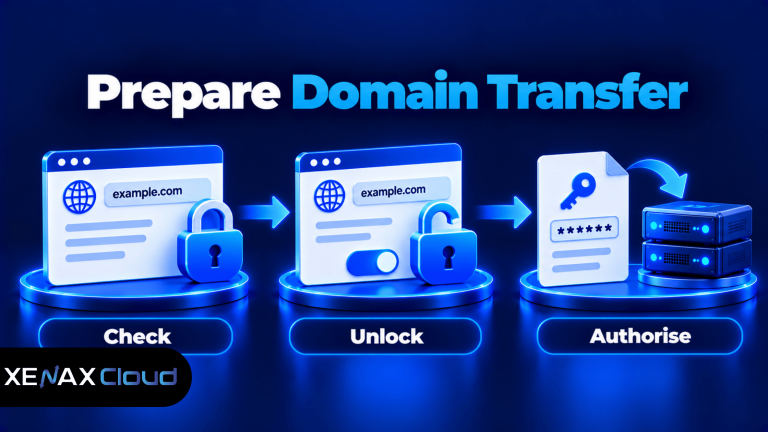
Transfer domain to new registrar means moving the management of your domain name registration from your current registrar to another registrar. The process normally requires an unlocked domain, an authorised transfer request and an EPP or Auth-Code. Your website and email can continue working if you preserve the existing DNS configuration.
You might want to change registrars because of domain management difficulties, renewal terms, support quality or the need to manage multiple domains from one account. However, transferring a domain is not the same as moving a website to another hosting server.
The distinction matters because an incorrectly handled transfer can interrupt DNS management, email delivery or domain ownership verification. Understanding the domain transfer process before starting helps you avoid unnecessary downtime and transfer rejections.
What Does It Mean to Transfer a Domain to a New Registrar?
Transferring a domain to a new registrar means changing the company responsible for managing the domain registration without necessarily changing the website hosting provider.
A domain registrar is an organisation authorised to register and manage domain names through the relevant domain registry. For example, you might register a .com domain with one registrar and later move its registration to another.
Three organisations or services can have different responsibilities:
- Domain registrar: Manages domain registration, renewal, ownership information and registrar-level settings.
- Domain registry: Maintains the central database for a particular domain extension.
- DNS hosting provider: Maintains DNS records that direct visitors and email services to their destinations.
These responsibilities do not have to belong to the same company.
For example, your domain might be registered with Registrar A, use DNS managed by Provider B and host its website on Xenax Cloud. Transferring the registration to Registrar C does not automatically require moving the DNS service or website hosting.
This distinction is particularly important for businesses using WordPress, cPanel or custom applications. The domain transfer changes the registrar relationship, not the server where your website files and databases are stored.
How Does the Domain Transfer Process Work?
The domain transfer process involves preparing the existing registration, obtaining its authorisation code, submitting a request to the receiving registrar and confirming the transfer.
For most generic top-level domains such as .com, .org and .net, the transfer follows a standard procedure governed by applicable ICANN policies and registry requirements.
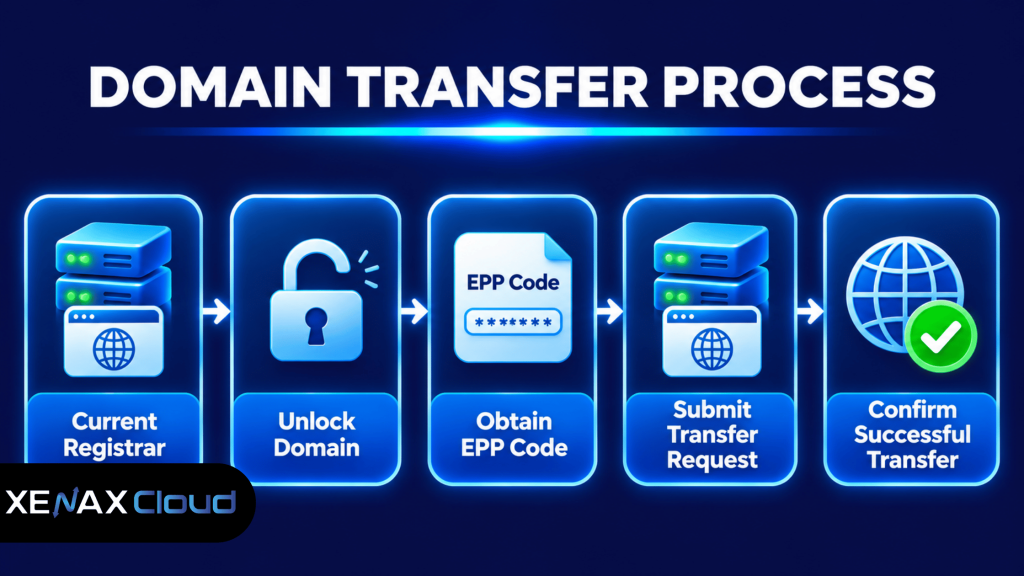
A typical transfer involves these stages:
- Check the domain’s eligibility and registration status.
- Unlock the domain through the existing registrar.
- Request the EPP or Auth-Code from the existing registrar.
- Submit the domain transfer request to the new registrar.
- Confirm the transfer using the authorised contact method.
- Monitor the transfer status until completion.
The exact dashboard labels and confirmation methods vary between registrars. Some providers allow you to retrieve the authorisation code directly from their control panel, while others require a support request.
A transfer request should not be considered complete simply because you have entered the EPP code. Check the receiving registrar’s status and confirm that the domain is now listed under the correct account.
What Is an EPP Code and Why Do You Need It?
An EPP code is an authorisation code used to verify that a domain holder has permission to transfer an eligible domain between registrars.
EPP stands for Extensible Provisioning Protocol. The code is also called an Auth-Code, Auth-Info Code or transfer authorisation code.
For supported generic top-level domains, the receiving registrar uses this code as part of its transfer validation process. The code helps prevent unauthorised parties from moving domain registrations without the registered holder’s permission.
The EPP code is generally obtained from the current registrar.
You may find it in a dashboard under menu names such as:
- Domain Management
- Transfer Domain
- Get EPP Code
- Authorization Code
- Domain Security
If you cannot locate the option, contact the existing registrar and request the authorisation code for your domain.
Treat the EPP code as confidential information. Do not publish it in support forums, send it to unknown individuals or share it with someone who is not authorised to manage the domain.
An EPP code does not replace the domain unlock requirement or the receiving registrar’s confirmation process. Both the authorisation code and the other applicable transfer checks must be satisfied.
For further technical details, see ICANN’s explanation of domain Auth-Codes.
What Should You Check Before Starting a Domain Transfer?
Before starting a transfer, check the domain’s age, expiry status, registrar lock, ownership information and DNS configuration.
These checks are necessary because an otherwise valid transfer request can fail due to a registration restriction or incorrect contact details.
Domain transfer eligibility
Most .com, .org and .net transfers follow ICANN’s inter-registrar transfer framework, but the specific extension’s registry rules also matter.
For eligible generic top-level domains, pay attention to these restrictions:
- A transfer generally cannot proceed within the first 60 days after initial registration.
- A transfer generally cannot proceed within 60 days after a previous registrar transfer.
- A change of registrant information can trigger a separate 60-day transfer lock under applicable policy.
- Certain disputes, court orders and registration restrictions can prevent a transfer.
The exact status should be checked with the current registrar rather than assumed from the domain’s expiry date.
Domain expiry and renewal status
Check the domain’s expiration date before initiating a transfer. An expired domain may have additional restrictions or recovery procedures depending on its registration and registry status.
Do not wait until the final expiry period to begin the transfer. Allow enough time to resolve verification problems and registrar delays.
Domain ownership and contact email
The registered name holder must authorise the transfer. Make sure the relevant contact details are accurate and that you can access the email address used for transfer notifications.
If you cannot access the registered contact email, resolve that issue with the current registrar before submitting a transfer request.
Nameservers and DNS records
Record the current nameservers and take a copy of the DNS zone before making changes.
Important records may include:
- A and AAAA records for website addresses.
- MX records for incoming email.
- TXT records for SPF, DKIM, DMARC and domain verification.
- CNAME records for service aliases.
- NS records identifying authoritative nameservers.
Preserving the existing DNS provider and nameserver delegation is generally the simplest way to avoid unnecessary changes during a registrar transfer.
Before initiating a transfer, read our article on how to check and remove a domain transfer lock to understand registrar locks, transfer restrictions and the steps required to prepare your domain.
Domain Transfer Requirements: What Can Stop a Transfer?
A domain transfer can be rejected or delayed if the domain is locked, restricted by a 60-day rule, under dispute or awaiting required authorisation.
The following table summarises the common checks for generic top-level domains.
| Requirement | What to check | Possible result |
| Domain lock | Registrar lock status | Transfer may be blocked |
| EPP code | Correct authorisation code | Validation failure if incorrect |
| Registration age | First 60 days | Transfer restriction |
| Previous transfer | Previous 60-day period | Transfer restriction |
| Contact email | Access to authorised contact | Confirmation may fail |
| Domain dispute | Legal or policy restrictions | Transfer may be denied |
A common mistake is assuming that entering the correct EPP code guarantees approval. It does not. The registrar and registry must also accept the transfer under their applicable policies.
For example, ICANN’s Transfer Policy identifies specific circumstances in which registrars must deny transfer requests. A domain subject to an applicable transfer lock or certain dispute proceedings may not be transferable until the restriction is resolved.
Another common mistake is confusing a domain registration transfer with a change of domain ownership. Moving a domain between registrars does not automatically change the registered owner.
How Long Does It Take to Transfer a Domain?
The time required to transfer a domain depends on registrar processing, registry procedures and the time taken to complete the required authorisation.
For many ICANN-governed generic top-level domains, the transfer process includes a five-calendar-day period associated with the gaining registrar’s authorisation procedure. A transfer may complete sooner if the relevant process allows it and the required approvals are received.
However, do not treat five days as a guaranteed completion time for every extension or registrar.
Delays can occur because:
- The EPP code is incorrect.
- The domain remains locked.
- The authorised contact has not confirmed the request.
- The domain is subject to a transfer restriction.
- The existing registrar or receiving registrar requires additional verification.
- The registry applies extension-specific procedures.
You should monitor the transfer status in the receiving registrar’s dashboard and respond promptly to any verification request.
If the transfer remains pending, ask the receiving registrar which specific stage is incomplete rather than repeatedly submitting new transfer requests.
Worked Example: Transferring a Business Domain in India
Consider a Lucknow-based digital marketing agency managing three business domains through an existing registrar.
The agency wants to move all three registrations to a new registrar because it prefers managing its domain portfolio from one account. Its main website and business email currently operate through separate hosting and mail services.
The administrator should first check each domain individually. Suppose two domains have passed their applicable 60-day eligibility period, while the third was registered recently and remains within its initial restriction period.
The correct approach is:
- Transfer the two eligible domains after unlocking them and obtaining their EPP codes.
- Keep the recently registered domain with the existing registrar until it becomes eligible.
- Preserve the existing nameservers for all three domains.
- Verify website resolution and email delivery after each completed transfer.
- Update the domain inventory with the new registrar, renewal dates and ownership details.
The agency does not need a different website hosting plan merely because it is transferring domain registrations. Its existing hosting arrangement can remain unchanged.
Which Domain Registration Option Should You Choose?
Choose a domain registration option based on the extension you need, the number of domains you manage and the registrar’s management features.
Xenax Cloud offers domain extensions including .com, .org, .net, .com.in, .xyz and .online.
For a business that needs a new registration or wants to manage its domain portfolio with Xenax Cloud, review the available domain registration options.
Compare the renewal price with the first-year price before selecting an extension. Also check the registrar’s transfer requirements, DNS management facilities and domain ownership controls.
A domain registration product is not a server-size plan. There is no smaller or larger hosting specification required simply to transfer a domain. If you only need to change registrars, select the appropriate domain registration service rather than purchasing additional hosting unnecessarily.
Before selecting a new registrar, read our article on what to check before choosing a domain registration offer to understand renewal terms, domain ownership and registration conditions.
How to Prevent Website and Email Downtime During a Transfer
You can reduce the risk of service interruption by preserving the existing DNS configuration and avoiding unrelated hosting changes during the registrar transfer.
A registrar transfer does not automatically move website files, databases, SSL certificates, email accounts or DNS hosting.
For example, a WordPress website may continue running on its existing server while the domain registration moves to another registrar. This is possible because the registrar relationship and website hosting infrastructure are separate.
Follow these precautions:
1. Keep existing nameservers unchanged.
If the current DNS provider is working correctly, there is usually no need to change nameservers during the registrar transfer. Changing them unnecessarily can create additional DNS configuration work.
2. Back up DNS records.
Export the DNS zone or record all important entries before starting. Pay particular attention to MX, TXT, A, AAAA and CNAME records.
3. Keep hosting services active.
Do not cancel your existing hosting or email service simply because the domain transfer request has been accepted. Wait until the registration and DNS arrangements have been verified.
4. Check website and email services.
After the transfer, test the root domain, www hostname, business email delivery and any verification-dependent services.
5. Verify DNS delegation.
Use a DNS lookup tool to check that the domain continues using the intended authoritative nameservers.
Common Domain Transfer Problems and Their Solutions
Most domain transfer problems can be traced to eligibility restrictions, incorrect authorisation details or incomplete confirmation.
Here are common situations and the appropriate response.
The EPP code is incorrect
Request a fresh authorisation code from your current registrar and check that it belongs to the exact domain you are transferring. Avoid adding spaces or changing characters while copying the code.
The domain is locked
Log in to the current registrar and check the transfer lock setting. Remove the registrar lock if the domain is eligible and you are authorised to do so.
Some restrictions cannot be removed simply by switching off the ordinary domain lock.
The transfer confirmation email has not arrived
Check the authorised contact address, spam folder and registrar notification settings. Contact the receiving registrar if the confirmation message is not available.
The domain is within a 60-day restriction
Check whether the restriction relates to initial registration, a previous registrar transfer or a change of registrant information. Wait until the applicable restriction expires or ask the registrar whether an eligible exception or opt-out applies.
The transfer is pending
Check the receiving registrar’s transfer status and any outstanding approval requests. Do not assume that a pending status means the EPP code is incorrect.
For a disputed or unauthorised transfer, contact the relevant registrar immediately and preserve the registration and communication records.
transfer domain to new registrar: FAQs
Can I transfer a domain to a new registrar without losing my website?
Yes, you can transfer a domain without moving or deleting your website files. A registrar transfer changes the company managing the domain registration, not the hosting server. Preserve your existing nameservers and DNS records, and keep your hosting service active while checking that the transfer has completed correctly.
Can I transfer a domain without an EPP code?
Generally, no for generic top-level domains that require an Auth-Code. The receiving registrar needs the correct authorisation information to process the transfer. Contact your current registrar if the code is unavailable. Different domain extensions may follow different registry procedures, so confirm the requirements before starting.
Does transferring a domain affect business email?
Not necessarily. Email can continue working if the existing nameservers and MX records remain correctly configured. Problems can occur if you change DNS providers without copying the MX, SPF, DKIM and DMARC records. Verify incoming and outgoing email after the transfer rather than assuming the service is unaffected.
Can I transfer an expired domain to another registrar?
Sometimes, but eligibility depends on the domain’s registration status and the applicable registry and registrar rules. An expired domain may enter a renewal or recovery period with additional restrictions. Contact the current registrar before initiating the transfer and resolve any expiry-related issue first.
Why is my domain transfer request rejected?
A transfer can be rejected because of an incorrect EPP code, registrar lock, 60-day restriction, missing authorisation or an applicable dispute. Ask the receiving registrar for the specific rejection reason. Correct the underlying issue before submitting another request.
Is there a 60-day lock after transferring a domain?
Yes, ICANN’s transfer policy generally restricts another registrar transfer during the 60 days following a completed inter-registrar transfer. There is also a restriction following initial registration and certain changes to registrant information. Check the domain’s actual eligibility status before planning another transfer.
Will transferring a domain automatically change its nameservers?
No, a registrar transfer does not inherently require changing nameservers. You can generally retain your existing authoritative DNS provider and nameserver delegation. Check the receiving registrar’s transfer procedure and preserve the existing DNS configuration to avoid disrupting website and email services.
Before initiating your transfer, check the domain’s eligibility, obtain the correct EPP code and identify the DNS provider responsible for your website and email. If you also need a new domain registration, review Xenax Cloud’s domain options and select the extension that matches your business requirements.