A domain transfer lock is a registrar-level protection that prevents a domain name from being transferred to another registrar until the required lock is removed. It helps stop unauthorised changes to domain ownership and registration management, but it can also block a legitimate transfer when you are moving your domain to a new provider.
If you manage a business website, email domain or online store, check the lock status before starting a transfer. You also need access to your registrar account, the registered contact email and the domain’s authorisation code.
The steps below explain how the lock works, when to remove it, how to avoid transfer delays and what to check before choosing a new domain registrar.
What Is a Domain Transfer Lock?
A domain transfer lock is a registration setting that restricts a domain from being transferred between registrars until the restriction is removed or expires. It is also commonly called a registrar lock, transfer lock or domain lock.
Registrars may display this setting as Domain Lock, Registrar Lock, Transfer Lock or Client Transfer Prohibited. The exact label depends on the registrar’s control panel and the domain registry.
The lock protects the registration relationship, not every part of your website. It does not replace strong account passwords, two-factor authentication, DNS security or website backups.
A locked domain can usually continue to resolve to your website because the lock does not automatically disable DNS records or website hosting. However, the precise status and restrictions depend on the registrar, registry and domain extension.
What Does Registrar Lock Protect?
A registrar lock helps prevent an unauthorised person from moving a domain registration to another registrar. This matters because a registrar transfer changes the company responsible for managing the registration.
The lock is different from these other controls:
- Account security: protects access to your registrar account.
- DNS management: controls records that direct visitors and email services to the correct servers.
- Domain expiration protection: helps you avoid losing a domain when its registration period ends.
- Registry or legal restrictions: may prevent a transfer even after the ordinary registrar lock has been removed.
Removing a registrar lock does not transfer ownership of a domain by itself. A transfer still requires the appropriate authorisation and acceptance process.
How to Check and Remove a Domain Transfer Lock
You can usually check a domain transfer lock from your current registrar’s domain-management panel. Menu names differ, so look for the domain’s settings, security options or transfer section.

Before changing the setting, confirm that you are working on the correct domain and that you intend to transfer it. Keep the domain registered in your name and make sure you can access the contact email used for transfer approvals.
Steps to Remove a Registrar Lock
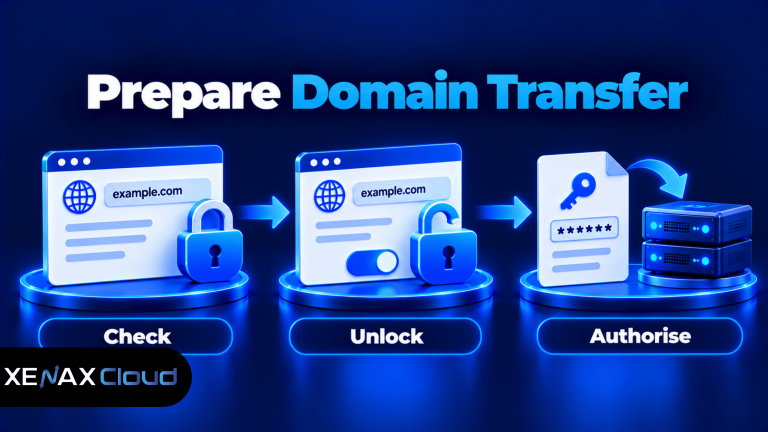
Follow these steps to prepare an eligible domain for transfer:
- Sign in to the account at your current domain registrar.
- Select the exact domain name you want to transfer.
- Open its domain settings or transfer-management section.
- Check the displayed registrar-lock or transfer-lock status.
- Disable the lock if the registrar provides that option and the transfer is intended.
- Request the domain’s authorisation code, also called an Auth-Code or EPP code where applicable.
- Start the transfer with the receiving registrar and complete its required verification steps.
Allow time for the registrar’s control panel and registry status to update. If the lock cannot be changed through the panel, contact the current registrar and ask what restriction applies and how it can be removed.
An authorisation code is not the same as a password. Share it only through the receiving registrar’s legitimate transfer process, and do not post it publicly or send it to an unverified person.
What If the Lock Cannot Be Removed?
A lock may be controlled by the registrar, or a separate transfer restriction may apply. Recent registration, a previous transfer, a registrant-contact change, a domain dispute or an unpaid registration obligation can affect transfer eligibility.
For domains governed by ICANN’s transfer rules, the registrar must provide an accessible way to remove an ordinary transfer lock or assist with the process under the applicable policy. Some other restrictions cannot simply be removed from a dashboard. Check the specific reason with your registrar before repeating the transfer request.
Registrar Lock vs Domain Transfer Restrictions
A registrar lock and a transfer-eligibility restriction are related but not identical. The ordinary registrar lock is a setting that may be removed, while certain policy-based restrictions can prevent a transfer even when that setting is off.
| Situation | What it means | What to check |
| Registrar lock enabled | The domain is restricted from transferring | Remove the lock using the registrar’s approved process |
| Recently registered domain | A transfer may be blocked during an initial eligibility period | Check the registration date and extension rules |
| Recent registrar transfer | Another transfer may be temporarily restricted | Confirm the previous transfer date |
| Recent registrant-detail change | A separate transfer lock may apply | Ask whether a change-of-registrant restriction is active |
| Missing authorisation code | The receiving registrar may be unable to initiate the transfer | Request the correct code from the current registrar |
| Contact email inaccessible | You may miss transfer verification messages | Restore access to the authorised email before starting |
ICANN’s Transfer Policy describes specific transfer-denial circumstances and the handling of the ClientTransferProhibited status for applicable generic top-level domains. Read the official ICANN Transfer Policy to confirm the rules relevant to your domain.
Do not assume every extension follows exactly the same process. Country-code domains and other extensions may have registry-specific eligibility rules, transfer codes or procedures.
When Should You Unlock a Domain for Transfer?
You should remove a domain’s ordinary transfer lock when you are ready to move the registration to a new registrar and have confirmed that the transfer is eligible. Keeping the lock enabled when no transfer is planned adds a layer of protection against unwanted registrar transfers.
Before you unlock domain for transfer, check these points:
- You control the domain and are authorised to approve the transfer.
- You can sign in to the existing registrar account.
- You can receive messages at the registered contact email.
- The domain is eligible to transfer under the applicable registrar and registry rules.
- You have obtained the required authorisation code, or know how to request it.
- You have saved the current DNS records and know where the website and email are hosted.
- You have checked the receiving registrar’s supported extensions and renewal terms.
A domain transfer and a DNS-hosting change are separate actions. If you only want to change the company that manages your registration, you may be able to keep your existing nameservers. Changing nameservers at the same time can affect website and email delivery if the new DNS zone does not contain the necessary records.
Should You Keep the Lock Enabled After a Transfer?
Yes, keep the transfer lock enabled after the transfer is complete unless you have a specific reason to leave it off. Recheck the new registrar’s settings, confirm that the domain appears in the correct account and verify that the website and email still work.
A transfer lock is one layer of protection, not a complete security plan. Use a unique password, enable two-factor authentication where available, keep recovery details current and limit account access to people who need it.
How Long Does a Domain Transfer Take?
A domain transfer does not have one universal completion time because the process depends on the extension, registrar workflows, verification steps and any restrictions affecting the domain. Removing the registrar lock does not guarantee that the transfer will complete immediately.
For eligible generic top-level domains covered by ICANN’s policy, the current registrar and receiving registrar follow defined transfer-authorisation and processing procedures. Missing approvals, an invalid authorisation code or an unresolved restriction can delay progress.
To reduce avoidable delays, complete these tasks before initiating the transfer:
- Confirm the domain is eligible.
- Verify the registered email address.
- Remove the ordinary transfer lock.
- Obtain the correct authorisation code.
- Submit matching domain details to the receiving registrar.
- Monitor messages from both registrars and respond to legitimate approval requests.
If the transfer fails, read the stated reason before trying again. A repeated request will not solve a policy restriction, and changing contact details at the wrong time may introduce an additional transfer lock.
A Practical Domain Transfer Example for an Indian Business
Consider a Jaipur-based design agency that manages its website and client email through a domain registered with one provider. The agency wants to move registration management to another registrar while keeping the website hosted on its existing server.
The correct approach is to separate the registration transfer from the hosting arrangement. First, the agency checks the domain’s status, confirms access to its registrar account and contact email, reviews transfer eligibility and saves the current nameserver and DNS details.
If the domain is eligible and only the ordinary registrar lock is active, the agency removes that lock, obtains the authorisation code and initiates the transfer with the receiving registrar. It keeps the existing nameservers unchanged unless it has a separate, tested plan to move DNS hosting.
The smaller and safer change is to transfer registration only. Moving the website, email and DNS at the same time adds more potential failure points, so the agency should do that only when it has a clear reason and verified records.
A Simple Decision Rule
Use the following rule to decide what to do next:
- Keep the lock enabled if you are not transferring the domain.
- Remove the ordinary lock if a transfer is planned and the domain is eligible.
- Contact the registrar if the lock cannot be removed or the transfer is rejected.
- Wait and recheck eligibility if a recent registration, transfer or registrant change is triggering a restriction.
- Keep DNS unchanged if your only goal is to change the registrar.
Xenax Cloud offers domain registration for supported extensions, including .com, .org, .net, .com.in, .xyz and .online. Before registering or transferring a domain, review the domain registration options at Xenax Cloud and compare renewal terms with the first-year registration terms. Extension availability and transfer eligibility should be confirmed before placing an order.
What Should You Check Before Choosing a Domain Registrar?
Choose a registrar based on the controls you need, the extensions it supports and how clearly it explains registration and transfer procedures. A low initial registration cost is not enough to judge the long-term suitability of a domain provider.
Check these factors before committing:
- Extension support: Confirm that the registrar supports your exact domain extension and can handle its transfer process.
- Account control: Check whether you can manage lock status, nameservers, contact information and authorisation codes.
- Renewal terms: Compare the renewal price with the first-year price, and check whether renewal is automatic.
- Recovery process: Understand how to recover account access and update an inaccessible contact email.
- Support availability: Look for clear ways to contact support when a transfer is blocked or an authorisation code is missing.
- DNS management: Confirm that you can access the nameserver and DNS settings needed for your website and email.
A registrar change is not the same as a hosting migration. If your website remains on its current hosting service and your nameservers stay the same, the transfer may require no website-file migration. You should still save the existing DNS configuration and verify the site and email after completion.
Domain Transfer Lock: FAQs
Is a domain transfer lock the same as a registrar lock?
Yes, a domain transfer lock and a registrar lock commonly describe the same setting that restricts a domain from moving to another registrar. Control-panel labels vary, and some domains can also have separate eligibility restrictions. Check the specific status and the reason for any transfer block before changing settings.
Is it safe to remove a domain transfer lock?
Yes, removing an ordinary transfer lock is a normal step when you are preparing an authorised domain transfer. However, leaving the lock disabled unnecessarily reduces protection against unwanted transfers. Remove it only when needed, use a trusted receiving registrar and restore the lock after the transfer is complete.
How do I unlock domain for transfer if the option is missing?
If the lock option is missing, contact the current registrar and ask whether the domain has an ordinary transfer lock or another restriction. You may need the registrar to change the status or explain an eligibility rule. Do not assume a missing button means the domain is permanently locked.
Do I need an EPP code to transfer every domain?
No, not every domain extension uses the same transfer process, but many generic top-level domains require an authorisation code known as an Auth-Code, AuthInfo code or EPP code. Check the requirements for your specific extension. ICANN explains how applicable registrars provide Auth-Codes in its official Auth-Code documentation.
Can I transfer a domain immediately after registering it?
Not always. Under ICANN’s rules for applicable generic top-level domains, a registrar may deny a transfer request made within the initial registration restriction period. A recent registrar transfer or certain registrant-detail changes can also trigger restrictions. Confirm your domain’s registration date and the rules that apply before starting.
Will changing the registrar affect my website or business email?
Not necessarily. A registrar transfer alone does not automatically require you to move website hosting or email services. Keeping the existing nameservers and DNS records in place can help avoid unnecessary changes, but you should save the current configuration and test the website and email after the transfer.
What should I do if my registrar refuses to transfer my domain?
Check the stated reason first because a missing code, active lock, eligibility restriction or legal dispute may require a different response. Ask the registrar for the exact restriction and the steps needed to resolve it. For applicable ICANN-regulated domains, you can review ICANN’s transfer guidance and complaint process.
To manage a domain registration with fewer avoidable transfer problems, choose a supported extension, keep the registrant email accessible and confirm the renewal terms before ordering. Review Xenax Cloud’s domain registration options, then select the extension that fits your website and long-term registration needs.
If you are planning to register a new domain, review the available domain registration options at Xenax Cloud before choosing your extension.