If your website, database or application has outgrown shared hosting and a VPS, the next step is usually to rent a server of your own: a physical machine in a data centre that nobody else shares. You pay a monthly fee, the provider owns and maintains the hardware, and you get full control of everything that runs on it.
This guide covers what it costs to rent a server in India in 2026, what you actually get for the money, how to tell whether you need a dedicated server at all, and the point at which buying your own hardware becomes cheaper than renting.
What You Get When You Rent a Server
Renting a dedicated server gives you one complete physical machine, its processor, memory, disks and network port, for your workloads alone. That is the difference from a VPS, where one physical host is split into several virtual machines that share its hardware.
With a rented dedicated server you normally get:
- Full root or administrator access, so you can install any operating system, database or control panel.
- IPMI access, a separate management connection that lets you reboot the machine, reinstall the operating system or watch it start up even when the server itself is not responding. IPMI is the reason you rarely need to raise a ticket for a stuck server.
- A dedicated network port, usually 1 Gbps, with a monthly bandwidth allowance.
- Hardware that the provider replaces when a disk or power supply fails, at no extra cost to you.
What you do not get is someone managing the software for you. On an unmanaged rental you apply updates, configure the firewall and set up backups yourself.
Dedicated Server Rental Prices in India
Dedicated server rental in India at Xenax Cloud costs between ₹7,999 and ₹59,999 a month, depending on the processor, memory and storage. All eight plans run in the Indian data centre and include a 1 Gbps port, IPMI, 100 Gbps DDoS protection, IPv4 and IPv6, weekly backup and a free operating system install.
| Plan | Processor | Cores / threads | RAM | NVMe storage | Bandwidth | Monthly rent |
|---|---|---|---|---|---|---|
| Xeon Starter | Xeon E-2314 | 4C / 4T | 16 GB ECC | 480 GB | 10 TB | ₹7,999 |
| Xeon Pro | Xeon E-2388G | 8C / 16T | 32 GB ECC | 960 GB | 20 TB | ₹11,999 |
| EPYC Core | EPYC 7313P | 16C / 32T | 64 GB ECC | 1.92 TB | 20 TB | ₹15,999 |
| Xeon Gold | Xeon Gold 6226R | 16C / 32T | 64 GB ECC | 1.92 TB | 30 TB | ₹18,999 |
| EPYC Power | EPYC 7402P | 24C / 48T | 128 GB ECC | 3.84 TB | 30 TB | ₹22,999 |
| Xeon Ultra | Xeon Gold 6242R | 20C / 40T | 128 GB | 3.84 TB | Unlimited | ₹27,999 |
| EPYC Ultra | EPYC 7502P | 32C / 64T | 256 GB | 7.68 TB | Unlimited | ₹34,999 |
| EPYC Titan | EPYC 7742 | 64C / 128T | 512 GB | 15.36 TB | Unlimited | ₹59,999 |
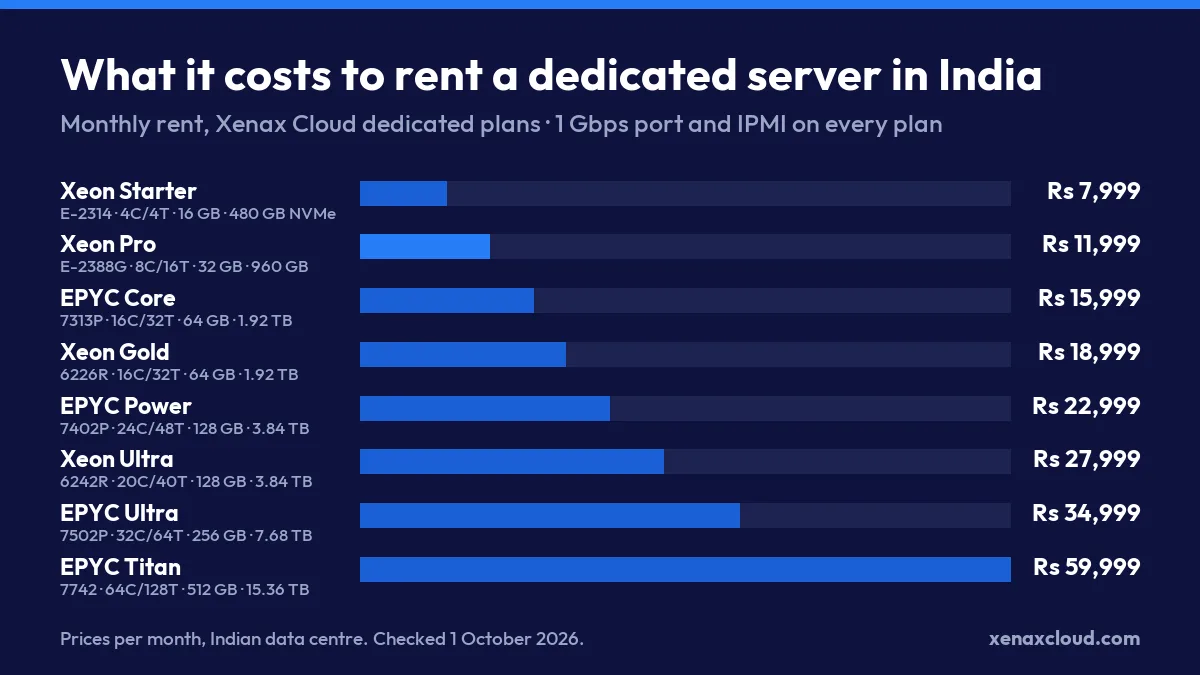
The rent is the same every month; there is no low introductory price that jumps at renewal. Current configurations and ordering are on the Xenax dedicated server page. For a wider look at what drives server prices, see what a dedicated server costs in India.
Rent a Dedicated Server or a VPS?
Rent a server of your own when your bottleneck is storage, consistent disk speed or the need for hardware nobody else touches; stay on a VPS when you simply need more CPU and RAM. Many teams move to dedicated too early and pay double for capacity they do not use.
A VPS is enough when:
- Your data fits comfortably in 200 GB or less.
- Load is steady rather than spiky, and brief slowdowns are acceptable.
- You want to resize up or down without a hardware change.
Rent a dedicated server when:
- Your database or files need more than about 200 GB of fast storage.
- You run jobs that keep every core busy for hours, such as payroll runs, video encoding or large reports.
- A compliance review or client contract asks for hardware that is not shared with other customers.
- You need IPMI-level control, for example to install a custom operating system image.
For comparison, the largest Gold VPS gives 32 vCPU and 64 GB RAM for ₹6,099 a month, but with 200 GB of SSD. The Xeon Starter dedicated server costs ₹1,900 more and has fewer cores, but more than twice the storage on its own disks and no neighbours. If you are still deciding how much server administration you want to take on, the comparison of managed and unmanaged servers is worth reading first.
Worked Example: A Payroll SaaS Outgrowing Its VPS
A payroll software company in Pune serves about 2,000 client businesses. Its application and PostgreSQL database run on a Gold VPS with 16 vCPU and 32 GB RAM at ₹3,649 a month. For most of the month this is fine. In the last three days of every month, when clients run payroll, reports that normally take seconds take minutes, and the database has grown to 450 GB.
Three facts decide the choice:
- The database no longer fits on VPS storage. At 450 GB and growing, it has outgrown the 200 GB ceiling of the largest VPS.
- Payroll runs are parallel. Each client’s payroll can be processed separately, so more cores finish the batch sooner.
- The working data should sit in memory. The most-used tables add up to about 40 GB.
That points to EPYC Core at ₹15,999 a month: 16 cores and 32 threads for the parallel payroll jobs, 64 GB of ECC RAM so the busy tables stay in memory, and 1.92 TB of NVMe with room for three to four years of growth. Xeon Pro at ₹11,999 would be cheaper, but its 32 GB of RAM would not hold the working set, and its 960 GB of storage would be two-thirds full within a year or two.
The annual cost is ₹1,91,988, against ₹43,788 for the VPS. The company pays roughly ₹1.48 lakh more a year to remove a month-end slowdown that its clients notice. For a subscription business, that is usually the cheaper problem to have.
Renting vs Buying and Colocating: The Three-Year Maths
For most teams it is cheaper to rent a server than to own one over three years, but not for all. The alternative to renting is buying your own server and placing it in a data centre through colocation, where you pay for rack space, power and bandwidth while owning the hardware.
Take the Xeon Pro plan as the benchmark:
| Rent Xeon Pro | Buy and colocate (1U) | |
|---|---|---|
| Monthly fee | ₹11,999 | ₹3,999 |
| 36 months | ₹4,31,964 | ₹1,43,964 |
| Hardware | Included | You buy it |
| Failed disk or power supply | Replaced by the provider | You buy and ship the part |
| Remaining budget for hardware | — | ₹2,88,000 |
Owning wins over three years only if a comparable server, plus spare disks, plus the time someone on your team spends on hardware, costs less than about ₹2.88 lakh, and only if the machine runs well beyond three years. If you already own suitable servers, colocation is usually the better deal; the numbers for larger footprints are in our guide to full rack colocation pricing. If you would be buying new hardware just to colocate it, renting generally costs less and carries no hardware risk.
How to Rent a Dedicated Server, Step by Step
When you rent a server, a few decisions come before you order and a few tasks come after you receive it.
- Size the workload. Note peak CPU use, the memory your application and database need, and current storage multiplied by 1.5 for growth.
- Choose the plan that covers all three with some headroom. If two plans fit, pick the one with more RAM.
- Pick the operating system at order time, for example Ubuntu, AlmaLinux or Windows Server with a licence.
- Check your access details when the server is handed over, including the IPMI login, and store them in a password manager.
- Secure it before going live. Use SSH keys instead of passwords, close every port you do not need, and apply updates.
- Set up your own backups in addition to the weekly backup, so that you can restore a single database from yesterday.
- Move your data and point your DNS at the new server’s IP address once everything is tested.
What to Check Before You Rent Any Server
Before you rent a server from any provider, check these points on the plan page or with their sales team:
- Where the data centre is. A server in India gives about 5 to 30 ms latency to Indian users; users in Europe see roughly 120 to 160 ms and users on the US east coast 200 to 250 ms.
- Port speed and bandwidth together. A 1 Gbps port with a 10 TB monthly allowance is not the same as unmetered traffic.
- ECC memory and NVMe storage. ECC RAM corrects memory errors that would otherwise crash a database; NVMe disks are several times faster than SATA SSDs.
- IPMI or remote console access. Without it, a server that fails to boot means a support ticket and waiting.
- Renewal price and contract terms. Look for the same price every month and no long lock-in.
Rent a Server in India: FAQs
How much does it cost to rent a server in India?
A dedicated server at Xenax Cloud costs ₹7,999 a month for a 4-core Xeon with 16 GB RAM and 480 GB NVMe, rising to ₹59,999 for a 64-core EPYC with 512 GB RAM. A VPS, which shares physical hardware, starts at ₹599 a month.
Do I get full root access on a rented dedicated server?
Yes. Every dedicated plan includes full root access, so you can install any operating system, control panel or database. You also get IPMI, which lets you reboot or reinstall the server from a browser even when it is not responding over the network.
Is there a refund if the rented server does not suit my workload?
New plans carry a 15-day money-back guarantee on the first term. A 25% administrative deduction applies, capped at ₹2,500, and the guarantee can be used once per customer. That gives you two weeks to run your real workload before committing.
Can I upgrade a rented dedicated server later?
A dedicated server is fixed hardware, so moving up usually means moving to a larger machine rather than resizing in place. Plan storage with room for two to three years of growth, and ask the sales team about custom builds, including dual-socket servers or extra NVMe disks.
Is a server rented in India fast for visitors outside India?
It is fastest for visitors in India and South and South-East Asia. Visitors in Europe or North America will see more latency, roughly 120 to 250 ms. For a global audience, pair the server with a CDN so that images and static files are served from locations near each visitor.
If you are about to rent a server because you are moving off a VPS, list your current peak CPU, RAM and storage figures and compare them with the table above. The right plan is usually the smallest one that covers all three with room to grow, and the 15-day window lets you confirm that with your own workload.