Searches for a 10Gbps dedicated server usually mix up two different things: how fast the network port is, and how much data you are allowed to move each month. A provider can sell you a 10 Gbps port with a transfer cap, or a 1 Gbps port with no cap at all, and both get called “unmetered” in adverts.
Here is where Xenax Cloud stands before anything else: its standard dedicated plans ship a 1 Gbps dedicated port, unlimited transfer is included on the upper tiers, and a 10 Gbps port is available on a custom quote rather than as a listed plan. The rest of this guide explains the difference and how to work out which one your workload actually needs.
Port Speed and Unmetered Transfer Are Different Products
Port speed is how fast data can leave the server at any instant; unmetered means nobody counts how much leaves over the month. You buy both, but they solve different problems.
- Port speed sets the ceiling per second: 1 Gbps is about 125 MB/s, 10 Gbps about 1.25 GB/s.
- Metered transfer gives you a monthly allowance, such as 10 TB or 30 TB. Above it you pay extra per terabyte or get slowed down.
- Unmetered transfer has no monthly counter, although most contracts still carry a fair-use clause.
So a “10gbps unmetered dedicated server” is a very fast pipe with no volume counter. It is essential for a small set of workloads and money wasted on almost everything else.
How Much Data a 10Gbps Dedicated Server Can Move
A 10Gbps dedicated server running flat out for a 30-day month moves about 3,240 TB, ten times the 324 TB of a 1 Gbps port. The same arithmetic gives you the number of video streams each port can carry.
| Port | Per second | Per month, at full speed | 5 Mbps video streams |
|---|---|---|---|
| 500 Mbps (VPS) | 62.5 MB/s | 162 TB | about 100 |
| 1 Gbps | 125 MB/s | 324 TB | about 200 |
| 10 Gbps | 1.25 GB/s | 3,240 TB | about 2,000 |
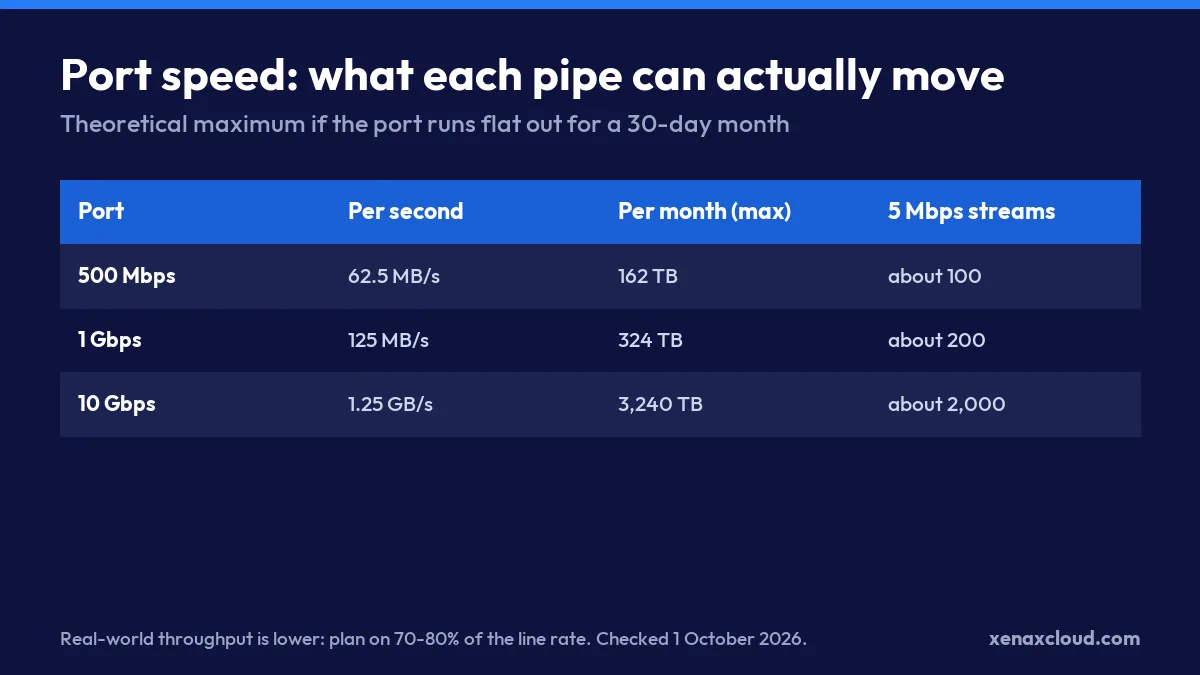
These are ceilings, not averages. Real traffic comes in waves, and TCP overhead takes a slice, so a 1 Gbps port rarely sustains more than about 800 Mbps of useful traffic for long.
What Xenax Dedicated Servers Include
Every Xenax dedicated plan has a 1 Gbps dedicated port, full root access, IPMI, 100 Gbps DDoS protection, and IPv4 plus IPv6. Transfer depends on the tier:
| Plan | RAM | NVMe | Transfer | Monthly |
|---|---|---|---|---|
| Xeon Starter | 16 GB ECC | 480 GB | 10 TB | ₹7,999 |
| Xeon Pro | 32 GB ECC | 960 GB | 20 TB | ₹11,999 |
| EPYC Core | 64 GB ECC | 1.92 TB | 20 TB | ₹15,999 |
| Xeon Gold | 64 GB ECC | 1.92 TB | 30 TB | ₹18,999 |
| EPYC Power | 128 GB ECC | 3.84 TB | 30 TB | ₹22,999 |
| Xeon Ultra | 128 GB | 3.84 TB | Unlimited | ₹27,999 |
| EPYC Ultra | 256 GB | 7.68 TB | Unlimited | ₹34,999 |
| EPYC Titan | 512 GB | 15.36 TB | Unlimited | ₹59,999 |
If what you need is an unmetered dedicated server, the three upper tiers already are, on a 1 Gbps port. If you need a 10 Gbps port specifically, ask for a custom quote on the Xenax dedicated server page; dual-CPU builds and larger IP blocks are quoted the same way. Our guide to renting a server in India covers how to pick between these plans.
A note for people searching “10gbps VPS”: Xenax VPS and RDP plans use a 500 Mbps port. A VPS shares its physical host with other customers, so a 10 Gbps port on a VPS rarely delivers 10 Gbps to one customer anyway.
Do You Need a 10Gbps Unmetered Dedicated Server?
Most buyers do not, because the processor, disks or database run out long before a 1 Gbps port fills up. A busy WordPress or WooCommerce site, an API, a game server or a small CDN origin will hit CPU or disk limits first.
A 10 Gbps port earns its cost when the job is mostly moving bytes:
- Video streaming origins serving many high-bitrate streams without a CDN in front.
- Large file distribution, such as software mirrors, game patches or public datasets, where thousands of downloads start at once.
- Backup and replication targets that must copy several terabytes inside a fixed nightly window.
- Storage and media clusters, where traffic between nodes would otherwise queue behind customer traffic.
It is wasted on websites, business applications, email, databases and most online shops, especially when a CDN serves the images and files.
Worked Example: A Streaming Startup Sizing Its Port
An ed-tech company in Bengaluru streams recorded lectures at 5 Mbps. On exam weeks, up to 600 students watch at the same time, and on normal days about 150.
- Normal day: 150 streams × 5 Mbps = 750 Mbps. A 1 Gbps port copes, but with little headroom.
- Exam week: 600 × 5 Mbps = 3,000 Mbps. That is three times what a 1 Gbps port can carry.
- Monthly volume: an average of 250 viewers watching 6 hours a day adds up to about 100 TB a month.
There are two sensible answers. The first is a 10 Gbps port on a custom quote, sized for the exam-week peak. The second, usually cheaper, is to keep a 1 Gbps origin such as Xeon Ultra at ₹27,999 with unlimited transfer and put a CDN in front, so that most viewers are served from the CDN’s edge and the origin only fills the cache. Many streaming teams choose the second option, because the peak lasts a few weeks a year while a 10 Gbps port costs more every month.
How to Check What Your Workload Needs
You do not have to guess; you can measure your real traffic in about ten minutes.
- Find your monthly transfer. Your current provider’s panel shows it, or run
vnstat -mon a Linux server with vnStat installed. - Find your peak hour. Run
vnstat -hand note the busiest hour in megabits per second. - Compare with the port. If the busiest hour stays under about 400 Mbps, a 1 Gbps port has plenty of room. Above about 700 Mbps, plan for a larger port or a CDN.
- Compare with the allowance. If your monthly transfer is above 20 TB and growing, choose an unlimited-transfer tier so that a traffic spike does not become a bill.
vnstat -m    # transfer per month
vnstat -h    # traffic per hour, to find the peak
Questions to Ask Any Provider Selling 10Gbps Unmetered
Before you pay for a 10 Gbps unmetered port anywhere, get clear answers to these:
- Is the port dedicated or shared? “10 Gbps” on a shared uplink means 10 Gbps only when nobody else is busy.
- What is the fair-use threshold? Ask for it in terabytes, and what happens when you pass it: throttling or an invoice.
- How is the port billed? Some plans use 95th-percentile billing, which behaves nothing like a flat monthly rate.
- Where are your users? A 10 Gbps server in the wrong country still has the latency of the wrong country. Xenax servers are in India, which suits users in India and nearby regions; users in Europe see roughly 120 to 160 ms.
For more on how transfer allowances work, see our guide to unmetered server hosting.
Xenax Cloud Dedicated Server vs the usual alternatives
| Feature | Xenax Cloud | Typical Indian shared host | Global budget host |
|---|---|---|---|
| Starting price | ₹7999/mo | ₹199/mo | ₹149/mo (renews ₹499) |
| Storage | 480 GB NVMe | 10 GB SSD | 25 GB SSD |
| DDoS protection | 100 Gbps, always on | Basic | Cloudflare only |
| Support | 24×7, in-house engineers | Tickets, business hours | Chat, outsourced |
| Data centre | India (NVMe) | India | Singapore / US |
| Control panel | cPanel / WHM included | cPanel | Custom panel |
Entry-level plans, list prices including GST where shown. Check each provider before buying — prices change.
See Dedicated Server plans10Gbps Dedicated Server: FAQs
Does Xenax Cloud offer a 10Gbps dedicated server?
Standard Xenax dedicated plans ship a 1 Gbps dedicated port. A 10 Gbps port is available on a custom quote rather than as a listed plan. Unlimited transfer is already included on the Xeon Ultra, EPYC Ultra and EPYC Titan tiers, from ₹27,999 a month.
What does unmetered mean on a dedicated server?
Unmetered means the provider does not count your total monthly transfer, so you can keep the port busy without a data bill. It does not make the port faster. Most contracts still include a fair-use clause, so ask for the threshold in writing before you sign.
How much data can a 1 Gbps port move in a month?
About 324 TB if it runs at full speed for a 30-day month. In practice, very few websites or applications come close, because CPU, disk and database limits arrive long before the network port fills.
Is a 10Gbps VPS worth it?
Rarely. A VPS shares its physical server and uplink with other customers, so one customer seldom gets the full 10 Gbps. If you genuinely need that throughput, a dedicated server with a dedicated port, or a CDN in front of a smaller server, is the reliable option.
What does a dedicated server cost at Xenax Cloud?
From ₹7,999 a month for a Xeon Starter with 16 GB ECC RAM, 480 GB NVMe and 10 TB transfer, up to ₹59,999 for an EPYC Titan with 512 GB RAM and unlimited transfer. New plans carry a 15-day money-back guarantee with a 25% administrative deduction, capped at ₹2,500.
Start with your own numbers: the busiest hour and the monthly total from vnstat will tell you within minutes whether you need a 10 Gbps port, an unmetered 1 Gbps plan, or just a CDN.