A VPS for Gitea is a virtual private server that runs Gitea, a self-hosted Git service for storing source code, reviewing changes and managing software projects. It gives developers control over repository access, application configuration and server maintenance without requiring a dedicated physical server. The right VPS depends on repository size, team activity and whether automated builds also run on it.
Gitea provides a web interface for Git repositories, pull requests, issues, releases and team collaboration. You can use it for personal projects, internal company code or a development team that wants to manage repositories on infrastructure it controls.
Before selecting a server, decide whether you need only Git hosting or also continuous integration, package storage and large-file support. Those additional workloads can change CPU, RAM and storage requirements considerably.
What Does a VPS for Gitea Actually Run?
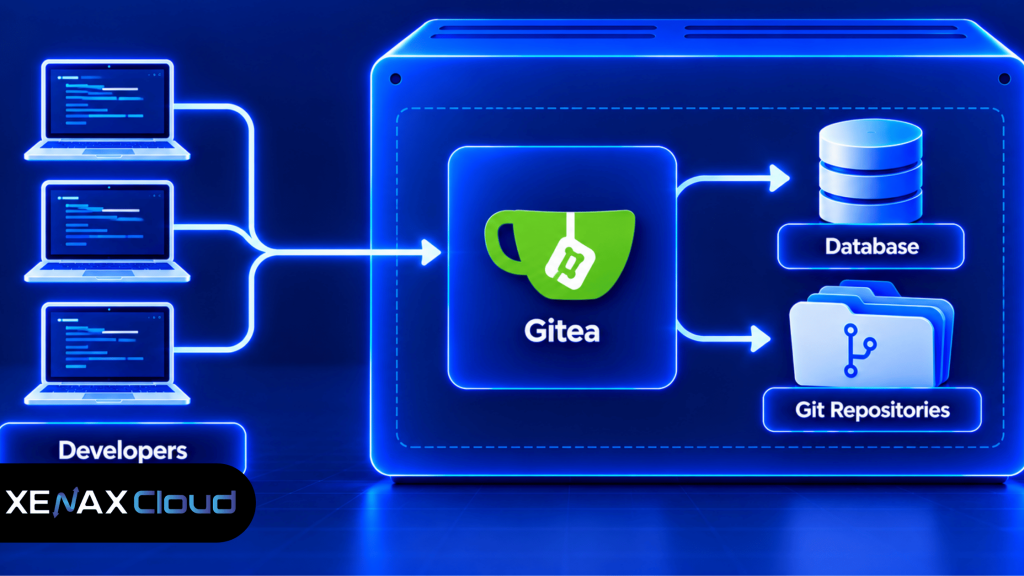
A VPS for Gitea runs the Gitea application, its supporting database, Git repositories and any configured storage for attachments or large files. The server also needs an operating system, network access, secure administration and a backup process.
Gitea is a self-hosted Git service that provides repository management and collaboration features through a web interface. Git is the version-control system that records changes to source code and lets developers work with branches and merge changes.
A typical installation contains these components:
- Gitea application: Handles repository browsing, user accounts, pull requests, issues and other web features.
- Git repositories: Store project files and their version history.
- Application database: Stores Gitea’s users, settings, issues and other application metadata.
- Persistent storage: Holds repository data, attachments, avatars and other configured files.
- Reverse proxy and HTTPS: A web server such as Nginx or Caddy can handle encrypted browser access and forward requests to Gitea.
- Backup and monitoring tools: Protect project data and help you detect service or storage problems.
These components do not all need separate servers. A small installation can run Gitea and its database on one VPS, while a larger team may separate the database or build workers when resource contention becomes a problem.
A VPS gives you operating-system access and control over the installation, but you are responsible for applying updates, managing access permissions and recovering data after failures. The application does not automatically protect itself from accidental deletion, compromised credentials or a failed disk.
How Much RAM and Storage Does Gitea Need?
A Gitea server needs enough RAM for the application, database, operating system and concurrent activity, while storage must accommodate repository history, attachments and backups. The requirements depend more on the actual workload than on the number of repositories alone.
For a small team with modest repositories and no build jobs on the same server, a VPS with 2 vCPU and 4 GB RAM is a practical starting point to evaluate. It is a planning recommendation, not a universal minimum or a performance guarantee.
| Workload | Starting configuration to evaluate | Main resource concern |
| Personal projects or a small team | 2 vCPU, 4 GB RAM | Application memory and repository storage |
| Active team with more concurrent use | 4 vCPU, 8 GB RAM for evaluation | Web requests, Git operations and database activity |
| Large repositories or Git LFS files | Size RAM and disk according to actual data | Storage capacity and transfer volume |
| Gitea with CI build jobs | Keep builds on separate workers where practical | Build CPU, memory and temporary storage |
These configurations are planning examples, not official Gitea minimums or measured Xenax Cloud benchmarks. Git repositories can grow as history accumulates, while Git Large File Storage (Git LFS) can add substantial data outside the normal Git object workflow. Check both before estimating disk capacity.
For a storage estimate, add current repository sizes, expected growth, attachments, Git LFS objects and a separate allowance for backups. Do not treat the VPS’s full disk capacity as usable repository capacity; the operating system, database and logs also need room.
How to Install Gitea on a VPS Step by Step
You can install Gitea on a Linux VPS by preparing the server, selecting a supported installation method, configuring persistent storage and setting up secure web access. Follow the official installation instructions for the operating system and release you intend to use.
- Choose a Linux VPS with sufficient CPU, RAM and disk capacity.
- Update the operating system and restrict administrative access.
- Create a dedicated service account and prepare persistent data directories.
- Install Gitea using a supported binary, package or container method.
- Configure the database, application settings and repository storage paths.
- Secure web access with HTTPS and suitable account permissions.
- Test repository cloning, pushing, user access and backup restoration.
For example, on a Debian- or Ubuntu-based server, start by updating package metadata and reviewing available operating system updates:
sudo apt update
sudo apt upgrade
Review the proposed changes before confirming an upgrade, especially if the server already hosts production services. These commands prepare the operating system; they do not install Gitea by themselves.
For installation options and current configuration guidance, consult the official Gitea documentation. Use the instructions for your chosen deployment method, and make sure persistent repository data and application configuration survive service restarts or container replacement.
Avoid running the Gitea application as root when a dedicated service account is suitable. Limit access to configuration files containing secrets, and ensure the directories used for repositories and attachments are writable by the intended service account without exposing them publicly.
After installation, test the full Git workflow from a client machine. Create a test repository, clone it, commit a change, push it back and confirm that the web interface displays the expected result.
Should You Run Gitea and CI Jobs on the Same VPS?
Running Gitea and its database on one VPS is reasonable for a small team, but resource-intensive CI jobs are often better placed on separate workers. The main concern is preventing builds from competing with Git operations and the web interface.
Continuous integration (CI) is an automated process that builds or tests code when changes are submitted. CI jobs may consume CPU, RAM, disk space and network bandwidth in bursts, depending on the language, dependencies and build steps.
Gitea can manage repository collaboration without compiling every project on the same server. If you also run build agents or runners, their workloads should be considered separately from the requirements of the Gitea application.
Consider separate build workers when:
- Builds repeatedly saturate CPU or memory on the repository server.
- Build jobs need different operating systems or runtime environments.
- Temporary build files consume significant disk space.
- You need to isolate untrusted code from the repository application.
- Build activity causes slow web responses or delayed Git operations.
Separating CI jobs adds administration and requires secure communication between the repository server and workers. For a small personal project, keeping the setup simple may be more sensible until builds create measurable contention.
A lightweight Git server should not be judged only by how quickly the web interface loads. Large clones, pushes, repository maintenance and CI activity can have different resource profiles. Monitor the workload that actually matters to your developers.
Which Xenax Cloud VPS Family Fits Gitea?
The right Xenax Cloud VPS family depends on storage needs, memory requirements and whether the server handles only Git hosting or additional workloads. Compare the resource configuration with your repository size and expected concurrency before selecting a plan.
| VPS family | Published characteristics | Consider it when |
| Speed VPS | NVMe storage; 2 to 32 vCPU; 4 GB to 64 GB RAM | Repository and application storage performance matter |
| General VPS | More RAM per vCPU; 2 to 16 vCPU; 8 GB to 64 GB RAM | Memory capacity is a key constraint |
| Gold VPS | High-frequency Xeon Gold processors; 2 to 32 vCPU; 4 GB to 64 GB RAM | CPU frequency is relevant to your workload |
Xenax Cloud VPS plans use KVM virtualisation, Linux, full root access, one IPv4 address, a 500 Mbps port and weekly backups. The data centre is located in Banda, Uttar Pradesh, India. These specifications describe the infrastructure, not a guarantee of Git operation speed.
For a small Gitea deployment, Speed VPS is worth evaluating when you want NVMe storage and a range of CPU and memory sizes. General VPS is worth considering when memory is the main constraint, while Gold VPS may fit workloads that benefit from its high-frequency Xeon Gold processors.
Review the Xenax Cloud VPS hosting configurations and select a size based on the actual workload. If you need a server for Gitea plus large CI builds, the recommended small configuration may not be the right choice; consider a separate build worker or a larger VPS instead.
Worked Example: A Jaipur Development Agency Hosting Gitea
A Jaipur development agency with six developers can use Gitea to host internal repositories, review pull requests and track issues. Its VPS requirements depend on the size of the repositories, how often developers push code and whether automated builds run on the same server.
Suppose the agency has several application repositories, modest Git history and a separate CI worker. It could begin by evaluating a Speed VPS with 2 vCPU, 4 GB RAM and 40 GB NVMe storage, provided the current repository data and projected growth fit comfortably within the available disk space.
If the agency adds larger repositories, more attachments or concurrent application activity, it should measure disk growth, RAM use and Git operation times. If memory becomes the main limitation, General VPS with 2 vCPU and 8 GB RAM is a sensible configuration to evaluate next. If disk capacity is the limiting factor, compare available storage options rather than upgrading CPU alone.
Use this decision rule:
- Choose Speed VPS with 2 vCPU and 4 GB RAM for initial evaluation when repository storage fits and the server only runs Gitea and its lightweight database.
- Evaluate General VPS with 2 vCPU and 8 GB RAM when memory pressure persists under normal team use.
- Choose a larger storage configuration when repository history, attachments and Git LFS data approach the disk capacity you can safely allocate.
- Separate CI workers when builds regularly compete with Gitea for CPU, RAM or temporary disk space.
The next smaller configuration would not be appropriate if it fails to meet the software’s requirements or cannot provide enough memory and storage headroom for the agency’s repositories. The decision should follow measured needs rather than assuming every six-person team has identical usage.
Why Choose a Lightweight Git Server?
A lightweight Git server is useful when you need repository management and code collaboration without the operational overhead of a larger development platform. Gitea provides a web interface for common Git workflows while letting you manage the application and its data on your own infrastructure.
A small Gitea installation can support repository browsing, branches, pull requests, issue tracking and user permissions without requiring a separate server for each feature. You still need to account for the database, repository storage, updates and backups.
Gitea may be a good fit if you want to:
- Keep source code under your organisation’s administration.
- Manage access for internal developers and contractors.
- Review changes through pull requests.
- Track issues alongside the related repositories.
- Use a Git workflow without running build jobs on the same machine.
The main trade-off is responsibility. A self-managed Git service gives you more control over configuration and access, but your team must handle patching, monitoring, account recovery and data protection. If nobody can maintain the server, a managed Git service may be a better operational fit.
A lightweight Git server also needs adequate storage planning. Repository history remains part of the data set, so deleting a large file from the latest commit does not necessarily remove it from previous Git history. Review repository growth and use Git maintenance procedures carefully before attempting to reduce storage.
What Does Self Hosted Gitea Require for Safe Operation?
Self hosted Gitea requires secure administrator access, controlled repository permissions, protected configuration and a backup process that can restore both repository content and application metadata. Hosting Gitea yourself does not automatically make the installation secure.
Start with the network and account configuration. Use HTTPS for the web interface, restrict SSH access to trusted users and protect administrator accounts with strong credentials. If developers use SSH keys to push code, manage those keys and user permissions as part of the access policy.
Important maintenance tasks include:
- Updates: Review Gitea security and release notices, then test upgrades before applying them to a critical service.
- Backups: Protect Git repositories, the application database, configuration files, attachments and any Git LFS objects.
- Permissions: Limit access to private repositories and avoid granting administrator privileges to every developer.
- Monitoring: Watch disk capacity, memory, CPU, service errors and failed authentication attempts.
- Recovery: Test restoration to a separate environment before relying on backups after a server failure.
Xenax Cloud’s weekly VPS backups provide an additional recovery layer, but verify their coverage and retention against your recovery requirements. Take an application-consistent backup before a Gitea upgrade or repository migration, and keep a separate copy of critical code and metadata where your security policy permits.
For a private development environment, consider where repository data and backup copies are stored. Xenax Cloud operates one data centre in Banda, Uttar Pradesh, India. If your organisation has specific data-location obligations, verify the location and handling of every external backup or connected service as well.
VPS for Gitea: FAQs
How much RAM does a VPS for Gitea need?
A VPS with 2 vCPU and 4 GB RAM is a practical starting point to evaluate for a small Gitea deployment with modest repositories and no heavy CI jobs. Larger teams, extensive Git LFS use or additional services may require more resources. Monitor actual memory and storage use before upgrading.
Can I run Gitea and its database on one VPS?
Yes, Gitea and its application database can run on one VPS for a small deployment if sufficient resources are available. This simplifies administration but combines their resource needs. Consider a separate database when memory pressure, maintenance requirements or database activity begins affecting repository operations.
Is a VPS suitable for a private Git server?
Yes, a VPS can host a private Git server when you configure repository permissions, secure connections and administrator access appropriately. Use HTTPS for the web interface, protect SSH access and back up repository data. A VPS gives you control, but security updates and recovery remain your responsibility.
Can Gitea store large files using Git LFS?
Yes, Gitea supports Git Large File Storage when Git LFS is configured for the deployment. Git LFS stores large file objects separately from normal Git repository objects, so include those objects in your storage estimates and backup process. Check disk growth before allowing large design, media or binary assets into repositories.
Can I run CI builds on the same VPS as Gitea?
Yes, you can run CI workloads alongside Gitea if the combined resource demand fits the server, but separate workers are often easier to manage as builds grow. Build jobs can consume CPU, RAM and temporary storage. Separate them when builds slow Git operations or require stronger workload isolation.
Which Xenax Cloud VPS family suits Gitea?
Speed VPS is worth evaluating when NVMe storage and a range of CPU and memory sizes suit your repository workload. General VPS provides more RAM per vCPU, while Gold VPS uses high-frequency Xeon Gold processors. Select the family and size based on measured memory, storage growth and concurrent Git activity.
How do I back up a self hosted Gitea installation?
Back up the Git repositories, application database, configuration and required attachments or Git LFS objects. Use the backup procedure appropriate to your database and deployment method, then test restoration in a separate environment. Before upgrades or migrations, take a fresh verified backup so you can recover from an incomplete change.
For a small development team, start by evaluating a Speed VPS with 2 vCPU, 4 GB RAM and 40 GB NVMe storage if the repository data fits with room for growth. Choose General VPS for greater memory per vCPU, or separate CI workers if builds compete with Git hosting resources.