If your laptop struggles with software, storage, or long-running tasks, RDP for students India can provide a separate Windows computer that you access remotely. Xenax Cloud’s RDP hardware is located at its one data centre in Banda, Uttar Pradesh, India, so it suits students who want an India-hosted Windows environment; it isn’t the right option if your college or application specifically requires infrastructure in another country.
RDP stands for Remote Desktop Protocol, a technology that lets you control a remote Windows computer from another device. You can use it for programming, academic software, project work, remote applications, file access and other tasks that need Windows.
The important decision is not simply whether you need an RDP. It is how much CPU and RAM your coursework actually requires and whether paying for a remote Windows machine makes more sense than upgrading your own laptop.
What can students actually use an RDP for?
An RDP can give a student a separate Windows environment for software, projects and tasks that are inconvenient to run continuously on a personal laptop.
For example, you might use a remote desktop for programming projects, Windows-only applications, research tools, database work, development environments, or coursework that requires a machine to remain available while you’re away from your laptop.
It can also help when your local computer has limited storage. Instead of installing every development tool locally, you can keep the required environment on the remote Windows machine and access it when needed.
RDP isn’t the same as cloud storage. Your applications actually run on the remote computer, while your local device acts as the screen and input device.
Microsoft documents Remote Desktop as a way to connect to and control a remote PC, including accessing its applications and files.
Cheap RDP for Students: What Does It Cost?
Cheap RDP for students starts at ₹649 per month on the listed Speed RDP range, with higher configurations available when your coursework needs more resources.
The entry Speed RDP configuration provides 2 vCPU and 4 GB RAM for ₹649 per month. The next configuration provides 4 vCPU and 8 GB RAM for ₹949 per month, while 8 vCPU and 16 GB RAM costs ₹1,599 per month.
| Speed RDP configuration | Monthly price | Suitable starting workload |
|---|---|---|
| 2 vCPU, 4 GB RAM | ₹649 | Basic Windows work and lighter applications |
| 4 vCPU, 8 GB RAM | ₹949 | Development and several applications |
| 8 vCPU, 16 GB RAM | ₹1,599 | Heavier development or multiple applications |
| 12 vCPU, 24 GB RAM | ₹2,199 | Larger workloads |
| 16 vCPU, 32 GB RAM | ₹2,899 | Resource-heavy Windows work |
The RDP range continues to 20 vCPU, 40 GB RAM, 24 vCPU, 48 GB RAM and 32 vCPU, 64 GB RAM.
These prices are monthly, so a student shouldn’t automatically choose the largest configuration. If your workload fits comfortably within 4 GB RAM, paying for 16 GB gives you resources you may not use.
Every plan carries a 15-day money-back window, which gives you a defined period to assess whether the selected configuration works for your needs.
Student RDP: How Much RAM Do You Need?
A student RDP should generally be sized around the applications you run simultaneously rather than the name of your course or degree.
RAM is the computer’s working memory. A browser with many tabs, an IDE, database software and another Windows application can collectively need much more memory than a single lightweight application.
A 4 GB configuration can be a starting point for basic Windows tasks and lighter software. If you’re programming while running an IDE, browser, local database and other development tools together, 8 GB gives you more working memory.
For heavier projects, multiple development services or resource-intensive software, 16 GB or more may make sense.
You can check your actual usage inside Windows through Task Manager > Performance > Memory. If memory usage regularly approaches the available capacity while all your required applications are open, moving to a higher configuration is more useful than simply reinstalling software.
Can an RDP Replace Your Student Laptop?
An RDP can supplement a student laptop, but it doesn’t replace the laptop’s need for internet access and a device capable of connecting to the remote desktop.
Your local device still needs to send keyboard and mouse input and display the remote session. That means an RDP can reduce the processing burden on your laptop for many workloads, but it doesn’t eliminate the need for a functional computer.
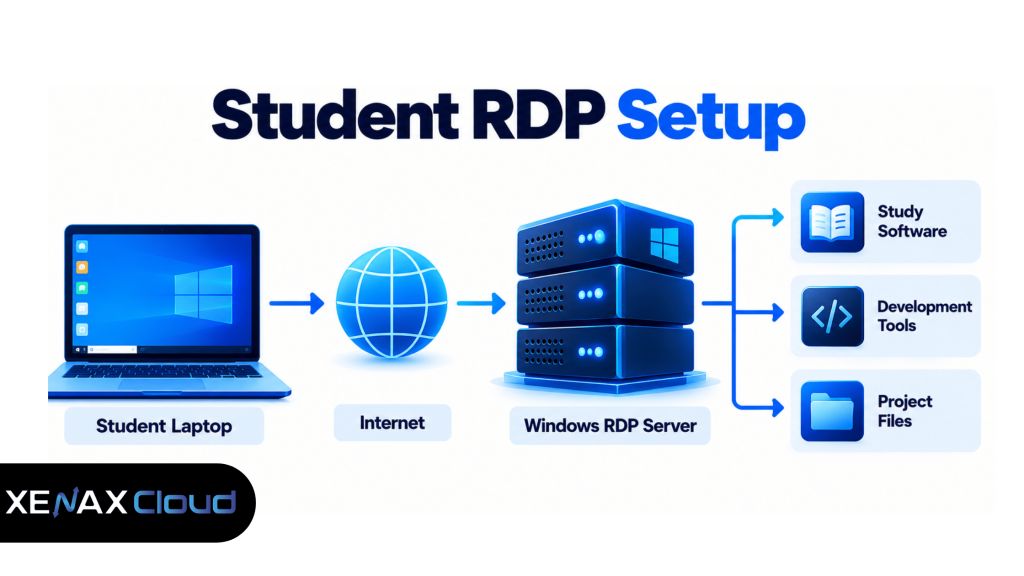
The arrangement looks like this:
Student laptop / tablet
          |
          | Internet
          v
     Remote Desktop
          |
          v
   Windows RDP Server
          |
    +-----+-----+
    |     |     |
   IDE  Apps  Files
Microsoft supports Remote Desktop connections from several client platforms, including Windows, macOS, iOS/iPadOS and Android, with feature availability varying by client.
For students using an older laptop, this arrangement can be useful when the main requirement is interacting with software running on the remote machine rather than performing all computation locally.
However, an unstable internet connection can make remote work frustrating. A local application doesn’t depend on a continuous connection to a remote desktop in the same way.
What Can You Install on a Student RDP?
You can use the remote Windows environment for compatible applications that your RDP account and Windows configuration permit you to install.
For programming students, that can include an IDE, Git, programming runtimes, database tools and browser-based development utilities. For other courses, the useful software depends on the application’s Windows requirements and licensing terms.
Before buying, check three things:
- Whether the software supports your Windows version.
- Whether your college licence permits remote or virtual-machine use.
- How much RAM and CPU the application requires.
Don’t assume that an RDP automatically provides a licence for third-party software. The remote Windows environment and the applications you install are separate considerations.
For example, if your university provides a licensed engineering, design or statistical application, check its licence conditions before installing it on a remote server.
How Do You Connect to an RDP?
Connecting to an RDP normally requires the server address, username and password supplied for the remote Windows machine.
On a Windows computer, Microsoft’s documented connection process uses the Remote Desktop Connection application, where you enter the remote computer’s name or IP address and then provide your credentials.
A typical connection process is:
- Open Remote Desktop Connection on your Windows device.
- Enter the RDP server IP address or hostname.
- Select Connect.
- Enter the username and password supplied for the server.
- Wait for the Windows desktop to load.
- Install your required academic or development applications.
- Check available CPU and RAM through Task Manager > Performance.
- Sign out when finished rather than leaving unnecessary applications running.
Microsoft also recommends keeping strong, unique passwords for accounts with remote access and using Network Level Authentication where appropriate.
For a student, this matters because an RDP is an internet-accessible computer. Don’t treat it like a temporary disposable account if you’re storing coursework, credentials or project files on it.
When Is an RDP Worth Paying For as a Student?
An RDP is worth considering when you regularly need Windows applications or computing resources that your current device cannot conveniently provide.
Suppose you’re studying computer science and your laptop can handle normal browsing but becomes difficult to use while running an IDE, database and several development services. An 8 GB Speed RDP at ₹949 per month gives you a separate Windows environment with 4 vCPU and 8 GB RAM.
If you’re only using Microsoft Office, PDFs, web applications and video lectures, an RDP adds another monthly cost without solving a significant problem.
The same distinction applies to students with powerful laptops. If your local machine already runs your required software comfortably, remote hosting may not provide enough benefit to justify the recurring expense.
A useful decision rule is simple:
Buy an RDP when a specific application or workload is the problem, not merely because remote desktops sound useful.
For students who do need a Windows remote environment, Indian RDP hosting is the relevant Xenax product page to review.
What About Latency for Students in India?
Latency matters mainly for how responsive the remote desktop feels, and an India-hosted RDP is naturally better aligned with users whose access path is close to India.
Xenax Cloud’s RDP hardware is located at its single data centre in Banda, Uttar Pradesh. As a physics-based expectation rather than a Xenax performance benchmark, round-trip latency from India can be roughly 50–80 ms to Singapore, 120–160 ms to Europe and 200–250 ms to the US East Coast.
For ordinary academic work, the most important consideration is whether the connection feels responsive enough for your applications. For highly interactive workloads that require infrastructure in another country, an India-hosted RDP may not meet that specific requirement.
The server location should therefore be treated as a technical requirement, not a marketing feature.
FAQs
Can I use RDP from my phone or tablet?
Yes, Remote Desktop clients are available across several platforms, including mobile devices. The exact features depend on the client and remote desktop configuration, so a laptop or desktop is generally more practical for programming and software-heavy coursework.
Is ₹649 enough for a student RDP?
₹649 per month gets the listed Speed RDP entry configuration of 2 vCPU and 4 GB RAM. It can be a starting point for lighter workloads, while students running development tools or several applications together may need 8 GB or more.
Can I use an RDP for college projects?
Yes, provided the software licences and your institution’s rules permit remote use. An RDP can host development tools, project files and compatible Windows applications, but you remain responsible for following your college’s software and data policies.
Can I use the same RDP from different devices?
Yes, the remote desktop can generally be accessed from supported client devices using the supplied connection credentials. This can let you continue working from another computer without moving the remote application’s installation between devices.
Is an RDP useful if my laptop is already powerful?
Not necessarily. If your laptop already runs your required software comfortably, an RDP may add cost without solving a real problem; it becomes more useful when you specifically need remote access, a separate Windows environment or additional computing resources.
If you have a specific application or project that your laptop cannot handle comfortably, identify its CPU, RAM and Windows requirements first, then compare those requirements with the available RDP configurations; the 15-day money-back window can be relevant when evaluating a new plan.