
Domain and hosting together means registering your website address and purchasing the server space needed to publish the website through the same provider. The domain identifies your website on the internet, while hosting stores its files and database. Buying both together can simplify setup, but they remain separate services with separate renewal terms.
If you are starting a business website, blog, portfolio or online store, you need both services before visitors can reach your website using its domain name. You should also understand what happens after registration: DNS records connect the domain to the hosting server, SSL protects website connections, and renewals keep the services active.
The right purchase depends on your website platform, storage requirements, number of websites, email needs and future plans. The following sections explain what to order, how to connect the services and which details to check before completing the purchase.
What Does Domain and Hosting Together Mean?
Domain and hosting together means obtaining a domain registration and a web hosting service through one provider or account. The domain is the address visitors enter, while hosting is the server environment that delivers the website’s content.
A domain name is a human-readable internet address that points users towards online services, such as a website or email service. A web hosting service is a server service that stores website files, databases and related resources so visitors can access them.
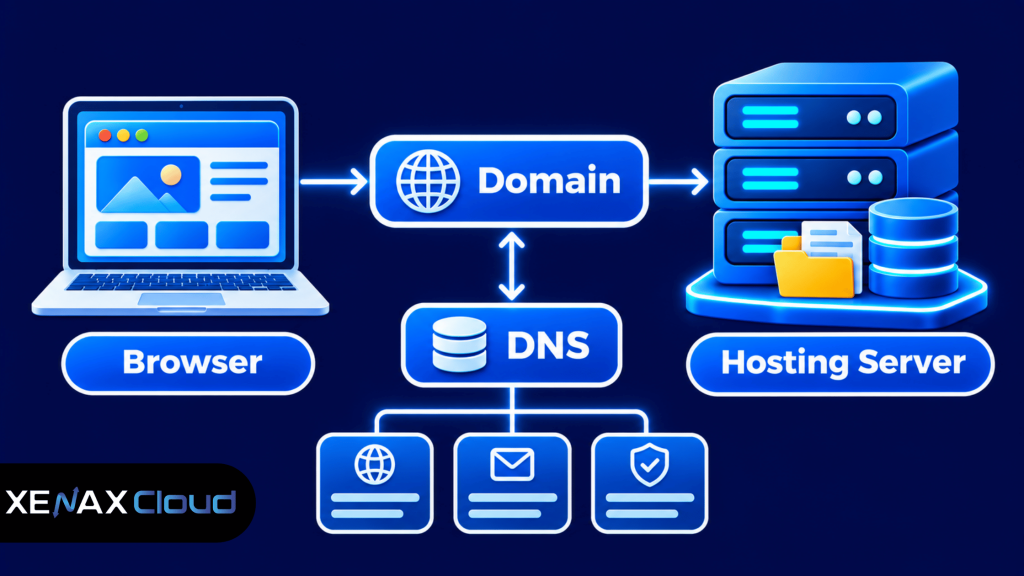
For example, a business might register example.com as its domain and use a hosting server to store its WordPress website. When someone enters the domain in a browser, the Domain Name System helps locate the server responsible for the website.
The two services perform different jobs:
- Domain registration: Reserves the right to use a domain name for its registration period.
- Web hosting: Stores website files, application code, images and databases.
- DNS management: Connects the domain name to the correct hosting server and other services.
- SSL certificate: Enables encrypted HTTPS connections between a visitor’s browser and the website.
- Email hosting: Handles mailboxes associated with a domain when the selected service provides them.
Buying both services through one provider can reduce the number of accounts you manage. However, purchasing them together does not mean the domain is automatically included with hosting; check the order details to confirm that both services have been selected.
Before you buy domain and hosting together, understand how these two services work independently. Read our guide on the difference between domain and hosting to learn what each service does and how they work together to make your website accessible online.
Buy Domain and Hosting Together: What Should You Check?
You should check domain availability, extension, ownership details, renewal terms and hosting specifications before placing an order. These checks help prevent choosing a name that does not fit your brand or a hosting plan that cannot support your website.
A top-level domain (TLD) is the final part of a domain name, such as .com, .org or .net. Different extensions can suit different organisations, audiences and naming strategies.
Before ordering, review the following:
- Name: Choose a short, recognisable name that is easy to spell and communicate verbally.
- Extension: Check whether the extension fits your organisation and intended audience.
- Availability: Confirm that the exact spelling is available for registration.
- Ownership: Register the domain using contact details controlled by you or your business.
- Renewal: Compare the renewal price with the first-year registration price before paying.
- Hosting capacity: Check disk space, bandwidth, website limits, database support and email mailboxes.
- Support: Check how to contact the provider if domain configuration or hosting setup fails.
Xenax Cloud offers domain extensions including .com, .org, .net, .com.in, .xyz and .online. The available extension list can change, so confirm the exact domain’s availability and registration terms during checkout.
Do not choose a domain only because its first-year registration appears attractive. Domain registration continues only while it is renewed according to the registrar’s terms. The ICANN guidance on renewing domain names explains why registrants should keep their contact details current and renew before expiration.
Buy Domain and Hosting: Which Hosting Plan Fits Your Website?
The hosting plan should match your website platform, number of websites, storage requirements, traffic and email needs. A domain name alone cannot publish a website; you must connect it to a hosting service or another platform that serves the website.
For a typical business website, cPanel hosting provides a control panel for managing files, databases, email accounts and domain settings. Xenax Cloud hosting uses cPanel and LiteSpeed web server, with Let’s Encrypt SSL and DDoS protection included.
The shared hosting plans have different limits:
| Plan | Websites | Disk space | Bandwidth | Mailboxes |
| Silver | 1 | 5 GB | 50 GB | 3 |
| Gold | 3 | 15 GB | 100 GB | 6 |
| Platinum | 10 | 100 GB | 1,000 GB | 25 |
| Diamond | Unlimited | Unlimited | Unlimited | Unlimited |
JetBackup 5 backups are included with these shared hosting plans. Check the backup and restoration process for your account, and keep an independent copy of important website files and databases.
Use these practical selection rules:
- One small business website: Silver can fit a single website that stays within its disk and bandwidth limits.
- Two or three websites: Gold supports up to three websites, with 15 GB disk space and 100 GB bandwidth.
- Several business websites: Platinum supports up to ten websites, with 100 GB disk space and 1,000 GB bandwidth.
- Larger multi-site requirements: Diamond provides unlimited website, disk, bandwidth and mailbox limits under the plan specification.
These are plan limits, not a promise that every website will perform identically. A website with large image files, frequent database queries or heavy traffic can use resources differently from a simple brochure website.
If you are building a WordPress website, also consider whether a WordPress-specific hosting plan better matches your setup. Xenax Cloud WordPress Hosting has plans for different site counts and storage requirements, with weekly backups included.
How to Connect Your Domain to Web Hosting
You can connect a domain to web hosting by assigning the correct nameservers or DNS records, then allowing DNS changes to propagate. The exact settings depend on the hosting provider and the DNS management service controlling the domain.
A nameserver is a DNS server that provides the authoritative records for a domain. An A record maps a domain or hostname to an IPv4 address, while an MX record identifies the mail servers responsible for receiving email.
Follow these steps after purchasing both services:
- Open the domain management panel where your domain registration is managed.
- Find the nameserver or DNS settings for the registered domain.
- Copy the nameserver details or DNS records supplied by your hosting provider.
- Update the nameservers or required records without changing unrelated entries.
- Add the domain to the hosting account if it is not already configured.
- Enable SSL and verify that the website loads through HTTPS.
- Test the website, email delivery and important pages after DNS changes take effect.
If the hosting provider supplies nameservers, enter the exact values provided in the domain panel. If you use external DNS management, configure the required A, CNAME and MX records instead of changing nameservers without understanding which services depend on the existing DNS zone.
DNS changes are not always visible everywhere immediately because resolvers may retain cached records. Avoid deleting existing MX or verification records during a website connection because doing so can interrupt business email or other services.
Once the domain points to the hosting server, install your website platform or upload the website files. For WordPress, use the hosting control panel’s application installer if available, then confirm the site address, SSL configuration and administrator login.
Worked Example: A Jaipur Boutique Buying Its First Website
A Jaipur boutique launching one catalogue website can register a memorable business domain and select a shared hosting plan that supports one website. The correct choice depends on the site’s actual storage, bandwidth and mailbox requirements rather than the business’s size alone.
Assume the boutique needs:
- One website with product photographs, contact details and store information.
- A website directory and database that fit within 5 GB of disk space.
- Monthly data transfer within the Silver plan’s 50 GB bandwidth limit.
- Two business email mailboxes for enquiries and order communication.
Xenax Cloud Shared Hosting Silver supports one website, 5 GB disk space, 50 GB bandwidth and three mailboxes. It fits this example because the website count, storage requirement, bandwidth estimate and mailbox requirement remain within the listed limits.
Gold would be a more suitable choice if the boutique plans to host up to three websites, needs more disk space or expects its data transfer to exceed Silver’s allocation. Platinum is a better fit for a business managing several websites, with support for up to ten sites and 100 GB disk space.
For the domain, the boutique should choose an available name that matches its registered or recognised business identity. It should register the domain under contact details it controls, then connect the domain to the hosting account using the supplied DNS settings.
This example assumes the website’s resource needs stay within the stated limits. If product images, downloadable catalogues or visitor activity push storage or bandwidth beyond Silver’s allocation, Silver is no longer the right choice; compare Gold or Platinum against the measured requirement.
Xenax Cloud provides domain registration through its domain registration service. The domain and hosting are separate services, so confirm both appear in your order and note their individual renewal dates.
Domain Ownership, DNS, Email and Website Security
Buying domain and hosting together does not combine their technical responsibilities; you still need to manage domain ownership, DNS records, website security and backups. Keeping these settings organised protects your website address and reduces the risk of service interruptions.
A registrant is the person or organisation that registers a domain name and holds the registration rights for the agreed registration period. Use a business-controlled email address and accurate contact details so renewal notices and domain verification messages reach the right person.
Keep these responsibilities clear:
- Domain account: Protect the registrar login with a strong, unique password and multi-factor authentication where available.
- DNS records: Keep a record of the active nameservers, A records, CNAME records and MX records.
- Hosting account: Restrict access to authorised administrators and remove accounts that are no longer needed.
- Website software: Apply updates to WordPress, themes, plugins and server-side applications.
- SSL: Confirm that HTTPS works and that the certificate renews correctly.
- Backups: Keep an independent copy of important files and databases, and periodically test restoration.
Email deserves separate attention. A domain can point its website to one hosting server while its MX records direct incoming email to another mail service. If you change nameservers or edit DNS records, preserve the existing email records unless you intend to move email as well.
A common mistake is to assume that buying hosting automatically creates a domain-based email service. Check the mailbox allowance and email features of the selected hosting plan; Xenax Cloud shared hosting lists mailbox limits for each plan.
Another mistake is to treat a backup as proof that recovery will work. Before making major changes, download a current copy of website files and export the database. A backup that has never been restored is not a verified recovery procedure.
What Happens When Your Domain or Hosting Expires?
A domain expiration can make your website and associated services unavailable even when the hosting account still contains all website files. Hosting expiration can also make the website unavailable while the domain registration remains active.
The two renewal dates are independent, so record both in a calendar and enable renewal reminders where available. Keep payment details and registrant contact information current, and check the provider’s renewal and restoration terms before the due date.
If a domain expires, the available recovery options depend on the extension, registrar and registration status. Do not assume that an expired domain will remain reserved for you; it may eventually become available for registration by another person.
Hosting renewal should also be treated separately. Before changing providers or allowing a hosting account to expire, create a full backup of website files, databases and any configuration you need to restore the site elsewhere.
For a business website, assign one person responsibility for renewal reminders and account access. Keep the registrar login, hosting login and recovery email under business control rather than tying them only to an employee’s personal account.
Domain and Hosting Together: FAQs
Can I buy a domain and hosting from the same company?
Yes, you can register a domain and purchase hosting through the same provider if both services are offered. This can simplify account management and DNS setup. Check that the domain registration and hosting subscription are both listed in your order, because one service does not automatically include the other.
Does buying domain and hosting together include a domain at no cost?
No, buying domain and hosting together does not automatically mean the domain is included in the hosting plan. Domain registration and hosting are separate services with their own terms. Review the order summary and renewal details so you know which services you are paying for and when each must be renewed.
Which domain extension should I choose for my business?
Choose an extension that fits your business identity, audience and availability. .com is commonly used for commercial websites, while .org may suit organisations and .net can suit technology-related projects. Check the registration and renewal terms for the exact extension before completing your order.
Can I use a domain with hosting from a different company?
Yes, a domain can point to hosting from a different provider by changing its nameservers or DNS records. You do not have to transfer the registration to connect the services. Keep existing MX and verification records intact if your business email or other services use the domain.
How long does it take to connect a domain to hosting?
A domain connection can become active after the correct nameserver or DNS records are saved, but visibility can vary because DNS resolvers cache information. Check the records supplied by your hosting provider, allow for propagation and test the website using HTTPS before sharing the address with customers.
Can I change my hosting provider without changing my domain?
Yes, you can move your website to another hosting provider while keeping the same domain registration. Back up your website files and database, copy the required DNS records and test the new hosting account before changing the domain’s DNS settings. Keep the old hosting active until the new website works correctly.
What should I compare before I buy domain and hosting together?
Compare the domain’s first-year registration and renewal terms, hosting storage, bandwidth, website limits, mailbox allowance, backup coverage and support. Also confirm that the domain is registered under your control. A low initial registration cost does not tell you the full cost or suitability of the services over time.
Choose an available domain that matches your business name, then select a hosting plan according to your website count, disk usage, bandwidth and mailbox needs. For a single small website within the Silver limits, compare the Silver shared hosting specifications; complete the domain registration separately and keep both renewal dates recorded.