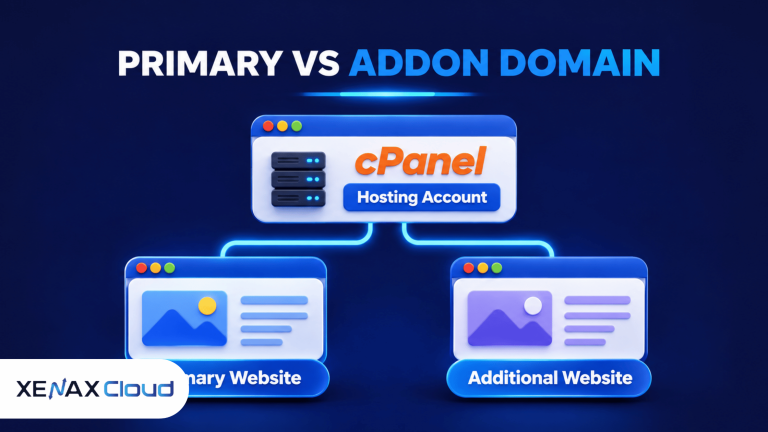
Primary domain vs addon domain describes two different roles that domain names can have inside one cPanel hosting account. The primary domain is the main domain assigned to the account, while an addon domain is an additional registered domain that can host a separate website using the same account and its shared resources.
This distinction matters when you own more than one website, manage client projects or want to keep a business website separate from a personal project. Choosing the right setup affects website directories, DNS configuration, email management and how you organise hosting resources.
The terms can also be confusing because cPanel has updated its interface over time. Older tutorials may refer to a separate Addon Domains menu, while current cPanel versions manage domain creation through the Domains interface.
What Is the Difference Between a Primary Domain and an Addon Domain?
A primary domain is the main domain name associated with a cPanel account, while an addon domain is an additional domain configured to host a separate website within that account.
For example, imagine a business that owns brightretail.com and later registers brightfashion.com. If brightretail.com was assigned when the hosting account was created, it is the primary domain. The business can add brightfashion.com as an addon domain if its hosting provider allows additional domains.
The two websites can have different content, website files and domain names. Visitors do not need to know that both websites use the same hosting account.
| Feature | Primary domain | Addon domain |
| Account role | Main domain assigned to the account | Additional domain |
| Website | Hosts the account’s main website | Can host a separate website |
| Domain registration | Must be registered | Must also be registered |
| Website directory | Commonly uses the account’s main document root | Can use a separate document root |
| cPanel account | Belongs to the hosting account | Uses the same hosting account |
| Resource usage | Uses account resources | Shares account resources |
The important difference is not that one domain is more valuable or more professional. The difference is how the hosting account organises them.
Understanding primary domain vs addon domain is important when planning multiple websites under one cPanel hosting account. A primary domain serves as the main website, while an addon domain allows you to host another independent website without purchasing a separate hosting account. Both domains can have separate website files, but they share the hosting account’s available resources.
An addon domain does not automatically provide a separate hosting account, independent resource allocation or a separate control panel login. It remains part of the same cPanel account unless the provider creates a separate account for it.
What Is a Main Domain in cPanel?
A main domain is the primary domain that the hosting provider assigns when creating a cPanel account. It identifies the account’s principal website and is shown as the Main Domain in the cPanel domain list.
The main domain is not necessarily the oldest domain you own, the domain with the most visitors or the domain you use for your most important business. Its role comes from the hosting account configuration.
For example, suppose a web designer registers three domains:
- designstudio.com for the agency website.
- portfoliohub.net for a personal portfolio.
- localbrand.org for a client project.
If the hosting account was created with designstudio.com, that domain is the main domain. The other two can be configured as additional domains if the hosting plan and cPanel permissions support them.
A hosting provider can change the primary domain through account-level administration, but changing it is not the same as simply adding another website. Website files, email settings, DNS records and redirects may need attention during such a change.
Keep a record of the current document roots and take a complete account backup before changing the main domain. This helps prevent accidental file or configuration loss.
How Does Addon Domain cPanel Hosting Work?
Addon domain cPanel hosting allows multiple registered domains to serve separate websites from one cPanel account. Each additional domain can have its own website directory and virtual host configuration.
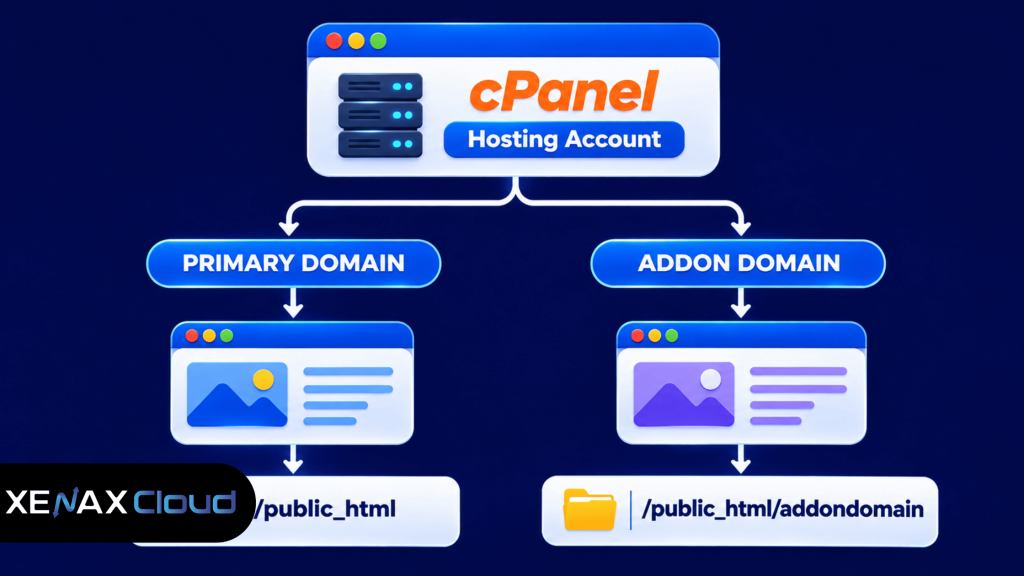
The hosting server uses domain configuration and virtual hosts to direct visitors to the correct website. When someone opens an addon domain, the server uses its configured document root to find and serve the relevant website files.
For example, brightretail.com might use the account’s main website directory, while brightfashion.com uses a separate directory. Uploading the fashion website into its own document root helps prevent its files from mixing with the retail website.
The cPanel interface and available options depend on the hosting provider. Some providers restrict the number of additional domains or disable domain creation for particular packages.
A separate document root is particularly useful when two websites have different designs, applications, databases or maintenance schedules. It does not, however, create a completely isolated hosting environment. Both websites still share the account’s resource limits and account-level access.
If you are new to managing websites through cPanel, read our guide on shared hosting with cPanel to understand how website files, databases, domains and hosting resources are managed from one account.
How to Add an Addon Domain in cPanel
You can add an addon domain through the Domains interface when your hosting provider has enabled the required feature and your domain is registered.
Follow these steps:
- Register the additional domain through a domain registrar.
- Check whether your hosting plan allows additional domains.
- Open the Domains interface in cPanel.
- Select Create a New Domain.
- Enter the additional domain name.
- Set a separate document root for its website files.
- Verify DNS and website access after creation.
After entering the domain name, review the document root carefully. If the interface offers an option to share the primary domain’s document root, leave that option disabled when you want a separate website.
The document root is the directory that contains the publicly accessible files for a website. A separate directory makes it easier to manage website content and reduces the risk of accidentally replacing files belonging to another domain.
For DNS, the additional domain must point to the hosting server. Your provider can supply the nameservers or DNS records required for the account. Allow for DNS propagation after changing records, and verify that the domain resolves to the intended server before uploading or publishing the website.
The cPanel interface has changed in newer versions. Older instructions may show separate Addon Domains, Aliases and Subdomains menus. Current cPanel versions consolidate these functions under Domains, although the hosting provider controls which features are available. See the official cPanel instructions for creating a new domain for the current interface and its options.
Before adding another website, it is useful to understand the relationship between domain registration and hosting. Read our guide on buying a domain and hosting together to learn how domain registration, DNS configuration and hosting setup work together.
When Should You Use a Primary Domain vs Addon Domain?
Use a primary domain for the main website assigned to your hosting account, and use an addon domain when you need another independent website under the same account.
The right arrangement depends on how many websites you manage, how much control each project needs and whether the sites can share hosting resources.
Choose an addon domain when:
- You operate a small business website and a separate portfolio website.
- You manage a few low-traffic websites with similar maintenance requirements.
- You want to organise separate websites through one cPanel login.
- Your hosting package permits the required number of additional domains.
- Shared CPU, memory, storage and other account limits are sufficient.
Consider separate hosting accounts when:
- Different clients need independent control panel access.
- Websites need separate resource allocations.
- One website has substantially heavier traffic or application requirements.
- You need stronger separation between administrative users and website files.
- One project’s activity should not affect the resources available to another.
An addon domain is not automatically the better choice simply because it reduces the number of hosting accounts you manage. Convenience must be balanced against shared resources, account permissions and the consequences of a problem affecting the whole account.
For example, if a web agency manages several small brochure websites, a shared cPanel account may be practical. If the agency manages business-critical applications for separate clients, individual hosting accounts can make permissions and resource management easier.
Worked Example: A Jaipur Business With Two Websites
A Jaipur-based clothing business owns a retail website and wants to launch a separate website for its wholesale operation. Both websites need different content, branding and contact information.
The owner can keep the retail website as the primary domain and configure the wholesale domain as an addon domain, provided the selected cPanel hosting plan supports the required number of websites.
The setup could look like this:
| Requirement | Retail website | Wholesale website |
| Domain | jaipurretail.com | jaipurwholesale.com |
| Account role | Primary domain | Addon domain |
| Website files | Main document root | Separate document root |
| Website content | Retail products | Wholesale catalogue |
| Hosting account | Same account | Same account |
This arrangement works when both websites have modest resource requirements and the business is comfortable managing them through one cPanel login.
The next decision is the hosting plan’s website limit. Xenax Cloud Shared Hosting Silver supports one website, so it would not fit this two-website requirement. Gold supports three websites, making it a suitable plan family to evaluate for this example. The owner should still check storage, bandwidth and mailbox requirements before ordering.
If the wholesale website later becomes a resource-intensive store or needs independent administrative access, moving it to a separate hosting account may be a better arrangement.
Does an Addon Domain Affect SEO or Website Security?
An addon domain does not automatically receive an SEO advantage or penalty simply because it shares a hosting account with another domain. Search engines evaluate the content, technical setup and signals of each website.
Each website should have its own:
- Relevant page titles and meta descriptions.
- Original content that serves its intended visitors.
- Correct canonical URLs.
- Valid HTTPS configuration.
- XML sitemap and appropriate indexing settings.
- Consistent internal links and navigation.
Avoid copying the same website across multiple domains without a clear purpose. Duplicate or near-duplicate pages can make it harder for search engines to identify which version should appear in results.
Security also needs attention. An addon domain shares the cPanel account’s administrative environment, so a compromised account can potentially affect multiple websites. Use strong account credentials, keep applications updated and maintain backups that can be restored.
For a website migration or major directory change, create and verify a complete backup before changing document roots or removing domains. Do not assume that deleting a domain entry also deletes or preserves every file and database in the way you expect.
Xenax Cloud Domain Registration vs the usual alternatives
| Feature | Xenax Cloud | Typical Indian shared host | Global budget host |
|---|---|---|---|
| Starting price | ₹624/yr | ₹199/mo | ₹149/mo (renews ₹499) |
| Storage | .com ₹1,124/yr | 10 GB SSD | 25 GB SSD |
| DDoS protection | 100 Gbps, always on | Basic | Cloudflare only |
| Support | 24×7, in-house engineers | Tickets, business hours | Chat, outsourced |
| Data centre | India (NVMe) | India | Singapore / US |
| Control panel | cPanel / WHM included | cPanel | Custom panel |
Entry-level plans, list prices including GST where shown. Check each provider before buying — prices change.
See Domain Registration plansPrimary Domain vs Addon Domain: FAQs
Can an addon domain have its own website?
Yes, an addon domain can host a separate website when it has its own document root and the hosting account permits additional domains. You can install a separate content management system, upload different website files and configure its own database. It still shares the cPanel account’s overall resources and administrative access.
Does an addon domain need separate hosting?
No, an addon domain does not require a separate hosting account if your existing cPanel package supports additional domains. It uses the resources of the current account. Separate hosting becomes useful when you need independent resource limits, different control panel users or stronger separation between projects.
Is an addon domain the same as a subdomain?
No, an addon domain uses a separately registered domain name, while a subdomain is created under an existing domain. For example, anotherbrand.com can be an addon domain, whereas shop.example.com is a subdomain of example.com. Their DNS and hosting configurations are different.
Can I change my primary domain to an addon domain?
Yes, a hosting administrator can change the primary domain and configure the former primary domain as an addon domain, but the process requires care. Back up the account first, review document roots, update DNS and check email settings. Follow your hosting provider’s procedure rather than simply renaming website folders.
Does an addon domain have a separate cPanel login?
No, an addon domain normally uses the same cPanel login as the primary domain because both belong to one hosting account. If a client or team member needs independent control panel access, ask the hosting provider about creating a separate hosting account or an appropriate account-level arrangement.
How many addon domains can I create in one cPanel account?
The number depends on the hosting package and the features enabled by the hosting provider. Some plans allow only one website, while others support multiple or unlimited websites. Check the package’s domain and website limits before registering domains or moving existing websites into the account.
Is primary domain vs addon domain important for SEO?
Yes, understanding primary domain vs addon domain helps you organise separate websites, document roots and technical settings correctly. The account role itself does not give a website a ranking advantage. Each domain still needs useful content, correct indexing, HTTPS, canonical URLs and a clear site structure.
If you plan to manage multiple independent websites through one cPanel login, check the domain allowance and storage requirements of your hosting package before ordering. Choose a shared hosting plan with enough website capacity for your projects, or use separate hosting accounts when clients need independent access and resources.