To buy .com domain name means registering an available internet address that ends in .com through an authorised registrar. A .com domain name is widely recognised by businesses, customers and website visitors, making it a practical choice for company websites, online stores, professional services and general-purpose projects.
Before registering, choose a name that matches your brand, check that the exact spelling is available and review the renewal terms. You should also decide who will control the registration account, because losing access can affect your website and business email.
Domain registration is separate from website hosting. You can register your domain first and connect it to hosting later, or arrange both services as part of the same website setup.
What Is a .com Domain Name?
A .com domain name is an internet address that uses .com, a generic top-level domain originally intended for commercial organisations but now used across many types of websites.
A domain name is a human-readable internet address that identifies a website or another online service. In example.com, example is the registered name and .com is the top-level domain, commonly called a TLD.
The .com extension is not restricted to large companies or commercial businesses. Freelancers, local shops, consultants, educational projects, software companies and personal websites can also use it.
A business often chooses .com because customers are familiar with the extension. It is also suitable when the same address will appear on visiting cards, invoices, email signatures, advertisements and social profiles.
However, choosing .com does not automatically improve search rankings or prove that a website is legitimate. The domain name, website content, business information and security practices still determine how visitors experience the business.
What Should You Check Before You Buy a .com Domain Name?
Before you buy a .com domain name, check its spelling, availability, brand suitability, registration terms and future renewal conditions.
A domain search result marked available does not reserve the name. Another person can register it before you complete the order, so verify the exact name and proceed when your checks are complete.
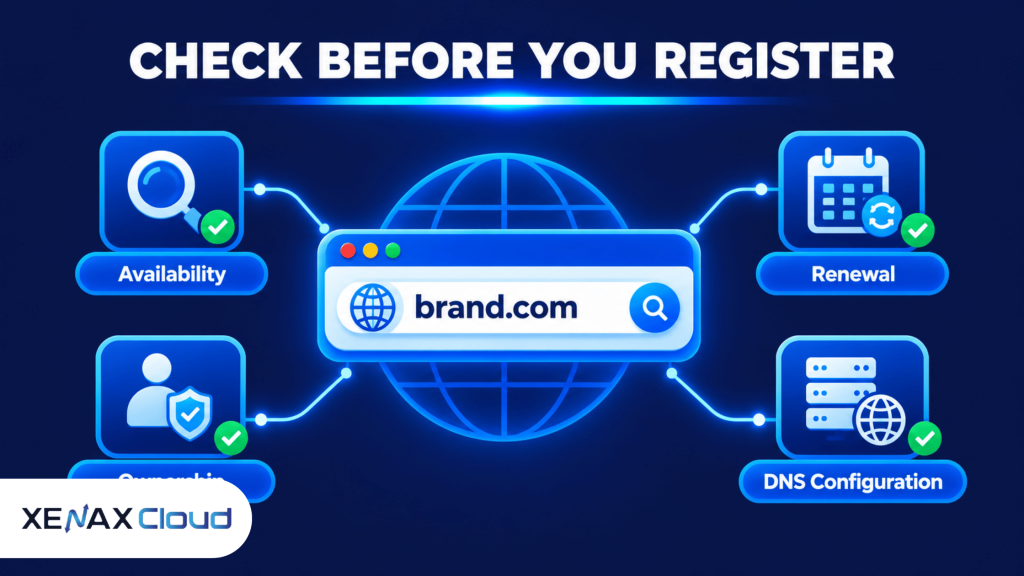
Start with these checks:
- Spelling: Read the full name carefully, including every letter and the .com ending.
- Brand suitability: Make sure the name represents your business, product or service.
- Availability: Search the exact name through a domain registrar.
- Existing businesses: Check for similar company names, brands and trademarks.
- Renewal terms: Compare the renewal terms with the first registration term.
- Ownership: Use contact details and an account controlled by the intended domain owner.
- Management access: Check whether you can manage nameservers, DNS records and domain transfers.
A name that sounds good but is difficult to spell can create problems in email addresses and offline marketing. Ask someone to write it down after hearing it once; if they repeatedly misspell it, consider a simpler name.
For more detail on checking an exact name and reviewing alternative extensions, read How to Check Domain Availability Before You Register. The availability result can change, so do not treat a search as a reservation.
How to Choose a .com Domain Name for Your Business
Choose a .com domain name that is easy to remember, closely connected to your brand and simple for customers to type without assistance.
A business domain becomes part of your public identity. It may appear on invoices, advertisements, packaging, email addresses and customer communication, so changing it later can require updates across many business channels.
Use these naming principles:
- Keep it short. Prefer a name that customers can remember without writing it down.
- Use clear spelling. Avoid unusual combinations that people may confuse when hearing the name.
- Match your brand. Use your business or product name when the exact name is suitable and available.
- Avoid unnecessary hyphens. Extra punctuation makes verbal communication and typing less convenient.
- Check pronunciation. Make sure people can say the name naturally.
- Consider future services. Avoid a name that becomes restrictive if your business expands.
- Check brand conflicts. Search for existing businesses using similar names before registration.
For example, a Varanasi-based accounting consultancy could prefer a name based on its established business identity rather than a long address containing several service keywords. The domain should be easy for existing clients to recognise and new customers to remember.
Do not assume that adding a popular keyword to a domain guarantees better Google rankings. A relevant, memorable brand name is generally a more practical long-term choice than an awkward phrase created only to include search terms.
If you are still deciding on a name, read Domain Name Generator: Find Your Perfect Domain. It can help you develop possible names before checking which exact .com addresses are available.
.com Domain Name vs Other Domain Extensions
A .com domain name is a common choice for general business use, but another extension may suit a project better when the preferred name is unavailable or the alternative has a clear purpose.
| Extension | Common association | Consider it for |
| .com | Commercial and general-purpose websites | Businesses, services and online stores |
| .org | Organisations and community-focused projects | Non-profit and membership organisations |
| .net | Network and technology-related use | Technology services and general websites |
| .xyz | General-purpose alternative | Projects seeking a different brand identity |
| .online | Websites and online services | Digital services and web-based businesses |
The extension does not determine whether a website is trustworthy. Visitors are more likely to judge a business through its content, contact information, payment security, reputation and overall website experience.
If your exact business name is available as .com and the registration terms suit you, it can be a sensible primary domain. If it is unavailable, compare a different brand name with another suitable extension rather than registering a confusing variation.
Also consider whether you need additional extensions. Registering several versions of the same name creates additional renewal and account-management responsibilities. Buy another extension only when it protects a meaningful brand variation or serves a separate business purpose.
How to Get a .com Domain and Register It
You can get a .com domain by searching for the exact name through a registrar, reviewing its registration conditions and completing the registration under the correct owner.
Follow these steps:
- Open a domain registrar’s search page.
- Enter your preferred name with the .com extension.
- Check whether the exact domain is available.
- Review registration and renewal terms.
- Verify the registrant information and account ownership.
- Complete the registration using the available payment method.
- Confirm that the domain appears in your account.
- Save the registration and account recovery details securely.
After checkout, sign in to the registrar account and confirm that the domain appears in your domain list. Check the spelling again and verify that the registration contact details belong to the person or organisation intended to control the domain.
For a business, avoid leaving the domain registered only under a web developer’s personal account. The business owner or an authorised business account should retain control, even if a developer handles website configuration.
Xenax Cloud provides domain registration for .com and other supported extensions. You can check the available names through Xenax Cloud domain registration and review the registration and renewal terms before placing an order.
Worked Example: A Varanasi Business Registering Its First Domain
Consider a Varanasi-based printing business with one shop and four employees. The owner wants a website to display services, accept customer enquiries and provide a business email address for quotations and order communication.
The owner has shortlisted brandname.com, using the actual business name in place of the example. The first step is to check the exact spelling and confirm that the domain is available, then review similar business names and possible trademark conflicts.
If the preferred .com is available and its renewal terms are acceptable, registering that name is a reasonable decision. The owner should register it under an account controlled by the business rather than relying on an employee or outside developer to retain ownership.
For this requirement, the domain registration product is the relevant Xenax Cloud service. Domain registration does not have a smaller or larger resource configuration like a server plan; the decision is based on the name, extension, availability and registration conditions.
The business should also understand that registering the domain does not publish its website. It will need a hosting service for website files and a suitable email service or hosting arrangement for business email.
The decision rule is straightforward:
- Choose the preferred .com when the exact name is available, easy to communicate and suitable for the brand.
- Consider another brand name if the preferred .com is already registered.
- Consider another extension if it accurately fits the business and the preferred .com is unavailable.
- Register additional extensions only when they protect a meaningful brand identity or support a separate project.
The domain registration product is not the right purchase by itself if your immediate requirement is a working website. In that case, arrange suitable web hosting as well and connect the domain through DNS.
What Happens After You Buy a .com Domain?
After you buy a .com domain, confirm ownership, configure DNS and connect the name to the website and email services you intend to use.
A Domain Name System (DNS) is a system that translates domain names into information used to locate internet services. DNS records tell browsers and email systems where to send their requests.
Common records include:
- A record: Points a hostname to an IPv4 address.
- AAAA record: Points a hostname to an IPv6 address.
- CNAME record: Makes one hostname an alias of another hostname.
- MX record: Identifies the mail servers that receive email for a domain.
- TXT record: Stores text information used for verification and email authentication.
If your website is hosted by a separate provider, use the nameservers or DNS records supplied by that provider. Do not guess the IP address or replace existing DNS records without checking which services currently depend on them.
For business email, confirm the required MX, SPF, DKIM and DMARC configuration with your email provider. Incorrect mail records can prevent messages from reaching the correct server or affect email authentication.
A practical safety step is to save the existing DNS records before making changes to an active domain. If a change interrupts the website or email, the previous values can help you restore the earlier configuration.
How to Protect Your .com Domain Name
Protect your .com domain name by securing the registrar account, keeping ownership details accurate and monitoring renewal dates.
A domain is a business asset because it controls the address customers use to reach your website and email services. Losing access to the registrar account or allowing registration to expire can disrupt those services.
Use these safeguards:
- Enable two-factor authentication where the registrar supports it.
- Use a strong, unique password for the registrar account.
- Keep the registrant email address current and accessible.
- Enable domain locking where available to reduce unauthorised transfer risk.
- Turn on renewal reminders or auto-renew if appropriate.
- Keep payment details current.
- Limit account access to authorised people.
- Store recovery information securely.
Domain registration is not permanent ownership. You register the name for a specified term and must renew it according to the registrar and registry rules to continue using it.
ICANN provides information for domain name registrants, including guidance about registration responsibilities and registrar relationships. Review the applicable terms rather than assuming every extension follows identical procedures.
Buy .com Domain Name: FAQs
Can I buy a .com domain without hosting?
Yes, you can register a .com domain without purchasing hosting. Domain registration reserves the internet address for its registration term, while hosting stores and serves your website files. You can register the domain first and connect it to a hosting provider whenever your website is ready.
Is a .com domain name suitable for a small business?
Yes, a .com domain name is suitable for small businesses, local shops, consultants and service providers. It is widely recognised and can be used for a business website and email address. Choose a name that matches your brand and is easy for customers to remember and type.
How do I know if a .com domain is available?
Search the exact domain name through a registrar’s domain search tool. A result marked available means it can currently be submitted for registration, subject to applicable rules. The search does not reserve the name, so complete registration promptly after checking spelling and ownership details.
Can I register a .com domain in my business name?
Yes, you can register a .com domain using the appropriate business registrant details where the registrar’s process permits it. Keep the registration account under business control and use an accessible contact email. This reduces dependence on an individual employee or developer for future renewals and transfers.
Does buying a .com domain improve Google rankings?
No, registering a .com domain does not automatically improve Google rankings. The extension is widely recognised, but search visibility depends on content relevance, technical accessibility, website quality and other search signals. Choose .com for its brand suitability and familiarity, not as a ranking shortcut.
Can I use a .com domain for business email?
Yes, you can use a .com domain for business email after configuring the required email service and DNS records. Your provider will supply the MX and authentication settings, which may include SPF, DKIM and DMARC. Verify these records before relying on the address for customer communication.
What happens if I forget to renew my .com domain?
If you do not renew a .com domain, it can expire and eventually become available for registration by someone else. The recovery period and process depend on the registrar and applicable registry rules. Keep renewal reminders enabled and ensure your account contact and payment details remain current.
If your business has selected a suitable name, check its exact .com availability and compare the renewal terms with the first registration term. Register it under your business-controlled account through Xenax Cloud, then arrange hosting separately if you need to publish a website.