
A domain name generator is a tool that creates website name ideas using keywords, business descriptions, industry terms and brand concepts. A good domain name generator helps you discover memorable names, explore suitable extensions and shortlist options before checking their registration availability.
Choosing a domain is one of the first decisions when launching a business website, blog, online store or personal portfolio. The right name should reflect your identity, be easy to communicate and remain suitable as your project grows.
However, generating a name and registering a domain are two different steps. A suggested name must still be checked through a domain registrar before you can secure it.
What Is a Domain Name Generator?
A domain name generator is an online naming tool that combines words, keywords and brand concepts to suggest possible website addresses.
For example, someone starting a web design agency might enter keywords such as design, creative, studio and digital. The generator can combine these terms into different brand ideas that can then be checked for domain availability.
A domain name is a human-readable internet address that identifies a website or online service. For example, xenaxcloud.com is a domain name.
A Top-Level Domain (TLD) is the final part of a domain name, such as .com, .org or .net.
How does a domain name generator work?
Most generators use combinations of words, keyword variations, prefixes, suffixes and naming patterns to produce suggestions.
A typical generator may use:
- Business keywords describing your industry.
- Brand words representing your identity.
- Short prefixes and suffixes.
- Synonyms and related terms.
- Different domain extensions.
- Word combinations designed for memorability.
Some advanced generators also use artificial intelligence to create names from natural-language descriptions.
For example, entering “an online clothing store for Indian customers” may produce suggestions based on fashion, apparel, style, wardrobe and shopping terminology.
The quality of suggestions depends on the tool’s word database, naming logic and available domain information. A generated name should always be reviewed manually before registration.
How to Generate Domain Name Suggestions for Your Business
Good domain name suggestions begin with a clear understanding of your business, audience and brand identity.
Instead of entering random words, start with the products or services you provide. Then use combinations of industry terms, brand concepts and memorable expressions to create a shortlist.
Consider these examples:
| Business type | Main keywords | Example name ideas |
| Clothing store | Fashion, style, wear | StyleNest, UrbanWear |
| Digital agency | Creative, digital, media | PixelCraft, MediaNest |
| Restaurant | Food, kitchen, taste | TasteCorner, UrbanKitchen |
| Technology company | Tech, cloud, systems | CloudSphere, TechNest |
| Travel business | Travel, trips, journey | TripTrail, JourneyHub |
These are brainstorming examples, not confirmed available domains.
What makes a good domain name?
A good domain name should be easy to remember, spell, pronounce and communicate.
Consider the following characteristics:
Keep it short: Short names are generally easier to type and share. Avoid unnecessary words that make the address difficult to remember.
Make spelling predictable: Avoid unusual spellings that force customers to ask how the name is written.
Choose relevant words: Your domain should have a logical connection to your business or brand.
Avoid unnecessary hyphens: Hyphens can make a domain harder to communicate verbally and increase typing mistakes.
Think long term: Select a name that remains suitable if your business expands into additional products or services.
For example, a company selling only mobile phone accessories might initially choose a name containing the word “mobile”. If the company later starts selling laptops and other electronics, a broader technology-related brand name may provide more flexibility.
How to Find a Domain Name That Is Available
To find a domain name that is available, generate suitable ideas, select an extension and check the complete domain through a registrar’s availability search.
A name generated by an AI tool or naming website is not automatically available for registration. Someone else may already own it, or the registry may have reserved it.
The following process helps you shortlist and verify domain names.
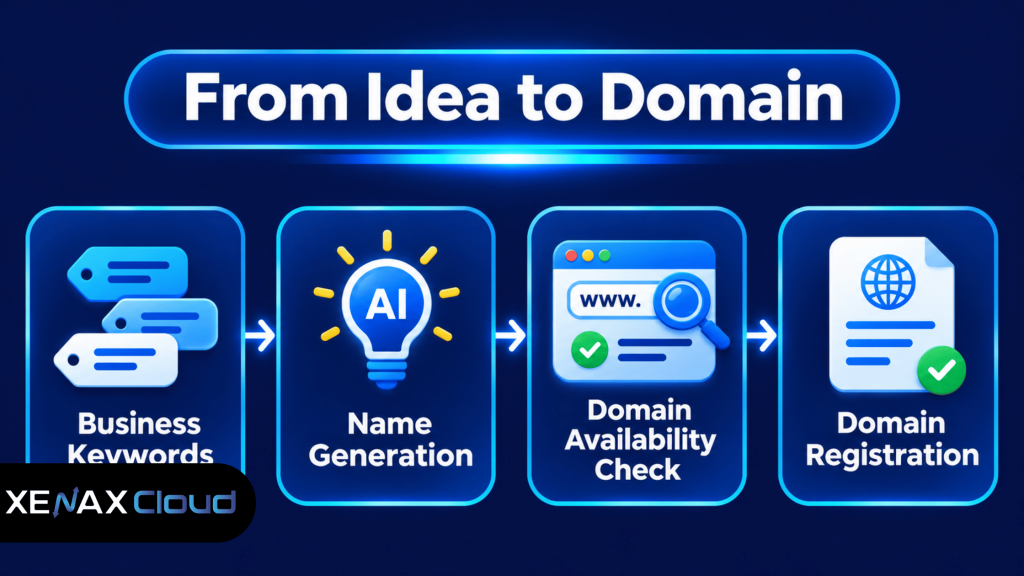
How to find a domain name step by step
- Identify your business name, industry and target audience.
- Collect relevant keywords and brand-related words.
- Generate multiple domain name combinations.
- Shortlist names that are easy to spell and pronounce.
- Select suitable extensions for your business.
- Check availability using a domain registrar.
- Review registration and renewal conditions before purchasing.
For example, imagine a business named Sharma Digital Services.
You could create a shortlist:
- sharmadigital.com
- sharmamedia.com
- sharmacreative.com
- sharmatech.com
Search each complete domain separately. If your preferred name is unavailable, consider a different brand combination rather than adding random characters to the original name.
Why should you check availability before choosing a brand name?
Domain availability can change because domain names are registered on a first-come, first-served basis under the applicable registry rules.
A search result showing an available domain does not reserve it. Another customer may register the name before you complete the registration process.
You should also check whether the proposed name conflicts with an existing business identity or trademark. Domain availability does not establish that you have legal rights to use a brand name.
For domain registration responsibilities, review ICANN’s information for domain name registrants.
Which Domain Extension Should You Choose?
The best domain extension depends on your brand, website purpose and intended audience.
A domain extension is the ending of a web address that identifies its top-level domain category. Common choices include .com, .org, .net, .xyz and .online.
| Extension | Common association | Suitable use |
| .com | Commercial and general websites | Businesses and online stores |
| .org | Organisations and communities | Non-profit and community projects |
| .net | Networks and technology | Technology-related websites |
| .xyz | General-purpose extension | Startups and creative brands |
| .online | Online presence | Digital businesses and services |
These associations are common conventions, not mandatory registration restrictions. An extension does not automatically improve search rankings.
Is .com always the best choice?
No. A .com domain is a familiar choice for businesses, but another extension can work when it accurately represents your brand and is easier to obtain.
For example, a technology startup may prefer a suitable .net or .xyz name if its preferred .com address is already registered. A community organisation may find .org more appropriate.
Do not select an extension only because it looks attractive. Check the renewal conditions, registration requirements and how easily your customers will recognise it.
Xenax Cloud supports domain registration for extensions including .com, .org, .net, .com.in, .xyz and .online. You can explore the available options through Xenax Cloud domain registration.
Should you register multiple domain extensions?
Register additional extensions when they serve a clear branding or business purpose.
For example, a company may register its main .com domain and an additional suitable extension to reduce brand confusion. However, purchasing many extensions without a specific reason creates additional renewal responsibilities.
Prioritise the main brand domain first, then decide whether additional registrations are necessary.
Worked Example: Choosing a Domain for a Varanasi-Based Business
A Varanasi-based clothing business needs a memorable domain for its online catalogue, product enquiries and future online store.
Suppose the business operates under the name “Banaras Style House” and wants a domain that customers can easily remember and share.
The owner could shortlist:
- banarasstyle.com
- banarasfashion.com
- stylehouseonline.com
- banaraswear.com
The first step is to check the preferred .com name. If it is unavailable, the owner should evaluate the remaining suggestions rather than automatically choosing a confusing spelling variation.
For this business, the best choice is the shortest available name that accurately represents its brand and remains suitable if the business expands beyond clothing.
The owner should also compare the registration and renewal terms for the selected extension. Xenax Cloud’s domain registration service is suitable for checking supported extensions and registering an available name.
If the business later needs a website, it must also arrange web hosting. Domain registration reserves the web address, while hosting stores the website files and makes them accessible online. These are separate services.
Common Domain Name Generator Mistakes to Avoid
A domain name generator can provide useful ideas, but blindly registering the first available suggestion can create branding and ownership problems.
Avoid these common mistakes:
Choosing complicated spellings: Unusual spellings may look distinctive but can make it difficult for customers to find your website.
Using unnecessary numbers: Numbers can create confusion when customers hear your domain verbally.
Ignoring trademark conflicts: A domain may be available for registration but still conflict with another business’s trademark. Check the relevant brand and trademark records before registering.
Choosing an overly narrow name: A name describing only one product may become unsuitable if your business expands.
Ignoring renewal terms: Compare the renewal price with the first-year registration price before purchasing. The initial registration cost does not represent the full long-term cost of ownership.
Using a generated name without checking it: A generator does not guarantee availability, legal suitability or brand uniqueness.
What Should You Do After Registering a Domain?
After registering a domain, verify the ownership information, secure the registrar account and configure DNS records for your website and email services.
Use this checklist:
- Verify ownership: Confirm that the registrant information is accurate.
- Secure the account: Use a strong unique password and two-factor authentication where supported.
- Enable domain locking: Use the registrar’s transfer-lock feature where available.
- Configure nameservers: Enter the correct nameservers supplied by your DNS or hosting provider.
- Set DNS records: Configure A, AAAA, CNAME, MX and TXT records as required by your services.
- Check renewal settings: Record the expiration date and review automatic renewal options.
- Keep recovery details safe: Store account credentials and recovery information securely.
A DNS record is an entry that tells internet systems how to handle a domain or its subdomain. For example, an A record maps a hostname to an IPv4 address, while an MX record identifies the mail servers responsible for receiving email.
If you connect your domain to a hosting account, use the exact nameservers or DNS records supplied by the hosting provider. Keep existing email-related records intact during DNS changes to avoid disrupting business email.
You can also read How to Check Domain Availability Before You Register for additional information about availability checks and registration.
For a broader understanding of domain ownership and hosting, see Domain Name and Website: What’s the Difference?.
Domain Name Generator: FAQs
Is a domain name generator available online?
Yes, domain name generators are available online and help create website name ideas from keywords, business descriptions and brand concepts. Some tools also suggest domain extensions and display availability information. Always verify the complete domain through a registrar before registering it.
Are domain name suggestions automatically available for registration?
No, domain name suggestions are not automatically available for registration. A generator creates ideas, but another person may already own the suggested name. Check its registration status through a registrar and complete the registration process promptly if the name is available and suitable.
How do I find a domain name for my business?
Start with your business name, products, industry and audience. Generate several short combinations, remove difficult spellings and check suitable extensions. Before registering, review potential trademark conflicts and compare renewal conditions. Choose a name that remains relevant if your business expands into additional services.
Which domain extension is best for a new business?
A .com domain is a familiar choice for general businesses, but .net, .org, .xyz and .online can also suit different projects. Choose an extension that fits your brand and audience. Compare registration and renewal terms before completing the purchase.
Can I use an AI domain name generator for my startup?
Yes, an AI domain name generator can help startups brainstorm names from descriptions, keywords and industry concepts. However, AI-generated suggestions are not guaranteed to be unique, legally suitable or available. Check domain availability and potential trademark conflicts before using a generated name commercially.
Does registering a domain name include website hosting?
No, domain registration and website hosting are separate services. A domain provides the address visitors use to reach your website, while hosting stores website files and serves them to visitors. You can register a domain first and connect it to a hosting provider later through DNS.
What should I check before registering a generated domain name?
Check the spelling, extension, availability, trademark suitability and renewal conditions before registering a generated domain. Also verify that you can control the registrar account and update its DNS settings. Keep registration details accurate and store account recovery information securely.
If you have shortlisted a suitable brand name, check its availability through Xenax Cloud domain registration. Compare the renewal terms with the first-registration terms, choose an appropriate extension such as .com, .org, .net, .xyz or .online, and keep the registration account under your control.