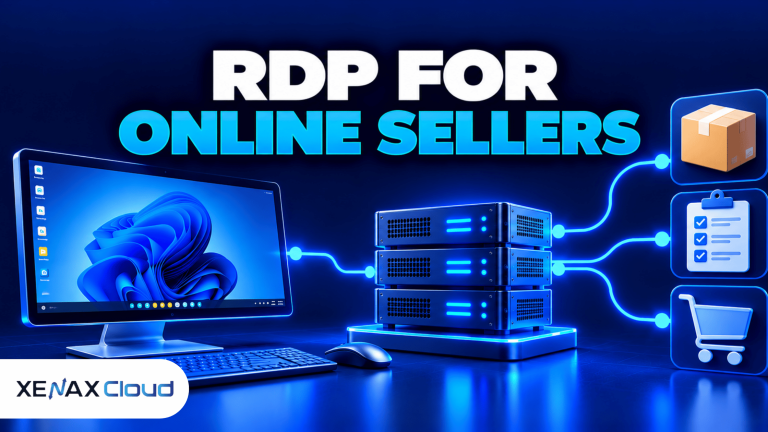
RDP for online sellers provides remote access to a Windows desktop hosted on a remote server, allowing sellers to manage marketplace dashboards, product listings, order records and business applications from different devices. The desktop runs on the server rather than relying entirely on your local computer, so your work environment can remain available when you disconnect.
For sellers operating across marketplaces, this setup can help separate business activities from personal computer use. The right configuration depends on your browser workload, number of open tabs, inventory tools, staff access requirements and the applications you need to run.
Xenax Cloud offers Windows-based RDP hosting from an Indian data centre in Banda, Uttar Pradesh. Choosing a plan requires checking its processor, memory and storage against your actual workload rather than selecting a server based on the word “RDP” alone.
What Is RDP for Online Sellers?
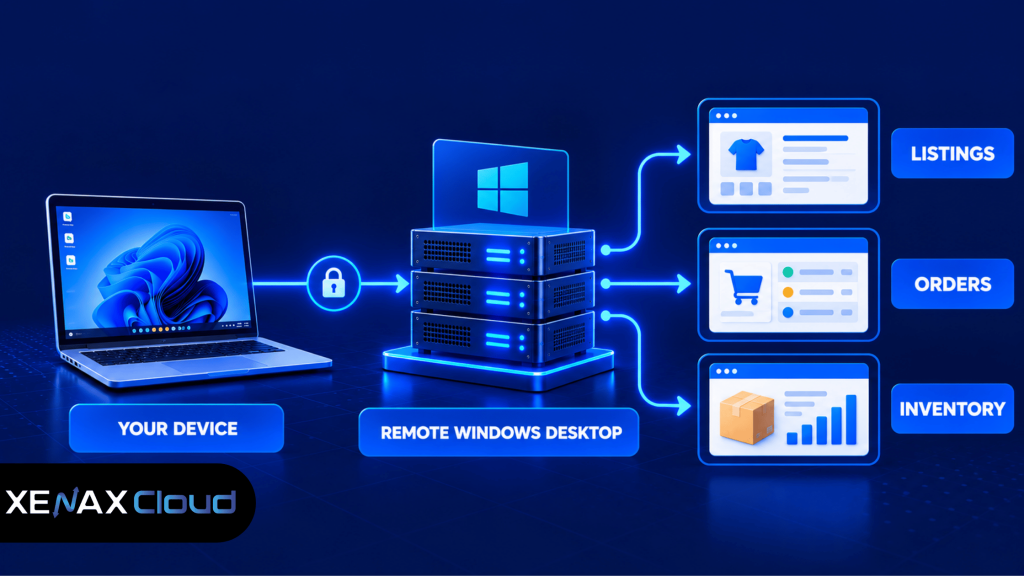
RDP for online sellers is a remote Windows desktop service that lets ecommerce businesses access applications and files on a server through a network connection. RDP stands for Remote Desktop Protocol, Microsoft’s technology for connecting to and interacting with a remote Windows computer.
A seller connects to the remote desktop using a compatible Remote Desktop client. The server processes the applications, while the seller views the desktop and sends keyboard and mouse input through the connection.
This arrangement can be useful for several business tasks:
- Managing product listings and updating descriptions.
- Reviewing orders, returns and inventory records.
- Using browser-based seller dashboards and reporting tools.
- Running compatible Windows applications used for ecommerce operations.
- Accessing a consistent business desktop from different locations.
A remote desktop does not automatically connect every marketplace account or synchronise inventory across platforms. Those functions still depend on the marketplace, the software you use and any integrations you configure.
How Is RDP Different From Using Your Personal Computer?
RDP runs applications on a remote server, while a conventional desktop runs them on your local computer. This distinction affects where processing happens, how you access your work and what happens when your personal device is switched off.
With local computing, your applications depend on your computer’s available memory, processor and storage. With RDP, the server supplies the assigned resources, while your local device mainly handles the connection and display.
However, remote access still depends on a reliable internet connection. A server also needs appropriate security settings, updates and backups. RDP is not a substitute for a marketplace’s own security controls or an independent backup strategy.
RDP for online sellers provides a remote Windows desktop for managing marketplace listings, tracking orders and accessing ecommerce tools. A Windows remote desktop environment lets sellers access their work environment from different devices without relying entirely on their personal computer.
Which RDP Configuration Fits Your Ecommerce Workload?
The right RDP configuration depends on whether you mainly manage browser-based listings or run several applications, reports and background tasks together. CPU resources affect processing, RAM supports running applications, and storage holds the operating system, software and working files.
Before ordering, estimate your workload instead of choosing a configuration based only on the number of marketplace accounts you manage.
A browser-based seller dashboard may not need the same resources as a desktop application that processes large spreadsheets or handles multiple simultaneous tasks. Check actual memory usage and CPU load when your usual applications are open.
RDP for online sellers helps marketplace businesses manage product listings, track orders and access ecommerce tools through a remote Windows desktop. The right RDP configuration depends on the applications you run, the number of browser tabs you keep open and your daily workload.
Xenax Cloud provides three RDP families, each suited to a different resource preference.
| RDP family | Starting configuration | Main characteristic | Consider it for |
| Speed RDP | 2 vCPU, 4 GB RAM | Multiple sizes available | General marketplace and browser work |
| General RDP | 2 vCPU, 8 GB RAM | More RAM per vCPU | Memory-heavy browser sessions and applications |
| Gold RDP | 2 vCPU, 4 GB RAM | High-frequency Xeon Gold processor | Workloads that benefit from CPU performance |
The available configurations extend to 32 vCPU and 64 GB RAM for Speed RDP and Gold RDP. General RDP has configurations extending to 16 vCPU and 64 GB RAM. All three families use Windows on KVM virtualisation and provide administrator access.
Storage requirements also matter. Leave sufficient room for Windows updates, application installations, downloaded reports and working files. Avoid treating the remote desktop as the only location for important business records.
How Much RAM Do Online Sellers Need for RDP?
Online sellers should select RAM based on the applications they run together, not simply on the number of marketplace accounts they own. Browser tabs, spreadsheet applications, image editors and inventory tools can all compete for memory.
Use these practical starting points when evaluating a plan:
- 2 vCPU and 4 GB RAM: Consider for light browser-based work and a limited set of applications.
- 2 vCPU and 8 GB RAM: Consider when several browser sessions, spreadsheets or business tools run together.
- Higher-memory configurations: Consider when monitoring shows sustained memory pressure or when your software has specific RAM requirements.
These are planning guidelines, not guaranteed performance figures. Marketplace pages, browser extensions and third-party tools vary in resource use, so monitor the actual workload before deciding to upgrade.
How to Choose RDP for Ecommerce Sellers
RDP for ecommerce sellers should be selected according to the software, workload and access requirements of the business. A seller who mainly updates product descriptions has different needs from a team that processes large spreadsheets and runs several business applications simultaneously.
Use the following decision rules:
- Choose Speed RDP if your work is general marketplace management and you need a choice of CPU and RAM sizes.
- Choose General RDP if your applications need more memory relative to the number of virtual CPU cores.
- Choose Gold RDP if CPU performance is a priority for your compatible applications.
- Consider a larger configuration if resource monitoring shows repeated CPU saturation or memory pressure.
- Review storage capacity if downloaded reports, product images and local application files take up significant space.
Xenax Cloud’s Windows RDP hosting plans let you compare the available RDP families and configurations.
One important limitation: RDP is not the right solution if you only need to access a marketplace’s website and your current device already handles the work comfortably. A remote desktop adds server administration and another connection to maintain. It makes more sense when you need a separate Windows environment, remote application access or a consistent work setup across devices.
Worked Example: An Online Seller Managing Two Marketplaces
Consider a Jaipur-based online seller who manages two marketplace accounts, updates product listings, reviews orders and prepares inventory spreadsheets. The seller uses a browser, a spreadsheet application and a separate Windows business tool during the same work session.
A configuration with 2 vCPU and 4 GB RAM may be a reasonable starting point if the applications remain lightweight. If the seller regularly runs several browser sessions alongside large spreadsheets and sees memory pressure, General RDP with 2 vCPU and 8 GB RAM is a more suitable configuration to evaluate because it provides more memory.
The next step is to check actual usage during a busy working session. If the processor remains saturated during reporting tasks, additional RAM alone may not solve the problem; a configuration with more CPU resources may be more appropriate.
Before using remote desktop for marketplace management, configure the server properly, install the required applications and secure your login credentials. Follow our guide on how to set up a VPS to understand the essential steps involved in server setup and administration.
How to Set Up Remote Desktop for Marketplace Sellers
Remote desktop for marketplace sellers should be configured with secure access, the required business applications and a tested backup process. Follow these steps before using the server for routine order management.
- Choose an RDP configuration based on your application requirements and expected workload.
- Connect using a compatible Remote Desktop client and the connection details provided for your server.
- Secure the Windows account with a strong, unique password and available additional authentication controls.
- Update Windows and install required browser and business application updates.
- Configure your seller dashboards and approved inventory or reporting tools.
- Test file access, printing or downloads if your workflow depends on them.
- Back up essential business files and verify that you can restore them when needed.
For a Windows client, open the Remote Desktop application, enter the server name or IP address supplied by your hosting provider, and authenticate using the authorised account. Exact menu labels vary by Windows version and client.
Before entering marketplace credentials, confirm that the server certificate and connection details are correct. Never send passwords or one-time authentication codes to someone claiming to be technical support.
Can You Keep Your Work Available After Disconnecting?
Yes, a remote Windows session can remain active after the client disconnects, depending on the session settings and server policies. Disconnecting is different from signing out: signing out closes the session and can terminate applications that are running inside it.
For long-running tasks, confirm how Windows handles disconnected sessions and application timeouts. Do not assume that every script, browser process or application will continue running indefinitely. Marketplace policies and the behaviour of your software may also restrict unattended tasks.
Is RDP Safe for Marketplace Accounts?
RDP can be used securely when access is properly restricted, Windows is maintained and marketplace credentials are protected. It is not automatically secure simply because the desktop is hosted remotely.
Follow these security practices:
- Use a strong, unique password for the Windows account.
- Enable multi-factor authentication where supported by your remote access setup and marketplace accounts.
- Keep Windows, browsers and installed applications updated.
- Restrict remote access to authorised users and appropriate network sources where possible.
- Avoid sharing administrator credentials among staff.
- Store recovery codes and important business records securely.
- Keep independent copies of essential files and test restoration periodically.
Microsoft’s Remote Desktop security guidance explains security considerations for Remote Desktop Services. Review the guidance relevant to your Windows environment and access method.
Should Every Staff Member Use the Same RDP Login?
No, separate authorised accounts are preferable when the Windows configuration and licensing support the required access model. Individual accounts help you manage permissions and identify which user performed an action.
Do not assume that one RDP server licence or configuration automatically permits multiple simultaneous interactive users. Check the Windows edition, licensing requirements and session limits before planning team access. Also review each marketplace’s rules about account sharing, staff permissions and third-party access.
What Should Indian Online Sellers Check Before Ordering RDP?
Indian online sellers should check server location, network access, configuration limits, support availability and billing terms before choosing a remote desktop. Xenax Cloud operates a Tier-III data centre in Banda, Uttar Pradesh, India; it does not operate additional data centres in other countries.
A server’s location can affect network latency, which is the time taken for data to travel between your device and the server. The actual experience also depends on your internet provider, routing, connection quality and the applications you use.
Before ordering, verify these points:
- Location: Confirm that an Indian-hosted Windows environment meets your business and data-handling requirements.
- Network: Xenax Cloud’s RDP plans use a 500 Mbps port; this is the port specification, not a guarantee of application speed.
- Administration: RDP plans include administrator access, so you can manage supported software and Windows settings.
- Backups: Check the backup arrangement and keep separate copies of critical business data.
- Support: Confirm how to contact support if you cannot connect or need help with server-level issues.
- Billing: Review the selected plan’s billing term, renewal conditions and applicable policy documents before paying.
If your business handles customer information, invoices or order records, review your own retention, access-control and compliance obligations as well. Hosting location alone does not establish that every business process meets a particular legal or marketplace requirement.
RDP for Online Sellers: FAQs
What is RDP for online sellers used for?
RDP for online sellers is used to access a remote Windows desktop for marketplace management, inventory work, order review and compatible business applications. The applications run on the server rather than entirely on your personal computer. The setup is useful when you need a separate work environment, but it does not replace marketplace integrations or account-security controls.
Is RDP for ecommerce sellers suitable for beginners?
Yes, RDP for ecommerce sellers can be suitable for beginners who are comfortable using Windows applications. You still need to connect to the server, manage credentials and install or update software as required. If you do not need a remote Windows environment, a normal browser on your computer may be simpler.
How much RAM is required for an online seller’s RDP?
A configuration with 4 GB RAM can be a starting point for light browser-based tasks, while 8 GB RAM may suit workloads involving several browser sessions and spreadsheets. Actual requirements depend on the applications, browser extensions and files you use. Monitor resource usage during a busy session before selecting a larger configuration.
Can I manage multiple marketplace accounts through one RDP?
Yes, you can access multiple marketplace dashboards from one RDP desktop if each marketplace permits your intended account-management arrangement. Separate browser profiles can help organise sessions, but they do not override marketplace policies or guarantee account separation. Use approved access methods, protect credentials and avoid sharing accounts in ways prohibited by marketplace rules.
Is remote desktop for marketplace sellers safe?
Remote desktop for marketplace sellers can be safe when you use strong credentials, updates, restricted access and appropriate account protections. Security depends on server configuration and user behaviour, not merely the hosting provider. Enable additional authentication where available, avoid sharing administrator passwords and keep independent backups of essential business records.
Which Xenax Cloud RDP plan should an online seller choose?
Speed RDP is a reasonable starting point for general workloads, General RDP suits applications that need more RAM per vCPU, and Gold RDP is worth evaluating for CPU-focused workloads. Compare the available configurations with your actual resource use. If the work is entirely browser-based and your own device is sufficient, you may not need RDP.
Can I access my RDP server from another computer?
Yes, you can access an RDP server from another compatible device when you have network connectivity and authorised connection credentials. Use a trusted device, verify the server details and avoid saving passwords on shared computers. Your experience will depend on the client device, internet connection and server configuration.
For a seller who needs a dedicated Windows work environment, start by comparing Speed RDP, General RDP and Gold RDP against the applications you run and the memory or CPU resources they require. Select the smallest suitable configuration, protect account credentials and review the backup arrangements before moving routine marketplace work onto the server.