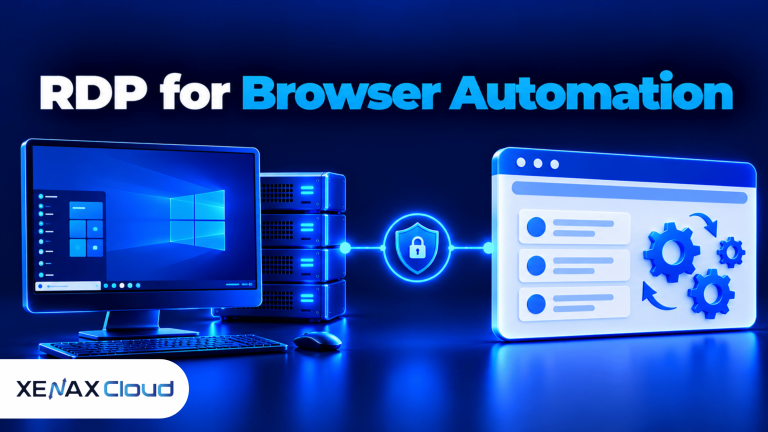
RDP for software testing gives developers and QA testers access to a remote Windows desktop where they can run applications, check browser behaviour and investigate defects. It is useful when you need a separate test machine, access from different locations or a Windows environment without keeping a physical test PC running locally.
A remote desktop can support manual testing, compatibility checks, application installation and controlled reproduction of software issues. It does not automatically create a complete testing lab: the operating system, applications, test data, user permissions and recovery process still need to be configured.
This article explains how to use a remote Windows server for QA work, which resources to consider and when a Xenax Cloud RDP configuration fits the workload.
What Is RDP for Software Testing?
RDP for software testing means using Remote Desktop Protocol to connect to a Windows machine and perform testing tasks through its graphical desktop. RDP is a Microsoft protocol that transmits display updates, keyboard input and mouse activity between a remote computer and a client device.
The remote machine runs the software being tested. Your local computer acts as the client, displaying the remote desktop and sending your interactions to the server.
This arrangement is useful when the application needs a Windows environment or when the tester wants to keep test software separate from their everyday computer. You can install supported browsers, development tools, test applications and other dependencies on the remote machine.
Common testing tasks include:
- Manual application testing: Open software, follow test cases and record unexpected behaviour.
- Browser compatibility checks: Test website layouts and functions in browsers installed on the remote Windows system.
- Installation testing: Check application setup, updates, configuration and removal.
- Regression testing: Repeat previously completed test cases after a software change.
- Defect reproduction: Use a consistent remote environment to investigate a reported issue.
- Remote QA access: Connect to the same configured test machine from an authorised location.
RDP is an access method, not a testing framework. You still need test cases, expected results, defect tracking and a process for reporting issues.
How Does a Windows Test Server Help QA Teams?
A Windows test server is a remote Windows machine that provides a separate environment for installing and checking software before release. It can help a QA tester avoid mixing test applications, temporary files and development dependencies with their primary computer.
A remote test environment is particularly useful when a tester needs to reproduce a problem using a known application setup. Instead of repeatedly installing the same tools on a personal laptop, the tester can connect to a configured server and use its installed software.
The basic arrangement looks like this:
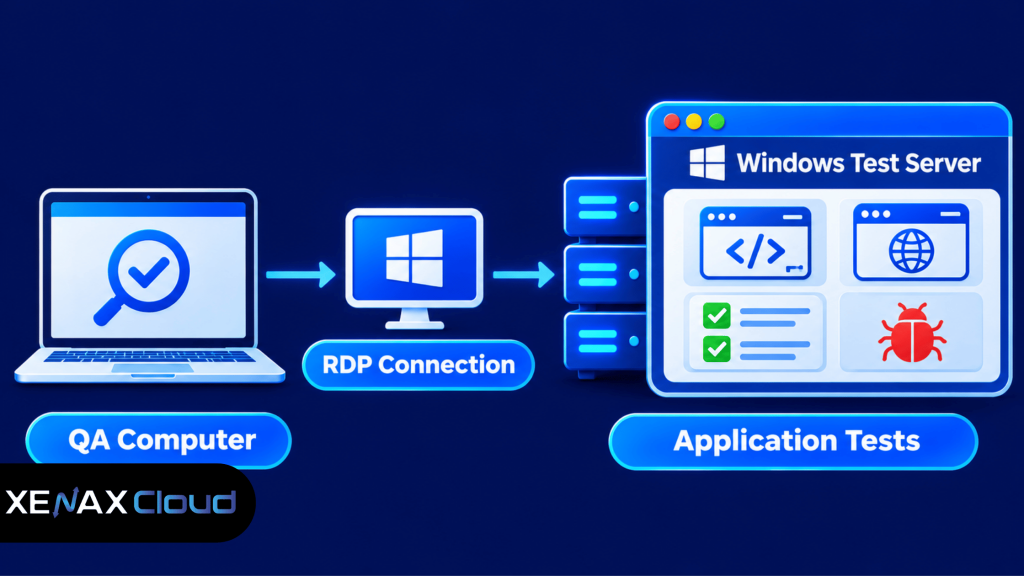
The tester interacts with the remote desktop, but the application and its dependencies run on the Windows server. This can keep the test environment separate from the local computer, although network quality still affects how responsive the remote session feels.
A remote Windows machine is not automatically an exact copy of a customer’s computer. If a defect depends on a particular Windows edition, browser version, display setting or hardware feature, document and reproduce those conditions as closely as possible.
What Can You Test Using Remote Desktop for QA Testing?
Remote desktop for QA testing is suitable for tasks that can run inside the configured Windows environment and be controlled through a remote desktop session. It is particularly useful for manual checks and application workflows that require a graphical interface.
| Testing task | Suitable use | Important limitation |
| Website testing | Check layouts and functions in installed browsers | Does not represent every device or browser version |
| Windows application testing | Install and run desktop software | Application and OS compatibility still need checking |
| Regression testing | Repeat manual test cases | Automated execution needs separate tools |
| Installation testing | Check setup, updates and removal | Requires appropriate permissions |
| Defect reproduction | Recreate issues in a configured environment | Results depend on matching the original conditions |
For website testing, install the browsers and versions required by the test plan. Check responsive layouts, form submissions, navigation, file uploads and browser-console errors, while remembering that a remote desktop does not reproduce every mobile device’s touch behaviour or hardware characteristics.
For desktop applications, check installation requirements, application permissions, file paths and dependencies. If the software needs a specific Windows version, database service or runtime, confirm that the selected server environment supports it before building the test setup.
RDP can also support automated tests when the required testing tools are installed and configured. However, a remote desktop session is not a substitute for a dedicated continuous integration (CI) runner, which executes repeatable build and test jobs through an automated pipeline.
How Much RAM and CPU Do You Need for RDP Testing?
The RAM and CPU required for RDP testing depend on the operating system, testing tools, number of open applications and whether local services run alongside the software. A browser-only manual check has different resource needs from a workload that combines an IDE, several browser profiles and a local database.
Use these Xenax Cloud RDP families as a starting point:
| RDP family | Entry configuration | Suitable workload |
| Speed RDP | 2 vCPU, 4 GB RAM | Lighter manual testing and basic applications |
| General RDP | 2 vCPU, 8 GB RAM | Workloads needing more memory per vCPU |
| Gold RDP | 2 vCPU, 4 GB RAM | CPU-sensitive tasks that benefit from high-frequency Xeon Gold processors |
Speed RDP provides a range of configurations from 2 vCPU and 4 GB RAM up to 32 vCPU and 64 GB RAM. General RDP offers more RAM per vCPU, with configurations from 2 vCPU and 8 GB RAM up to 16 vCPU and 64 GB RAM.
Gold RDP uses high-frequency Xeon Gold processors and has configurations from 2 vCPU and 4 GB RAM up to 32 vCPU and 64 GB RAM. All three families use Windows on KVM and include administrator access, a 500 Mbps port, one IPv4 address and weekly backups.
Use this decision rule:
- Choose Speed RDP for lighter manual checks, a limited number of applications and workloads that fit within 4 GB RAM.
- Choose General RDP if your testing setup needs more memory per vCPU, such as an IDE, multiple browser profiles and local test services.
- Choose Gold RDP if CPU-sensitive application tasks benefit from high-frequency Xeon Gold processors.
- Select a larger configuration if monitoring shows sustained memory pressure, CPU saturation or insufficient storage for the installed test tools.
Do not select a server based only on the number of applications. Check Task Manager while running the actual test workload: review memory use, CPU utilisation and disk activity, then leave headroom for the operating system and background services.
A higher CPU frequency does not solve a memory shortage. If the test environment regularly runs out of RAM, consider a configuration with more memory rather than choosing a processor-focused option for the wrong reason.
Before selecting a remote testing configuration, estimate how much memory your applications use together and leave room for Windows background processes. Our guide on how much RAM a VPS needs explains how workload and application requirements affect memory planning.
How to Set Up RDP for Software Testing
You can set up RDP for software testing by ordering a suitable Windows configuration, securing remote access and installing the required test tools. Prepare the environment before running tests so that results can be reproduced and unexpected changes can be identified.
Follow these steps:
- Select an RDP configuration that meets your software’s resource requirements.
- Connect using the Remote Desktop client and the server credentials.
- Update Windows and check the installed system components.
- Install the browsers, IDEs, runtimes and applications required for testing.
- Configure test accounts, permissions and sample data.
- Run a small test case and monitor CPU, memory and disk usage.
- Document the environment settings so future tests use the same configuration.
Xenax Cloud provides Windows RDP hosting on KVM virtual machines with administrator access. The RDP service uses the same network and backup infrastructure as its VPS service, with a 500 Mbps port and weekly backups.
After connecting, open Windows Update and apply the required updates. Restart the server if prompted, then check Device Manager and Windows settings for any configuration issues that could affect the software under test.
Install only the tools required by the test plan. For example, a web application tester may need browsers and developer tools, while a desktop application tester may need a particular runtime, database client or development environment.
Record the environment details in a test note:
Operating system:
Windows updates:
Browser and version:
Application build:
Installed runtimes:
Test account:
Display resolution:
Test date:
This record helps another tester understand the conditions under which a defect was found. It also makes it easier to identify whether a later result changed because of an application update or a different environment configuration.
If test files need to be moved between your local computer and the remote machine, use an approved transfer method and restrict access to the relevant folders. See how to transfer files to RDP for additional file-transfer guidance.
Worked Example: Which RDP Configuration Fits a QA Tester?
A QA tester in Noida who runs an IDE, two browser profiles and a local test service may need more memory than a browser-only tester. The configuration should be selected around the complete workload, not just the application being tested.
Consider a tester who needs one remote Windows desktop for manual testing of a web application. The tester runs an IDE, two browser profiles, a test client and a local supporting service together, and wants enough memory headroom to avoid frequent swapping during normal work.
For this workload, General RDP with 2 vCPU and 8 GB RAM is the more appropriate starting configuration. Its higher memory allocation per vCPU makes it a better fit than the entry Speed RDP configuration with 2 vCPU and 4 GB RAM, which may be constrained when several development and testing tools are open together.
Use this decision rule for a similar setup:
- Choose Speed RDP with 2 vCPU and 4 GB RAM if you mainly run one browser, a lightweight test client and basic manual checks.
- Choose General RDP with 2 vCPU and 8 GB RAM if you run an IDE, multiple browser profiles and a local test service together.
- Choose a larger General RDP configuration if Task Manager shows sustained memory pressure or the workload needs more than the entry configuration can provide.
- Consider Gold RDP if CPU-sensitive tasks, rather than memory capacity, are the main constraint.
The example is a planning scenario, not a performance benchmark. Before ordering, list the tools you will run simultaneously and check their published system requirements. After setup, monitor actual resource use and adjust the configuration if the workload grows.
Xenax Cloud’s General RDP is the relevant family for a tester who needs more RAM per vCPU. Speed RDP may be enough for simpler manual checks, while Gold RDP is aimed at workloads that benefit from high-frequency Xeon Gold processors.
How Should You Secure a Remote Windows Test Server?
You should secure a remote Windows test server by restricting access, using strong credentials, applying updates and separating test data from sensitive production information. Remote desktop access gives a user control of the Windows environment, so an exposed or poorly managed login can create a security risk.
Apply these practices before using the server for regular testing:
- Restrict remote access: Allow connections only from authorised users and use network-level access restrictions where available.
- Use strong credentials: Create unique passwords and do not share administrator credentials across a team.
- Limit permissions: Use administrator access only for installation and configuration tasks that require it.
- Install updates: Keep Windows and testing applications updated according to your organisation’s change process.
- Separate test data: Use synthetic or anonymised data instead of copying real customer records into a test environment.
- Review access: Remove accounts that no longer need to connect and check access settings when team responsibilities change.
Do not assume that a remote desktop is secure simply because it uses a password. Use an appropriate firewall policy, avoid exposing unnecessary services and follow your organisation’s security requirements for remote access.
For web application testing, follow a defined methodology rather than relying only on ad hoc browsing. The OWASP Web Security Testing Guide provides testing guidance for areas such as authentication, session management and input validation.
Weekly backups are included with Xenax Cloud RDP, but a backup is not a replacement for a test-data management policy. Keep separate copies of important test scripts and configuration notes, and confirm that the recovery process meets your team’s requirements before relying on it.
When Is RDP Not Enough for Software Testing?
RDP is not enough when your testing requires multiple operating systems, physical devices, specialised hardware or a fully automated build-and-test pipeline. A remote Windows desktop is one test environment, not a complete replacement for a device lab or CI infrastructure.
Consider another testing approach when you need:
- Cross-platform coverage: Use separate environments for Linux, macOS, Android or iOS testing where those platforms are required.
- Mobile device testing: Use physical devices or a suitable device-testing service for touch, sensor, camera and hardware-specific checks.
- Automated CI pipelines: Use a CI runner and version-controlled test scripts to run repeatable jobs after code changes.
- Load testing: Use a controlled load-testing setup that can generate and measure the required traffic without treating a desktop session as the load generator by default.
- Hardware-specific validation: Test on the actual hardware or a suitable environment that exposes the required device features.
RDP is also not a guarantee that multiple people can use one Windows installation in the way a dedicated multi-user test platform would. Check the Windows edition, licensing terms and permitted remote-session arrangement for the intended use before planning shared access.
For a single tester who needs a persistent Windows desktop for manual application checks, RDP can be a practical environment. If the requirement is a wider operating-system matrix or automated release pipeline, combine RDP with the appropriate virtual machines, physical devices or CI tools.
RDP for Software Testing: FAQs
What is RDP for software testing used for?
RDP for software testing provides remote access to a Windows desktop where testers can install applications, check browser behaviour and reproduce software defects. It is useful for manual QA work and controlled Windows environments. It does not replace test management software, automated test runners or testing on physical devices.
Can I use RDP as a Windows test server?
Yes, a Windows RDP server can act as a remote test machine for compatible Windows applications and browser checks. Install the required tools, configure test accounts and document the environment. Check the operating system and application requirements before selecting a server configuration.
How much RAM do I need for remote desktop QA testing?
A lighter manual testing workload may fit a 2 vCPU and 4 GB RAM configuration, while an IDE, multiple browsers and local test services may need 8 GB RAM or more. Xenax Cloud Speed RDP starts at 4 GB RAM, while General RDP starts at 8 GB RAM.
Can I run automated software tests through RDP?
Yes, you can run compatible automated testing tools on a remote Windows machine if their dependencies and execution requirements are met. However, RDP itself does not provide a CI pipeline. For repeatable build-triggered tests, configure a suitable automation runner and version-controlled test scripts.
Is RDP safe for testing business applications?
RDP can be used for business application testing if remote access, user accounts, software updates and test data are managed securely. Restrict access to authorised users and avoid copying sensitive production records into the test environment. Follow your organisation’s security policies for remote connections and data handling.
Is RDP better than a local computer for QA testing?
RDP can be more convenient when you need a separate Windows environment accessible from different locations, while a local computer can be better for hardware-specific checks and testing without network dependence. Choose based on the application requirements, access needs and whether the test depends on local hardware.
Can multiple QA testers use the same RDP server?
Do not assume that one RDP server supports your required number of simultaneous independent tester sessions. Remote-session capabilities depend on the Windows edition, licensing and configuration. Confirm the permitted session arrangement and software licensing before planning a shared testing environment.
For a tester running an IDE, multiple browser profiles and local test services, Xenax Cloud General RDP is a sensible starting point because its entry configuration provides 2 vCPU and 8 GB RAM. Choose Speed RDP for lighter checks or Gold RDP when high-frequency CPU performance is the main requirement.